
Erik Zanker
Visualization Technologies Lead (Software Engineer)
Chose ASP.NET
Compared to plain HTML/CSS/JS, ASP.Net adds many productivity tools and frameworks that allow for more rapid and robust development.

| Product | Rating | Most Used By | Product Summary | Starting Price |
|---|---|---|---|---|
 ASP.NET | N/A | N/A | N/A | |
 Progress Kendo UI | N/A | Kendo UI is a JavaScript UI toolkit that allows users to build responsive web-based apps integrated into their framework of choice (jQuery, Angular, React, or Vue). The vendor’s value proposition is that Kendo UI offers a large library of popular and configurable components ranging from sophisticated grids and charts to basic buttons, so users don’t have to waste development time building their UI. The vendor also says the large library of customizable themes means users can easily deploy a… | $999 per developer, royalty-free |
| ASP.NET | Progress Kendo UI | |||||||||||||||
|---|---|---|---|---|---|---|---|---|---|---|---|---|---|---|---|---|
| Editions & Modules | No answers on this topic |
| ||||||||||||||
| Offerings |
| |||||||||||||||
| Entry-level Setup Fee | No setup fee | No setup fee | ||||||||||||||
| Additional Details | — | — | ||||||||||||||
| More Pricing Information | ||||||||||||||||
| ASP.NET | Progress Kendo UI | |
|---|---|---|
| Considered Both Products |  ASP.NET Erik Zanker Visualization Technologies Lead (Software Engineer) Chose ASP.NET Compared to plain HTML/CSS/JS, ASP.Net adds many productivity tools and frameworks that allow for more rapid and robust development. | Progress Kendo UI  Gary Davis Director of Internet Services Chose Progress Kendo UI The Kendo controls are far superior to the built-in controls of ASP.NET.  Markus Hopfenspirger Geschäftsführer Chose Progress Kendo UI  Christian Storb Software Engineer Chose Progress Kendo UI One of our partner companies is using Kendo UI for jQuery. In order to exploit synergies with our partner we selected Telerik Kendo UI for jQuery. Other selection criterias were a) the longevity of Telerik, b) the Support, c) the Performance and d) the scalability.  Clay Horste Software Developer III Chose Progress Kendo UI We have tried Component One's stuff as well as jQuery UI. Component One is good for their grids, but it is easy to get behind with them. jQuery UI just looks stodgy. We also looked at EXT for a bit, but it was too proprietary. I have worked with Angular Material and Bootstrap …  Louis Kemp Senior Software Developer Chose Progress Kendo UI The Kendo UI controls are more professional in appearance, better documented and simpler to integrate into our software applications. It takes us less time to implement the Kendo UI controls in our projects than comparable offerings from other vendors or open-source …  Jim Ingwersen Web Developer Chose Progress Kendo UI Liked Kendo so much and found it to be exactly what I needed and relatively easy to deploy, I didn't need to look elsewhere.  Brian MacKay Founder Chose Progress Kendo UI Kendo provides a more unified experience than piecing together JQuery components. Having a dozen or more JQuery widgets in your project, all maintained (or not) independently, is not ideal. Wijmo seems competitive but I don't see a compelling reason to change. I took another …  Jakub Wilk President & Co-Founder Chose Progress Kendo UI Directly at the begging of Telerik, we choose Telerik as our main component solution. When Telerik added Kendo to the family of their products we made a decision to słowy move out from ASP.NET Ajax to Kendo UI. After a long time, we see that it was a very good decision and we …  Mark Orlando Senior Developer Analyst Chose Progress Kendo UI We use Telerik's Kendo UI for AJAX, MVC and jQuery. Now that we're venturing into Angular some colleagues want to use the Angular set of components.  Ioana Gosman Sharepoint Consultant Chose Progress Kendo UI We selected Kendo UI because we were using Telerik controls already, and Kendo was included in our license. Other than that we have found the package mature enough to support our workflows which include some tricky scenarios: file upload, text editor, grids with grouping and … |
| ASP.NET | Progress Kendo UI | |
|---|---|---|
| Small Businesses |  Visual Studio Score 8.8 out of 10 |  Syncfusion Essential Studio Score 7.3 out of 10 |
| Medium-sized Companies | Visual Studio Score 8.8 out of 10 |  React (React.js) Score 9.2 out of 10 |
| Enterprises | Visual Studio Score 8.8 out of 10 | React (React.js) Score 9.2 out of 10 |
| All Alternatives | View all alternatives | View all alternatives |
| ASP.NET | Progress Kendo UI | |
|---|---|---|
| Likelihood to Recommend | 8.9 (38 ratings) | 8.2 (177 ratings) |
| Likelihood to Renew | 10.0 (1 ratings) | 8.8 (21 ratings) |
| Usability | - (0 ratings) | 9.0 (38 ratings) |
| Availability | - (0 ratings) | 9.1 (2 ratings) |
| Performance | - (0 ratings) | 9.1 (2 ratings) |
| Support Rating | 8.0 (1 ratings) | 7.5 (38 ratings) |
| Implementation Rating | - (0 ratings) | 8.1 (9 ratings) |
| Configurability | - (0 ratings) | 8.2 (2 ratings) |
| Ease of integration | - (0 ratings) | 8.2 (2 ratings) |
| Product Scalability | - (0 ratings) | 8.2 (2 ratings) |
| Vendor post-sale | - (0 ratings) | 9.1 (2 ratings) |
| Vendor pre-sale | - (0 ratings) | 9.1 (2 ratings) |
| ASP.NET | Progress Kendo UI | |
|---|---|---|
| Likelihood to Recommend | Microsoft
| Progress Software Corporation
|
| Pros | Microsoft
| Progress Software Corporation
 Thangadurai Narayanan Software Architect |
| Cons | Microsoft
 Pritesh Patel Product Manager, Partnerships & Data Services | Progress Software Corporation
|
| Likelihood to Renew | Microsoft
Erik Zanker Visualization Technologies Lead (Software Engineer) | Progress Software Corporation
Clay Horste Software Developer III |
| Usability | Microsoft No answers on this topic | Progress Software Corporation
|
| Reliability and Availability | Microsoft No answers on this topic | Progress Software Corporation
 Alejandro Javier Fernandez Silva Web Project Leader |
| Performance | Microsoft No answers on this topic | Progress Software Corporation
|
| Support Rating | Microsoft
 Viral Patel Senior Software Engineer | Progress Software Corporation
|
| Implementation Rating | Microsoft No answers on this topic | Progress Software Corporation
|
| Alternatives Considered | Microsoft
 Fernando Roque Statistical Analyst | Progress Software Corporation
 Sergiu Pascutiu Senior Analyst, Business Data and Systems - Research and Innovation |
| Scalability | Microsoft No answers on this topic | Progress Software Corporation
|
| Return on Investment | Microsoft
| Progress Software Corporation
 Joshua Weaver Developer |
| ScreenShots | Progress Kendo UI Screenshots   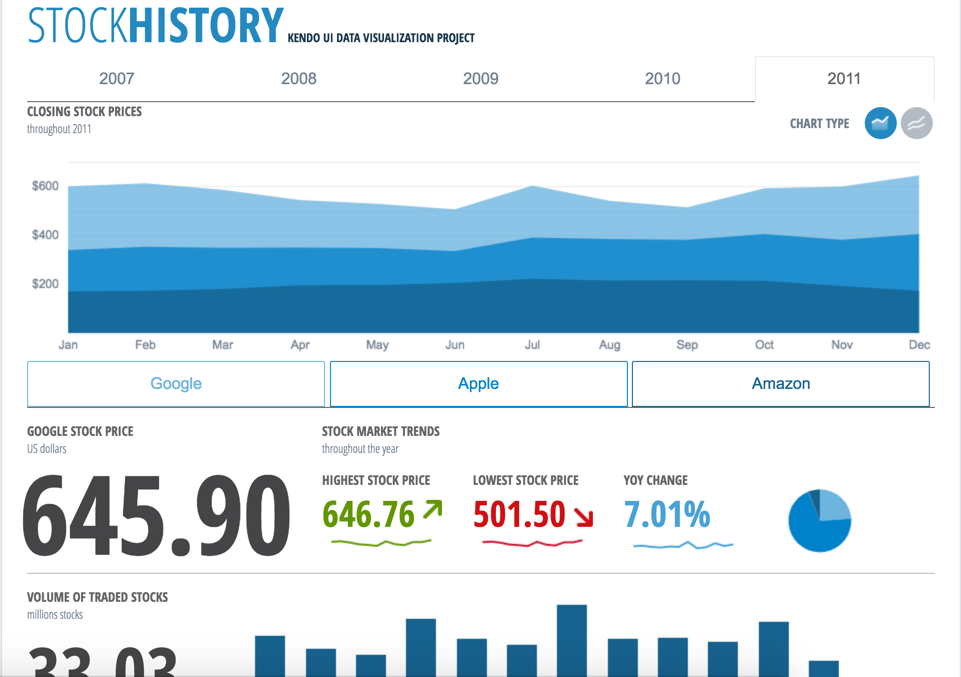 |