Atera vs. Scalefusion

Overview
ProductRatingMost Used ByProduct SummaryStarting Price
Atera
Score 8.7 out of 10
N/A
Atera is presented as an Agentic AI platform for IT management, that offers a digital workforce of AI agents that proactively and autonomously support entire IT operations. Atera’s all-in-one IT management platform consolidates RMM, helpdesk, ticketing, and automation, so IT teams and MSPs can manage and protect infrastructure, automate tasks, and boost service quality by reducing downtime and improving SLAs. Atera has shifted focus from automation to AI-powered autonomy in IT. With…
$139
per month per user
Scalefusion
Score 7.5 out of 10
N/A
Scalefusion is a Mobile Device & Endpoint Management software helping businesses globally to secure and manage their device fleet. Scalefusion simplifies management of diverse fleet of Android, iOS, macOS and Windows 10 devices. The platform extends support to various deployment scenarios such as dedicated-device, COPE (Corporate-owned, Personally Enabled), and BYOD (Bring Your Own Device). The vendor states over 6000 businesses globally rely on Scalefusion to manage their company-owned…
$24
per year
Pricing
AteraScalefusion
Editions & Modules
MSP - Pro
$129
per month (billed annually) per user
IT Department - Professional
$149
per month (billed annually) per user
MSP - Growth
$179
per month (billed annually) per user
IT Department - Expert
$189
per month (billed annually) per user
MSP - Power
$209
per month (billed annually) per user
IT Department - Master
$219
per month (billed annually) per user
Starter
$24.00
per year
Business
$36.00
per year
Enterprise
$48.00
per year
Offerings
Pricing Offerings
AteraScalefusion
Free Trial
YesYes
Free/Freemium Version
NoNo
Premium Consulting/Integration Services
YesNo
Entry-level Setup FeeNo setup feeNo setup fee
Additional DetailsUnlimited devices.
More Pricing Information
Community Pulse
AteraScalefusion
Features
AteraScalefusion
Application Performance Management
Comparison of Application Performance Management features of Product A and Product B
Atera
8.3
2 Ratings
19% above category average
Scalefusion
-
Ratings
Virtualization monitoring10.01 Ratings00 Ratings
IT Asset Discovery6.62 Ratings00 Ratings
Monitoring Tasks
Comparison of Monitoring Tasks features of Product A and Product B
Atera
8.7
119 Ratings
17% above category average
Scalefusion
-
Ratings
Remote monitoring9.1118 Ratings00 Ratings
Network device monitoring8.3105 Ratings00 Ratings
Activity Monitoring5.72 Ratings00 Ratings
Management Tasks
Comparison of Management Tasks features of Product A and Product B
Atera
9.1
118 Ratings
24% above category average
Scalefusion
-
Ratings
Patch Management8.4117 Ratings00 Ratings
Policy-based automation8.4103 Ratings00 Ratings
Remote Access
Comparison of Remote Access features of Product A and Product B
Atera
7.8
1 Ratings
16% above category average
Scalefusion
-
Ratings
Attended device access10.01 Ratings00 Ratings
Unattended device access10.01 Ratings00 Ratings
Mobile device access1.01 Ratings00 Ratings
Virtual device access10.01 Ratings00 Ratings
Multiple-display support7.01 Ratings00 Ratings
Multiple concurrent sessions9.01 Ratings00 Ratings
Best Alternatives
AteraScalefusion
Small Businesses
Panda Systems Management
Score 8.4 out of 10
NinjaOne
NinjaOne
Score 9.1 out of 10
Medium-sized Companies
Action1
Action1
Score 9.4 out of 10
Cisco Meraki SM
Cisco Meraki SM
Score 9.8 out of 10
Enterprises
TeamViewer
TeamViewer
Score 8.5 out of 10
Cisco Meraki SM
Cisco Meraki SM
Score 9.8 out of 10
All AlternativesView all alternativesView all alternatives
User Ratings
AteraScalefusion
Likelihood to Recommend
8.7
(120 ratings)
5.8
(3 ratings)
Likelihood to Renew
7.4
(5 ratings)
5.0
(1 ratings)
Usability
8.8
(68 ratings)
5.0
(1 ratings)
Support Rating
9.1
(6 ratings)
8.0
(1 ratings)
Implementation Rating
6.4
(1 ratings)
-
(0 ratings)
Configurability
-
(0 ratings)
8.0
(1 ratings)
User Testimonials
AteraScalefusion
Likelihood to Recommend
Atera
Atera is doing well in the monitoring part as it is informing the real time ping of running devices and if any device goes down, it is informing us on the real time. It is helping us to monitor the last reboot status, current logged in users, time zone, IP addresses and other things so that we can track our end devices status. In the patching part Atera is pathing our all devices with the notification stating user to restart device at their convenient time. It is also patching our third party applications. It is good in installing and uninstalling of the third party application but limited to availability in the Atera inventory. Atera is not good in some parts such as in the patching part of applications, sometime it fails to update all 3rd party applications that were not installed via Atera. It is not good if you have to transfer a file to multiple systems at the same time.
Read full review
Scalefusion
There a few things I wish I knew before committing to this software. 1. If you plan to track locations of devices then it drains battery life of phones quickly, I had to reduce the location ping to every 15 minutes to mitigate the poor battery performance. 2. The built in mapping on the Scalefusion site is not very useful, you can only map one device at a time. I had to write an app to map all the devices onto one map. I offered to sell them my map, they did not reply and have since copied it, so now they have group mapping but it is not as good as mine. (no satellite view options and does not use google maps)
Read full review
Pros
Atera
  • Atera is very helpful in monitoring the servers and end-user devices for high CPU, memory, hard disk uses, and temperature monitoring.
  • Atera is good at installing third-party applications and also helps to remove it from the end systems.
  • Atera is perfect for patching as you can select the patches as per your need and reject those that are not required for you or going to disturb any of your internal applications.
  • Atera is good for managing software inventory as it provides you with the complete software list that is used in your infrastructure.
Read full review
Scalefusion
  • Working on cloud. No physical device needed.
  • Supports big number of devices.
Read full review
Cons
Atera
  • Atera does not yet have a MDM system, but I have been told that it is in the works!
  • Sometimes getting around the admin section of the IT side of Atera can be tricky, but the webinars and chat support help.
  • Many of the demo and onboarding agents are based in Israel, so it can be a challenge to find available times during the day while living in the United States.
Read full review
Scalefusion
  • battery life of phones is dramatically affected if location is used
Read full review
Likelihood to Renew
Atera
As of right now, we have found nothing that can offer as many features as Atera does along with the affordability. They are doing monthly releases each month and not just making small changes (shared scripting library, chocolatey support, Install packages, Splashtop SOS support, Scheduled tickets to name a few). The uptimes are great and accessibility to the dashboard has yet to be limited. We are a happy customer and bordering on fanboy status now
Read full review
Scalefusion
We need this type of software, Scalefusion although clunky, it does function. And their prices are good compared to the competition. Note I have not tried the competitions software, just looked at their prices.
Read full review
Usability
Atera
Atera's remote monitoring feature is one of it's best features. The laptops and servers we used it on responded quickly to our administrative task requests and made our work light. We were able to increase the resources, manage patches, windows updates and quite a few other tasks remotely and that too 24×7.
Read full review
Scalefusion
Installation is easy. There is a steep learning curve of what the software can and cannot do. It is also quite comprehensive, so the is much to absorb. The user interface is not intuitive, many setting are buried very deep.
Read full review
Support Rating
Atera
Atera support provides answers to my questions lightning fast. They have never left me feeling like I'm out there on my own. I can ask questions by email, or by chat, or by opening a ticket with them and they are always on it quickly. They also have a forum where other Atera users can help you if you need it, and you can also add feature requests via the forum.
Read full review
Scalefusion
The support is quite good, usually you can get a response answer within an hour, however many issues take quite a while to resolve.
Read full review
Implementation Rating
Atera
The implementation was performed by the system administrator so I don't have much insight into this
Read full review
Scalefusion
No answers on this topic
Alternatives Considered
Atera
Because Atera is a much more effective and efficient solution to manage all our IT operations, it automates each of our business processes. It offers us the best support to respond to any problem that may arise. I think Atera is much more cost-effective and reliable; its value is justified with each function and satisfies all our business needs and requirements.
Read full review
Scalefusion
No answers on this topic
Return on Investment
Atera
  • The intuitive user interface has enabled both users and support technicians to familiarize themselves quickly with the functionality, and the learning curve is less.
  • Some features need to be accessed through documentation; they're not available directly on the dashboard.
  • Sometimes, internet access plays a significant role, whereas low connectivity is a hindrance.
Read full review
Scalefusion
  • Once we set up our device through Scalefusion we manage our devices from end to end. That's why it's cost friendly and easy to manage our environment.
Read full review
ScreenShots

Atera Screenshots

Screenshot of Atera’s AI-powered solution.Screenshot of Atera's process automation.Screenshot of Atera's real-time monitoring, which gives visibility and control of the IT environment.Screenshot of Atera's ticketing, where users can deliver end-user support and issue resolution at scale.

Scalefusion Screenshots

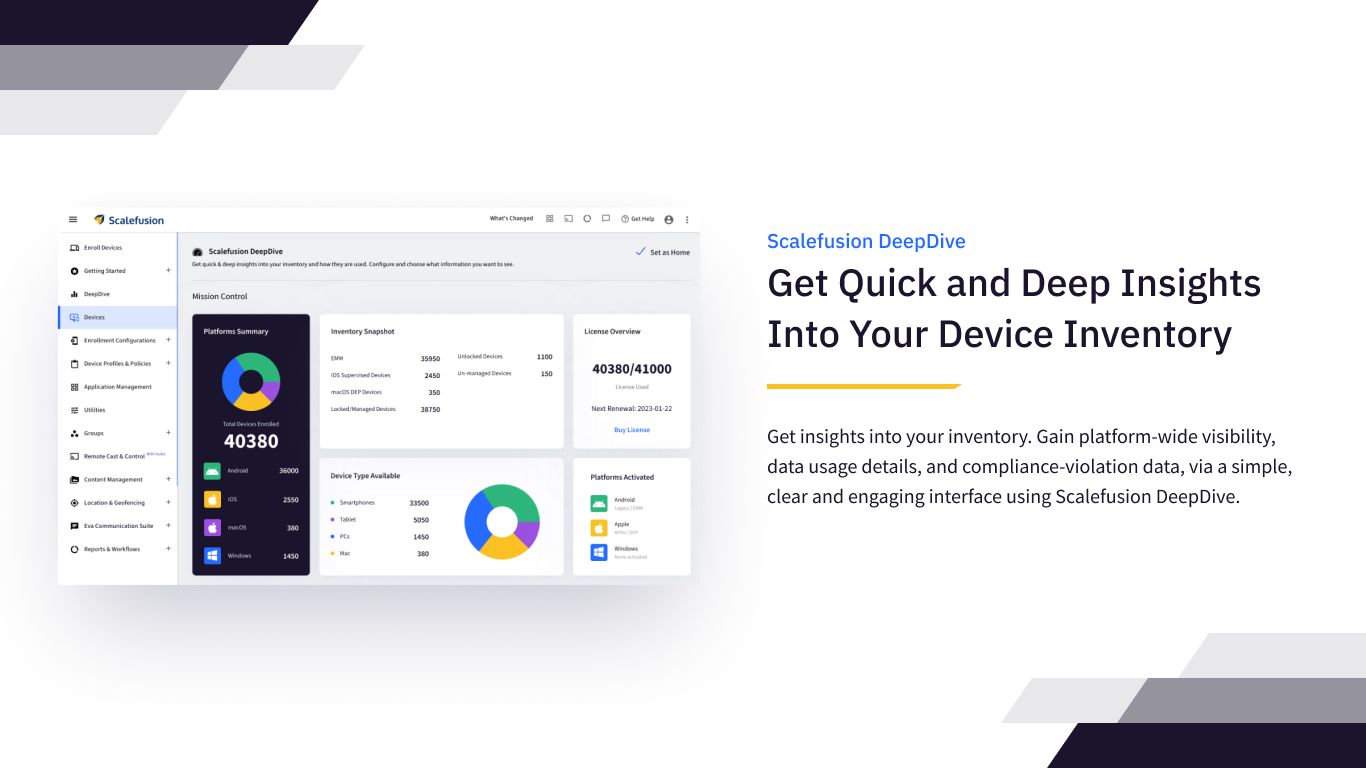
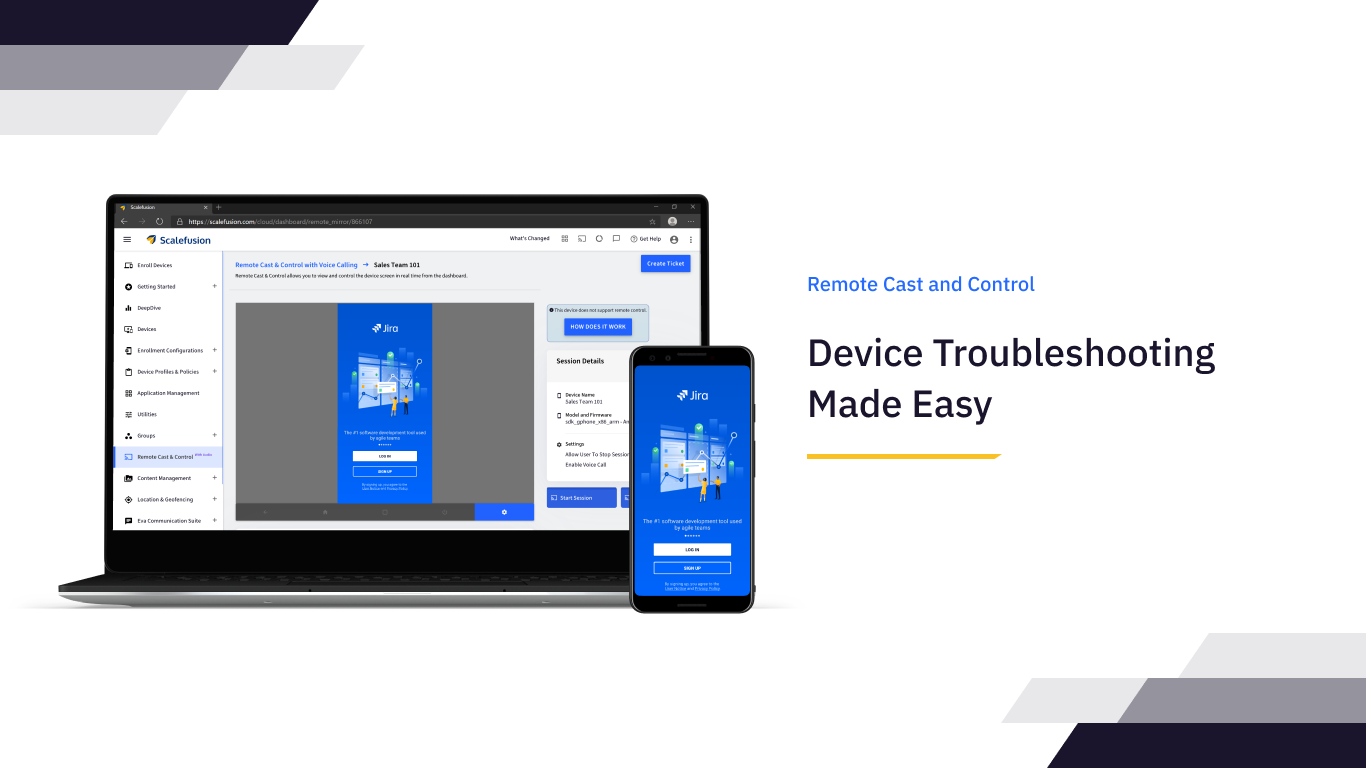
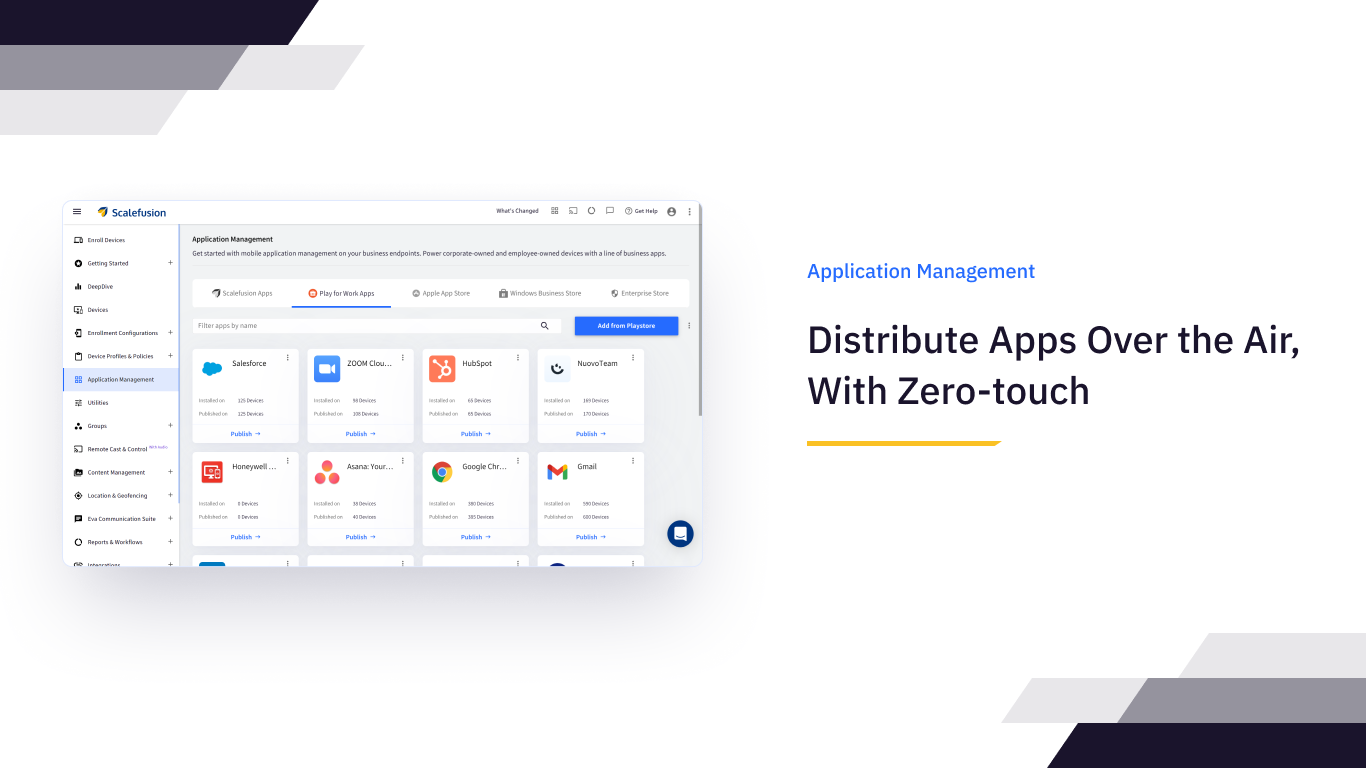
Screenshot of the Scalefusion Unified Mobile Device Management dashboard, used to manage devices, apps, and content. Couple that with the data-driven mobile analytics feature DeepDive, it offers a 360-degree overview of the entire device inventory.Screenshot of Location tracking and GeofencingScreenshot of Remote Cast and ControlScreenshot of Application ManagementScreenshot of Application Management