AudioEye, headquartered in Tucson, creates technology to make digital content more consumable, and more accessible, for more people.
N/A
Chrome DevTools
Score 9.6 out of 10
N/A
Chrome DevTools is a set of authoring, debugging, and profiling tools built into Google Chrome.
N/A
Crownpeak Digital Accessibility and Quality
Score 7.4 out of 10
N/A
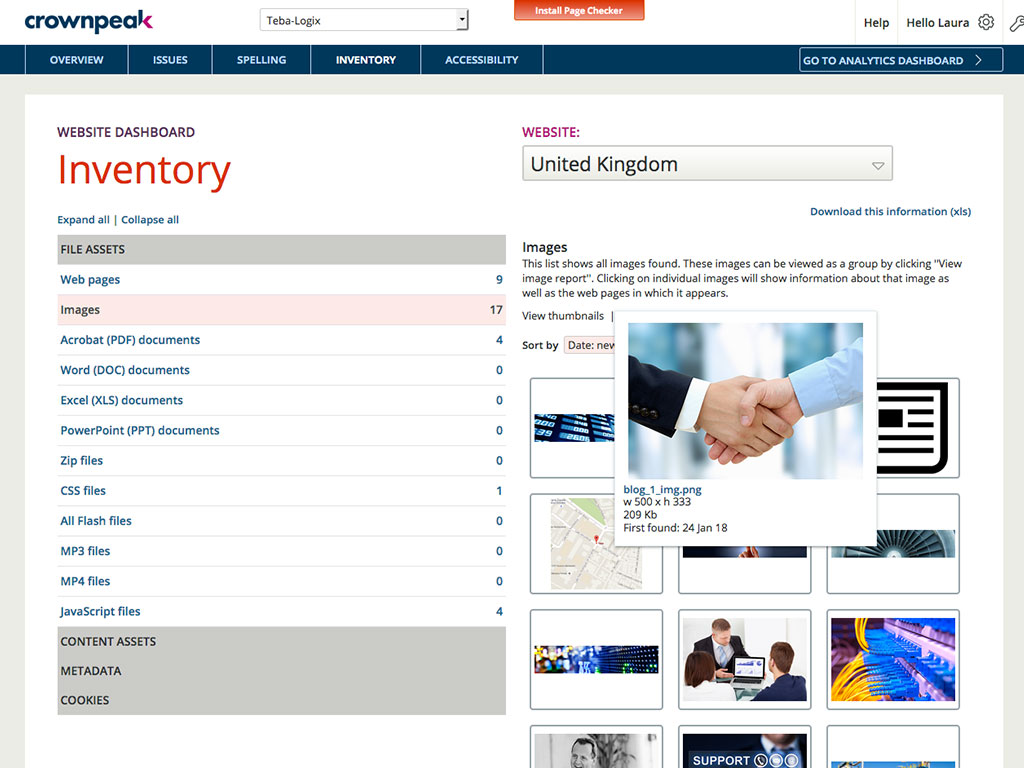
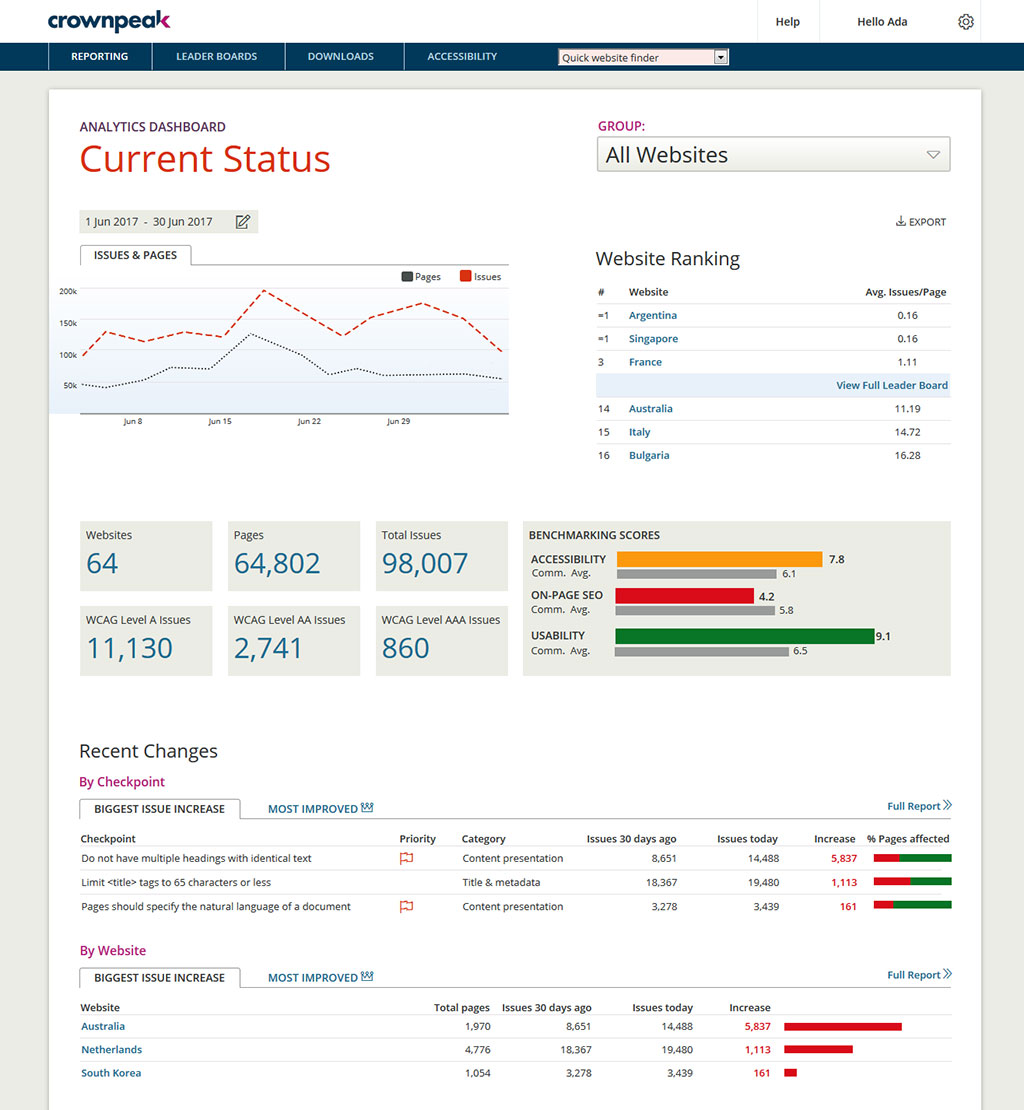
Crownpeak Digital Accessibility and Quality is a digital governance and web content management and monitoring solution designed to support excellent customer experience across all digital touchpoints, supporting web accessibility needs, error catching, SEO best practices, brand compliance, and analytics with benchmarking. Crownpeak Digital Accessibility and Quality can be integrated into an existing CMS.
N/A
Pricing
AudioEye
Chrome DevTools
Crownpeak Digital Accessibility and Quality
Editions & Modules
No answers on this topic
No answers on this topic
No answers on this topic
Offerings
Pricing Offerings
AudioEye
Chrome DevTools
Crownpeak Digital Accessibility and Quality
Free Trial
No
No
Yes
Free/Freemium Version
No
No
No
Premium Consulting/Integration Services
No
No
No
Entry-level Setup Fee
No setup fee
No setup fee
No setup fee
Additional Details
—
—
—
More Pricing Information
Community Pulse
AudioEye
Chrome DevTools
Crownpeak Digital Accessibility and Quality
Considered Multiple Products
AudioEye
No answer on this topic
Chrome DevTools
No answer on this topic
Crownpeak Digital Accessibility and Quality
Verified User
Executive
Chose Crownpeak Digital Accessibility and Quality
Having worked on hundreds of accessibility projects across many types and sizes of organizations, my recommendation is that Crownpeak DQM is the most effective automated accessibility testing tool for achieving the end goals of:
It is near impossible to find all accessibility flaws on your own when designing a website. Having an AI keeping track brings firstly, peace of mind, but also more customers and engagement. It makes sure no customers lose interest because they can’t maneouver in the space properly. So this helps when you’ve come on the web, but want to make sure you have legal and accessibility compliance.
Chrome DevTools are great for troubleshooting bugs, broken elements on pages, styling issues, responsiveness, identifying performance issues, third-party connections for data privacy, reviewing cookies and local storage, screenshots in different dimensions. Chrome DevTools are for technical users, so you do need to have a decent understanding of some basics like HTML and CSS to get started using them.
If you have a fully customized cms and have people working on the site with html and css knowledge this is the best tool ever, all specifics can be checked. Using ab tests and optimization services we identify best practices of the website and everywhere the best practices aren't implemented we find using the custom checkpoints. Aspects that cannot be automated via a quick IT solution is turned into a checkpoint and that's great!
As one delves into DevTools, one encounters a gradually steeper learning curve. You can do a lot very quickly, but to fully utilize DevTools takes time as one explores what it can do.
With many new updates, tools and items are moved, and a comfortable workflow becomes a frustrating search. This often happens when following only slightly outdated tutorials on a given feature, even in Google's own documentation.
The experimental flags, settings, and options are scattered about and a little clunky to configure when one has to make changes in multiple places.
It would be helpful if the Issues page under Website showed the WCAG level for each issue (A, AA, AAA). You currently have to look up the guideline to find the level.
There is no indicator that a page is currently being scanned. During a website scan, some of the reports are blank or missing information. Having a notification on the main page showing which websites are being scanned would be helpful.
Some ADA compliance items are left off, such as keyboard navigation, tabbing, etc.
It doesn't view the websites on mobile devices or if using a screen reader. Some pages or formatting changes depending on resolution. The DQM, from what I have seen, doesn't account for that.
While Chrome DevTools are very powerful, it's not the easiest thing to use, as there are so many different tools built in. It takes some exploring to discover all the options possible within DevTools, but with a little exploring, the DevTools become a very powerful asset. Accessing the basic HTML and CSS inspection is very easy though, and that's the most common usage for the DevTools.
I had a small learning curve in order to become fluent with the platform as it doesn't work like the other automated accessibility tools that I've used. However, once I was up to speed, I like it better than any of the other tools and find the data more useful, digestible, and relevant.
I'm not entirely sure what to rate the support for DevTools, because I don't have any experience dealing with official customer support for DevTools. I would guess the primary support for DevTools would be in a Chrome forum. Typically if I have a question or issue, I am able to find an answer from doing a quick Google search. It's pretty widely used, so it's not difficult to find answers.
DQM support teams are responsive and knowledgeable, and will spend time working directly with client and agency teams to ensure the best outcomes are achieved. I can't fault the level of input and engagement from Crownpeak support teams across the board.
They are accessibility tools that help achieve ADA/WCAG compliance. They offer plugin with WordPress, Go Daddy, Wix, Shopify, etc. AudioEye can be installed without any problem. They also offer a 7-day free trial.
I find them pretty much the same, they have the same tools except Firefox doesn't provide the lighthouse functionality. I do prefer firefox's dark theme and colour palette. But I use Chrome Dev tools because of the Light house functionality that analyzes the page load and scores the website on desktop and mobile experience.
One of the most similar solutions to Crownpeak is the Yext tool because it has a good set of functions that can be managed from content to customer experiences, it is fascinating to be able to track all user interactions through users, in the same way as in Crownpeak that allows all users to create digital experiences.
When driving Customer Care, it was great to be able to add the Autofix tool to the web estate - a quick-win that really drives the accessibility agenda.
Building reports off the back of DQM gives senior stakeholders an understanding of the importance of usability and accessibility.
The gamification of league tables highlights to stakeholders the areas that need focus and budget in order to improve.