Overview
ProductRatingMost Used ByProduct SummaryStarting Price
ShotGrid
Score 9.0 out of 10
N/A
ShotGrid is a production management and review toolset for VFX, animation, and games teams. ShotGrid is equipped to handle creative production tracking needs, supporting teams from large to smaller studios.
$45
per month per user
Kantata PS Cloud
Score 8.5 out of 10
Mid-Size Companies (51-1,000 employees)
Kantata Cloud (formerly Mavenlink + Kimble) provides project management and collaboration software for small to mid-sized professional services companies. Features include resource management, project dependencies, time and expense tracking, file sharing, versatile user permissions, private messaging, planning and reporting.N/A
TaskQue
Score 9.0 out of 10
N/A
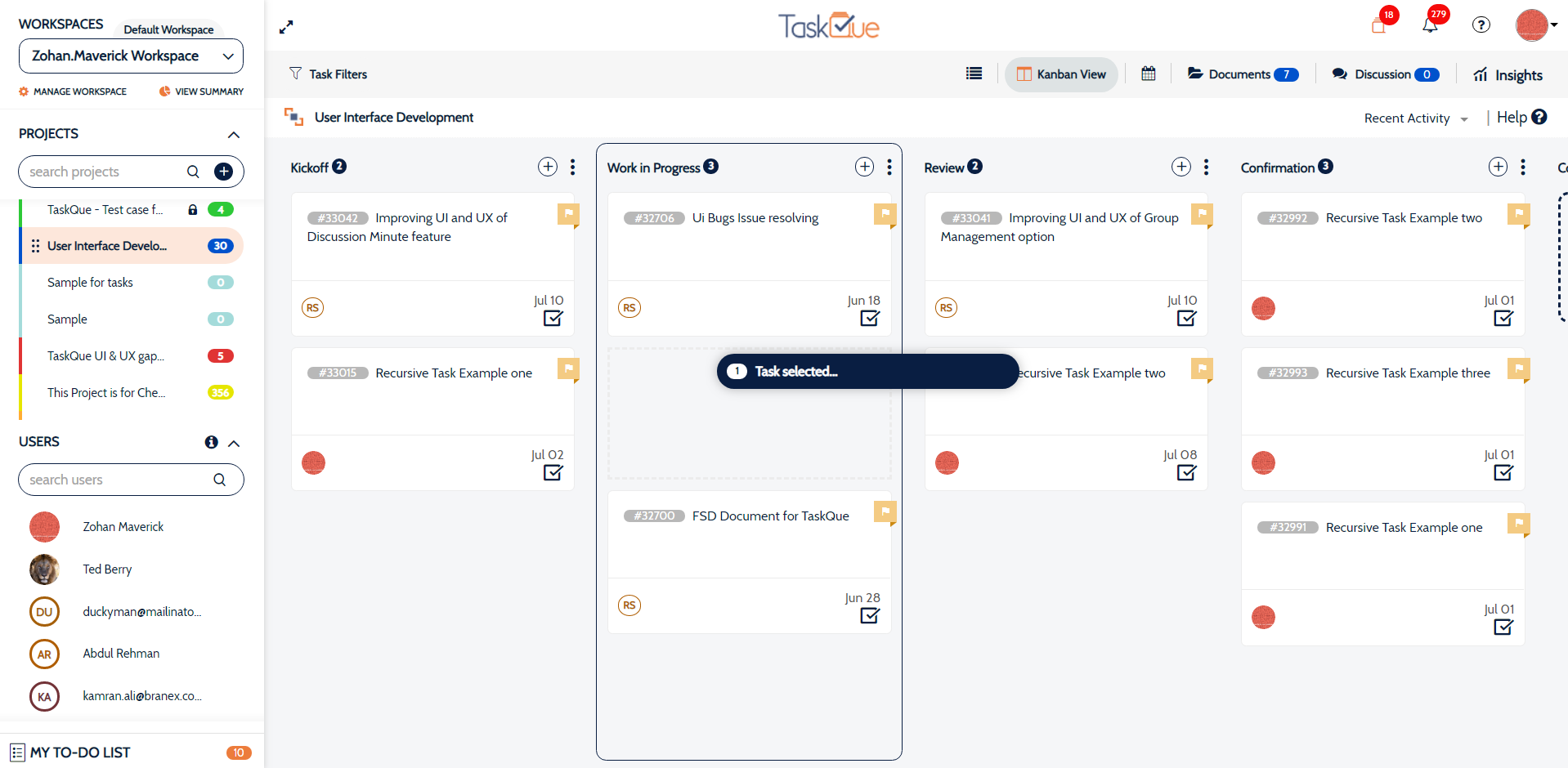
TaskQue is a productivity management tool. It offers auto task assignment features, different workflow templates for various industries and functional departments, and a list of collaboration tools designed to facilitate remote workers.
$0
up to 10 users
Pricing
Autodesk ShotGridKantata PS CloudTaskQue
Editions & Modules
No answers on this topic
Premier
Contact Sales Team
per month per seat
Enterprise
Contact Sales Team
Basic
$0.00
up to 10 users
Business
$5.00
per user
Offerings
Pricing Offerings
ShotGridKantata PS CloudTaskQue
Free Trial
YesNoYes
Free/Freemium Version
NoNoYes
Premium Consulting/Integration Services
NoYesYes
Entry-level Setup FeeNo setup feeRequired$5 per user
Additional DetailsFor 10 users, its free. After that, we charge $5.00 per user.
More Pricing Information
Community Pulse
Autodesk ShotGridKantata PS CloudTaskQue
Features
Autodesk ShotGridKantata PS CloudTaskQue
Project Management
Comparison of Project Management features of Product A and Product B
Autodesk ShotGrid
-
Ratings
Kantata PS Cloud
-
Ratings
TaskQue
7.8
1 Ratings
1% above category average
Task Management00 Ratings00 Ratings10.01 Ratings
Resource Management00 Ratings00 Ratings9.01 Ratings
Scheduling00 Ratings00 Ratings9.01 Ratings
Workflow Automation00 Ratings00 Ratings7.01 Ratings
Team Collaboration00 Ratings00 Ratings7.01 Ratings
Support for Agile Methodology00 Ratings00 Ratings7.01 Ratings
Support for Waterfall Methodology00 Ratings00 Ratings7.01 Ratings
Document Management00 Ratings00 Ratings8.01 Ratings
Mobile Access00 Ratings00 Ratings9.01 Ratings
Timesheet Tracking00 Ratings00 Ratings7.01 Ratings
Change request and Case Management00 Ratings00 Ratings6.01 Ratings
Professional Services Automation
Comparison of Professional Services Automation features of Product A and Product B
Autodesk ShotGrid
-
Ratings
Kantata PS Cloud
-
Ratings
TaskQue
7.5
1 Ratings
3% below category average
Quotes/estimates00 Ratings00 Ratings7.01 Ratings
Project & financial reporting00 Ratings00 Ratings8.01 Ratings
Best Alternatives
Autodesk ShotGridKantata PS CloudTaskQue
Small Businesses
Frame.io
Frame.io
Score 9.1 out of 10
Teamwork.com
Teamwork.com
Score 8.5 out of 10
Stackby
Stackby
Score 8.9 out of 10
Medium-sized Companies

No answers on this topic

Teamwork.com
Teamwork.com
Score 8.5 out of 10
InEight
InEight
Score 8.4 out of 10
Enterprises

No answers on this topic

Planview AdaptiveWork
Score 8.1 out of 10
InEight
InEight
Score 8.4 out of 10
All AlternativesView all alternativesView all alternativesView all alternatives
User Ratings
Autodesk ShotGridKantata PS CloudTaskQue
Likelihood to Recommend
7.0
(1 ratings)
9.1
(50 ratings)
9.0
(1 ratings)
Likelihood to Renew
10.0
(1 ratings)
9.0
(6 ratings)
-
(0 ratings)
Usability
5.0
(1 ratings)
8.0
(8 ratings)
-
(0 ratings)
Availability
-
(0 ratings)
9.0
(2 ratings)
-
(0 ratings)
Performance
-
(0 ratings)
7.0
(3 ratings)
-
(0 ratings)
Support Rating
-
(0 ratings)
9.0
(8 ratings)
9.0
(1 ratings)
In-Person Training
-
(0 ratings)
9.0
(2 ratings)
-
(0 ratings)
Online Training
-
(0 ratings)
9.0
(2 ratings)
-
(0 ratings)
Implementation Rating
-
(0 ratings)
9.0
(5 ratings)
-
(0 ratings)
Configurability
-
(0 ratings)
8.2
(1 ratings)
-
(0 ratings)
Ease of integration
-
(0 ratings)
8.2
(1 ratings)
-
(0 ratings)
Product Scalability
-
(0 ratings)
9.0
(2 ratings)
-
(0 ratings)
Vendor post-sale
-
(0 ratings)
9.0
(2 ratings)
-
(0 ratings)
Vendor pre-sale
-
(0 ratings)
9.0
(2 ratings)
-
(0 ratings)
User Testimonials
Autodesk ShotGridKantata PS CloudTaskQue
Likelihood to Recommend
Autodesk
ShotGrid seems to be well suited for a video team for reviews and project tracking. It may not be well suited for Project managers who need to see the bigger picture of the project.
Read full review
Kantata (Kimble + Mavenlink)
It is appropriate and even exceeds expectations 90% of the time. It makes project tracking very easy and visually accessible for most cases. The only occasion where Mavenlink came slightly short was for a special project that required more interaction options among project members. I am certain there are ways to work around that issue, but we did not find them.
Read full review
TaskQue
Companies that face issues due to chaos in terms of document management can really take advantage by organizing all their documents at a single place. TaskQue is inappropriate for project costing requirements in big projects.
Read full review
Pros
Autodesk
  • Uploads videos efficiently
  • allows annotation within the video
  • setting custom filters
  • creating Gantt chart with inputs from each editor and animator
  • adding versions to shot/asset
  • adding assets to a shot
Read full review
Kantata (Kimble + Mavenlink)
  • With Mavenlink when starting to assign tasks to people, set deadlines and milestones, and add files to our projects we can look at it all from a variety of perspectives, including a task tracker view and a Gantt chart view
  • Through Mavenlink each project also includes an activity stream where we can view all project details as they come up, as well as an activity feed for all the projects it is linked to.
Read full review
TaskQue
  • Workload management.
  • Auto task management.
Read full review
Cons
Autodesk
  • Ordering comments made by different people by timecode/frame number, instead by the time and date the comment was made
  • Being able to move an uploaded video from shots to assets and vice versa. Right now we have to re-upload but lose any comments made already if they were in the wrong place
  • Custom filters are great but they could get a little confusing with all the options. Might help with guidelines or a place we could ask what we want and someone could answer with the best way to achieve those specific filters we want
Read full review
Kantata (Kimble + Mavenlink)
  • The Gantt chart does not allow for baselines to be stored
  • There is no means to upload an excel task tracker and build a plan using an upload
  • The schedule does not allow for planning of holidays
  • The status report functionality needs to be improved
Read full review
TaskQue
  • I think Gantt charts should be here to be used as a project management tool. Moreover, affiliation with productivity tools such as time-tracking tools can make it much better.
Read full review
Likelihood to Renew
Autodesk
For education, we can't see ourselves using anything else that comes at a cost
Read full review
Kantata (Kimble + Mavenlink)
Although the company I currently work for does not use the product I have recommended that we do switch to Mavenlink. We will be opening some new sites internationally this year and I can see that Mavenlink would be a great product for us to use
Read full review
TaskQue
No answers on this topic
Usability
Autodesk
It's UI/UX is very robust. There's a lot of functionality but it's not very intuitive or intuitive. I spend time with new hires and contractors to overview ShotGrid for a day and revisit after a week or two. Questions always arise down the line
Read full review
Kantata (Kimble + Mavenlink)
I think Kantata is one of the most robust and best project management tools out there for an organization like ours. However, some of our staff feel like it isn't as user-friendly as it could be. From a Director point of view or a Project Manager point of view, Kantata is exceptional. From the point of view of a task-doer, it could be more visually appealing. Also, the mobile version isn't great.
Read full review
TaskQue
No answers on this topic
Reliability and Availability
Autodesk
No answers on this topic
Kantata (Kimble + Mavenlink)
Mavenlink gives advance notice for system upgrades, and they're not during our business day. Mavenlink has always been available when we needed it.
Read full review
TaskQue
No answers on this topic
Performance
Autodesk
No answers on this topic
Kantata (Kimble + Mavenlink)
Very good integration with Google apps. Some complexity is called however in the synchronization between Google Tasks and Maven links tasks. This can sometimes lead to duplicate records in Google Tasks. It has been dissolvable that becomes cumbersome if not properly curated.
Read full review
TaskQue
No answers on this topic
Support Rating
Autodesk
No answers on this topic
Kantata (Kimble + Mavenlink)
Kantata support is fantastic! Any issues that arise are always handled quickly and efficiently. Granted, we haven't had many issues to report. Typically, my team tends to only reach out to support if they need assistance remembering how to do something or asking about an improvement. We had Kantata build an integration when we first started using the software, and the support team worked hard to listen and improve the integration.
Read full review
TaskQue
We inquired using the
TaskQue community forum and got a timely response regarding my queries. We really
appreciate it.
Read full review
In-Person Training
Autodesk
No answers on this topic
Kantata (Kimble + Mavenlink)
We prepared questions in advance, and our trainer was an expert in what Mavenlink was and wasn't able to do. We were able to have multiple people trained at once.
Read full review
TaskQue
No answers on this topic
Online Training
Autodesk
No answers on this topic
Kantata (Kimble + Mavenlink)
The training was very well-organized. We were able to send questions in advance so the instructor knew what to cover, and the brought up related topics to maximize the usefulness of what they were teaching us.
Read full review
TaskQue
No answers on this topic
Implementation Rating
Autodesk
No answers on this topic
Kantata (Kimble + Mavenlink)
Dedicate as much internal time to the implementation effort as possible, even if you're using a 3rd party or Mavenlink services. Your team knows your processes the best
Read full review
TaskQue
No answers on this topic
Alternatives Considered
Autodesk
Wipster had limitations on video uploads, which was a major drawback. One thing we liked with Wipster was how we can see comments made in order on the timeline while watching the video.
Read full review
Kantata (Kimble + Mavenlink)
We have since switched over to JIRA and let me tell you, it was probably the best decision we have made as a company. We chose Mavenlink based on promises from the sales team about future roadmap work that really never happened. We thought Mavenlink would easily integrate with our billing software but we couldn't have been more wrong. We ended up never utilizing Mavenlink invoices as they don't even allow you to fully customize your invoices that go out to clients!
Read full review
TaskQue
TaskQue’s most unique
feature is the queue feature which enables you to assign tasks automatically.
We were seriously fed up with the manual assignment of tasks.
Read full review
Scalability
Autodesk
No answers on this topic
Kantata (Kimble + Mavenlink)
It's very easy to add users and contractors into Mavenlink. There's also an option that let's you manage access for teams in multiple locations.
Read full review
TaskQue
No answers on this topic
Return on Investment
Autodesk
  • We spend less time going back and forth with different stakeholders on shots and assets
  • We don't have to pay services that only provided trial versions
  • There is unlimited video uploading which was not the case with wiz
Read full review
Kantata (Kimble + Mavenlink)
  • Manvenlink is perfect for showing expenses and income over time and across people.
  • Manvenlink is adaptable for the integration and automation of the processes of each of our projects in order to optimize resources and improve operational performance.
  • Mavenlink allows us to determine if our projects are profitable or not, as well as save significant time by automating components such as recurring tasks and having templates, among other things.
  • Manvenlink is advantageous for our operations due to its simple portfolio management of our projects: manage several projects at once and receive a complete perspective of the development of each one at a glance.
  • Manvenlink kindly provides us with robust discussion threads, access restrictions, and built-in document management, allowing us to contextualize communications.
Read full review
TaskQue
  • High customer retention.
  • Optimized project and task deliveries.
Read full review
ScreenShots

Kantata PS Cloud Screenshots

Screenshot of real-time project status tracking.Screenshot of visualizations that help track resources with confidence.Screenshot of at a glance capacity and staffing monitoring.Screenshot of financials and project margin monitoring.Screenshot of revenue tracking, to scale a business with confidence.

TaskQue Screenshots

Screenshot of Screenshot of Screenshot of Screenshot of