Avaza vs. Flock

Overview
ProductRatingMost Used ByProduct SummaryStarting Price
Avaza
Score 8.0 out of 10
Mid-Size Companies (51-1,000 employees)
Avaza is a software suite targeted for all business sizes. It includes modules for project management and collaboration, resource scheduling, team chat, time tracking, expense management, quoting and invoicing. Depending on their business needs, companies can use as many, or as few, of the modules as they need. Avaza offers reporting functionality, and the project management module is designed with both list view and Kanban style task management, so users can choose…
$0
Unlimited Project Collaborators, 1 Admin, 1 Timesheet/ Expense User, 1 Resource Scheduling User
Flock
Score 9.4 out of 10
N/A
Flock is a collaborative business messaging application, designed to compete with Slack. The app is presented as a fast and reliable means of communication, and is available in a free edition for teams of up to twenty members.
$0
for teams of 1-20 members
Pricing
AvazaFlock
Editions & Modules
Free Plan
$0
Unlimited Project Collaborators, 1 Admin, 1 Timesheet/ Expense User, 1 Resource Scheduling User
Startup Plan
$11.95
per month
Basic Plan
$23.95
per month
Business Plan
$47.95
per month
Starter
$0
for teams of 1-20 members
Pro
$6
per month per user (ideal for teams of 20-100 users)
Enterprise
Contact Sales
for organizations of 100+ members
Offerings
Pricing Offerings
AvazaFlock
Free Trial
YesNo
Free/Freemium Version
YesNo
Premium Consulting/Integration Services
NoNo
Entry-level Setup FeeOptionalNo setup fee
Additional DetailsDiscount available for annual pricing.
More Pricing Information
Community Pulse
AvazaFlock
Considered Both Products
Avaza
Chose Avaza
Avaza takes the easy of Asana and adds the invoicing and bookkeeping capabilities you need all in one place.
Chose Avaza
Avaza is the only solution that ties all of our needs together in one platform at a reasonable price.
Chose Avaza
Avaza's time tracking capabilities are much more detailed than Upwork's. Upwork focuses on simplicity, using a simple on/off button and a spot for taking notes about each project, but Avaza gives you more to work with, allowing you to add detailed notes and specify tasks.
Chose Avaza
I've used Trello before, but Avaza has way more features and is more applicable for cross-team collaboration. We selected Avaza for it's ability to not only project manage, but also for invoicing, expenses and it's ability to track time. We've gotten more accurate with estimate …
Chose Avaza
This is miles ahead of ActiveCollab. It has more features, the interface is easier to use and the invoicing is easier to use. Across the board better. We migrated from ActiveCollab, but that was just essentially a Fancier Wunderlist. If you just need one project and a few tasks …
Chose Avaza
I have not used any other products like Avaza.
Flock
Chose Flock
Flock standsout with it's extra ordinary features such as file sharing, pinning any file in groups, customised integration with various applications, reminders across groups, creating and managing groups, file sharing with integration, notes sharing and mainly communicate …
Chose Flock
Many of the features are shared between these three programs but for us, we found the mobile application to be much easier to manage and being that we were using this a lot on the go that was a major selling point for our team and operation.
Chose Flock
In my opinion, Flock is not the best among the listed products in terms of extensive features that other products listed provides but has it's own place in the communication and team collboration domain. I think Flock works well for smaller teams and organizations looking for a …
Chose Flock
Flock stands strong with these tools in market. Although it does offer some great features but can be better in terms of integration.

We used Flock for over 10 years in our organization because it was easy to use for non technical users.
Chose Flock
Flock stands up very well against others when used for individual and group chats. It also works well with Google Drive Integration. The best part of Flock, compared with others, is in the area of File and Document sharing. The two areas it slightly lacks are voice/ video calls …
Chose Flock
Slack and Flock are fairly comparable in terms of features, though Flock has a cost advantage.
Chose Flock
I mainly prefer Asana as a task management tool, but I prefer Flock to Slack for communication. Flock bridges the gap between the two, and I find it's the best niche is for businesses or collaborators who need some integration (drive or calendar) but mostly need it for its chat …
Chose Flock
Flock as mentioned takes the best of all these apps and improves upon them. Flock's UI was exactly what we were looking for and Flock doesn't overcharge small teams for search functional or messaging. It just offers a great product at a great price combined with great …
Chose Flock
Unlike Flock which is more official, Google Hangouts are geared towards personal communication rather than business. Flock on the other hand has many features which relate to business setting
Chose Flock
I did not like Google Hangouts. Hangouts is more geared toward personal communication instead of business related communication. Flock is also a lot easier to use and has more options related to a business setting.
Chose Flock
Our creative team collaboration pathway story went like this..We started on Facebook as a secret group. We looked for better solutions and moved to Google Docs. It was a bit too robust for smaller conversations, so we moved to flock. Flock was great but proved to be too much …
Chose Flock
Flock is similar to Glip, with only two notable differences: the gifs are worse but the reactions are slightly better. Integrations are a little better, albeit a bit confusing. For example, there is a built in video conferencing feature where you can video chat with someone, …
Features
AvazaFlock
Project Management
Comparison of Project Management features of Product A and Product B
Avaza
8.0
Ratings
4% above category average
Flock
7.8
Ratings
1% above category average
Task Management10.00 Ratings8.30 Ratings
Resource Management7.00 Ratings00 Ratings
Gantt Charts7.00 Ratings7.00 Ratings
Scheduling8.00 Ratings8.90 Ratings
Team Collaboration10.00 Ratings00 Ratings
Support for Agile Methodology7.00 Ratings00 Ratings
Support for Waterfall Methodology7.00 Ratings00 Ratings
Document Management9.00 Ratings00 Ratings
Email integration8.00 Ratings00 Ratings
Mobile Access8.00 Ratings9.10 Ratings
Timesheet Tracking7.00 Ratings00 Ratings
Budget and Expense Management8.00 Ratings00 Ratings
Workflow Automation00 Ratings8.00 Ratings
Search00 Ratings6.90 Ratings
Visual planning tools00 Ratings6.40 Ratings
Professional Services Automation
Comparison of Professional Services Automation features of Product A and Product B
Avaza
10.0
Ratings
26% above category average
Flock
-
Ratings
Quotes/estimates10.00 Ratings00 Ratings
Invoicing10.00 Ratings00 Ratings
Project & financial reporting10.00 Ratings00 Ratings
Integration with accounting software10.00 Ratings00 Ratings
Communication
Comparison of Communication features of Product A and Product B
Avaza
-
Ratings
Flock
8.4
Ratings
5% above category average
Chat00 Ratings9.60 Ratings
Notifications00 Ratings9.30 Ratings
Discussions00 Ratings9.10 Ratings
Surveys00 Ratings8.20 Ratings
Internal knowledgebase00 Ratings6.70 Ratings
Integrates with GoToMeeting00 Ratings10.00 Ratings
Integrates with Gmail and Google Hangouts00 Ratings8.00 Ratings
Integrates with Outlook00 Ratings6.00 Ratings
File Sharing & Management
Comparison of File Sharing & Management features of Product A and Product B
Avaza
-
Ratings
Flock
7.1
Ratings
12% below category average
Versioning00 Ratings7.30 Ratings
Video files00 Ratings6.40 Ratings
Audio files00 Ratings6.40 Ratings
Document collaboration00 Ratings8.10 Ratings
Access control00 Ratings7.20 Ratings
Advanced security features00 Ratings6.40 Ratings
Integrates with Google Drive00 Ratings7.00 Ratings
Device sync00 Ratings8.30 Ratings
Best Alternatives
AvazaFlock
Small Businesses
Stackby
Stackby
Score 8.9 out of 10
Stackby
Stackby
Score 8.9 out of 10
Medium-sized Companies
InEight
InEight
Score 8.2 out of 10
Troop Messenger
Troop Messenger
Score 9.8 out of 10
Enterprises
InEight
InEight
Score 8.2 out of 10
HCL Connections
HCL Connections
Score 9.0 out of 10
All AlternativesView all alternativesView all alternatives
User Ratings
AvazaFlock
Likelihood to Recommend
10.0
(0 ratings)
9.4
(0 ratings)
Likelihood to Renew
10.0
(0 ratings)
9.0
(0 ratings)
Usability
9.0
(0 ratings)
9.5
(0 ratings)
Support Rating
10.0
(0 ratings)
8.8
(0 ratings)
User Testimonials
AvazaFlock
Likelihood to Recommend
There are teams who work hard, and there are those who work smart. Avaza helps you be the latter--it's is a great tool for any team collaborating on several projects, especially multiple projects with a lot of simultaneously moving parts. It has just about everything you need - from team schedules to timesheets, down to the task and sub-task monitoring. The best part for me is that we can switch from List View to Kanban to Gantt charts!
Read full review
Flock is a great communication tool. However, it's in a very competitive space. It offers seamless app integration (i.e., google calendar and drive) to allow for easy use across the platform. It's a great communication tool. However, if you don't need an overloaded app, there are other options out there. And for work purposes, it only covers some of what you need.
Read full review
Pros
  • Helps keep track of time spent on each project
  • Helps employees break down their time spent throughout the day
  • Encourages better time management skills
Read full review
  • Networked phones are a thing of past now. We don’t have to stop what we are doing to receive phone calls currently because Flock can do that
  • It is now easy to send messages to many people at the same time, all we need to do is to add all the contants in the chat and select all to send a message
  • This software has an in-built to-do-list which allows us to assign tasks to different people or users and then supervise each independently
Read full review
Cons
  • I wish sub-tasks could also have due dates
  • For really big projects, we hope there could be phases (aside from sections)
  • In the chatbox, it would be great if photo attachments could be displayed as screenshots (instead of downloading the file)
Read full review
  • A tool is only good if people use it. Some of the artists I work with found it too complex (though I don't think they really gave it a good shot).
  • We used it heavily for about six months and it didn't hit too many other big negative points.
Read full review
Likelihood to Renew
Because it has been amazing and easy to work with.
Read full review
We would likely to renew use of Flock for our organization since it meets most of the requirements of team collboration and communication for a small group like us. Most of our Flock users like it's features and use it extensively for day-to-day work. We are quite optimistic about it's future updates.
Read full review
Usability
Avaza is very easy to use, but the mobile app needs work.
Read full review
It is good to give what an app deserves, Flock is very efficient and effective app to manage the all day to day activities and communicate across all team members, create groups, share files, send reminders schedule reminders for each group or persons and share notes.Pin files and search any messages from anyone with advanced filters. It's a great app.
Read full review
Support Rating
They are always available and open to doing a call or a shared screen to walk through the issues.
Read full review
We've only needed customer support a few times with Flock (mainly concerning app integration and security), and they've always been timely and helpful, which are the only things I truly need from support. The response rate was still rapid, and there's plenty of support available online as well for Flock.
Read full review
Alternatives Considered
I've used Trello before, but Avaza has way more features and is more applicable for cross-team collaboration. We selected Avaza for it's ability to not only project manage, but also for invoicing, expenses and it's ability to track time. We've gotten more accurate with estimate project hours, and therefore create more accurate proposals
Read full review
Flock stands up very well against others when used for individual and group chats. It also works well with Google Drive Integration. The best part of Flock, compared with others, is in the area of File and Document sharing. The two areas it slightly lacks are voice/ video calls and search.
Read full review
Return on Investment
  • Avaza has made it easier to see how long I spend on certain types of projects and where I could be spending more time.
Read full review
  • Organizing notes manually has been drastically reduced. Flock folders and chats are perfect for keeping each file separate.
  • We have not missed one calendar event with Flocks integration of our Google Calendar.
  • Being able to cut out or $99/month case management software has saved a ton of money each month.
Read full review
ScreenShots

Avaza Screenshots

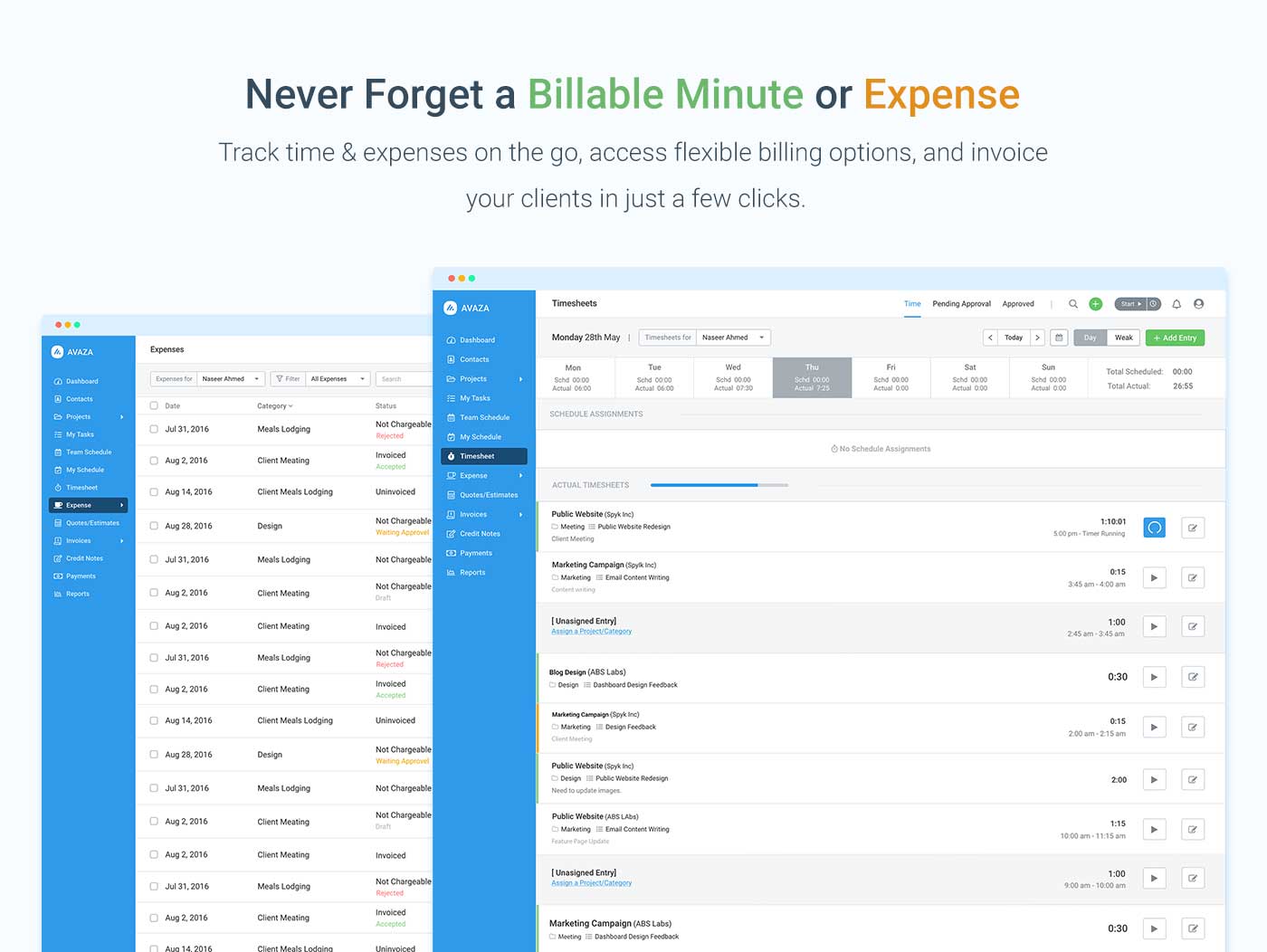
Screenshot of avaza, appearing across platformsScreenshot of visual project resource scheduling for teamsScreenshot of time and expense trackingScreenshot of team chatScreenshot of time trackingScreenshot of the expense management interface

Flock Screenshots

Screenshot of Screenshot of Screenshot of