Bitwarden vs. Keeper vs. Square 9 Softworks

Overview
ProductRatingMost Used ByProduct SummaryStarting Price
Bitwarden
Score 9.3 out of 10
N/A
Bitwarden headquartered in Santa Barbara offers open source password management solutions for individuals, teams, and business organizations.
$4
per month (billed annually) per user
Keeper
Score 8.3 out of 10
N/A
Keeper's password security and management platform boasts millions of people and thousands of businesses as users, who manage, secure and enforce strong passwords across all employee logins, applications and sites. Employees can access Keeper natively on all mobile operating systems, desktops and browsers. Keeper enables businesses to auto-generate high-strength passwords, protect sensitive files in an encrypted digital vault, securely share records with teams and integrate with SSO, LDAP and…
$2
per month per user
Square 9 Softworks
Score 9.3 out of 10
N/A
For document-intensive companies looking to improve business efficiency, Square 9 Softworks develops solutions for process automation that aim to drive increased productivity across all business applications.
$50
per month per user (5 User Minimum)
Pricing
BitwardenKeeperSquare 9 Softworks
Editions & Modules
Teams
$4
per month (billed annually) per user
Enterprise
$6
per month (billed annually) per user
Keeper Business Starter
$2.00
per month per user
Keeper Enterprise
Contact Keeper for pricing
Square 9 Process Automation Essentials
$50
per month per user (5 User Minimum)
Square 9 Digital Transformation Essentials
$68
per month per user (5 User Minimum)
Square 9 Enterprise Essentials
$75
per month per user (10 User Minimum)
Offerings
Pricing Offerings
BitwardenKeeperSquare 9 Softworks
Free Trial
YesYesNo
Free/Freemium Version
YesNoNo
Premium Consulting/Integration Services
NoNoNo
Entry-level Setup FeeNo setup feeNo setup feeOptional
Additional DetailsOffered via a three-tier pricing model that allows customers to scale their solution up or down based on the changing needs of their organization. Pricing excludes professional services and implementation fees
More Pricing Information
Community Pulse
BitwardenKeeperSquare 9 Softworks
Considered Multiple Products
Bitwarden
Chose Bitwarden
Bitwarden hasn't been hacked and is easy to implement. None of the others can say the same in both aspects.
Chose Bitwarden
LastPass had a huge security breach which led us to switch to Bitwarden.
Chose Bitwarden
Other solutions felt more clunky or were significantly higher priced. Bitwarden seems to straddle the consumer/prosumer/SMB fence more than adequately by designing their user experience to feel welcoming but also trustworthy and reliable. The other tools seem to assume that …
Keeper
Chose Keeper
From a password manager, they are all similar in terms of organisation and credential management but what Keeper has above these organisations is the MSP/Admin console.

Chose Keeper
I do not recall the other products I tested. I believe Keeper provided a free trial that allowed me to verify that it met my needs before I was required to purchase. I also found their support team to be responsive when I experienced some problems. The cliche, "If it ain't …
Chose Keeper
I do not have any direct experience with LastPass, but I did assess them before deciding on Keeper. I believe the reason I went with Keeper over LastPass at the time was Keeper's enterprise solution was a lot more solid and featured SSO which I do not believe was offered by …
Chose Keeper
Usability, file organization, attachments, and other information that can be included.
Chose Keeper
I tried different Android services for password managing but all of them have many different features that are not useful and just distract you - Keeper is simple and easy to use with only needed features included.
Chose Keeper
I have used the Apple cloud, but if you forget your password into that, once again, you’re at the mercy of calling customer service. With Keeper, you can use the thumbprint option to log on, and there’s any of your needed passwords. It’s fast and simple, and you don’t have to …
Chose Keeper
My husband recommended Keeper to me about 3 years ago when I complained about never being able to remember my passwords. I have never used any other product. Why would I? I found the best vault, so there's no need to change! As they say, "if it ain't broke, don't fix it!"
Chose Keeper
I read a lot of reviews before buying Keeper even though it has an annual renewal. When it came down to it, it beat the rest, although when I bought it did not have document and photo storage. After enquiring at the help desk I was told it was in the pipeline and in the next …
Chose Keeper
I am a true believer in the Keeper app and know, with confidence, that if you use it and take advantage of all its functions you'll find it to be a tool that helps you live life easier every day.
Chose Keeper
Keeper fit with my usage. I felt Keeper was more in tune with my daily activities. In my opinion, it was easier to use and access. Dash did offer other options but those were not important to me at all. From the beginning, Keeper has always been a great partner in the way I use …
Square 9 Softworks
Chose Square 9 Softworks
Comparatively, both of these applications are used for different aspects of the department, but they’re both useful. But overall, Square 9 Softworks is used for a more complex section of our day-to-day work, and with that being said, Square 9 Softworks is the application that …
Chose Square 9 Softworks
Cost was the big reason we went with Square 9 Softworks. Other products wanted to add a license for this and that and all were subscription based and significantly added to the cost of the product. Square 9 Softworks licening and support costs made it an easy choice for us.
Chose Square 9 Softworks
We tried Etrieve before Square 9 and it never got off the ground. Our requirements were too complex and the platform could not accommodate them. Square 9 offered the flexibility and customization we needed from the start. Support worked with us to build workflows that actually …
Chose Square 9 Softworks
Sharepoint and Square 9 Softworks are similar in some ways and totally different in others. They both do workflow, although Square 9 Workflow gives administrators more options. They both have a repository, although Square 9 GlobalSearch is more structured in terms of …
Chose Square 9 Softworks
We have been using Square 9 Softworks for over a decade and before that we did everything with hard paper.
Chose Square 9 Softworks
Laserfiche could not even complete their installation. Square 9 Softworks was able to come in and rescue the failed project. We have hardly scratched the surface of what we believe we can do in terms of more implementations of the Square 9 Softworks program in other business …
Chose Square 9 Softworks
Unfortunately, I have no experience with any other software used at Harrison REMC besides Square 9.
Chose Square 9 Softworks
This is the only product that I can think of that we use so far. But we are willing to explore other options, such as automating the invoices being directly uploaded into our accounting software. It would definitely cut down on the time our accounts payable has to input all the …
Chose Square 9 Softworks
We've been with Square 9 for many years so have not been in the market for some time so not familiar with the competition out there
Chose Square 9 Softworks
Square 9 Softworks is very different from other software that I have used. It acts more of a file box than anything else.
Chose Square 9 Softworks
I have used Agris in the past, and the filing cabinet ability that was implemented was at the end of my time using it, so I never learned it as well as I have been able to with Square 9 Softworks. As, for the last 3 years, I have used it on a daily basis. I personally didn't …
Chose Square 9 Softworks
I like the Square 9 Softworks platform because it is simple to use and visually simple.
Chose Square 9 Softworks
Square 9 Softworks is very easy to setup, use, and maintain, when compared with SharePoint from Microsoft. Also, support is extremely easy to work with, more so than Microsoft. They are easy to reach, and easy to work with. Square 9 Softworks is a niche software company and a …
Chose Square 9 Softworks
We reached out to Iron Mountain but did not pursue this option since we had an established relationship with Square 9 Softworks that could be expanded and not a complete restart.
Chose Square 9 Softworks
Features look similar but the price point is much more affordable for my current employer. Square 9's training material could use an update but works overall.
Chose Square 9 Softworks
We chose to leave ImageSilo and go with Square 9 Softworks because 1) ImageSilo was inconsistent and buggy and 2) Square 9 Softworks was streamlined and had a lot of helpful features. It seemed easier to maintain.
Chose Square 9 Softworks
Square 9 Softworks met the needs of what was needed.
Chose Square 9 Softworks
Square 9 was a better fit for our organization due to the costs and features that it offers. With Square 9, we were able to get 3 years of licensing for about 1 year of the competitors licensing costs.

Square 9 is also much easier to manage and use on a day-to-day basis than …
Chose Square 9 Softworks
I have not used any other document storage besides Square 9.
Chose Square 9 Softworks
We did not research other product offerings so I have nothing to compare the program to. I can only share why we selected Square 9 Softworks to use as our document management system. Square 9 Softworks was amazing to work with from day 1 - we worked with Xerox initially for …
Chose Square 9 Softworks
The main thing we liked was the ease of use of GlobalSearch. Also, the people doing the demo were able to answer somewhat technical questions without having to get back to us a day later from one of their more technical people.
Chose Square 9 Softworks
I have not used other document management software. Prior to Global Search we manually entered metadata through Adobe Acrobat. This was extremely time consuming and not exactly user friendly. Global Search cut the indexing time to less than 1/4 the time we were spending on each …
Chose Square 9 Softworks
Never used another similar product
Best Alternatives
BitwardenKeeperSquare 9 Softworks
Small Businesses
RoboForm
RoboForm
Score 8.4 out of 10
Bitwarden
Bitwarden
Score 9.3 out of 10
PowerDMS by NEOGOV
PowerDMS by NEOGOV
Score 7.0 out of 10
Medium-sized Companies
1Password
1Password
Score 9.3 out of 10
Bitwarden
Bitwarden
Score 9.3 out of 10
MSB Docs
MSB Docs
Score 9.4 out of 10
Enterprises
KeePass
KeePass
Score 8.9 out of 10
Delinea Secret Server
Score 7.8 out of 10
M‑Files
M‑Files
Score 8.9 out of 10
All AlternativesView all alternativesView all alternativesView all alternatives
User Ratings
BitwardenKeeperSquare 9 Softworks
Likelihood to Recommend
9.7
(0 ratings)
10.0
(0 ratings)
9.3
(0 ratings)
Likelihood to Renew
-
(0 ratings)
-
(0 ratings)
4.9
(0 ratings)
Usability
9.5
(0 ratings)
9.0
(0 ratings)
7.9
(0 ratings)
Availability
-
(0 ratings)
-
(0 ratings)
7.3
(0 ratings)
Performance
-
(0 ratings)
-
(0 ratings)
7.3
(0 ratings)
Support Rating
-
(0 ratings)
10.0
(0 ratings)
7.9
(0 ratings)
In-Person Training
-
(0 ratings)
-
(0 ratings)
7.3
(0 ratings)
Implementation Rating
-
(0 ratings)
-
(0 ratings)
6.4
(0 ratings)
Configurability
-
(0 ratings)
-
(0 ratings)
7.3
(0 ratings)
Ease of integration
-
(0 ratings)
-
(0 ratings)
4.5
(0 ratings)
Product Scalability
-
(0 ratings)
-
(0 ratings)
7.3
(0 ratings)
Vendor post-sale
-
(0 ratings)
-
(0 ratings)
7.3
(0 ratings)
Vendor pre-sale
-
(0 ratings)
-
(0 ratings)
7.3
(0 ratings)
User Testimonials
BitwardenKeeperSquare 9 Softworks
Likelihood to Recommend
Bitwarden supports various forms of two-factor authentication, including time-based one-time passwords (TOTP), Duo, YubiKey, and other hardware-based tokens. This integration enhances the security of the Bitwarden account and allows to store and manage their 2FA credentials for other applications within Bitwarden itself.
Read full review
I can only think of scenarios where Keeper is well-suited, in my experience. I work in small business (i.e., sole proprietor, 1 employee) environments and Keeper is well-suited to my needs. I imagine it would also be well-suited to multi-user environments, but would require a great deal more management and organization in such environments.
Read full review
Great for automating invoice processing where you want to set it and forget it. Also works well for document storage where you need things organized and easy to find. If you have complex requirements and need flexibility, this platform can handle it.
Not ideal if you expect a lot of exceptions or manual intervention since troubleshooting misrouted documents can be tricky. Also not the best fit if you want something that works out of the box with zero setup. You get the most out of it when you invest time upfront to build workflows.
Read full review
Pros
  • Bitwarden secures company passwords within the organization vault.
  • Bitwarden makes entering credentials to different websites a breeze.
  • Bitwarden allows us to shares passwords securely within our organization.
Read full review
  • Easy to use - you can easily access it anywhere and anytime you want (it has mobile apps, web and desktop versions)
  • High level of security - 2-step authentication with your phone number
  • Simple to save and get passwords and login information. Keeper fills it in for you. It may create complex passwords for you
  • Syncs across all devices
Read full review
  • The software is very flexible, and the technicians were great at implementing our customizations for the PO project.
  • While indexing fields in Global Search, the Key Free tool works great.
  • Global Search is well-organized. It's easy to navigate and find your documents.
  • The process for completing your project was well done. Communicating with individuals at Square 9 who were responsible for different aspects of the project was easy.
Read full review
Cons
  • Sometimes it will not fill in my password and I have to do it manually.
  • It does not work as well at filling in passwords on the mobile app.
Read full review
  • I find that Keeper could use some work with their desktop interface, a sleeker and friendlier user interface would definitely benefit them.
  • Keeper doesn’t have a Security Dashboard, which makes it more complicated to evaluate the strengths and weaknesses of your passwords.
  • The automatic web form filling is somewhat limited at the time, but im sure they will improve it soon.
Read full review
  • GlobalSearch could use some enhancements in layout - THIS IS FIXED WITH THE NEWEST VERSION OF GLOBALSEARCH 6.3 and their Sleek GUI GlobalSearch GO! - WELL DONE!
  • GlobalSearch could use external sharing of documents THIS IS FIXED WITH THE NEWEST VERSION OF GLOBALSEARCH 6.3 and their Sleek GUI GlobalSearch GO! - WELL DONE!
  • GlobalForms could have better formatting tools to enhance the fields and text formatting
Read full review
Likelihood to Renew
No answers on this topic
We are definitely renewing our SmartSearch. This is the only place all of our companies contracts and regulatory filings are kept. Our company would lose track of all expiring contracts if we did not renew. We would also need to spend many hours figuring out a new organizational system for all of our files, as well as savings the documents from SmartSearch onto the computer.
Read full review
Usability
Bitwarden is easy to use and has a very straightforward simple interface. Having coverage across multiple platforms is the key to its value to me. Additionally, Bitwarden is consistently rated by third party (PC Magazine, Wired, Tom's Guide, etc.) as one of the best password managers available.
Read full review
It's just easy to use, plain and simple. It has the complexity and user-interface that gives you confidence in its build but the ease-of-use that keep things from getting too complicated. A huge plus when you have to onboard new members of the team or summer interns when you need them to step in and make orders on your behalf.
Read full review
The items I am searching for are easily found. They are found in at least 95% of the searches. The failure rate generally is related to another employees user error or a template error set up by our Square 9 team in house.
Read full review
Reliability and Availability
No answers on this topic
Square-9 can get this product out to you in almost the same hour your order it. We got ours very fast.
Read full review
Performance
No answers on this topic
With the PDF projected viewer, the document retrieval-to-display can drag for a second more than some systems, and the capture workflow if you overload a server array can also drag, but those are the only two issues we've ever seen with this product, and they are not serious issues at all.
Read full review
Support Rating
No answers on this topic
Because it is so good. It always works, has not crashed even in 3 years; I have a lot of data in it (never any problems).
Read full review
We had one "production down" incident that took about a day to get help on. I think that's a bit too long. The support people seem confident but not that friendly. I feel like I'm bothering them when I get help, but they get the job done.
Read full review
In-Person Training
No answers on this topic
It would have been higher, but the training is a bit muted for the lesser qualified office equipment vendors who signed up as partners to sell and support it. The more experienced ECM vendors and customer end-users will find the training very good, but a bit slow.
Read full review
Implementation Rating
No answers on this topic
I think the implementation could have gone a little smoother than it did. Now that I know how to use the software, I could do it myself. I feel that as an organization, we could have been a little better prepared. If the consultant was more aware of what we were looking for, they could have assisted in setting up some workflows for us as per the contract. But because we were not prepared, the initial implementation process was a little painful. That said, adding a document management system to ANY business kinda means everyone has to re-think the way they do their work which can be difficult for some staff.
Read full review
Alternatives Considered
Bitwarden hasn't been hacked and is easy to implement. None of the others can say the same in both aspects.
Read full review
From a password manager, they are all similar in terms of organisation and credential management but what Keeper has above these organisations is the MSP/Admin console.
Its intuitive, great to setup and the reporting functionality is second to none compared to the other reviewed tenants.
Read full review
Comparatively, both of these applications are used for different aspects of the department, but they’re both useful. But overall, Square 9 Softworks is used for a more complex section of our day-to-day work, and with that being said, Square 9 Softworks is the application that brings us to excel in our everyday work. OptiSigns is mostly used for our digital signage.
Read full review
Scalability
No answers on this topic
The scale-ability is quite good actually, but you need competent sales/support folks providing it to you, so the scale is set right for the demands of your system use. Some resellers are not good at doing this, some are fantastic. If you are scaled correctly at first implementation, you'll be very happy with this system.
Read full review
Return on Investment
  • Saves me time by storing all of my login information. I'm no longer digging through my notes app or having to reset passwords that I've forgotten.
  • Stores vendor names, addresses, and W-9's. I don't have to text or email vendor's asking for this info every time I work with them.
  • Protects my data by identifying weak or unused passwords. Bitwarden helped me identify multiple weak and reused passwords and I quickly updated them using their built-in password generator.
Read full review
  • The spreadsheets and printed papers being passed around the office with passwords on them have gone! This is a huge security hole plugged.
  • Users actively use the software which says something - it is easy to use and intuitive. When software is not intuitive, it tends to not get used.
  • It gives IT control over who does what with passwords, and while difficult to quantify it is certainly a dramatically positive impact on the organization.
Read full review
  • Reduction in human error through manual data entry process now being automated
  • Reduction in cost due to automation allowing the function to not require a full time employee
  • Reduction in time spent performing the previous manual tasks. Example: on our consolidated shipment days, it could take doc clerk 2-3 hours to prepare master document package. This has been reduced to 30 minutes or less (depending on size of shipment and time needed for OCR to complete)
Read full review
ScreenShots

Bitwarden Screenshots

Screenshot of the Bitwarden Vault, where users can generate, autofill, and share unlimited credentials and other sensitive data from any browser, mobile device, or desktop application.Screenshot of the Bitwarden browser extension that protects passwords and digital secrets in a vault, auto-fills them, and generates new passwords that are fully encrypted end-to-end (even the Bitwarden team can’t access them).Screenshot of Bitwarden's password generator, used to generate strong and unique passwords, including usernames. It also integrates with email alias services for additional security. Using the strong generator tool keeps personal info like anniversaries and pet names out of your passwords, out of the dark web, and out of hackers’ hands.Screenshot of Bitwarden Send, a feature that lets users quickly share encrypted files and text with another individual via a private link. It can also be used to automatically share vault items using collections in a Bitwarden organization.Screenshot of Bitwarden's sync feature, that syncs passwords and other sensitive data (like identities, addresses, and credit cards) across devices, including mobile devices.Screenshot of where Bitwarden can auto-fill login information into websites. Autofill can be used across browsers, mobile apps (Android and iOS), and other places using associated URIs.

Keeper Screenshots

Screenshot of Autofill Passwords in Websites & AppsScreenshot of Business & Enterprise ProtectionScreenshot of Dark Web Monitoring & AlertsScreenshot of Enhanced Two-Factor AuthenticationScreenshot of Increase Organization with SubfoldersScreenshot of Secure File & Password Sharing

Square 9 Softworks Screenshots

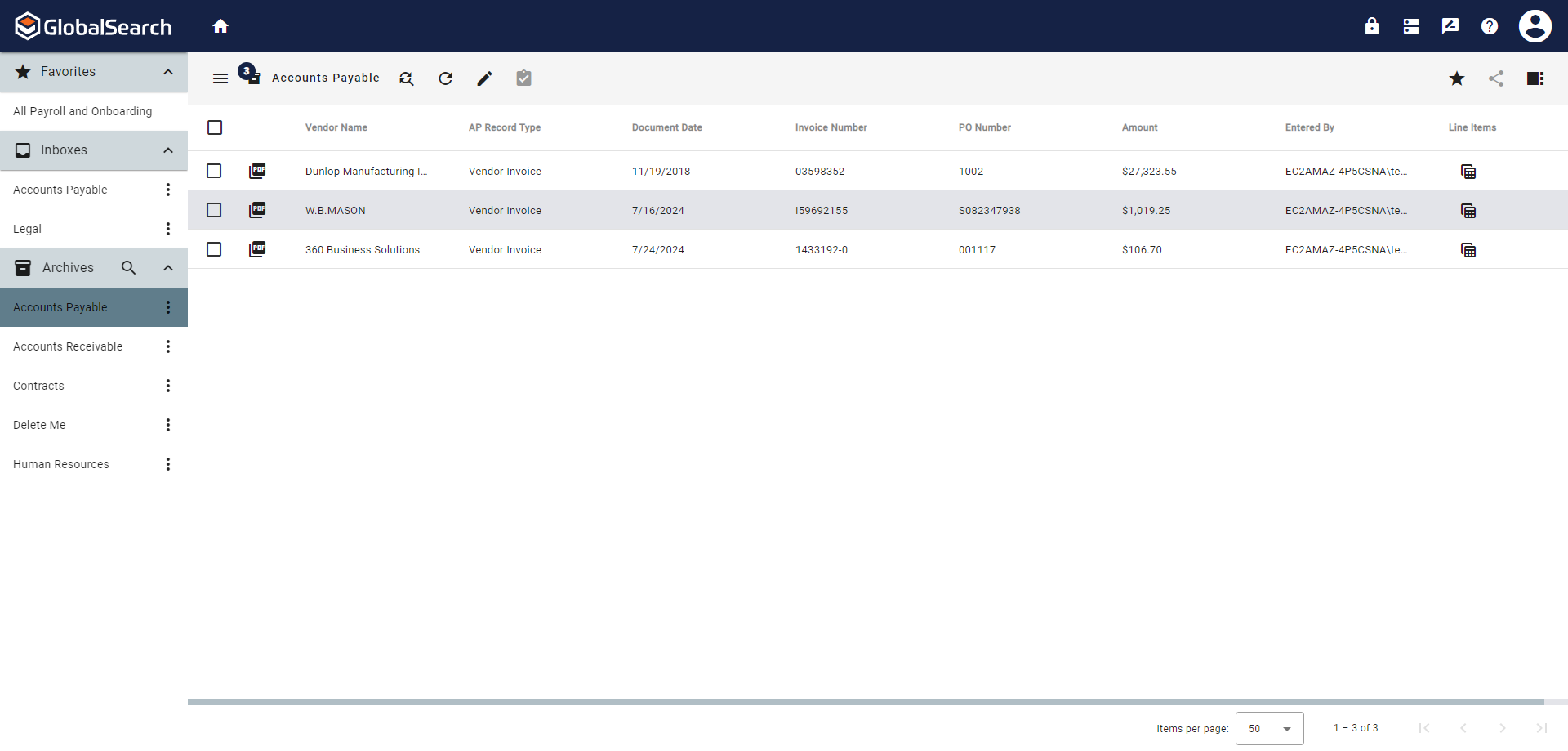
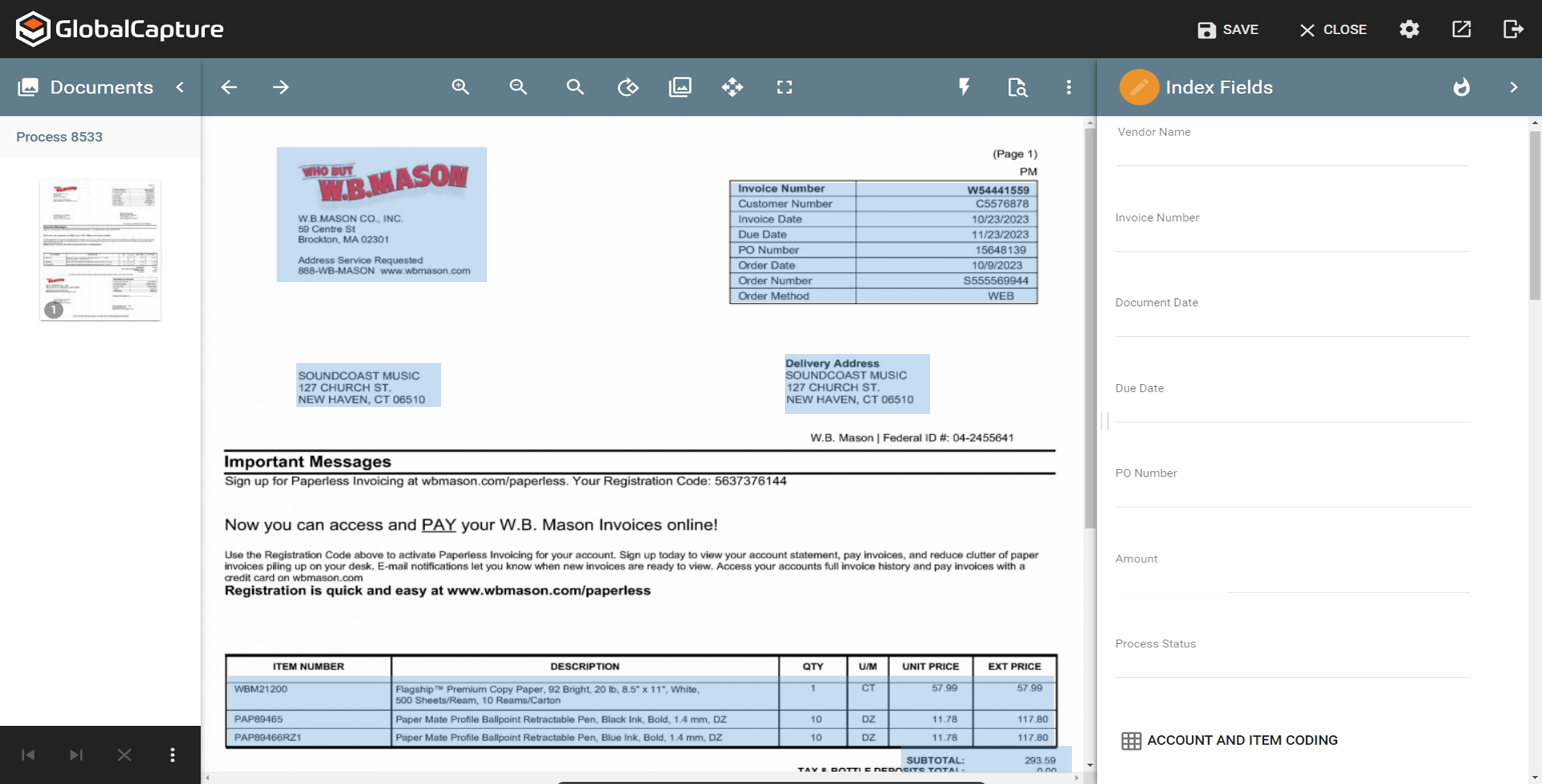
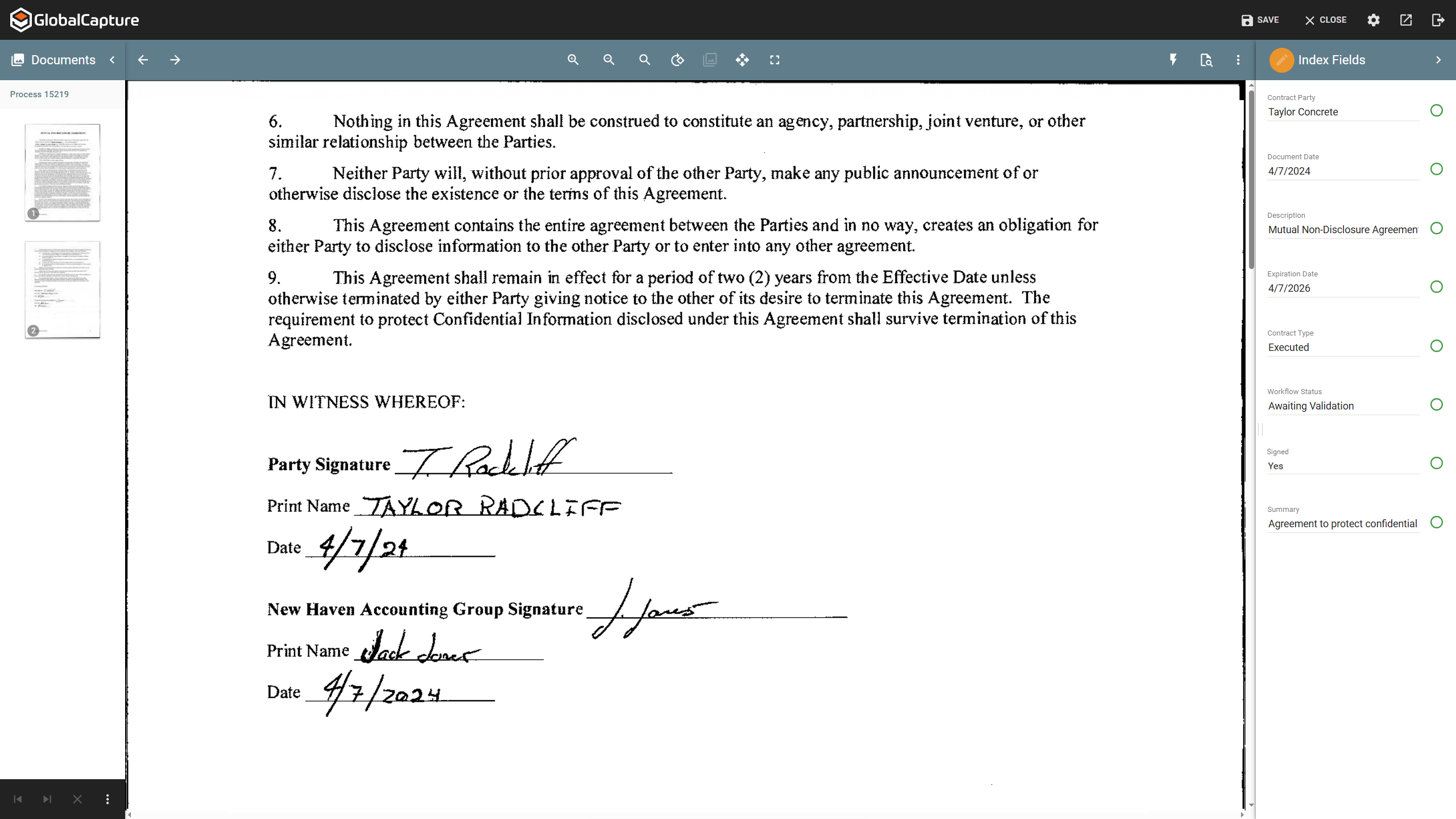
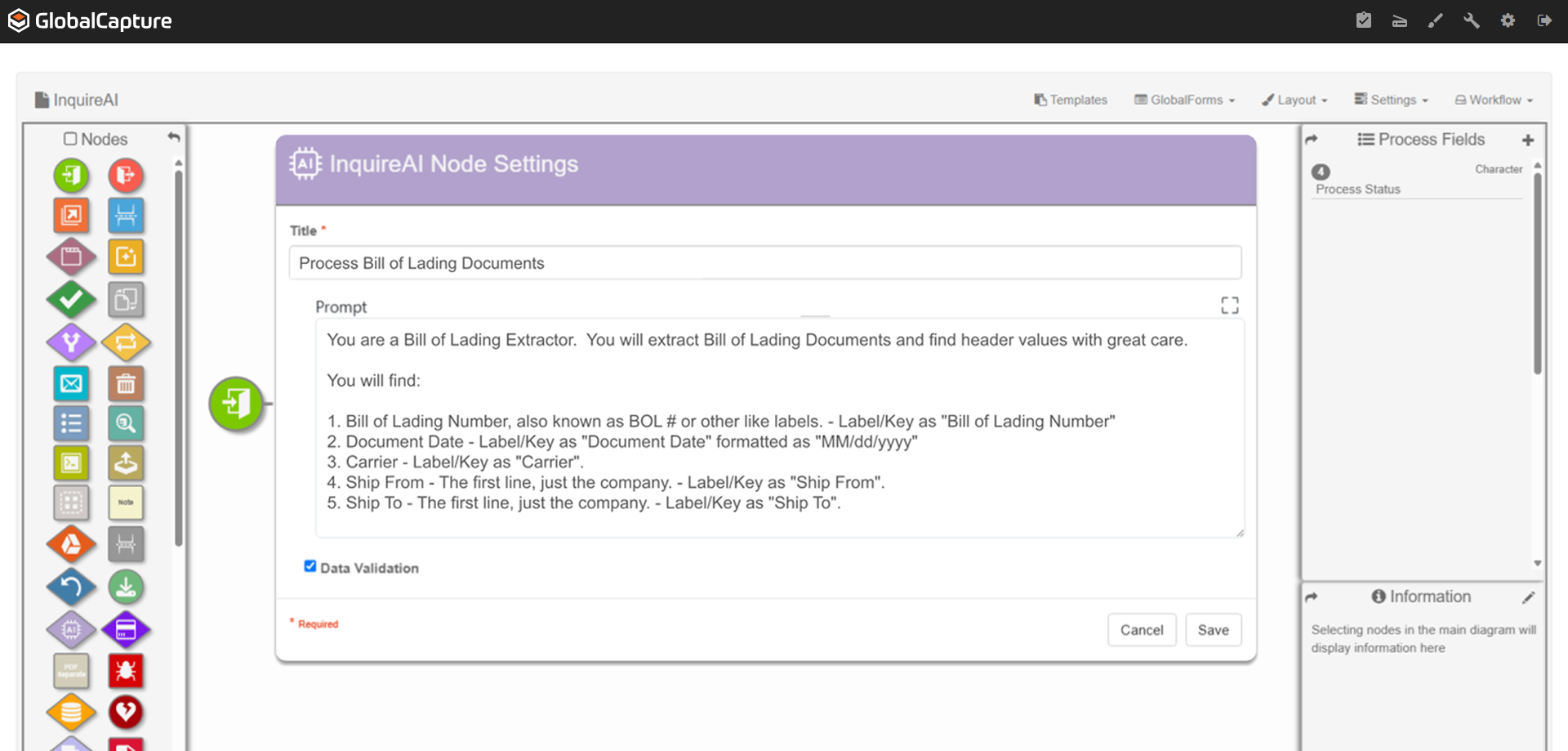
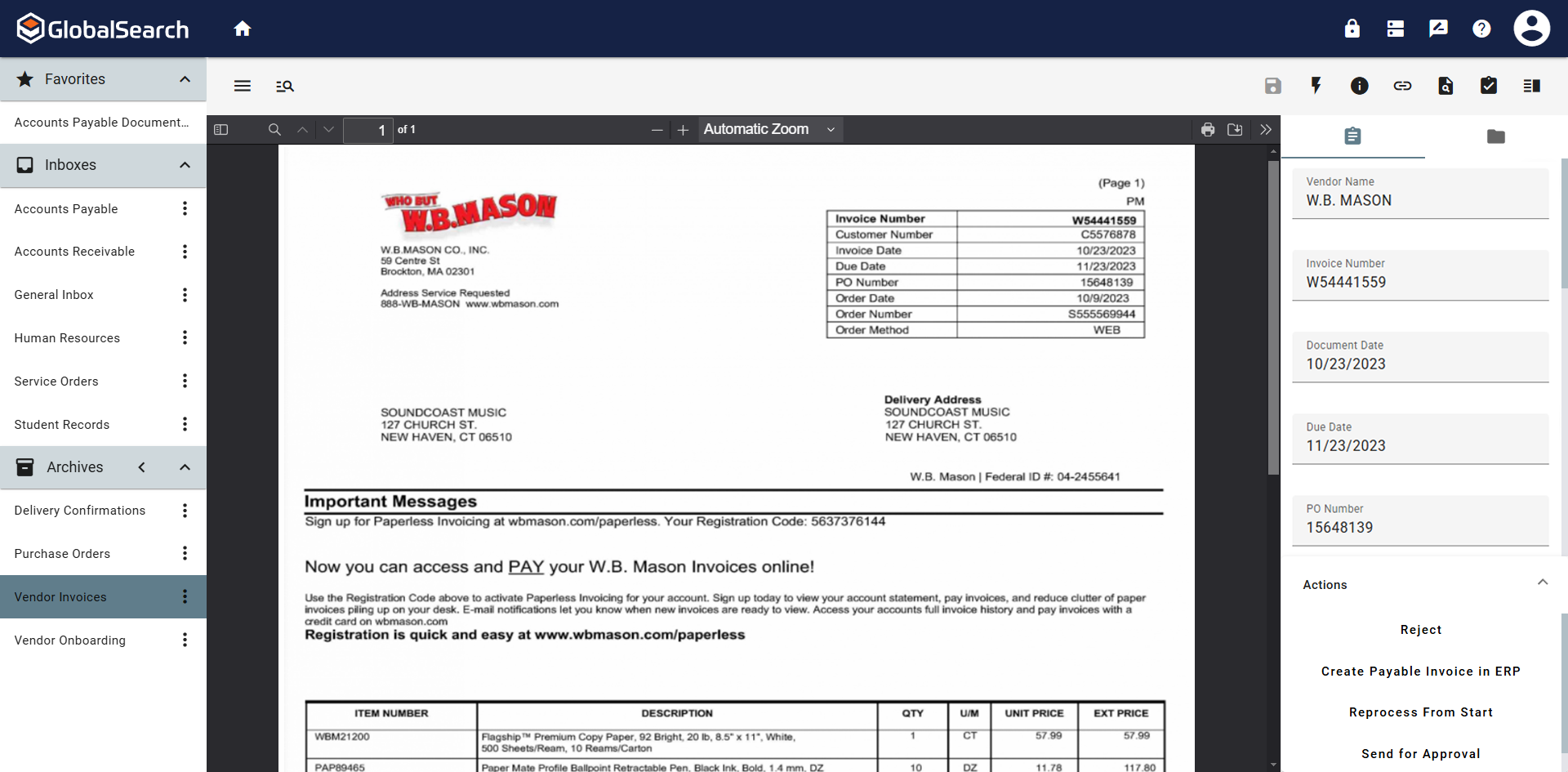
Screenshot of GlobalSearch Go, which organizes documents based on extracted data.Screenshot of InquireAI, which offers AI-driven data extraction of invoice and receipt fields to eliminate the need for manual data entry.Screenshot of a contract. Contracts are a complex document format that can require contextual understanding to collect accurate data points.Screenshot of where using natural language prompts, InquireAI works as an agent to extract, classify, and analyze information from any type of document.Screenshot of the invoice review process, where users can be notified by email when a pending approval is available.Screenshot of a fully indexed document. These can be released for secure access within GlobalSearch or sent to other repositories, including QuickBooks, Dynamics 35 Business Central, Citrix ShareFile, or Google Drive.