BQE CORE is a business management solution built specifically for professional service firms. BQE CORE is a combination of a billing assistant, project management, and accounting solution. CORE is designed to do the hard work of delivering actionable insights directly to the user's dashboards or inbox. BQE CORE replaces the products Engineeroffice, Archioffice, and BillQuick; the functionality of these applications is now found in BQE CORE.
N/A
QuickBooks Time
Score8.9 out of 10
N/A
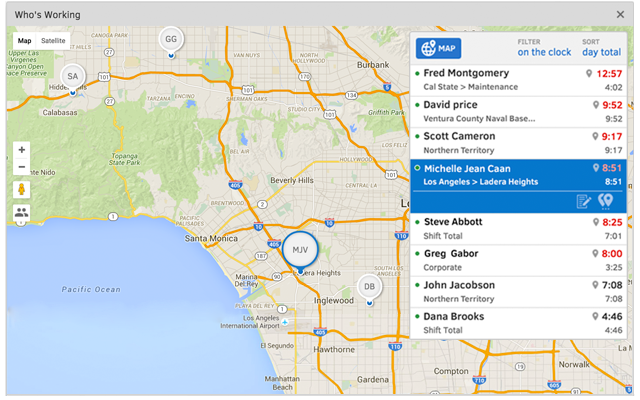
QuickBooks Time (formerly TSheets) is a cloud-based time tracking and scheduling app that allows employees to clock in and out from the job site with the devices they’ve already got in their pockets. The vendor aims to help companies replace paper timesheets with accurate, electronic time data as well as make payroll and invoicing faster and less costly. QuickBooks Time also accurately tracks time and GPS points (even without cell or internet service) then automatically syncs when back…
$0
1 user, unlimited projects
Pricing
BQE CORE
QuickBooks Time
Editions & Modules
No answers on this topic
Free
$0
1 user, unlimited projects
Premium
$8
per user/month + $20 base fee/month (paid annually)
Elite
$10
per user/month + $40 base fee/month (paid annually)
A de minimis incentive was given to thank the reviewer for their time. The incentive was not used to bias or drive a particular response, nor was the incentive contingent on a positive endorsement. More Info
Verified User
Chose BQE CORE
I use BQE Chore because the companies I work with on projects use it. [It took me some time to] get situated with the BQE Core billing system. Quickbooks was too complicated, [in my opinion]. BQE Core is straight forwarded and easy for anyone and everyone to use no matter where …
A de minimis incentive was given to thank the reviewer for their time. The incentive was not used to bias or drive a particular response, nor was the incentive contingent on a positive endorsement. More Info
Verified User
Chose BQE CORE
BQE Core appears to have a much more substantial feature set than TSheets which can provide more useful information.
A de minimis incentive was given to thank the reviewer for their time. The incentive was not used to bias or drive a particular response, nor was the incentive contingent on a positive endorsement. More Info
I would recommend this for our industry: architecture, engineering, or construction. I would recommend this for any larger firm with many employees or high number of projects. I would particularly recommend this for a company with projects that have budget constraints and where time tracking and expense tracking is very important. I would not recommend this complicated software for a small firm with a small amount of income or number of projects.
It would be very useful for certain remote jobs that require a high level of presence, as in the case of web development, or remote maintenance sessions, so that when reviewing the work data it is possible to ensure that there will be no failures. By being able to include files in the management, from the equipment tab, it is possible to fully control the hours in which each change in these files were made.
A de minimis incentive was given to thank the reviewer for their time. The incentive was not used to bias or drive a particular response, nor was the incentive contingent on a positive endorsement. More Info
Invoice Collections within Billing is a great tool because of the ability to take notes and track contact.
Invoices are professional looking and easy for our clients to understand the overall progress within each phase of their project.
Dashboards are the best tool EVER!
The Contact List feature within Clients setup is the perfect way to track multiple project managers within a large company that also has multiple contracts with us.
A de minimis incentive was given to thank the reviewer for their time. The incentive was not used to bias or drive a particular response, nor was the incentive contingent on a positive endorsement. More Info
Support (their help desk team is incredibly helpful and always quick to respond).
Ease of access and use (the app is user-friendly an intuitive, and the desktop version is equally as approachable).
Manager functionality (it's useful to be able to clock employees in and out at multiple events on the same day by sorting them into different groups by manager/event).
A de minimis incentive was given to thank the reviewer for their time. The incentive was not used to bias or drive a particular response, nor was the incentive contingent on a positive endorsement. More Info
Assigning contacts to particular roles - such as Invoicing, Contracts, etc.
Accounting Functionality - they are basically a project management accounting software, so in my opinion, they could learn some things from other accounting software such as QuickBooks etc.
A de minimis incentive was given to thank the reviewer for their time. The incentive was not used to bias or drive a particular response, nor was the incentive contingent on a positive endorsement. More Info
The desktop version of the TSheets schedule does not have a search feature. This makes it challenging to find things you are looking for without extra work
The app can be a bit buggy. Though it is a great app, there are many reasons that the app will stop syncing and can cause problems with staff scheduling
A de minimis incentive was given to thank the reviewer for their time. The incentive was not used to bias or drive a particular response, nor was the incentive contingent on a positive endorsement. More Info
We have been using Core for a few years now, and honestly started to look at other software systems to see what was out there. What we chose was a nightmare for migration so we never left Core. Now we have added invoicing and payments from Core instead of double entry with QBO. Still only a few cycles in but looks like it will be up to speed soon and working smoothly.
A de minimis incentive was given to thank the reviewer for their time. The incentive was not used to bias or drive a particular response, nor was the incentive contingent on a positive endorsement. More Info
TSheets tech support people, like Shawn Sommer, from Tsheets. She has been instrumental, after terminating the person in charge of TSheets I was left with a learning curve too high to climb but after 10 mins of her instructions I was able to make payroll in no time. She cleared all errors that nobody had fixed before. TSheets is not a vendor for me, TSheets is my partner in business. Thank you TSheets.
The foundation is awesome, like I have said before, however the house being built on it, the educational resources being provided to us (more of sales pitches that don't work), and flexible workflow opportunities, is making us look elsewhere for how much we will be spending on per user. It's crazy to think how flexible they are not when it comes to user settings. Lack of integration with other sources is awful.
A de minimis incentive was given to thank the reviewer for their time. The incentive was not used to bias or drive a particular response, nor was the incentive contingent on a positive endorsement. More Info
Our employees find TSheets easy to use and spend minimal time at reporting hours using it. As an administrator and user of the TSheets "data and information" I am extremely positive on the functionality and reporting that it has provided me. From its ease of set-up to training to reporting, TSheets has made us so much more efficient from an administration standpoint
A de minimis incentive was given to thank the reviewer for their time. The incentive was not used to bias or drive a particular response, nor was the incentive contingent on a positive endorsement. More Info
This is one area that does need some improvement. It can be slow at time, so we had our IT look at it from our side and we had no issues, so it has to be some slowness on their side.
As a new employee and CORE user, I talk to support on a weekly basis. I have never had to wait for more than 3 min to get connect with a support rep, and all my questions have been answered. The support representatives are polite and eager to help no matter how simple your question is.
A de minimis incentive was given to thank the reviewer for their time. The incentive was not used to bias or drive a particular response, nor was the incentive contingent on a positive endorsement. More Info
I have never failed to have an issue resolved within minutes of contacting Support. Jen D recently assisted my with an export issue and I was back on track in less the 10 minutes. She was knowledgable and thought about the current and future contexts of the issue and assured there would be no recurrence next payroll.
A de minimis incentive was given to thank the reviewer for their time. The incentive was not used to bias or drive a particular response, nor was the incentive contingent on a positive endorsement. More Info
A de minimis incentive was given to thank the reviewer for their time. The incentive was not used to bias or drive a particular response, nor was the incentive contingent on a positive endorsement. More Info
Deltek Vision is far more advanced, more encompassing and offers more flexibility with what you want to do. However, it's also quite difficult to use, whereas BQE CORE is intuitive and user friendly. The trade off is worth it in some arenas but overall it's not suited for a larger fast paced company. Great for smaller companies.
A de minimis incentive was given to thank the reviewer for their time. The incentive was not used to bias or drive a particular response, nor was the incentive contingent on a positive endorsement. More Info
Besides Intuit Payroll (Sage), the only program I've used is WorkBrain through Menards, and it's more as a scheduling guideline for management, employees don't use it to punch in or out or record hours. However, WorkBrain does show scheduling and it matches with a punch clock to record those hours. Every other place I've used has used either punch clocks or handwritten time cards. I think the TSheets is modern, user-friendly, convenient, accessible, and cost-effective for the owners. It also streamlines payroll for the Accountant instead of manually entering all hours for multiple employees by hand into a software program like Sage.
A de minimis incentive was given to thank the reviewer for their time. The incentive was not used to bias or drive a particular response, nor was the incentive contingent on a positive endorsement. More Info
A de minimis incentive was given to thank the reviewer for their time. The incentive was not used to bias or drive a particular response, nor was the incentive contingent on a positive endorsement. More Info