TrustRadius: an HG Insights company

Save this comparison

Save this comparison

Add Product

Recommended Comparisons

    Overview
    ProductRatingMost Used ByProduct SummaryStarting Price

    Cincopa

    Score9.8 out of 10
    N/ACincopa is a video knowledge management platform that converts video and document assets into searchable, structured knowledge environments. The solution utilizes Artificial Intelligence (AI) to index multimedia content, allowing users to query libraries using natural language to locate specific information within media files. Key Capabilities Structured Knowledge Environments: The platform organizes Video Assets and Digital Documents into categorized…

    $99

    per month

    Skype (discontinued)

    Score7.1 out of 10
    N/ASkype (the personal edition or Skype free) was a web meeting, video conferencing, and VoIP software, now superseded by Microsoft Teams' free edition and unsupported from May 2025.

    $2.99

    per month

    Pricing
    CincopaSkype (discontinued)
    Editions & Modules
    Starter
    $99.00
    per month
    Growth
    $349.00
    per month
    United States Subscription
    $2.99
    per month
    North America Subscription
    $6.99
    per month
    India Subscription
    $7.99
    per month
    Offerings
    Pricing Offerings
    CincopaSkype (discontinued)
    Free Trial
    NoNo
    Free/Freemium Version
    NoNo
    Premium Consulting/Integration Services
    NoNo
    Entry-level Setup FeeOptionalNo setup fee
    Additional Details——
    More Pricing Information
    Community Pulse
    CincopaSkype (discontinued)
    Considered Both Products
    Cincopa
    No answer on this topic
    Discontinued Products
    No answer on this topic
    Key User Insights
    Would buy again
    No answers on this topic
    86%
    Would buy again
    85 Answers
    Delivers good value for the price
    No answers on this topic
    93%
    Delivers good value for the price
    80 Answers
    Happy with the feature set
    No answers on this topic
    85%
    Happy with the feature set
    84 Answers
    Lived up to sales and marketing promises
    No answers on this topic
    84%
    Lived up to sales and marketing promises
    53 Answers
    Implementation went as expected
    No answers on this topic
    96%
    Implementation went as expected
    70 Answers
    Features
    CincopaSkype (discontinued)
    Video Marketing
    Comparison of Video Marketing features of Cincopa and Skype (discontinued)
    Feature
    Cincopa
    8.6
    17 Ratings
    13% above category average
    Skype (discontinued)
    -
    Ratings
    Lead generation7.014 Ratings00 Ratings
    Video personalization9.914 Ratings00 Ratings
    eCommerce8.76 Ratings00 Ratings
    Support for advertisements8.59 Ratings00 Ratings
    Video SEO8.913 Ratings00 Ratings
    Integration to Marketing Automation8.69 Ratings00 Ratings
    Video Platform Integrations
    Comparison of Video Platform Integrations features of Cincopa and Skype (discontinued)
    Feature
    Cincopa
    8.2
    5 Ratings
    28% above category average
    Skype (discontinued)
    -
    Ratings
    Integration to Salesforce.com8.24 Ratings00 Ratings
    Integration to Marketo8.24 Ratings00 Ratings
    Integration to HubSpot8.35 Ratings00 Ratings
    Video Security
    Comparison of Video Security features of Cincopa and Skype (discontinued)
    Feature
    Cincopa
    9.2
    16 Ratings
    7% above category average
    Skype (discontinued)
    -
    Ratings
    Video access controls9.016 Ratings00 Ratings
    User management9.016 Ratings00 Ratings
    Video link sharing9.915 Ratings00 Ratings
    Internal video9.013 Ratings00 Ratings
    External video9.014 Ratings00 Ratings
    Video Player
    Comparison of Video Player features of Cincopa and Skype (discontinued)
    Feature
    Cincopa
    9.0
    19 Ratings
    9% above category average
    Skype (discontinued)
    -
    Ratings
    Player customization9.019 Ratings00 Ratings
    Embedded videos9.018 Ratings00 Ratings
    Video quality / Bandwidth controls9.016 Ratings00 Ratings
    Mobile compatibility9.017 Ratings00 Ratings
    Video Analytics
    Comparison of Video Analytics features of Cincopa and Skype (discontinued)
    Feature
    Cincopa
    9.9
    14 Ratings
    23% above category average
    Skype (discontinued)
    -
    Ratings
    Per viewer tracking10.013 Ratings00 Ratings
    Per video tracking9.914 Ratings00 Ratings
    Video analytics dashboard9.712 Ratings00 Ratings
    Video Hosting, Management & Storage
    Comparison of Video Hosting, Management & Storage features of Cincopa and Skype (discontinued)
    Feature
    Cincopa
    8.7
    15 Ratings
    1% above category average
    Skype (discontinued)
    -
    Ratings
    On-Demand video9.010 Ratings00 Ratings
    Live streaming9.06 Ratings00 Ratings
    Video upload & format support8.115 Ratings00 Ratings
    Video library / File management9.015 Ratings00 Ratings
    Video portal8.110 Ratings00 Ratings
    Video Engagement
    Comparison of Video Engagement features of Cincopa and Skype (discontinued)
    Feature
    Cincopa
    7.7
    2 Ratings
    3% below category average
    Skype (discontinued)
    -
    Ratings
    Audience Q&A / Live chat8.21 Ratings00 Ratings
    Video comments7.22 Ratings00 Ratings
    Performance & Compatibility of Online Events Software
    Comparison of Performance & Compatibility of Online Events Software features of Cincopa and Skype (discontinued)
    Feature
    Cincopa
    -
    Ratings
    Skype (discontinued)
    6.2
    138 Ratings
    24% below category average
    High quality audio00 Ratings6.5135 Ratings
    High quality video00 Ratings7.2133 Ratings
    Low bandwidth requirements00 Ratings5.5130 Ratings
    Mobile support00 Ratings5.5118 Ratings
    Screen Sharing
    Comparison of Screen Sharing features of Cincopa and Skype (discontinued)
    Feature
    Cincopa
    -
    Ratings
    Skype (discontinued)
    6.2
    119 Ratings
    25% below category average
    Desktop sharing00 Ratings5.5118 Ratings
    Whiteboards00 Ratings6.860 Ratings
    Online Meetings / Events
    Comparison of Online Meetings / Events features of Cincopa and Skype (discontinued)
    Feature
    Cincopa
    -
    Ratings
    Skype (discontinued)
    6.0
    118 Ratings
    31% below category average
    Calendar integration00 Ratings6.185 Ratings
    Meeting initiation00 Ratings6.3106 Ratings
    Integrates with social media00 Ratings4.465 Ratings
    Record meetings / events00 Ratings7.077 Ratings
    Slideshows00 Ratings6.268 Ratings
    Online Events Collaboration
    Comparison of Online Events Collaboration features of Cincopa and Skype (discontinued)
    Feature
    Cincopa
    -
    Ratings
    Skype (discontinued)
    5.3
    111 Ratings
    41% below category average
    Live chat00 Ratings5.5110 Ratings
    Audience polling00 Ratings5.364 Ratings
    Q&A00 Ratings5.362 Ratings
    Online Events Security
    Comparison of Online Events Security features of Cincopa and Skype (discontinued)
    Feature
    Cincopa
    -
    Ratings
    Skype (discontinued)
    7.4
    101 Ratings
    9% below category average
    User authentication00 Ratings8.988 Ratings
    Participant roles & permissions00 Ratings7.183 Ratings
    Confidential attendee list00 Ratings6.260 Ratings
    VoIP system collaboration
    Comparison of VoIP system collaboration features of Cincopa and Skype (discontinued)
    Feature
    Cincopa
    -
    Ratings
    Skype (discontinued)
    6.5
    4 Ratings
    12% below category average
    Video conferencing00 Ratings5.74 Ratings
    Audio conferencing00 Ratings6.54 Ratings
    Video screen sharing00 Ratings6.14 Ratings
    Instant messaging00 Ratings7.94 Ratings
    Best Alternatives
    CincopaSkype (discontinued)
    Small Businesses
    Vidyard
    Score8.3 out of 10
    ClickMeeting
    Score9.5 out of 10
    Medium-sized Companies
    Vidyard
    Score8.3 out of 10
    JioMeet
    Score9.8 out of 10
    Enterprises
    Panopto
    Score7.5 out of 10
    Webex Meetings
    Score8.7 out of 10
    All AlternativesView all alternativesView all alternatives
    User Ratings
    CincopaSkype (discontinued)
    Likelihood to Recommend
    9.8
    (28 ratings)
    9.3
    (140 ratings)
    Likelihood to Renew
    9.1
    (1 ratings)
    10.0
    (5 ratings)
    Usability
    8.2
    (1 ratings)
    6.0
    (4 ratings)
    Availability
    -
    (0 ratings)
    10.0
    (1 ratings)
    Performance
    -
    (0 ratings)
    10.0
    (1 ratings)
    Support Rating
    -
    (0 ratings)
    10.0
    (42 ratings)
    Implementation Rating
    -
    (0 ratings)
    10.0
    (3 ratings)
    Configurability
    -
    (0 ratings)
    10.0
    (1 ratings)
    Contract Terms and Pricing Model
    -
    (0 ratings)
    10.0
    (1 ratings)
    Ease of integration
    -
    (0 ratings)
    10.0
    (1 ratings)
    Product Scalability
    -
    (0 ratings)
    10.0
    (1 ratings)
    Professional Services
    -
    (0 ratings)
    10.0
    (1 ratings)
    Vendor post-sale
    -
    (0 ratings)
    10.0
    (1 ratings)
    Vendor pre-sale
    -
    (0 ratings)
    10.0
    (1 ratings)
    User Testimonials
    CincopaSkype (discontinued)
    Likelihood to Recommend
    Cincopa
    I would say that Cincopa is a first-stop for any dev project without an internal gallery option. This is especially true if the person in charge of content or building the galleries is not a coder. Cincopa makes designing a good looking gallery and inserting it into nearly any webpage a pretty simple process, so it is a great starting place. There may be other options that would fit a different development project better (internal gallery functions or a full-scale DAM with importable galleries), but for our purposes Cincopa was (and is) a perfect fit.
    Incentivized
    Read full review
    Discontinued Products
    Having interacted with a new replacement tool, Microsoft Teams, it is challenging to recommend Skype, as it lacks some essential features, such as being less equipped with the latest updates, and it is not platform-independent, causing issues on PCs and phones, as well as during calls that might hinder work.
    Incentivized
    Read full review
    Pros
    Cincopa
    • Responsive - if your platform is not responsive it will display the gallery this way across all platforms.
    • Fast - if you have slow uploads it will increase your load speed.
    • Easy - you can upload all your photos at once or one at a time. Then use a preset gallery to display them.
    Read full review
    Discontinued Products
    • The instant chat function is great. Very straightforward, easy to use, easy to learn, no technical issues.
    • Video calls are pretty easy also, user friendly and a mostly stable connection with no issues.
    • Voice calls are easy also, eliminates the need for an external landline or the need to use your cell phone. Clear connections, not really any dropped calls.
    Incentivized
    Read full review
    Cons
    Cincopa
    • The number of pictures for the upload should be slightly higher.
    • The previous calculation of the traffic is difficult.
    • If many pictures have to be deleted from a gallery, that does not happen so fast, because only 50 pictures are loaded. Then you have to scroll all the way down and wait until the next 50 images are loaded, in order to be able to mark them for deletion. This takes a while with 800 pictures for example.
    Read full review
    Discontinued Products
    • Skype is a RESOURCE hog. People who have limited bandwidth will have poor call quality.
    • It is hard to figure out how to use emojis and upload images in the chat.
    • The background images do not fool anybody....it is clearly not your real background.
    Incentivized
    Read full review
    Likelihood to Renew
    Cincopa
    It solved the problems we were facing at the time.
    Read full review
    Discontinued Products
    I have given this rating as this need to give more than that as it's very helpful for us and makes our work more efficient and fast.
    Read full review
    Usability
    Cincopa
    Cincopa is very easy to use, especially to the uninitiated. You don't need a degree in CS or years of experience to set-up a fantastic looking gallery. The interface is self-explanatory for the most part and very easy to use. The drag-and-drop functionality makes it simple and inviting for all users.
    Incentivized
    Read full review
    Discontinued Products
    Skype is not as good as Facetime in terms of ease to glance at it and figure out how it works. I think that's a result of Skype trying to be too many things at once. A lot of the menu and UI could be streamlined, and I would jettison some of the additional functions that have been tacked on over the years to simplify. That being said, while some options are slightly hard to find, they all work flawlessly once found.
    Incentivized
    Read full review
    Support Rating
    Cincopa
    No answers on this topic
    Discontinued Products
    I am not aware of the current support level for Skype for business, as I have never used even though I have the product. However, the support for Skype's personal paid users is not where it could be. Users who pay for Skype features do not have a clear path to reach out to support. So, rating 6, can be better as soon as I need to use Skype for business support and get a good experience. I will say that I will renew Skype for Business subscription, which is a significant inconsistency on my end. The explanation is that Skype for Business comes bundled with Office for Business, with no additional cost, so why not.
    Incentivized
    Read full review
    Implementation Rating
    Cincopa
    No answers on this topic
    Discontinued Products
    It can be used on the phone via mobile application as well as on the desktop by logging in to the website. Easily installed and ready to use.
    Incentivized
    Read full review
    Alternatives Considered
    Cincopa
    Cincopa has nice templates that are easy to use. The images can be moved about, more images added, and the size changed.
    I particularly like the Pinterest style template, as it fits in well with the number of images that I need to display on my website. The more choices displayed, the more likely customers are to order.
    Incentivized
    Read full review
    Discontinued Products
    We use Skype in combination with Grasshopper. While Grasshopper acts as a routing toll free number with extensions, if we are making calls directly, we do it through Skype. Skype's desktop and mobile apps are easier to use, and provide unlimited local calls at a flat, affordable rate. Allowing our team to use their existing mobile or desktop devices without additional hardware for business office phone calls is important, and Skype makes that possible
    Incentivized
    Read full review
    Professional Services
    Cincopa
    No answers on this topic
    Discontinued Products
    The service provided is up to date, as discussed before buying.
    Read full review
    Return on Investment
    Cincopa
    • The video that we uploaded to our website will show prospects in the area around our apartment community and hopefully give them a good idea of how close they can be to work/school.
    • Our video will result in more apartments being rented which will have a positive impact on our ROI.
    • Our video will give residents and prospects a positive image of our community.
    Incentivized
    Read full review
    Discontinued Products
    • Skype made keeping in touch with an advisor in Mexico very easy. The initiative there resulted in 5 new partnerships.
    • Skype has helped me with account management for at least 3 customers in LATAM--usually it's a fast way to answer a question about a support renewal.
    • For about 9 months Skype helped me stay in touch with a colleague in Prague. We would meet once a week to go over sales activities.
    Incentivized
    Read full review
    ScreenShots

    Cincopa Screenshots

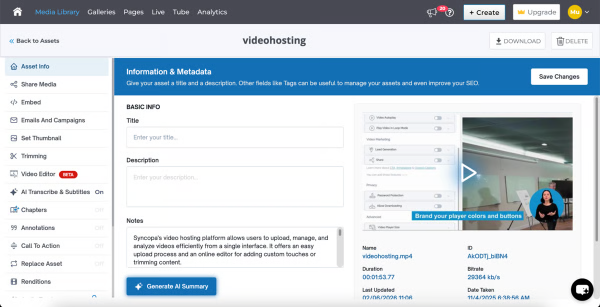
    Screenshot of where Cincopa's AI interacts with viewers, answering questions and surfacing key information without watching the entire video, making content more accessible, searchable, and engaging.Screenshot of the dashboard to see what users are asking, track unanswered questions, and identify content gaps.Screenshot of an analytics dashboard, offering insights to improve content quality, enhance viewer experience, and address missing information.Screenshot of key performance metrics like views, watch time, plays, and engagement in real time. Analyze trends across devices, pages, and geographies to understand viewer behavior and optimize video strategy.Screenshot of the interface to upload and edit videos. Users can update metadata, trim content, add subtitles, configure player settings, and control distribution.Screenshot of a branded video hub with categorized playlists and intuitive navigation. This enables users to browse, search, and access content across channels like onboarding, training, and updates, all in one centralized CincoTube experience.