Overview
ProductRatingMost Used ByProduct SummaryStarting Price
Clear Analytics
Score 8.8 out of 10
Enterprise companies (1,001+ employees)
Clear Analytics is a business intelligence solution that enables non technical end users to perform analytics by leveraging existing knowledge of Excel coupled with a built in query builder. Some key features include: Dynamic Data Refresh, Data Share and In-Excel Collaboration.
$29
Per Seat per Month
Project Insight
Score 4.0 out of 10
N/A
Project Insight is a web-based project and portfolio management software. Project teams can access, edit and update their projects information anytime, anywhere, with any supported browser, tablet and mobile device. Features for experienced project managers include: MS Project import/export, intelligent scheduling, resource allocation, Outlook integration, document management, approvals, time/expense tracking, issue management, 100s of dashboards and advanced permissions.
$45
per user or volume licensing options.
Zoho Projects
Score 9.2 out of 10
N/A
Zoho Project is online project management and planning software that provides project teams with a web-based collaborative environment. Zoho Projects can also include a bug tracking module specifically design to support software development project. It is integrated with other Zoho products including Zoho CRM.
$5
per month per user
Pricing
Clear AnalyticsProject InsightZoho Projects
Editions & Modules
Personal
$29
Per Seat per Month
Team
$165
upto 10 Seat per Month
Department
$265
upto 25 Seat per month
Organization
$565
Upto 100 per seat per month
Enterprise
$45
per user or volume licensing options.
Free
Sign Up & invite your team
#3 ADD-ONS
Grow as you go
Free
$0
Premium
$5
per month per user
Enterprise
$10
per month per user
Project Plus
Contact Sales
Offerings
Pricing Offerings
Clear AnalyticsProject InsightZoho Projects
Free Trial
YesYesYes
Free/Freemium Version
NoNoYes
Premium Consulting/Integration Services
YesNoYes
Entry-level Setup Fee$800 Initial OnBoardingNo setup feeOptional
Additional DetailsCertain Enterprise level features can be made available to Small Business edition at additional cost. Such services include Scheduler and OLAP connectivity. Custom adapters can also be created to connect to SaaS services.Discount offered for annual billing.
More Pricing Information
Community Pulse
Clear AnalyticsProject InsightZoho Projects
Features
Clear AnalyticsProject InsightZoho Projects
BI Standard Reporting
Comparison of BI Standard Reporting features of Product A and Product B
Clear Analytics
9.0
8 Ratings
9% above category average
Project Insight
-
Ratings
Zoho Projects
-
Ratings
Pixel Perfect reports9.08 Ratings00 Ratings00 Ratings
Customizable dashboards9.18 Ratings00 Ratings00 Ratings
Report Formatting Templates8.78 Ratings00 Ratings00 Ratings
Ad-hoc Reporting
Comparison of Ad-hoc Reporting features of Product A and Product B
Clear Analytics
8.9
8 Ratings
10% above category average
Project Insight
-
Ratings
Zoho Projects
-
Ratings
Drill-down analysis9.28 Ratings00 Ratings00 Ratings
Formatting capabilities8.78 Ratings00 Ratings00 Ratings
Report sharing and collaboration8.98 Ratings00 Ratings00 Ratings
Report Output and Scheduling
Comparison of Report Output and Scheduling features of Product A and Product B
Clear Analytics
9.0
8 Ratings
9% above category average
Project Insight
-
Ratings
Zoho Projects
-
Ratings
Publish to Web9.08 Ratings00 Ratings00 Ratings
Publish to PDF9.17 Ratings00 Ratings00 Ratings
Report Versioning8.98 Ratings00 Ratings00 Ratings
Report Delivery Scheduling8.87 Ratings00 Ratings00 Ratings
Data Discovery and Visualization
Comparison of Data Discovery and Visualization features of Product A and Product B
Clear Analytics
9.0
8 Ratings
12% above category average
Project Insight
-
Ratings
Zoho Projects
-
Ratings
Pre-built visualization formats (heatmaps, scatter plots etc.)8.98 Ratings00 Ratings00 Ratings
Location Analytics / Geographic Visualization9.18 Ratings00 Ratings00 Ratings
Access Control and Security
Comparison of Access Control and Security features of Product A and Product B
Clear Analytics
9.3
8 Ratings
9% above category average
Project Insight
-
Ratings
Zoho Projects
-
Ratings
Multi-User Support (named login)9.48 Ratings00 Ratings00 Ratings
Role-Based Security Model9.08 Ratings00 Ratings00 Ratings
Multiple Access Permission Levels (Create, Read, Delete)9.48 Ratings00 Ratings00 Ratings
Mobile Capabilities
Comparison of Mobile Capabilities features of Product A and Product B
Clear Analytics
8.6
6 Ratings
11% above category average
Project Insight
-
Ratings
Zoho Projects
-
Ratings
Mobile Application8.54 Ratings00 Ratings00 Ratings
Dashboard / Report / Visualization Interactivity on Mobile8.76 Ratings00 Ratings00 Ratings
Project Management
Comparison of Project Management features of Product A and Product B
Clear Analytics
-
Ratings
Project Insight
4.3
2 Ratings
57% below category average
Zoho Projects
8.2
21 Ratings
6% above category average
Task Management00 Ratings6.02 Ratings8.621 Ratings
Resource Management00 Ratings3.02 Ratings8.420 Ratings
Gantt Charts00 Ratings7.01 Ratings8.318 Ratings
Scheduling00 Ratings2.01 Ratings8.719 Ratings
Workflow Automation00 Ratings8.01 Ratings9.315 Ratings
Team Collaboration00 Ratings4.02 Ratings9.321 Ratings
Support for Agile Methodology00 Ratings3.01 Ratings6.35 Ratings
Support for Waterfall Methodology00 Ratings4.01 Ratings8.812 Ratings
Document Management00 Ratings1.02 Ratings8.117 Ratings
Email integration00 Ratings7.02 Ratings8.117 Ratings
Timesheet Tracking00 Ratings2.01 Ratings8.620 Ratings
Change request and Case Management00 Ratings5.01 Ratings6.96 Ratings
Mobile Access00 Ratings00 Ratings8.319 Ratings
Budget and Expense Management00 Ratings00 Ratings7.715 Ratings
Professional Services Automation
Comparison of Professional Services Automation features of Product A and Product B
Clear Analytics
-
Ratings
Project Insight
5.0
1 Ratings
43% below category average
Zoho Projects
6.9
14 Ratings
12% below category average
Project & financial reporting00 Ratings5.01 Ratings6.55 Ratings
Integration with accounting software00 Ratings5.01 Ratings7.314 Ratings
Quotes/estimates00 Ratings00 Ratings5.55 Ratings
Invoicing00 Ratings00 Ratings8.313 Ratings
Best Alternatives
Clear AnalyticsProject InsightZoho Projects
Small Businesses
Yellowfin
Yellowfin
Score 8.7 out of 10
Stackby
Stackby
Score 8.9 out of 10
Stackby
Stackby
Score 8.9 out of 10
Medium-sized Companies
Reveal
Reveal
Score 10.0 out of 10
InEight
InEight
Score 8.3 out of 10
InEight
InEight
Score 8.3 out of 10
Enterprises
Kyvos Semantic Layer
Score 9.5 out of 10
InEight
InEight
Score 8.3 out of 10
InEight
InEight
Score 8.3 out of 10
All AlternativesView all alternativesView all alternativesView all alternatives
User Ratings
Clear AnalyticsProject InsightZoho Projects
Likelihood to Recommend
9.0
(8 ratings)
4.0
(2 ratings)
6.5
(24 ratings)
Likelihood to Renew
-
(0 ratings)
-
(0 ratings)
9.9
(3 ratings)
Usability
9.1
(8 ratings)
-
(0 ratings)
5.6
(4 ratings)
Availability
-
(0 ratings)
-
(0 ratings)
9.0
(1 ratings)
Performance
-
(0 ratings)
-
(0 ratings)
9.0
(1 ratings)
Support Rating
9.5
(8 ratings)
4.0
(1 ratings)
7.4
(9 ratings)
Online Training
-
(0 ratings)
-
(0 ratings)
9.0
(1 ratings)
Implementation Rating
-
(0 ratings)
-
(0 ratings)
8.0
(1 ratings)
User Testimonials
Clear AnalyticsProject InsightZoho Projects
Likelihood to Recommend
Clear Analytics
Clear Analytics has almost all the features which are mostly required by the organizations for their data analytics and transformation activities. Clear Analytics is built on the support of a parallel query engine which makes it handle large volume requests and also provides optimized results. However, every solution has some limitations, Clear Analytics lacks advanced features such as Predictive Analytics which is a very demanding feature in the market as most organizations are adopting AI/ML automation for their businesses. Also, it needs to add a lot of advanced visualizations so that the user has the choice of selection. Overall a good solution to be recommended.
Read full review
Project Insight
My rating would vary depending on the types of projects that need to be managed. Since I am in software, I don't think it was an excellent fit to manage software projects unless they are small projects with only a few tasks. On the other hand, if you are needing to manage a wide range of departments that are working on a single project with many moving pieces, then I would think that PI might be a better fit. Think of it as a jack of all trades, but master of none.
Read full review
Zoho
My work involves projects of 5-15 people with numerous projects running simultaneously. Prior to Zoho, I did not have a central location from which to view all project statuses at once. Zoho looks to provide this and also looks like it will deliver. I am anxious to see how our organization's use of it develops. At this time, I feel I am likely to recommend Zoho Projects because my organization has made great software decisions in the past so I have a level of trust already that the research has been done that Zoho is the best solution for our line of work.
Read full review
Pros
Clear Analytics
  • Quick management of the data through Excel thanks to the tools Clear Analytics provides such as filtering different information for an easier view.
  • Ability to add new KPIs to measure different areas of our business.
  • Drag and drop tool which makes an easier usage of Excel.
  • Cost-effective. I find Clear Analytics to be affordable considering the number of features added and the unlimited sharing and editing it provides.
Read full review
Project Insight
  • History tracking for any changes made to data.
  • Tracks all milestones and retains records for lifetime of account.
  • Easy extracting for reporting purposes.
Read full review
Zoho
  • We use it to manage our sales orders as there are lots of moving parts which are necessary to get client orders done properly.
  • I use it anytime I have a new idea I want to put into motion. As I can create a list for brainstorming, feedback, specific actions necessary in order to test and or implement the idea.
  • Unrelated to business, it's a great way to plan travel in order to make sure you don't forget those important things like passport, flight arrangement, client meeting confirmation, and meeting prep as far as what specific documents or things do you need to bring with you.
  • And since everyone is on the go and expected to keep up with work, the mobile/tablet app makes it a breeze to keep up, work on, and create new projects.
Read full review
Cons
Clear Analytics
  • For Charts and Graphs , getting the Power Point Deck would be helpful. As of now we use the data from Excel Reports
Read full review
Project Insight
  • Not a good fit for all types of projects
  • Very Complex
Read full review
Zoho
  • There is no ability to add custom fields in the "Bugs" module - for example, if we want to add fields such as Version Number.
  • Reporting is not integrated - its a fairly expensive add-on.
  • There is no easy way to track actual and completed dates for tasks - so historical variance analysis is not easy.
Read full review
Likelihood to Renew
Clear Analytics
No answers on this topic
Project Insight
No answers on this topic
Zoho
I've reviewed about 8 other project management solutions and Zoho Projects is the best I've seen without being overly complicated. Zoho Projects keeps getting better! Recent new enhancements makes it even easier to navigate. There are new keyboard shortcuts that cut my time way down. The tools are very easy to use.
Read full review
Usability
Clear Analytics
I have really enjoyed working with Clear Analytics. This platform has contributed to increased production and reliable data control processes. It has flexible user interface that can be operated by any organization member. Reports are shared on simple and transparent way in the dashboard for easy access. Data analytics from all departments have created manageable working environment that have increased production.
Read full review
Project Insight
No answers on this topic
Zoho
Zoho Project has been very user-friendly. As a small business, we have a diverse group of people with varying skill sets. This platform has been easy for our team to learn, implement, and succeed with. The mobile version is also very handy for our team.
Read full review
Reliability and Availability
Clear Analytics
No answers on this topic
Project Insight
No answers on this topic
Zoho
Has not been down to my knowledge.
Read full review
Performance
Clear Analytics
No answers on this topic
Project Insight
No answers on this topic
Zoho
Speed meets my expectations.
Read full review
Support Rating
Clear Analytics
I have had multiple scenarios where I had to reach out to the support team of Clear Analytics, be it access-related, general queries, during initial implementation, etc. My overall experience has always been good. I got the needed support every time without any delay. I can definitely recommend Clear Analytics simply on the basis of its excellent support team.
Read full review
Project Insight
I found Project Insight somewhat opaque overall. I thought the training was sparse and answers to questions few and far in between. There was a lot of power there for the dedicated user/administrator. For me, who was a casual user and administrator, I found support lacking. I didn't administer Project Insight much, just some work on integrations with other tools.
Read full review
Zoho
Although it might lack intuitiveness, once you get a hang of how Zoho Projects works, you can do a LOT. The impact good project management has on profitability is huge, and it has helped not only improve communication and coordination when working on a project, but more importantly have adequate tracking of time, due dates and potential bottle necks
Read full review
Alternatives Considered
Clear Analytics
There are other great tools that are out there but Clear Analytics is reasonable for our business and provides a lot of features that we specifically needed
Read full review
Project Insight
  • When I got to the company where I used Project Insight, we had our own custom tool that fit the tasks that it was designed for but wouldn't grow with the company unless resources were put onto expanding capabilities. We needed something more.
  • We replaced that tool with Redmine. It worked well and was easy to use, but it looked pretty dated when we got it, and since we didn't have many resources for managing, it looked dated after a few years without receiving upgrades. It was a decent tool for small teams that were focused on similar tasks. Redmine was much more straightforward than Project Insight and felt more reliable since we never had an issue with our internal servers. On the other hand, Redmine felt dated and didn't fit as many of the tasks that were needed. Redmine's price was right if you installed it locally and was probably still cheaper if you used their SAAS version.
  • Jira, on the other hand, felt like an excellent tool for software teams. Jira had a great project and task management and felt right for a software team. Jira also had useful integrations, even with Project Insight. Jira seemed pretty unreliable, worse than Project Insight. Our team would have preferred Jira, but I think it didn't work for other teams.
Read full review
Zoho
Zoho Projects provides a more limited set of functionality and customization options than other task/bug trackers on the market, but what it lacks in functionality it makes up for in ease of use. It probably has 80-90% of the features of its competitors but takes about a third of the time to get up and running and realizing value.
Read full review
Return on Investment
Clear Analytics
  • Super useful to get started immediately
  • Didn't have to rely on migrating data
  • Easy to add members
  • Easy to learn and build charts
Read full review
Project Insight
  • Reduction in costs on materials (i.e. - paper documentation)
  • Improved efficiency given that our field members need to report back on an hourly basis
  • Web based platform allows anyone access to the same information
Read full review
Zoho
  • We needed a system to organize our growing business, so anything was better than what we had, which was nothing.
  • Recording time spend is a huge reason for using project software. It has made me aware of the tasks that are taking too long and where we are not being profitable as a company.
  • It has kept our team accountable for what needs to get completed and when projects are not in motion or completed timely. It's helpful to know in order to get billing out faster.
Read full review
ScreenShots

Clear Analytics Screenshots

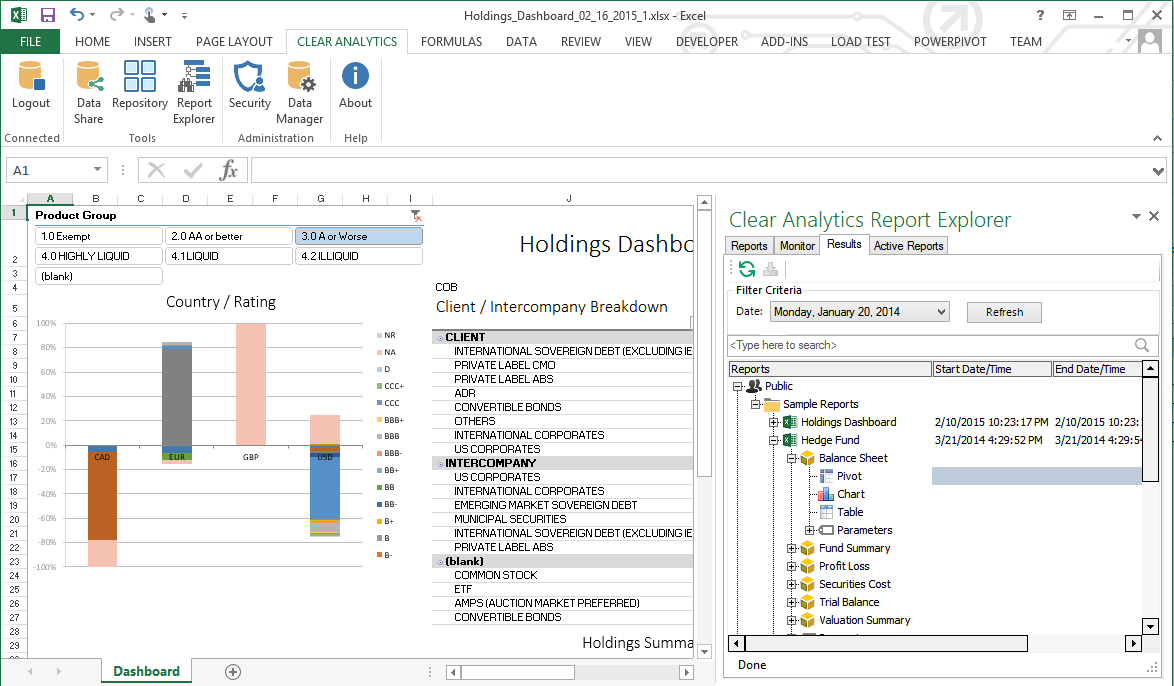
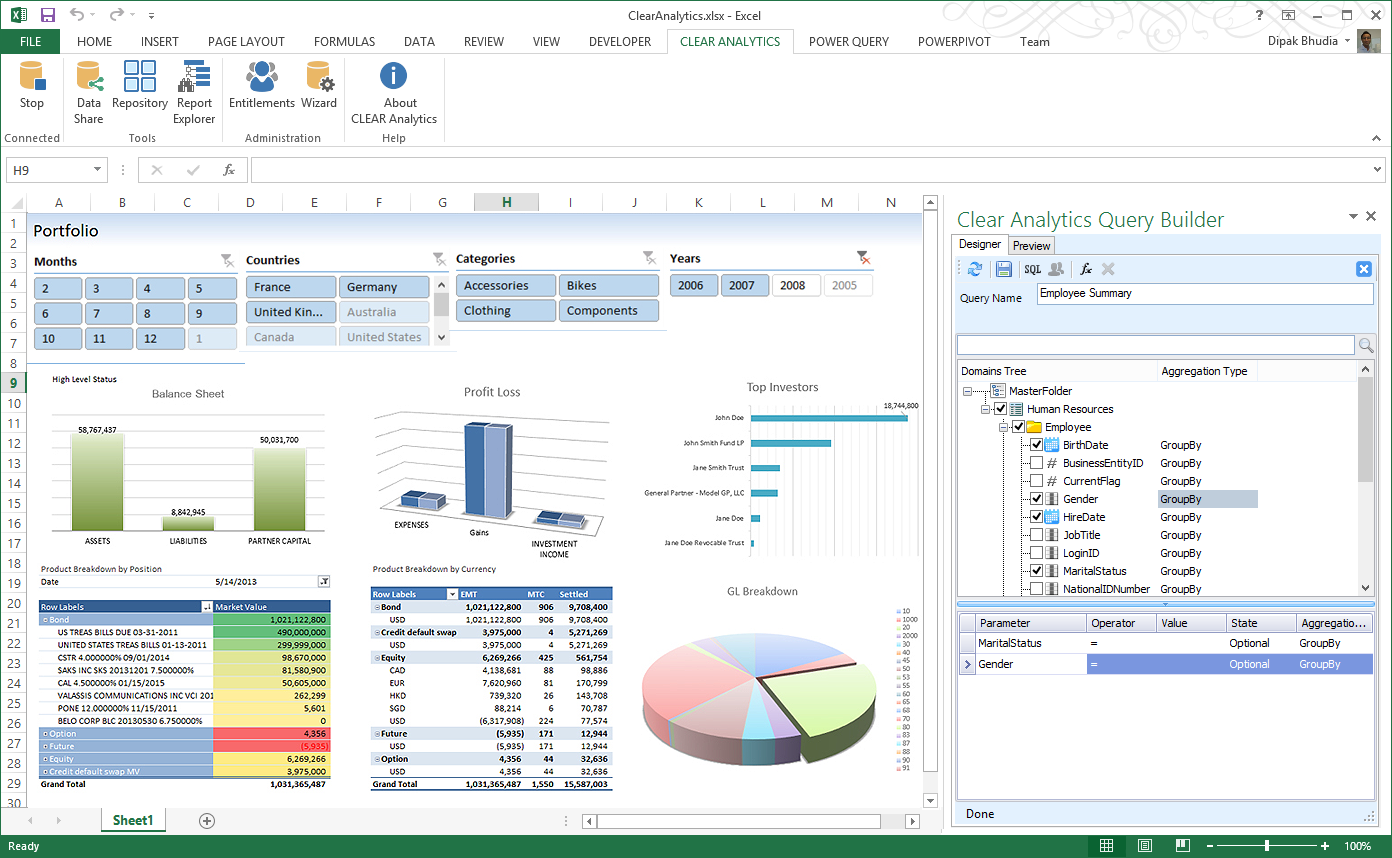
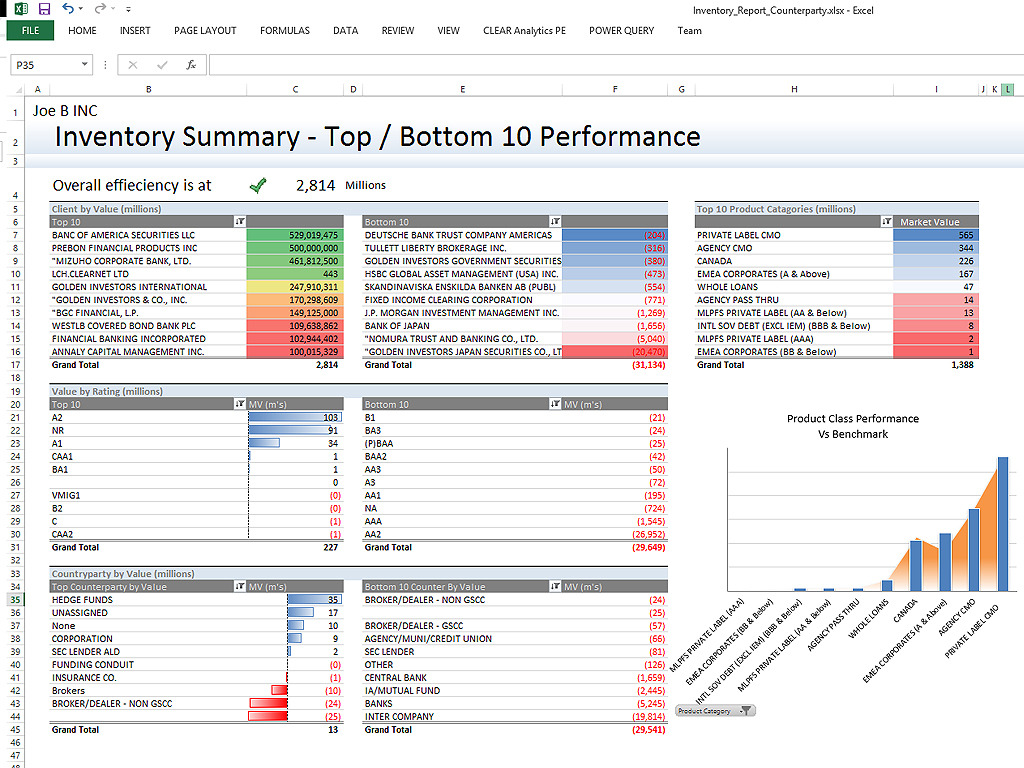
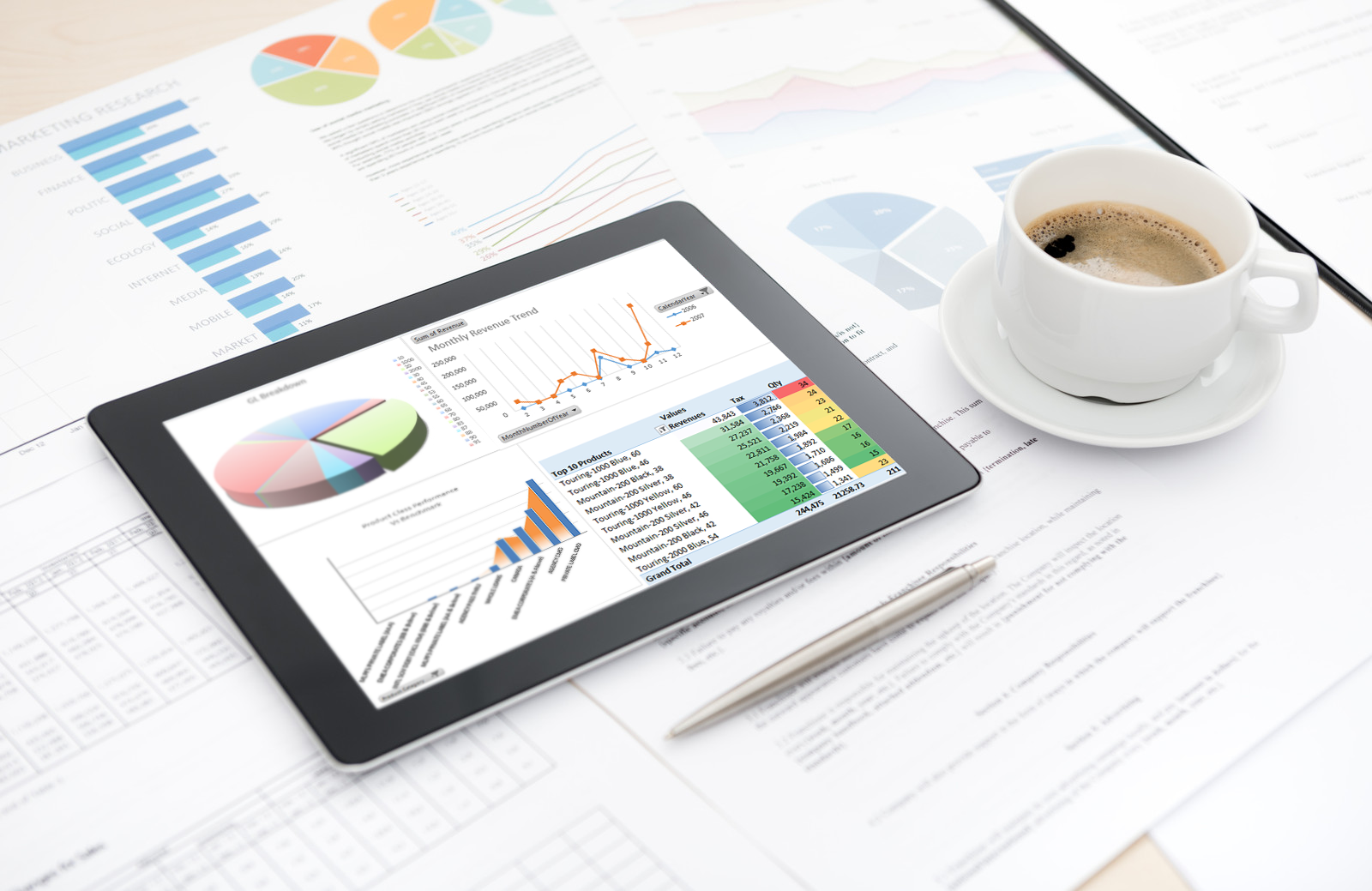
Screenshot of Clear Analytics integrated Excel panel essentially transforms standalone Excel into an enterprise strength, fully auditable, collaborative and centralized business intelligence platform.Screenshot of Users have the ability to dynamically query systems and render that data in any way they like.  No more waiting on IT to create reports.Screenshot of Your firms existing knowledge of Excel enables the firm to be product from day 1. Use the skills already present in your organization and don't pay for outside reporting consultants to create reports for you.Screenshot of Leverage the integration capability of Microsoft's Power BI to extend the reach of your data to web and mobile devices.Screenshot of Leverage all of Excels capabilities, from it's slicers to miniature spark-line charts to create incredibly informative and responsive dashboards.

Zoho Projects Screenshots

Screenshot of Task Automation with Blueprint - Map out your entire workflow with no code as flowcharts. Automate your tasks and notifications and set approval criteria with blueprint.Screenshot of Intuitive Gantt Charts - Say what, say who, say when. And done. Zoho Projects' Gantt chart comes feature loaded with advanced operations such as Critical path and Baseline.Screenshot of Inbuilt Issue Tracker - You can log, organize, track, and fix any problems. Features such as status and workflow, can be customized to suit the exact needs of your project.Screenshot of Drag, Drop and Done - A view of your tasks as cards placed along columns. Helps you identify bottlenecks and reorganize quickly using drag and drop.Screenshot of A quick pulse of all your work - The Portfolio dashboard, is a compact overview of all the work that's been happening across projects with widgets that address the project level timeline, status, ownership, budget health, and clients.Screenshot of Looks that matter - A refreshing UI that supports multiple themes, including an eye-catching dark mode.