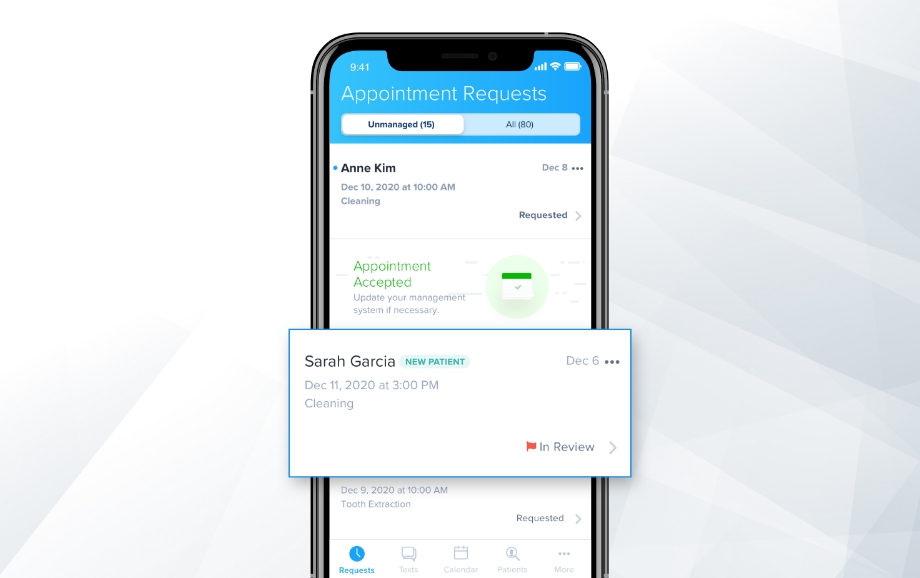
Demandforce is a solution available to the medical, veterinarian, lifestyle and automotive industries. Demandforce offers a variety of communication and office workflow solutions from appointment reminders and two-way text to marketing solutions like email campaign templates and online reputation management tools. Demandforce helps attract, retain, and grow a customer base.
N/A
Tebra Billing & Payments
Score 8.9 out of 10
N/A
Tebra Practice Management (formerly Kareo) provides cloud-based management and billing solutions for small medical offices. Some key features include: Patient Management, Scheduler & Patient Reminders, Insurance Billing & Reporting, and Patient Billing & Collections.
$74.50
per provider
Pricing
Demandforce
Tebra Billing & Payments
Editions & Modules
No answers on this topic
Non-Physician Provider (Low-Volume)
$74.50
per provider
Low-Volume Provider
$149
per provider
Physician Provider
$299
per provider
Offerings
Pricing Offerings
Demandforce
Tebra Billing & Payments
Free Trial
No
No
Free/Freemium Version
No
No
Premium Consulting/Integration Services
No
No
Entry-level Setup Fee
No setup fee
No setup fee
Additional Details
—
—
More Pricing Information
Community Pulse
Demandforce
Tebra Billing & Payments
Features
Demandforce
Tebra Billing & Payments
Sales Force Automation
Comparison of Sales Force Automation features of Product A and Product B
Demandforce
7.8
2 Ratings
0% above category average
Tebra Billing & Payments
-
Ratings
Customer data management / contact management
8.02 Ratings
00 Ratings
Workflow management
9.01 Ratings
00 Ratings
Territory management
7.01 Ratings
00 Ratings
Opportunity management
8.01 Ratings
00 Ratings
Integration with email client (e.g., Outlook or Gmail)
8.01 Ratings
00 Ratings
Contract management
7.01 Ratings
00 Ratings
Quote & order management
7.01 Ratings
00 Ratings
Interaction tracking
8.01 Ratings
00 Ratings
Channel / partner relationship management
8.01 Ratings
00 Ratings
Customer Service & Support
Comparison of Customer Service & Support features of Product A and Product B
Demandforce
9.0
2 Ratings
16% above category average
Tebra Billing & Payments
-
Ratings
Case management
9.02 Ratings
00 Ratings
Call center management
9.02 Ratings
00 Ratings
Help desk management
9.02 Ratings
00 Ratings
Marketing Automation
Comparison of Marketing Automation features of Product A and Product B
Demandforce
9.0
3 Ratings
15% above category average
Tebra Billing & Payments
-
Ratings
Lead management
9.01 Ratings
00 Ratings
Email marketing
9.03 Ratings
00 Ratings
CRM Project Management
Comparison of CRM Project Management features of Product A and Product B
Demandforce
9.0
1 Ratings
16% above category average
Tebra Billing & Payments
-
Ratings
Task management
9.01 Ratings
00 Ratings
Billing and invoicing management
9.01 Ratings
00 Ratings
Reporting
9.01 Ratings
00 Ratings
CRM Reporting & Analytics
Comparison of CRM Reporting & Analytics features of Product A and Product B
Demandforce
9.0
1 Ratings
17% above category average
Tebra Billing & Payments
-
Ratings
Forecasting
9.01 Ratings
00 Ratings
Pipeline visualization
9.01 Ratings
00 Ratings
Customizable reports
9.01 Ratings
00 Ratings
Customization
Comparison of Customization features of Product A and Product B
Demandforce
9.0
2 Ratings
16% above category average
Tebra Billing & Payments
-
Ratings
Custom fields
9.02 Ratings
00 Ratings
Custom objects
9.02 Ratings
00 Ratings
Scripting environment
9.02 Ratings
00 Ratings
API for custom integration
9.01 Ratings
00 Ratings
Security
Comparison of Security features of Product A and Product B
Demandforce
9.0
2 Ratings
7% above category average
Tebra Billing & Payments
-
Ratings
Single sign-on capability
9.02 Ratings
00 Ratings
Role-based user permissions
9.01 Ratings
00 Ratings
Social CRM
Comparison of Social CRM features of Product A and Product B
Demandforce
9.0
1 Ratings
19% above category average
Tebra Billing & Payments
-
Ratings
Social data
9.01 Ratings
00 Ratings
Social engagement
9.01 Ratings
00 Ratings
Integrations with 3rd-party Software
Comparison of Integrations with 3rd-party Software features of Product A and Product B
Demandforce
9.0
1 Ratings
19% above category average
Tebra Billing & Payments
-
Ratings
Marketing automation
9.01 Ratings
00 Ratings
Compensation management
9.01 Ratings
00 Ratings
Platform
Comparison of Platform features of Product A and Product B
We use Demandforce to reach out to 'old' customers. If they have not had an invoice generated in X number of days/weeks/months/years, we can create a custom campaign via email/text to reach out to them and attempt to re-engage with those customers to generate new 'existing business' or entirely new leads for our Sales team to run.
In my experience, problems with them adding incorrect fees to pad their bills coupled with their unethical business practices such as locking you out from accessing your EMR at the drop of a hat prevent me from recommending Kareo to any practice. Reliability is paramount. Kareo's use of unethical business practices (locking you out from your EMR or disabling your EMR all together) can result in a physician being sanctioned by the medical board (inappropriate medical record keeping) or financially destroy a small practice leaving them with NO ACCESS to their ERAs/patient billing accounts etc leads me to NOT reccomend their products or doing business with them.
Kareo stays up to date on insurance changes which allow for smooth transitions.
Kareo asks for feedback and has a place to go and request changes or additions that would make our job easier.
I love that you can submit a help ticket or call, if you prefer, with any questions or problems that you may have. They are always very prompt with their follow up.
Where to start...for one, during my start-up with a "success coach" and trust me, I use that term broadly, I had to f/u on every single issue that came up. I was told she was taking care of my electronic lab enrollment, after waiting 3 months and reaching out to my success coach, Kayli, countless times, I only was told when contacted by management that my Quest lab access had been denied after 2 weeks because I was never told to independently create my own account with Kareo- after asking/emailing/calling multiple times trying to figure out the process. So needless to say, I have NO electronic lab access 4 months after signing with Kareo and they are now just starting the process.
Prescriptions- I had reached out to Kareo, no exaggeration, over 10 times to figure out why I wasn't receiving prescription refills. Spent countless hours on the phone with "support line" that could never give me an answer- to any question. And never f/u either until I directly insisted to my salesperson to have management contact me directly. I had a patient go to the hospital due to not having their medications because apparently their pharmacy had sent refill prescriptions over 3 times which I never received. Only after talking to management, did they look into further and then inform me that I had 3 locations in the system (?? I have ONE location). They were all prior addresses of offices, one from over 4 years ago. To date, again, 4 months after paying a year up front, I can't receive refill requests. And the solution proposed to me by management was to call my prior EHR and request they delete my prior addresses. And I cannot contact my prior EHR because I was in a large group that restricted the account to only 2 individuals in a group of 18 doctors to even have access to talk to them. So I can't resolve the issue, Kareo after 4 months instructs me to call them myself, and the prior EHR doesn't even recognize I had an account with them because it was under a group practice name.
Online booking- I thought this would be an amazingly efficient add-on. What they don't tell you is you can only designate "increments" of appointment times. Kareo will tell you it syncs with your existing schedule so that online bookings are only in vacant time slots. I had new patients selecting a time increment of 15 minutes, existing patients selecting 45 minutes (with a deductible) and any increment over 15 minutes (which the patient can select at their own will, being if you choose 15 min increments, it will offer appointment length for 15 min, 30 min, 45 min, 60 min etc with no outline of the appropriate time length) will over-book your schedule. So if you have a 10-10:15 slot, the patient can select a 45 minute appointment that starts at 10 (Because that 15 minute slot is open). But then will overbook the patients at 10:15 and 10:30.
It created utter chaos in my practice. My office manager spent more time calling patients to inform them they had booked an inappropriate time increment, they can't book a new appointment for 15 minutes, we don't accept their insurance...the list goes on.
There is no way to restrict the increments or who can book an appointment.
Messaging- I can't view what incoming messages from patients are sent to whom. And neither can my office manager. And the patient gets to select who to sent the message to, either the "provider" or "location." And 9 times out of 10 they send to the "provider." So as a physician, I am inundated with patient messages simply wanting to book a new appointment or reschedule. As a physician, obviously prioritizing my time is important and my office manager can't view these messages.
The list goes on, unfortunately. "A/R" reports only allow them to calculate a theoretical A/R based on your self-pay rates to patients, not individual contracted rates with insurances. So my A/R has an inflated number, which I can't even quantify by how much, because the A/R is based as if every insurance patient paid as a self-pay patient. Seriously, no one thought this through?
Can't send multiple controlled scripts at once electronically. Have to enter, go to separate site, enter code, be redirected back to KAreo then re-enter another med, be redirected to separate site, enter code, be redirected...Any other EHR I've ever used (and I've used around 6 between residency and private practice) you could enter multiple Rx, but then check the meds you wanted to send and then enter ONE code for, say, 2 controlled scripts. Kareo, you must enter separate codes one by one.
I could go on but will choose to hope for all reading, you get the general point...
We are constantly being contacted by comparable organizations. If Mindbody Online integrated a feature like Demandforce, we'd move over there to keep everything in one platform.
Kareo Medical Billing is very user friendly and the support they provide allows users to get their questions answered quickly and efficiently. The wait time to receive help is usually pretty good and most of the time we can ger our questions answered. We have found that is the tech help is unable to answer our question, they will attempt to find a colleague who is able to help!
I do not have any alternative products to compare this service too. It was in place when I came aboard this company and I have no say in its continuation or replacement. As from what I can gather, there are many alternatives to this platform, but Demandforce is the only one I am aware of that runs in your system tray and is passively ran in conjunction with your accounting database.
We have used several Practice Management programs which our doctors have chosen. Kareo is far above those in ease of use, efficiency and reporting. Training takes very little time as the program is intuitive. Licensing cost is reasonable. Our doctors enjoy the integration with the Kareo EHR and our staff appreciates the integration from the EHR to the practice management. It makes their job easier.