DraftSight is a 2D and 3D CAD solution for architects, engineers and construction service providers, as well as professional CAD users, designers, educators and hobbyists. DraftSight lets users create, edit, view, and markup any kind of 2D and 3D DWG file with greater ease, speed, and efficiency. Its familiar user interface helps to facilitate a quick transition from other CAD applications. DraftSight Offerings: DraftSight Professional: the advanced 2D CAD drafting…
$249
per year
Teamcenter
Score9.4 out of 10
N/A
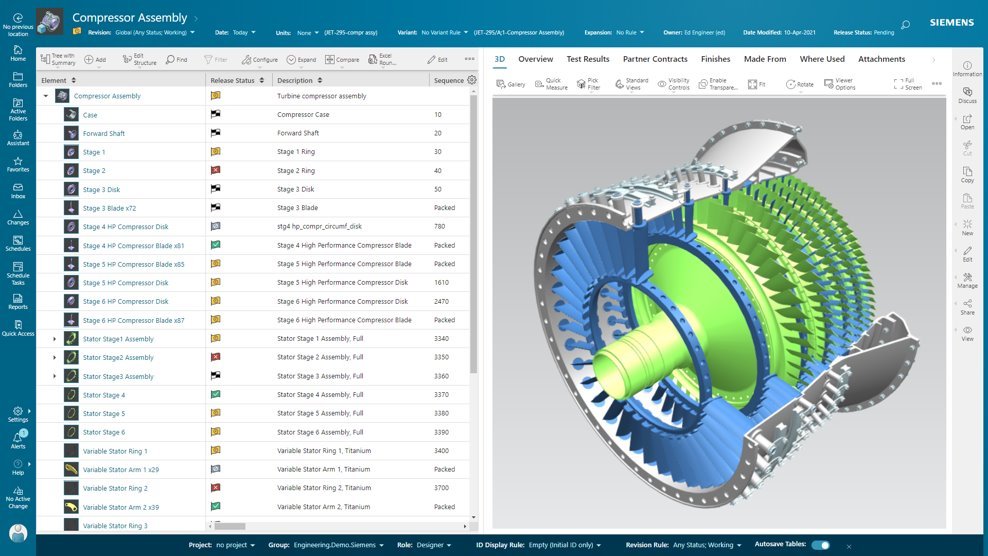
Teamcenter is a product lifecycle management system designed to help organizations integrate and standardize product development processes across functional silos.
N/A
Pricing
DraftSight
Teamcenter
Editions & Modules
DraftSight Professional
$249
per year
DraftSight Premium (3D)
$549
per year
DraftSight Enterprise
Contact sales team
DraftSight Enterprise Plus
Contact sales team
No answers on this topic
Offerings
Pricing Offerings
DraftSight
Teamcenter
Free Trial
Yes
Yes
Free/Freemium Version
No
No
Premium Consulting/Integration Services
No
No
Entry-level Setup Fee
No setup fee
No setup fee
Additional Details
DraftSight Professional, and Premium are available to purchase online directly. DraftSight Enterprise and Enterprise Plus are available to purchase through local resellers.
—
More Pricing Information
Community Pulse
DraftSight
Teamcenter
Considered Both Products
Dassault Systemes
Verified User
Chose DraftSight
DraftSight does all I need. AutoCAD would be much more expensive and I would not use all of its potentials.
A de minimis incentive was given to thank the reviewer for their time. The incentive was not used to bias or drive a particular response, nor was the incentive contingent on a positive endorsement. More Info
Verified User
Chose DraftSight
SOLIDWORKS is cheap and do what I needed to be done.
A de minimis incentive was given to thank the reviewer for their time. The incentive was not used to bias or drive a particular response, nor was the incentive contingent on a positive endorsement. More Info
Verified User
Chose DraftSight
I find Drafsight the equivalent to AutoCAD and a much more affordable solution for the individual user.
A de minimis incentive was given to thank the reviewer for their time. The incentive was not used to bias or drive a particular response, nor was the incentive contingent on a positive endorsement. More Info
From product design, including production drawings to lay out of large (10m x 1m footprint) layouts DraftSight is a cost effective solution providing all appropriate interfaces for BIM.
The level of detail during rendering (while it can be slow) is good for visualization and for use in installation and training materials
A de minimis incentive was given to thank the reviewer for their time. The incentive was not used to bias or drive a particular response, nor was the incentive contingent on a positive endorsement. More Info
Teamcenter is perfect for working in large-scale projects related to manufacturing and engineering where collaboration and management of data are crucial. It is evident where the complexity of the products is high such as in automobile and aerospace industries. Some of its features may seem too elaborate for the small business with a less complex process and therefore too expensive. It is less useful in organizations that do not have complex PLM needs or have less IT capacity to implement the system.
A de minimis incentive was given to thank the reviewer for their time. The incentive was not used to bias or drive a particular response, nor was the incentive contingent on a positive endorsement. More Info
A de minimis incentive was given to thank the reviewer for their time. The incentive was not used to bias or drive a particular response, nor was the incentive contingent on a positive endorsement. More Info
Teamcenter is a great PLM tool that allows collaboration between our teams, it’s possible to create a variety of teams that can all collaborate in one environment and share relevant information, I like that all the data can be integrated into the application so that it’s more organized and structured.
When working with Teamcenter, the roles can be properly distributed so it’s easy to see all the workflows and things that need to be done.
The interface is very nice and you can work through it if you don’t know some features. I like how well-integrated everything is and how easy it is to use and implement into your daily work routine.
One of my favorite aspects of Teamcenter is its reporting tools, they are definitely some of the best tools I have tried, allowing me to integrate data from different places into the platform and analyze it in different ways. Analyzing a variety of key metrics is possible and helps us have better results in our sales.
A de minimis incentive was given to thank the reviewer for their time. The incentive was not used to bias or drive a particular response, nor was the incentive contingent on a positive endorsement. More Info
The text search and replace is very crude and barely works. Needs a major revamping.
The layout tabs are very clunky and hard to use. Needs to be fixed.
DraftSight will fix a problem in one version, mess it up in another version, then fix it again later on. And so forth, and so forth, and so forth. Very poor software update control.
A de minimis incentive was given to thank the reviewer for their time. The incentive was not used to bias or drive a particular response, nor was the incentive contingent on a positive endorsement. More Info
A de minimis incentive was given to thank the reviewer for their time. The incentive was not used to bias or drive a particular response, nor was the incentive contingent on a positive endorsement. More Info
A de minimis incentive was given to thank the reviewer for their time. The incentive was not used to bias or drive a particular response, nor was the incentive contingent on a positive endorsement. More Info
Because of our current customer needs, we will most likely maintain use of Siemens PLM products for some time. Aside from the initial software cost, we pay for yearly maintenance. Maintaining our yearly maintenance licensing with Siemens, we receive access to all of the latest software releases, as well as premier technical support
A de minimis incentive was given to thank the reviewer for their time. The incentive was not used to bias or drive a particular response, nor was the incentive contingent on a positive endorsement. More Info
Easy if you know how to use CAD software. But is not very difficult to learn using DraftSight if this is your first CAD software. As soon as you get in to it the work flow will save you a lot of time and its simple interface is very nice.
A de minimis incentive was given to thank the reviewer for their time. The incentive was not used to bias or drive a particular response, nor was the incentive contingent on a positive endorsement. More Info
As previously mentioned, due to the intense amount of features and modules present in the software, the usability of the software suffers greatly. Many of the features are not used in our context, and many of the modules are not purchased, but the options are still present on the interface leading to a lot of clutter, much of which is never used. The interfaces suffer from a lack of design and tend to feel like a conglomerate of Windows 98 elements.
A de minimis incentive was given to thank the reviewer for their time. The incentive was not used to bias or drive a particular response, nor was the incentive contingent on a positive endorsement. More Info
A de minimis incentive was given to thank the reviewer for their time. The incentive was not used to bias or drive a particular response, nor was the incentive contingent on a positive endorsement. More Info
Technical support seems to be overseas with broken English and difficulty to read English. I asked for a trial license to try the fix but it was declined. Ask pratiksha.dahotre and gayatri.keskar for details. In summary, they released a broken version, I helped to fix by providing feedback and error logs. They claimed it is fixed but I can't test it.
In the time that we have used Teamcenter we have received a good response from the support team, they have great customer service, we have solved the problems that have arisen very quickly, and they are attentive and answer us if we have any questions.
A de minimis incentive was given to thank the reviewer for their time. The incentive was not used to bias or drive a particular response, nor was the incentive contingent on a positive endorsement. More Info
A de minimis incentive was given to thank the reviewer for their time. The incentive was not used to bias or drive a particular response, nor was the incentive contingent on a positive endorsement. More Info
Take time to get used to where commands are and how the interface can be customized to suit your needs and work style. The keyboard commands are very helpful and can make work more efficient if time is taken to learn them.
A de minimis incentive was given to thank the reviewer for their time. The incentive was not used to bias or drive a particular response, nor was the incentive contingent on a positive endorsement. More Info
A de minimis incentive was given to thank the reviewer for their time. The incentive was not used to bias or drive a particular response, nor was the incentive contingent on a positive endorsement. TR verified that a representative sample of customers was invited. More Info
While SketchUp is free, DraftSights cost is minimal and its abilities are much greater. It is so much easier to layout and modifies a system design. Since DraftSight is compatible with all versions of CAD, it makes it easy to collaborate with customers on their specific system design. We spend less time and see greater sales on our projects.
Earlier, some of the companies acquired by my organization were using PTC Windchill, but the overall stability, user experience and depth of functionality which are provided by Teamcenter doesn't match with any other PLM software and thus, all the acquired companies which were earlier using PTC Windchill has now slowly started into moving towards Teamcenter.
A de minimis incentive was given to thank the reviewer for their time. The incentive was not used to bias or drive a particular response, nor was the incentive contingent on a positive endorsement. More Info
It's a typical contract for cad software. It was inexpensive at the time I started. But now the more useful features are on the more premium (priced) version.
A de minimis incentive was given to thank the reviewer for their time. The incentive was not used to bias or drive a particular response, nor was the incentive contingent on a positive endorsement. More Info
Teamcenter is easily on the best scalable solution. The single source of product information allows us to collaborate more effectively on the product lifecycle. Also, being a cloud solution, it is pretty straightforward to scale as the maintenance required is quite low . In addition, the overall cost is also easily manageable for businesses like ours.
Quite responsive when I have an issue, and with little to no delay in responding. They are professional and know the software so have been able to solve all of the issues that I have had with both using the software and also with making revisions as required. Non-technical issues like invoices have also been resolved quickly.
A de minimis incentive was given to thank the reviewer for their time. The incentive was not used to bias or drive a particular response, nor was the incentive contingent on a positive endorsement. More Info
Draftsight has been very cost effective, it was free a few years ago then £79 a year, which it still is if you have the standard version. Now the minium level is Profession edition at £159+ VAT per year. Which is still very good value for money, just more that what we currently pay with the standard licences we have.
A de minimis incentive was given to thank the reviewer for their time. The incentive was not used to bias or drive a particular response, nor was the incentive contingent on a positive endorsement. More Info
Definitely, it has a very positive impact so to speak. What we are trying to do through our program, we are utilizing the full capacity of Teamcenter to produce one structure in an effective way. So before we implement this activity, the user has to prepare 10 to 15 structures to reach to our best possible data that can be set across the systems. But now with the complete capability of Teamcenter, we are able to do all these things into one structure itself and then let the system do all the automation or the things that users do not have to concentrate on. All of the automations are done behind the systems and then it is improving not only the efficiency of the end user, but also making a standardized way in order to proceed and transfer the data holistically towards other systems like SAP.
A de minimis incentive was given to thank the reviewer for their time. The incentive was not used to bias or drive a particular response, nor was the incentive contingent on a positive endorsement. TR verified that a representative sample of customers was invited. More Info