Overview
ProductRatingMost Used ByProduct SummaryStarting Price
Droplr
Score 8.3 out of 10
N/A
Droplr is a tool for capturing and sharing screen images.N/A
Markup Hero
Score 9.0 out of 10
Small Businesses (1-50 employees)
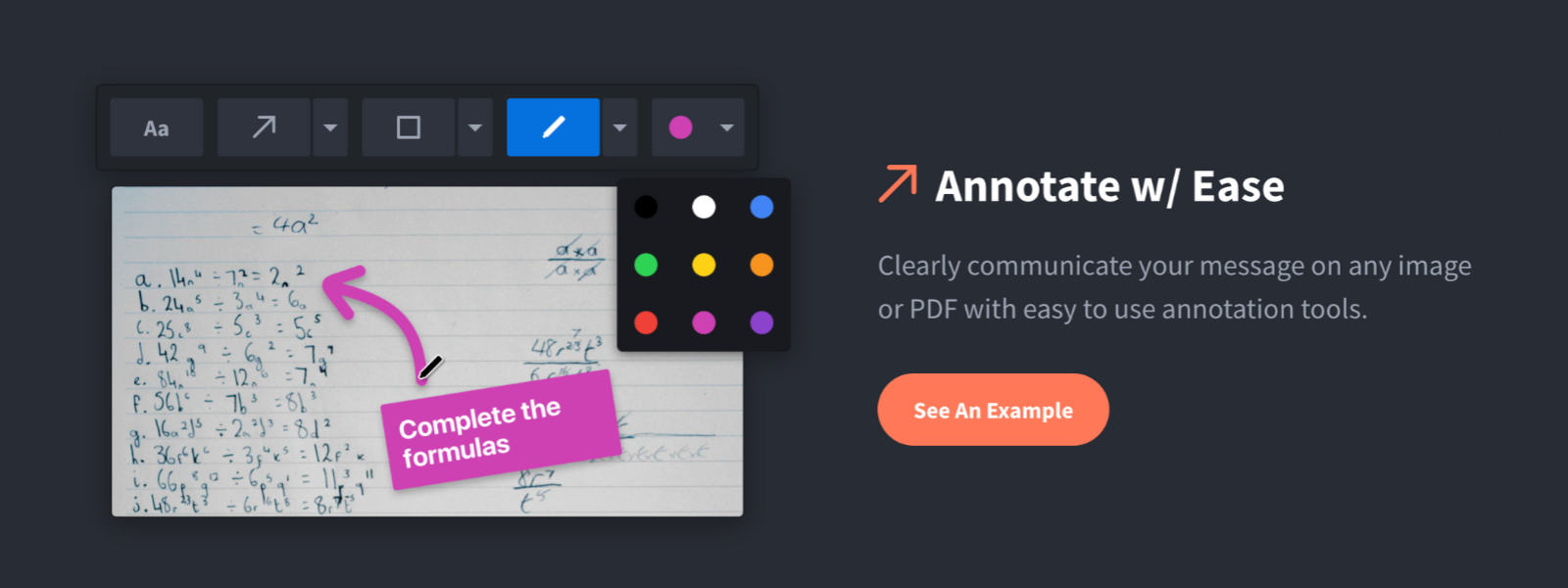
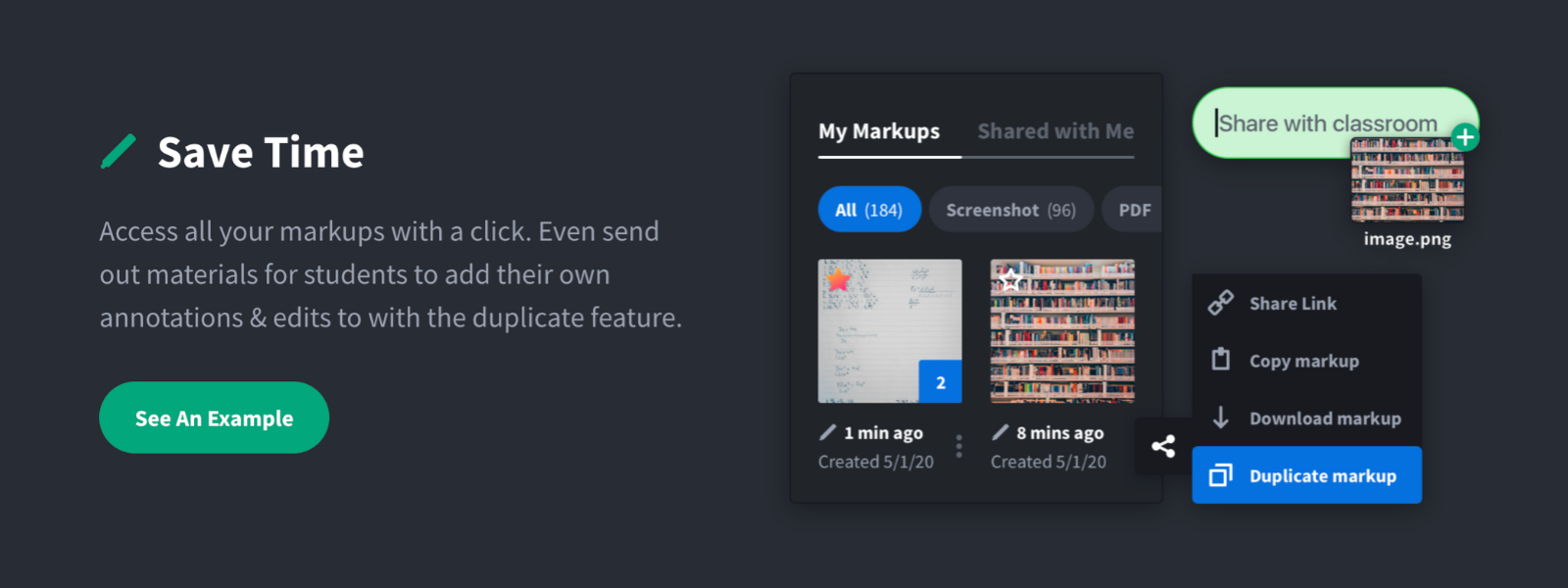
Screenshot, Annotate & Share Markup Hero is an annotation and screenshot tool designed to allow users to capture ideas, communicate clearly, and save time. Features Include: Screenshots Desktop app for Mac, Windows & Linux Works on any device including mobile Chrome extension Annotate screenshots, PDF's, images and URL's Always editable - annotations do not flatten permanently Arrow, text, rectangle, oval,…
$5
all features, unlimited markups, unlimited storage, unlimited bandwidth
Snagit
Score 9.6 out of 10
N/A
Snagit is screen capture and recording software from TechSmith, that lets users capture the screen and camera, add additional context, and share images, GIFs, or videos across preferred platforms.
$39
per year per user
Pricing
DroplrMarkup HeroSnagit
Editions & Modules
No answers on this topic
Superhero
$5/month
all features, unlimited markups, unlimited storage, unlimited bandwidth
Hero
FREE
10 markups per month, 3 days editing history
No answers on this topic
Offerings
Pricing Offerings
DroplrMarkup HeroSnagit
Free Trial
NoYesYes
Free/Freemium Version
NoYesNo
Premium Consulting/Integration Services
NoNoNo
Entry-level Setup FeeNo setup feeNo setup feeNo setup fee
Additional DetailsOne-time license cost One license per user - install on 2 machines, for work and home use Compatible with Windows and MacOS Optional Maintenance renewal - first year included FREE Upgrade to the next version Phone, chat and email support Access to Snagit Certification with 20+ exclusive how-to videos Enhanced Screencast integration to share content, plus the newest starter Assets for Snagit
More Pricing Information
Community Pulse
DroplrMarkup HeroSnagit
Considered Multiple Products
Droplr
Chose Droplr
I really like how Droplr auto-uploads and copies the shortened link in a snap. CloudApp does that as well, but, Droplr seems snappier. Something Droplr is lacking is something that Snagit does very well. It lets you choose where to upload or send the file when you're done. For …
Chose Droplr
There are pros and cons to each and every one of them. To be honest, I use them all for different scenarios. Snagit is a desktop app and is a bit more heavy-duty. I don't necessarily need that all the time. CloudApp is the most comparable - it is also good in its own way.
Markup Hero
Chose Markup Hero
Snagit is more powerful in some respects, but it's just overwhelming. I have Snagit too, but I only need the extra features like (unlimited colors, 50 different arrow shapes, etc.) like 1% of the time. I'd rather have simplicity and speed.

Droplr was a good tool, but they …
Chose Markup Hero
Markup Hero stands out because it is truly web based and supports PDFs (among a host of other file types). The annotation tools are significantly smoother and always editable. I don't know of any other products that provide a web experience that allows for edits at anytime. …
Snagit
Chose Snagit
Snagit can be a bit more expensive than some of the opensource options (some of which are free and effective), but I think its value comes from the fact that no matter your level of tech-savviness, Snagit remains an out of the box solution that is ready to go on Day 1. That, …
Best Alternatives
DroplrMarkup HeroSnagit
Small Businesses
Sendspark
Sendspark
Score 10.0 out of 10
Sendspark
Sendspark
Score 10.0 out of 10
Sendspark
Sendspark
Score 10.0 out of 10
Medium-sized Companies
Snagit
Snagit
Score 9.6 out of 10
Snagit
Snagit
Score 9.6 out of 10
Atlassian Loom
Atlassian Loom
Score 9.5 out of 10
Enterprises
Snagit
Snagit
Score 9.6 out of 10
Snagit
Snagit
Score 9.6 out of 10
Vyond
Vyond
Score 8.6 out of 10
All AlternativesView all alternativesView all alternativesView all alternatives
User Ratings
DroplrMarkup HeroSnagit
Likelihood to Recommend
8.0
(13 ratings)
9.6
(2 ratings)
8.9
(97 ratings)
Likelihood to Renew
9.0
(1 ratings)
-
(0 ratings)
9.4
(2 ratings)
Usability
10.0
(1 ratings)
-
(0 ratings)
7.5
(4 ratings)
Support Rating
2.1
(2 ratings)
-
(0 ratings)
9.0
(14 ratings)
Implementation Rating
-
(0 ratings)
-
(0 ratings)
10.0
(1 ratings)
User Testimonials
DroplrMarkup HeroSnagit
Likelihood to Recommend
Droplr
Droplr is very useful in any kind of visual work, particularly if there are more people involved and they need to follow the creation process. It allows the team to be on the same page. It is also very useful when dealing with clients without design training since we can show visually what we intend to do. Teachers, instructors, and even technical support people can make good use of Droplr since it makes easier to share screencasts, to capture screens for tutorials and to solve clients' doubts.
Read full review
Markup Hero
For us, it's sending real estate setup sheets with multiple properties and lots of comments and feedback. It's great for quick feedback and shares. If I need to make a custom graphic tho its not quite powerful enough as Photoshop or other tools. The former is about 90% of my use cases, the latter only 10% so it's still worth it. But I can see they are adding more and more design oriented features so I suspect I won't need Photoshop much longer.
Read full review
TechSmith
I have recommended Snagit several times. Discussion of screenshot programs is not something that often arises often, in my work environment. When such a situation does arise, I make it clear that Snagit is my go-to solution for anything related to screenshot capture. It opens the captured image directly into an editor window for quick and easy manipulation.
Read full review
Pros
Droplr
  • Simply moving files onto the menu bar icon is the fastest way to get files on their way.
  • The link to copy is automatically saved to your clipboard, so while I'm writing the email to send the file, I simply paste and I'm done.
  • Turns out, I check often if the file has been downloaded, as it allows me to followup and speed up the process if needed.
Read full review
Markup Hero
  • Quickly adding annotations
  • Sharing links to screenshots or marked up PDFs
  • Always editable and accessible from any device
Read full review
TechSmith
  • Being able to take screen captures quickly and with just a keystroke is a prime feature. I took several screenshots just yesterday to show folks, which saved me from taking the time to meet with [...] everyone.
  • Obviously recording and sharing video is Snagit's strength. It does this as well as any product I have used. It is not an editor but there are a lot of capture features that cover just about any situation.
  • One great feature that Snagit has is the ability to pull text from a capture. We don't use this a lot but when it is needed it is a huge time saver.
  • The settings and tools within Snagit are intuitive and easy to find.
Read full review
Cons
Droplr
  • Startup bug (Mac) - Even though I select Droplr not to start up with the computer, it still does. It's been months and they still haven't fixed this. It's very frustrating.
  • The Windows version doesn't allow me to select an area of my screen to record - one has to record the entire screen.
  • Though it may look like it in their settings, setting up SSL isn't as easy as clicking the button. I still don't quite understand how to do it.
Read full review
Markup Hero
  • Teams is basic right now; looking forward to more permissions and team folders
  • Love the insert image, but would like to be able to make my own library of images
  • Needs rotate when uploading from my iPhone - they're sideways right now
Read full review
TechSmith
  • Image merge - I wish there was an easier way to merge two images in one.
  • Scrolling capture - even though this is one thing I love, sometimes the text gets wonky when I use this feature.
  • The shortcut - this feature feels super unnecessary. And it can be annoying when every time I move my mouse to the right of the screen it pops up.
Read full review
Likelihood to Renew
Droplr
It solves a lot of everyday problems in our creative department and enhanced our workflow.
Read full review
Markup Hero
No answers on this topic
TechSmith
I think that the tool is excellent for what it is being used for. I particuarly like the ability to capture content from the screen whilst using the scroll wheel on my mouse. It is very annoying when your try to capture something with grab and you can't scroll which leads to multiple images
Read full review
Usability
Droplr
Because I find it especially easy to work with, compared to alternatives.
Read full review
Markup Hero
No answers on this topic
TechSmith
It's button centric for easy access to every feature. Everything allows undo! It works like any other standard Windows application. Everyone can be a professional without having to select every feature yourself by using the built in styles with just one click of a button in most cases. Every button is clearly labeled too.
Read full review
Support Rating
Droplr
I've only had to reach out to Droplr support a couple of times and they've been quick to getting back to me.
Read full review
Markup Hero
No answers on this topic
TechSmith
I've actually never had to contact support as the tool is easy to use. One aspect is that they upgrade and send email notifications of the upgrades. They don't charge extra for upgrades and their enhancements fall in line with the way we use the tool. We haven't had to submit any upgrade requests as the tool already does what we need it to do.
Read full review
Implementation Rating
Droplr
No answers on this topic
Markup Hero
No answers on this topic
TechSmith
It's a simple next next finish install. The SnagIt Library in the user profile should probably be backed up to make sure they have access to their old screen captures. We frequently will go back to previous captures and add context bubbles etc. when software changes to show the "old" vs "new". Also, go to SnagIt's website and download the additional Stamp Sets for the user. These are terrific. I wish there was one download to get them all, but you have to download and install them one set at a time. It's worth it - especially for training how-to's.
Read full review
Alternatives Considered
Droplr
Lightshot Screenshot provides the same screenshot functionality as Droplr, but with no cost. Lightshot Screenshot also allows you to edit a photo and can upload your photo either to the cloud or just paste it in an email/Slack/anything else to your client. There are very little go-betweens and a lot more flexibility.
Droplr was chosen by my company, not me. If I had chosen a screenshot software, in retrospect, I would have chosen Lightshot Screenshot. Droplr was fine. Lightshot Screenshot is killer, though.
Read full review
Markup Hero
Markup Hero stands out because it is truly web based and supports PDFs (among a host of other file types). The annotation tools are significantly smoother and always editable. I don't know of any other products that provide a web experience that allows for edits at anytime. Plus the team is clearly working hard to iterate the product and regularly delivering new features.
Read full review
TechSmith
Windows free snipping tool - Con: had to save each screen shot before I could take another screen shot and couldn't draw nice circles/rectangles around the area of the screen shot to bring attention. Chrome plugin options - Con: editing tools were lacking.
Read full review
Return on Investment
Droplr
  • I use Droplr every day and it's been a huge boost for productivity since I never need to think about how a screenshot will be shared. It's just built in and so easy.
  • I really wish Droplr had an Android app.
Read full review
Markup Hero
  • Productivity - Save at least 30 mins per day per employee
  • Organization - No more hunting through emails finding content I sent to someone
  • Communication - My clients better understand our suggested properties when I add annotations.
Read full review
TechSmith
  • Snagit isn't a very expensive product in general so it has been a huge ROI for us
  • It saves me countless amounts of time each day
  • I'm able to share instructions much easier and allows for more time spent on other tasks
Read full review
ScreenShots

Markup Hero Screenshots

Screenshot of Annotate and markup just about anything from almost anywhere.Screenshot of Always editable, saved in your history, set permissions and share with a click.Screenshot of Keep track with tags and never lose a past markup.Screenshot of Upload images, PDF's, website URL's, Google Docs and annotate away!Screenshot of Tons of annotation tools like arrows, text, blur, crop, highlight and more.Screenshot of Super simple user interface that you'll love coming back to again and again.