Entendo vs. Kantata PS Cloud

Overview
ProductRatingMost Used ByProduct SummaryStarting Price
Entendo
Score 0.0 out of 10
Mid-Size Companies (51-1,000 employees)
Entendo is a conversational business intelligence platform that turns plain-language questions into charts and numbers — without SQL, BI specialists, or weeks of setup. Built for Brazilian mid-market companies (50–300 employees), Entendo connects directly with XSLX/CSV to PostgreSQL, MySQL , SQL Server and Oracle databases — typically behind ERPs such as Totvs Protheus, SAP Business One, Bling, or Omie — and lets any decision-maker ask a question in natural language and get an answer in…
$29
per month per organization
Kantata PS Cloud
Score 8.5 out of 10
Mid-Size Companies (51-1,000 employees)
Kantata Cloud (formerly Mavenlink + Kimble) provides project management and collaboration software for small to mid-sized professional services companies. Features include resource management, project dependencies, time and expense tracking, file sharing, versatile user permissions, private messaging, planning and reporting.N/A
Pricing
EntendoKantata PS Cloud
Editions & Modules
Free
$0
one-time fee Up to 5 users 30 free queries CSV / Excel upload Agents: Chart, Table Exports (CSV, PDF, PNG)
Starter
$29
per month Up to 15 users 80 queries / month SQL, Postgres, Sheets connection Basic Analytics Agent Dashboard Sharing
Pro
$69
per month Up to 40 users 200 queries / month Prediction Agent (Forecast) Full Analytics Agent Prompt audit logs
Business
$149
per month Up to 100 users 500 queries / month Execution priority Embedded Analytics Optional contract
Enterprise
tbd
per month Custom Full control: your cloud, your rules, your data. Unlimited users SSO / SAML Custom SLA BYOK (bring your own AI key)
Premier
Contact Sales Team
per month per seat
Enterprise
Contact Sales Team
Offerings
Pricing Offerings
EntendoKantata PS Cloud
Free Trial
NoNo
Free/Freemium Version
YesNo
Premium Consulting/Integration Services
YesYes
Entry-level Setup FeeNo setup feeRequired
Additional DetailsEntendo is priced per workspace, not per seat. A 40-person data team on the Pro plan pays the equivalent of ~$1.75 per user per month. Query quotas refer to natural-language questions asked to the AI agents. Traditional dashboard views, chart interactions, drill-downs, cross-filters, report sharing, and data exports (CSV, PDF, PNG) are unlimited on all plans, including Free. Plan capabilities scale as follows: - Free (R$0 / ~$0): 5 users, 30 queries/month. CSV and Excel file upload only. Includes Chart Agent and Table Agent. Exports in CSV, PDF, PNG. - Starter (R$149 / ~$29): 15 users, 80 queries/month. Adds database connectors (PostgreSQL, MySQL, SQL Server, Oracle, Google Sheets). Adds Basic Analytics Agent. Adds Dashboard Sharing. - Pro (R$349 / ~$69, most popular): 40 users, 200 queries/month. Adds Prediction Agent (time-series forecasting with ARIMA and Holt-Winters). Upgrades to Full Analytics Agent. Adds prompt audit logs for governance and compliance. - Business (R$749 / ~$149): 100 users, 500 queries/month. Adds query execution priority, Embedded Analytics (iframe/embed in third-party applications), and optional annual contract terms. - Enterprise (custom): Unlimited users, custom query quotas, on-premise or hybrid deployment, BYOK (Bring Your Own Key) for LLM providers including OpenAI, Anthropic, and Google Gemini, SSO, audit trails, LGPD compliance, and SLA. Note on currency: Entendo is a Brazilian product and billing is currently available in Brazilian Reais (BRL) only. USD prices shown in this listing are approximate conversions at R$5.00 per USD and are provided for reference. Actual billed amounts are R$149 (Starter), R$349 (Pro), and R$749 (Business) per month.
More Pricing Information
Best Alternatives
EntendoKantata PS Cloud
Small Businesses
Yellowfin
Yellowfin
Score 8.6 out of 10
Teamwork.com
Teamwork.com
Score 8.5 out of 10
Medium-sized Companies
Reveal
Reveal
Score 10.0 out of 10
Teamwork.com
Teamwork.com
Score 8.5 out of 10
Enterprises
Kyvos Semantic Layer
Score 9.5 out of 10
Planview AdaptiveWork
Score 8.2 out of 10
All AlternativesView all alternativesView all alternatives
User Ratings
EntendoKantata PS Cloud
Likelihood to Recommend
-
(0 ratings)
9.1
(50 ratings)
Likelihood to Renew
-
(0 ratings)
9.0
(6 ratings)
Usability
-
(0 ratings)
8.0
(8 ratings)
Availability
-
(0 ratings)
9.0
(2 ratings)
Performance
-
(0 ratings)
7.0
(3 ratings)
Support Rating
-
(0 ratings)
9.0
(8 ratings)
In-Person Training
-
(0 ratings)
9.0
(2 ratings)
Online Training
-
(0 ratings)
9.0
(2 ratings)
Implementation Rating
-
(0 ratings)
9.0
(5 ratings)
Configurability
-
(0 ratings)
8.2
(1 ratings)
Ease of integration
-
(0 ratings)
8.2
(1 ratings)
Product Scalability
-
(0 ratings)
9.0
(2 ratings)
Vendor post-sale
-
(0 ratings)
9.0
(2 ratings)
Vendor pre-sale
-
(0 ratings)
9.0
(2 ratings)
User Testimonials
EntendoKantata PS Cloud
Likelihood to Recommend
Sozo Data Ltda
No answers on this topic
Kantata (Kimble + Mavenlink)
It is appropriate and even exceeds expectations 90% of the time. It makes project tracking very easy and visually accessible for most cases. The only occasion where Mavenlink came slightly short was for a special project that required more interaction options among project members. I am certain there are ways to work around that issue, but we did not find them.
Read full review
Pros
Sozo Data Ltda
No answers on this topic
Kantata (Kimble + Mavenlink)
  • With Mavenlink when starting to assign tasks to people, set deadlines and milestones, and add files to our projects we can look at it all from a variety of perspectives, including a task tracker view and a Gantt chart view
  • Through Mavenlink each project also includes an activity stream where we can view all project details as they come up, as well as an activity feed for all the projects it is linked to.
Read full review
Cons
Sozo Data Ltda
No answers on this topic
Kantata (Kimble + Mavenlink)
  • The Gantt chart does not allow for baselines to be stored
  • There is no means to upload an excel task tracker and build a plan using an upload
  • The schedule does not allow for planning of holidays
  • The status report functionality needs to be improved
Read full review
Likelihood to Renew
Sozo Data Ltda
No answers on this topic
Kantata (Kimble + Mavenlink)
Although the company I currently work for does not use the product I have recommended that we do switch to Mavenlink. We will be opening some new sites internationally this year and I can see that Mavenlink would be a great product for us to use
Read full review
Usability
Sozo Data Ltda
No answers on this topic
Kantata (Kimble + Mavenlink)
I think Kantata is one of the most robust and best project management tools out there for an organization like ours. However, some of our staff feel like it isn't as user-friendly as it could be. From a Director point of view or a Project Manager point of view, Kantata is exceptional. From the point of view of a task-doer, it could be more visually appealing. Also, the mobile version isn't great.
Read full review
Reliability and Availability
Sozo Data Ltda
No answers on this topic
Kantata (Kimble + Mavenlink)
Mavenlink gives advance notice for system upgrades, and they're not during our business day. Mavenlink has always been available when we needed it.
Read full review
Performance
Sozo Data Ltda
No answers on this topic
Kantata (Kimble + Mavenlink)
Very good integration with Google apps. Some complexity is called however in the synchronization between Google Tasks and Maven links tasks. This can sometimes lead to duplicate records in Google Tasks. It has been dissolvable that becomes cumbersome if not properly curated.
Read full review
Support Rating
Sozo Data Ltda
No answers on this topic
Kantata (Kimble + Mavenlink)
Kantata support is fantastic! Any issues that arise are always handled quickly and efficiently. Granted, we haven't had many issues to report. Typically, my team tends to only reach out to support if they need assistance remembering how to do something or asking about an improvement. We had Kantata build an integration when we first started using the software, and the support team worked hard to listen and improve the integration.
Read full review
In-Person Training
Sozo Data Ltda
No answers on this topic
Kantata (Kimble + Mavenlink)
We prepared questions in advance, and our trainer was an expert in what Mavenlink was and wasn't able to do. We were able to have multiple people trained at once.
Read full review
Online Training
Sozo Data Ltda
No answers on this topic
Kantata (Kimble + Mavenlink)
The training was very well-organized. We were able to send questions in advance so the instructor knew what to cover, and the brought up related topics to maximize the usefulness of what they were teaching us.
Read full review
Implementation Rating
Sozo Data Ltda
No answers on this topic
Kantata (Kimble + Mavenlink)
Dedicate as much internal time to the implementation effort as possible, even if you're using a 3rd party or Mavenlink services. Your team knows your processes the best
Read full review
Alternatives Considered
Sozo Data Ltda
No answers on this topic
Kantata (Kimble + Mavenlink)
We have since switched over to JIRA and let me tell you, it was probably the best decision we have made as a company. We chose Mavenlink based on promises from the sales team about future roadmap work that really never happened. We thought Mavenlink would easily integrate with our billing software but we couldn't have been more wrong. We ended up never utilizing Mavenlink invoices as they don't even allow you to fully customize your invoices that go out to clients!
Read full review
Scalability
Sozo Data Ltda
No answers on this topic
Kantata (Kimble + Mavenlink)
It's very easy to add users and contractors into Mavenlink. There's also an option that let's you manage access for teams in multiple locations.
Read full review
Return on Investment
Sozo Data Ltda
No answers on this topic
Kantata (Kimble + Mavenlink)
  • Manvenlink is perfect for showing expenses and income over time and across people.
  • Manvenlink is adaptable for the integration and automation of the processes of each of our projects in order to optimize resources and improve operational performance.
  • Mavenlink allows us to determine if our projects are profitable or not, as well as save significant time by automating components such as recurring tasks and having templates, among other things.
  • Manvenlink is advantageous for our operations due to its simple portfolio management of our projects: manage several projects at once and receive a complete perspective of the development of each one at a glance.
  • Manvenlink kindly provides us with robust discussion threads, access restrictions, and built-in document management, allowing us to contextualize communications.
Read full review
ScreenShots

Entendo Screenshots

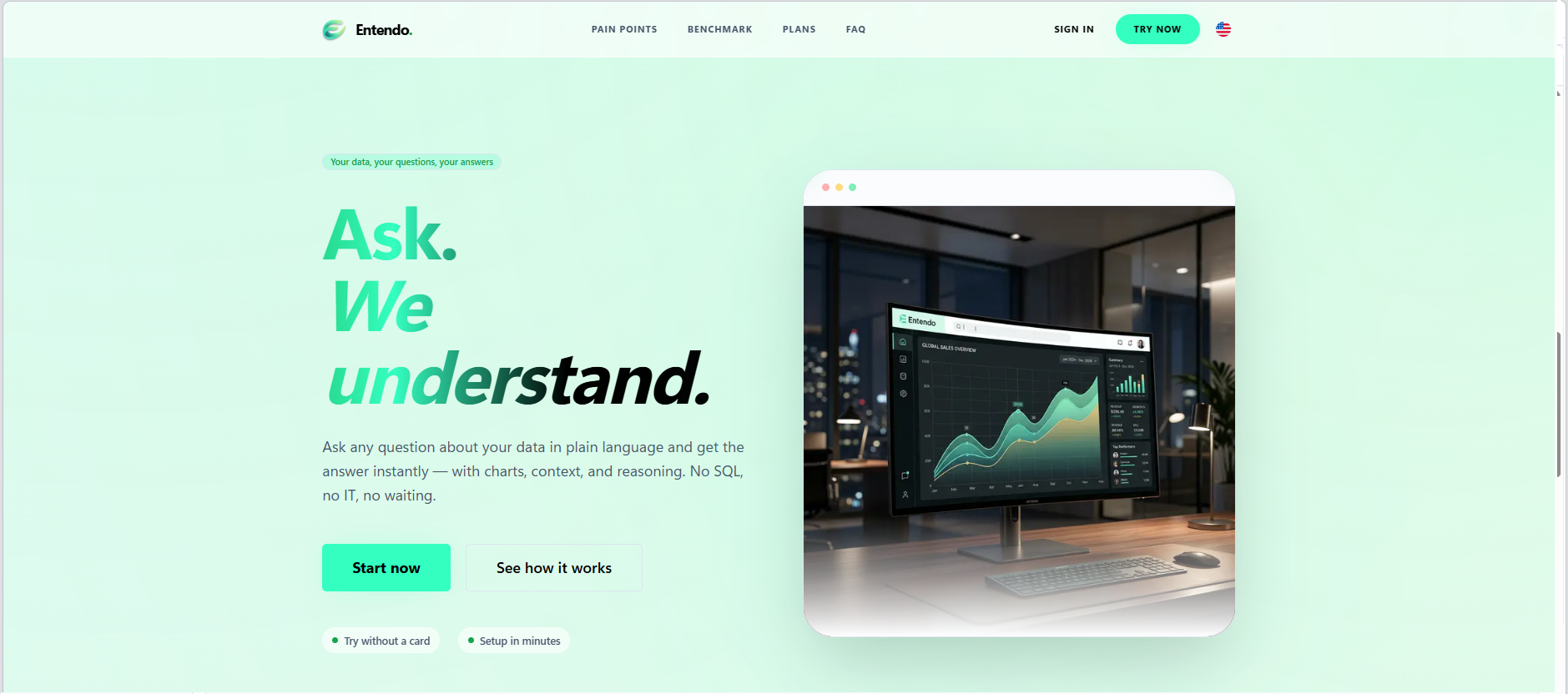
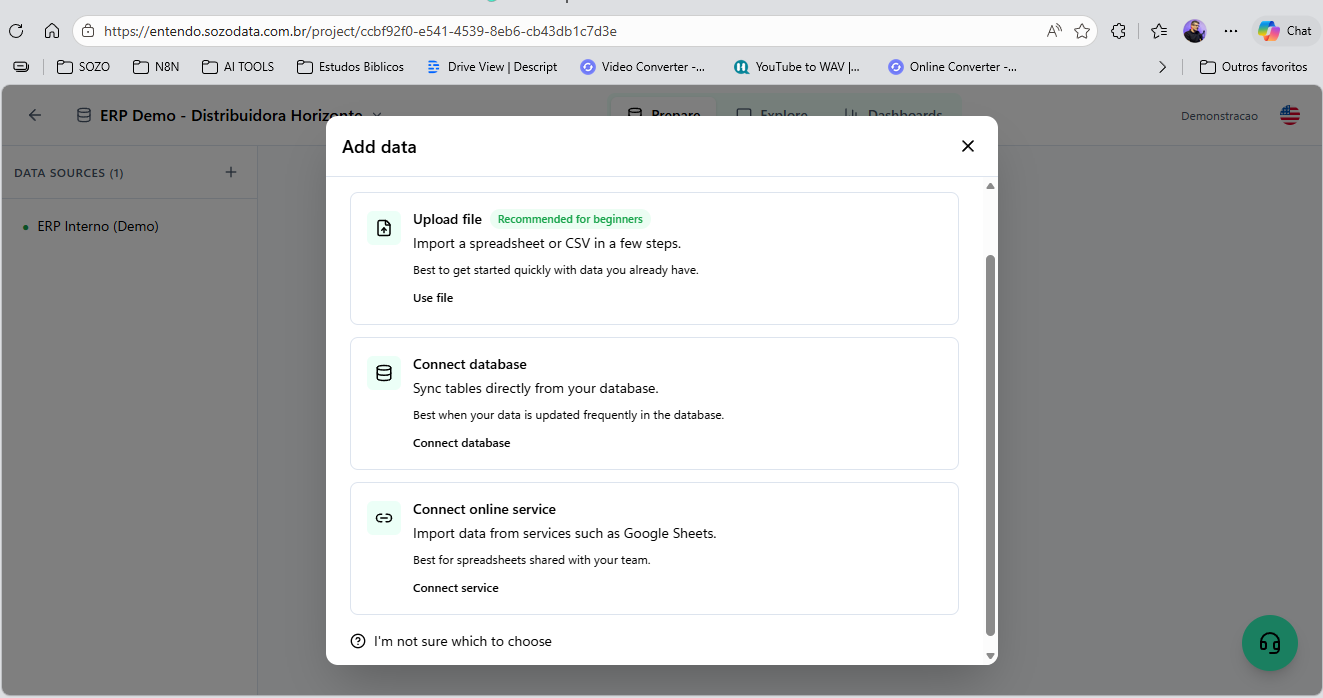
Screenshot of Entendo's landing page, which introduces the product's core promise: Ask. We  understand. Users type any business question in plain language and get the answer instantly — with charts, context, and reasoning — no SQL, no IT tickets, no waiting for the BI team.Screenshot of where users can upload a spreadsheet or CSV, connect their own SQL database (PostgreSQL, MySQL, SQL Server, Oracle), or sync tables from a cloud service like Google Sheets. File  upload is the recommended path for first-time users who want to evaluate the product on their own data before connecting production systems.Screenshot of where Entendo connects directly to existing production databases —   PostgreSQL, MySQL, SQL Server, and Oracle — using read-only credentials you control. The architecture is read-only by design with  four layers of SQL sanitization, so the AI agents can never write, update, or delete data.Screenshot of the conversational interface, which delivers analysis as a complete answer. In this view, the AI is responding about a pessimistic scenario: a revenue line chart on top, headline KPIs in the middle (current revenue, scenario impact, variation percentage), and a comparative bar chart at the bottom. Everything is generated live from the connected database.Screenshot of the Business Analytics Agent responding to a real question:   "show me an analysis of the actions being continuously taken to grow revenue by 30%." Instead of dumping a chart, the agent delivers a   structured diagnosis — overall picture, central problem, root-cause hypothesis, and concrete actions — grounded in the user's own data.Screenshot of an AI generated chart that can be pinned to a dashboard with a click. This example shows a wholesale operations dashboard with four views: weekly sales by day, top products by unit, critical stock   products, and inventory turnover ratio. Dashboards are shareable across the workspace, so the whole team sees the same numbers.

Kantata PS Cloud Screenshots

Screenshot of real-time project status tracking.Screenshot of visualizations that help track resources with confidence.Screenshot of at a glance capacity and staffing monitoring.Screenshot of financials and project margin monitoring.Screenshot of revenue tracking, to scale a business with confidence.