Google Analytics vs. Sellerview.AI

Overview
ProductRatingMost Used ByProduct SummaryStarting Price
Google Analytics
Score 8.2 out of 10
N/A
Google Analytics is perhaps the best-known web analytics product and, as a free product, it has massive adoption. Although it lacks some enterprise-level features compared to its competitors in the space, the launch of the paid Google Analytics Premium edition seems likely to close the gap.
$0
per month
Sellerview.AI
Score 0.0 out of 10
Small Businesses (1-50 employees)
Sellerview.ai is a profit intelligence platform for Amazon FBA and FBM sellers. The system provides SKU-level profitability analysis by calculating net margins after accounting for Amazon fees, advertising costs, and product returns. Core Features SKU-level P&L: Generates Profit and Loss (P&L) statements for individual products, incorporating FBA charges, ad spend, and return costs. Advertising Performance: Tracks Total Advertising Cost of Sale…
$19
per month per user
Pricing
Google AnalyticsSellerview.AI
Editions & Modules
Google Analytics 360
150,000
per year
Google Analytics
Free
Starter
19$
per month per user
Growth
31$
per month per user
Scale
63$
per month per user
Pro
127$
per month per user
Offerings
Pricing Offerings
Google AnalyticsSellerview.AI
Free Trial
NoYes
Free/Freemium Version
YesNo
Premium Consulting/Integration Services
NoYes
Entry-level Setup FeeNo setup feeNo setup fee
Additional DetailsSellerview.ai offers SaaS pricing designed for Amazon sellers, aggregators, and growing eCommerce brands. Pricing may vary based on business size, number of SKUs, and reporting requirements. All plans include access to SKU-level profitability analytics, TACoS and ACoS tracking, ad spend visibility, margin analysis, and profit leak detection tools. A 30-day free trial is available for new users, and custom onboarding or consulting support may be available for larger teams and enterprise accounts.
More Pricing Information
Community Pulse
Google AnalyticsSellerview.AI
Features
Google AnalyticsSellerview.AI
Web Analytics
Comparison of Web Analytics features of Product A and Product B
Google Analytics
8.4
11 Ratings
4% above category average
Sellerview.AI
-
Ratings
Lead Conversion Tracking8.110 Ratings00 Ratings
Bounce Rate Measurement8.410 Ratings00 Ratings
Device and Browser Reporting9.211 Ratings00 Ratings
Pageview Tracking9.011 Ratings00 Ratings
Event Tracking8.311 Ratings00 Ratings
Reporting in real-time7.910 Ratings00 Ratings
Referral Source Tracking8.510 Ratings00 Ratings
Customizable Dashboards7.910 Ratings00 Ratings
Best Alternatives
Google AnalyticsSellerview.AI
Small Businesses
StatCounter
StatCounter
Score 9.0 out of 10
Webgility
Webgility
Score 9.6 out of 10
Medium-sized Companies
Optimal
Optimal
Score 9.1 out of 10
Looker
Looker
Score 8.3 out of 10
Enterprises
Optimal
Optimal
Score 9.1 out of 10
Looker
Looker
Score 8.3 out of 10
All AlternativesView all alternativesView all alternatives
User Ratings
Google AnalyticsSellerview.AI
Likelihood to Recommend
8.5
(192 ratings)
-
(0 ratings)
Likelihood to Renew
9.0
(51 ratings)
-
(0 ratings)
Usability
7.4
(19 ratings)
-
(0 ratings)
Availability
10.0
(4 ratings)
-
(0 ratings)
Performance
10.0
(2 ratings)
-
(0 ratings)
Support Rating
7.0
(42 ratings)
-
(0 ratings)
Online Training
10.0
(2 ratings)
-
(0 ratings)
Implementation Rating
9.0
(7 ratings)
-
(0 ratings)
Configurability
6.0
(2 ratings)
-
(0 ratings)
Ease of integration
10.0
(1 ratings)
-
(0 ratings)
Product Scalability
10.0
(2 ratings)
-
(0 ratings)
Vendor post-sale
10.0
(1 ratings)
-
(0 ratings)
Vendor pre-sale
9.0
(1 ratings)
-
(0 ratings)
User Testimonials
Google AnalyticsSellerview.AI
Likelihood to Recommend
Google
Google Analytics is particularly well suited for tracking and analyzing customer behavior on a grocery e-commerce platform. It provides a wealth of information about customer behavior, including what products are most popular, what pages are visited the most, and where customers are coming from. This information can help the platform optimize its website for better customer engagement and conversion rates. However, Google Analytics may not be the best tool for more advanced, granular analysis of customer behavior, such as tracking individual customer journeys or understanding customer motivations. In these cases, it may be more appropriate to use additional tools or solutions that provide deeper insights into customer behavior.
Read full review
Sellerview.ai
No answers on this topic
Pros
Google
  • Multiple reports to see website use and behavior
  • Allows you to customize reports with days, weeks, months, and years
  • You can build out a dashboard to easily view stats from multiple websites in one place
  • You can share analytics reports via the dashboard, automatically emailed PDFs or in other formats
Read full review
Sellerview.ai
No answers on this topic
Cons
Google
  • Data sampling is somewhat inaccurate on the free tier - this is addressed in premium but is expensive.
  • Some of the UI is very similar in naming when presenting different data, some in-situ information might be useful.
  • Gotchas around filtering and data validation.
  • Implementation can be tricky, it can take a lot of time and expertise to get a full, accurate picture of your metrics.
Read full review
Sellerview.ai
No answers on this topic
Likelihood to Renew
Google
We will continue to use Google Analytics for several reasons. It is free, which is a huge selling point. It houses all of our ecommerce stores' data, and though it can't account for refunds or fraud orders, gives us and our clients directional, real time information on individual and group store performance.
Read full review
Sellerview.ai
No answers on this topic
Usability
Google
Google Analytics provides a wealth of data, down to minute levels. That is it's greatest detriment: find the right information when you need it can be a cumbersome task. You are able to create shortcuts, however, so it can mitigate some of this problem. Google is continually refining Analytics, so I do not doubt there will be improvements
Read full review
Sellerview.ai
No answers on this topic
Reliability and Availability
Google
We all know Google is at top when it comes to availability. We have never faced any such instances where I can suggest otherwise. All you need is a Google account, a device and internet connection to use this super powerful tool for reporting and visualising your site data, traffic, events, etc. that too in real time.
Read full review
Sellerview.ai
No answers on this topic
Performance
Google
This has been a catalyst for improving our site's traffic handling capabilities. We were able to identify exit% from our sites through it and we used recommendations to handle and implement the same in our sites. We have been increasing the usage of Google Analytics in our sites and never had any performance related issues if we used Analytics
Read full review
Sellerview.ai
No answers on this topic
Support Rating
Google
The Google reps respond very quickly. However, sometimes they can overly call you to set up an apportionment. I'm very proficient and sometimes when I talk to reps, they give beginner tutorials and insights that are a waste of time. I wish Google would understand my level of expertise and assign me to a rep (long-term) that doesn't have to walk me through the basics.
Read full review
Sellerview.ai
No answers on this topic
Online Training
Google
love the product and training they provide for businesses of all sizes. The following list of links will help you get started with Google Analytics from setup to understanding what data is being presented by Google Analytics.
  1. How to Use Google Analytics for Beginners – Mahalo’s how-to guide for beginners.
  2. A beginner’s guide to Google Analytics – A free eBook walking you through Google Analytics from setup to understanding what data is being presented.
  3. Getting to Know Your Google Analytics Dashboard – The title says it all! This is a brief post with one goal: to introduce you to the Google Analytics dashboard.
  4. Google Analytics for Beginners: How to Make the Most of Your Traffic Reports– This guide doesn’t cover setup, but it does a great job of helping you to better understand the data being presented.
  5. Google Analytics Video Tutorial 1: Setup – A video presentation that walks you through Google Analytics setup.
  6. Google Analytics Video Tutorial 2: Essential Stats – A video presentation that introduces you to some of the most important data being presented in Google Analytics.
Read full review
Sellerview.ai
No answers on this topic
Implementation Rating
Google
I think my biggest take away from the Google Analytics implementation was that there needs to be a clear understanding of what you want to achieve and how you want to achieve it before you start. Originally the analytics were added to track visitors, but as we became more savvy with the product, we began adding more and more functionality, and defining guidelines as we went along. While not detrimental to our success, this lack of an overarching goal resulted in some minor setbacks in implementation and the collection of some messy data that is unusable.
Read full review
Sellerview.ai
No answers on this topic
Alternatives Considered
Google
I have not used Adobe Analytics as much, but I know they offer something called customer journey analytics, which we are evaluating now. I have used Semrush, and I find them much better than Google Analytics. I feel a fairly nontechnical person could learn Semrush in about a month. They also offer features like competitive analysis (on content, keywords, traffic, etc.), which is very useful. If you have to choose one among Semrush and Google Analytics, I would say go for Semrush.
Read full review
Sellerview.ai
No answers on this topic
Scalability
Google
Google Analytics is currently handling the reporting and tracking of near about 80 sites in our project. And I am not talking about the sites from different projects. They may have way more accounts than that. Never ever felt a performance issue from Google's end while generating or customising reports or tracking custom events or creating custom dimensions
Read full review
Sellerview.ai
No answers on this topic
Return on Investment
Google
  • It has helped us gain understanding of what is going on on our website.
  • It has helped us determine areas that need fixing (i.e. pages with extremely high bounce rates may need to be redone).
  • It has helped us understand our biggest avenues for bringing traffic to the website and business in general.
  • It has helped guide our website redesign.
Read full review
Sellerview.ai
No answers on this topic
ScreenShots

Sellerview.AI Screenshots

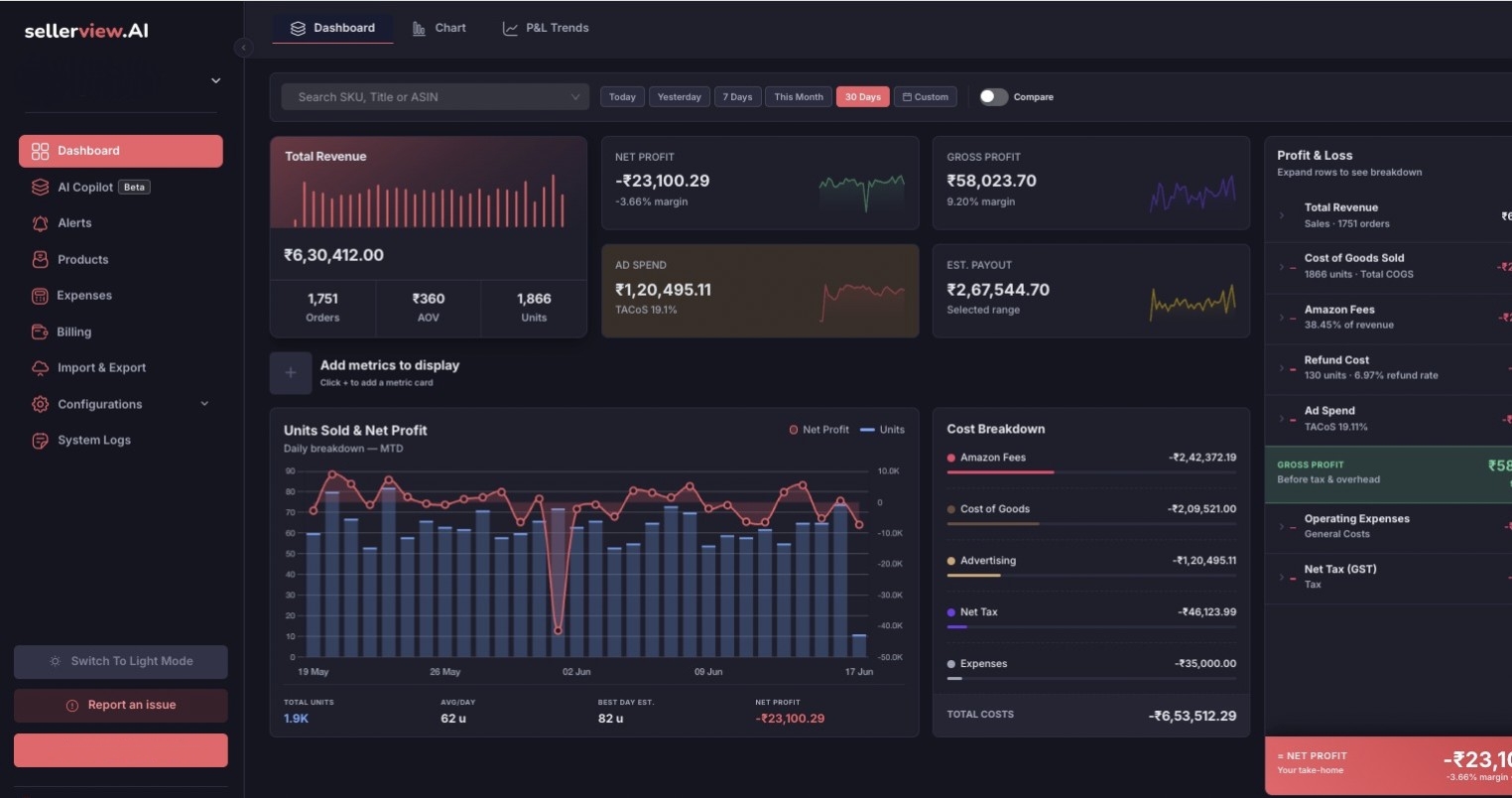
Screenshot of Sellerview.ai’s Dashboard provides Amazon sellers with a centralized view of business performance, profitability trends, and operational health across their catalog. The dashboard combines sales, ad spend, and net profit analytics into a single visual interface, helping sellers understand how revenue and profitability change over time.

Users can analyze performance by SKU, ASIN, marketplace, and date range while tracking key metrics such as total sales, advertising clicks, total units sold, order volume, ad conversion rate, refunds, and net profit. The Profit Health visualization makes it easy to identify profit fluctuations, rising ad costs, and performance anomalies before they impact overall margins.

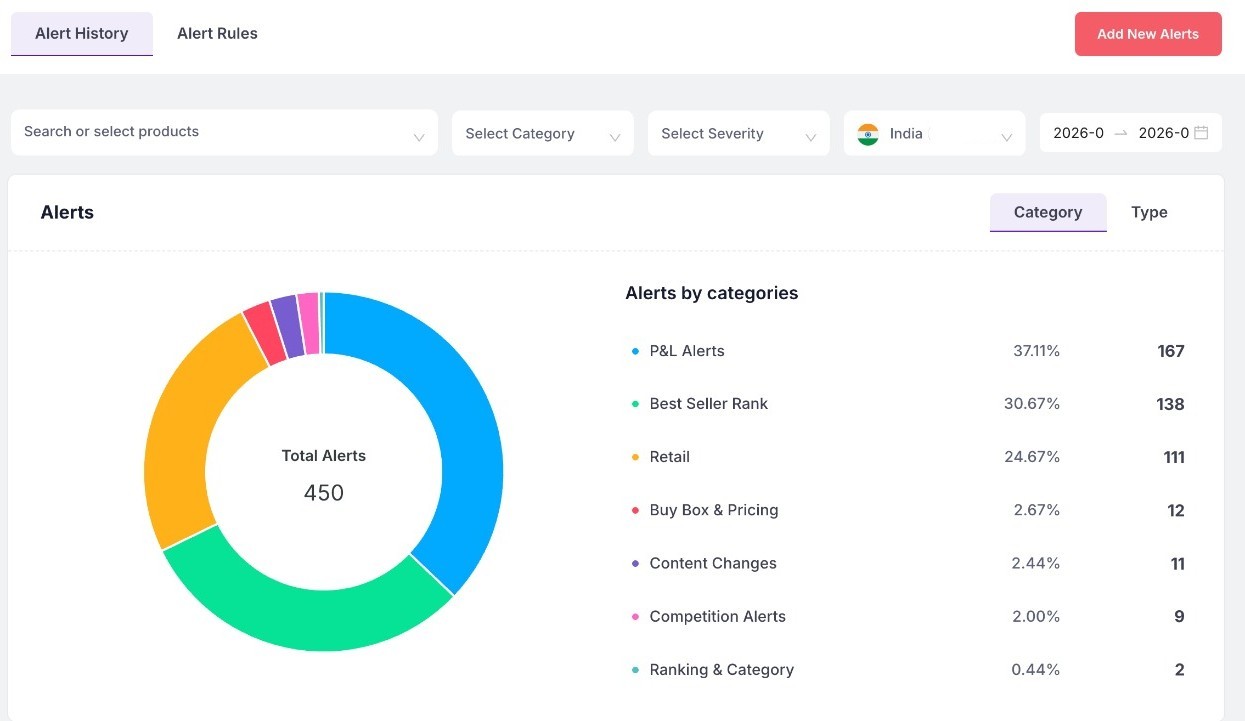
Advanced filtering, customizable columns, and export functionality allow teams to create focused reports and monitor the metrics most relevant to their business. The dashboard is designed to help Amazon brands make faster, data-driven decisions and scale operations more profitably.Screenshot of Sellerview.ai’s Alert System helps Amazon sellers proactively monitor critical changes affecting profitability, product performance, and marketplace visibility. The dashboard provides categorized real-time alerts across P&L performance, Best Seller Rank (BSR), retail activity, Buy Box changes, pricing fluctuations, content modifications, competition tracking, and ranking movements.

Users can filter alerts by product, category, severity, marketplace, and date range to quickly identify issues that need immediate attention. The visual alert breakdown makes it easy to understand which operational areas are generating the highest impact and where profit risks may be emerging.

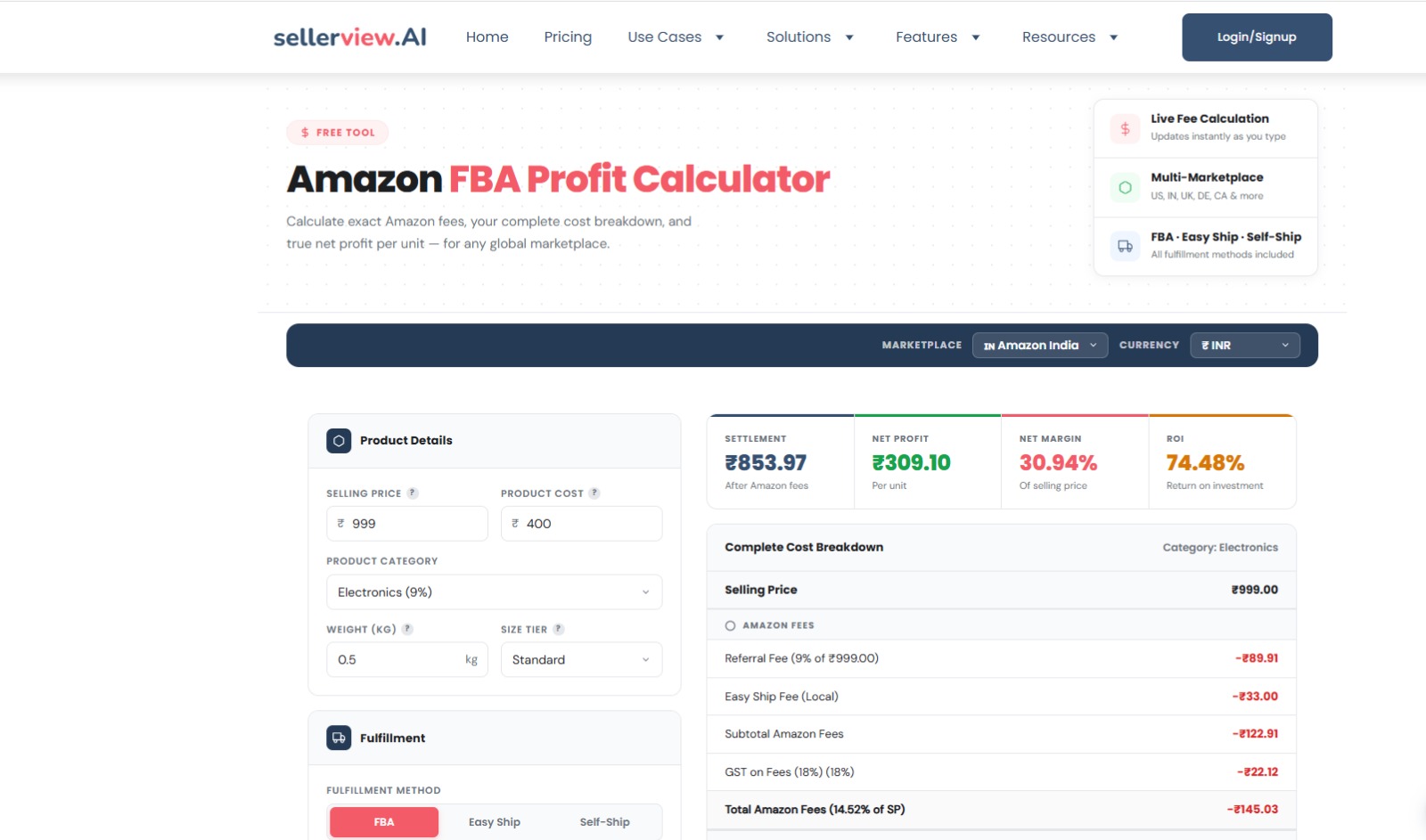
This feature is designed to help Amazon brands react faster, reduce hidden profit leaks, and stay ahead of operational and competitive changes across their catalog.Screenshot of Sellerview.ai’s Amazon FBA Profit Calculator helps sellers accurately estimate product profitability before launching or scaling products on Amazon. The tool provides a complete breakdown of Amazon fees, fulfillment costs, margins, ROI, and net profit per unit across multiple marketplaces and fulfillment methods.

Users can calculate profitability by entering selling price, product cost, category, weight, size tier, and fulfillment method, including FBA, Easy Ship, and Self-Ship options. The calculator automatically estimates referral fees, shipping charges, GST, and other Amazon-related costs to provide a real-time view of actual earnings.

The tool supports multiple marketplaces and currencies, making it useful for global Amazon sellers managing operations across different regions. By simplifying cost analysis and fee calculations, the FBA Profit Calculator helps sellers make better pricing, sourcing, and inventory decisions while reducing hidden profitability risks.