Overview
ProductRatingMost Used ByProduct SummaryStarting Price
Google Sheets
Score 8.9 out of 10
N/A
Google Sheets is the spreadsheet app available on Google Workspace, or standalone, with a free plan for personal use and accessible via mobile apps for iOS and Android.N/A
Microsoft Excel
Score 8.9 out of 10
N/A
Microsoft Excel is a spreadsheet application available as part of Microsoft 365 (Office 365), or standalone, in cloud-based and on-premise editions.
$6.99
per month
Thinkfree Office
Score 0.0 out of 10
N/A
Thinkfree Office is an on-premise and private cloud office suite that enables organizations to create, edit, share, and collaborate on documents while maintaining control over data. Designed for enterprises, SaaS providers, cloud service providers, and software vendors, the platform combines online document editing, real-time collaboration, and flexible deployment options. Thinkfree AI Office extends these capabilities by integrating AI-enabled document workflows…
$900
per year Billing based on the number of active browser tabs (Minimum: 30)
Pricing
Google SheetsMicrosoft ExcelThinkfree Office
Editions & Modules
No answers on this topic
Excel with Microsoft 365
$6.99
per month
Excel for 1 PC or Mac
$139.99
perpetual license
MCC License
$900
per year Billing based on the number of active browser tabs (Minimum: 30)
Site License
Contact
NU License
Contact
Offerings
Pricing Offerings
Google SheetsMicrosoft ExcelThinkfree Office
Free Trial
NoYesYes
Free/Freemium Version
NoYesNo
Premium Consulting/Integration Services
NoNoNo
Entry-level Setup FeeNo setup feeNo setup feeNo setup fee
Additional Details
More Pricing Information
Community Pulse
Google SheetsMicrosoft ExcelThinkfree Office
Considered Multiple Products
Google Sheets
Chose Google Sheets
It's easyest, fully online and fast to start. This is why I always use this tool to do something fast. Something that make it better than Excel as far as I know is the capability to connect to REST api and fetch data easily.
Chose Google Sheets
It's online and easy to use. I know Excel is online too, but it comes with a package, whereas Google gave it for free. Even its free version is out of bounds and can do whatever there is. Great part about this is, it doesn't matter if the data is from XLXS or CSV if you don't …
Chose Google Sheets
In some ways, SeaTable and AirTable provide a little more functionality beyond what Google Sheets provides. It is a little easier to set up different views of different types, not just table formats. They also make it easier to make groups and subgroups with the data set …
Chose Google Sheets
Apple Numbers and Microsoft Excel
Chose Google Sheets
Although I use Google Sheets more often than I use Microsoft Excel, I must admit that I frequently use them both. Google Sheets is my go to platform for a few reasons. I can easily use it offline when there's no connection. I don't have to have access to the Microsoft Suite in …
Chose Google Sheets
i use it to track progress on tasks and projects but it can not be used for tracking costs so it doesn't compare
Chose Google Sheets
Google Sheets is worlds superior to Microsoft Excel. Sheets in comparison has a seamless and user-friendly interface, not to mention it is free. Even in my college career thus far that includes (through my university) the entire Microsoft Office collection, I would not ever be …
Chose Google Sheets
Google Sheets is much better because it is already a part of our Google Workspace and we do not have to pay any extra for an extra server or software. We also use gmail for our internal communications and Google Slides for presentations, so it is easier for us to keep …
Chose Google Sheets
Excel definitely has more features, but as long as you are not a finance person, sheets has everything you need and then some! You can do most of the same things you can do with excel, but it is more intuitive and user friendly. The best thing is being able to collaborate with …
Chose Google Sheets
Google Sheets is the best at version history and collaboration, leaving comments, writing formulas, and simple usability.
Chose Google Sheets
Microsoft Excel in terms of singular user continues to be the best one in my opinion, but for collaboration I don't agree in that position, Google Sheets are better. Libre Office and WPS office unfortunately are far away from the quality of Microsoft Excel and Google Sheets, …
Chose Google Sheets
I use google sheets when need to create very fast teamwork space and manage goals, backlog etc. it is suitable for small business and for big teams. Easy entry and familiar interface
office is enterprise solution with not very easy entry, not every one have a Microsoft account, …
Chose Google Sheets
Google Sheets is the easiest to access to use, and is arguably the most powerful with its third-party integrations. Additionally, Google apps script enhances the ability of Google Sheets to process data in custom ways. For instance, integrating zap year to connect via Web hook …
Chose Google Sheets
It's a necessary building block upon which so many other programs are created. Our most important information is best shared via sheets - information that then gets posted in all of our other platforms.
Chose Google Sheets
As I need to share most of work with my colleagues or partners, Google Sheets is the best choice over Microsoft Office. It's true that MS Office has now an online version, but the sharing capabilities are not to the level of Google Sheets. This is particularly true if you are …
Chose Google Sheets
For my usage, I find these two products absolutely equivalent for personal use. Google sheets has an advantage if you want cooperative sharing capabilities. Google sheets is especially useful if you already rely heavily on the other google products and email system.
Chose Google Sheets
Apple Numbers doesn't have the collaboration tools like Google Sheets does. And if someone isn't working on a Mac, Number will have challenges. Google Sheets works across devices and operating systems.
Chose Google Sheets
I have used Monday.com and Trello for task and project tracking. Those tools are useful in the company-wide setting where multiple people need to have access, though the way I use Google Sheets is strictly for my own eyes. In that situation, I think Google Sheets is far more …
Chose Google Sheets
Google Sheets collaborative mode and integration with google drive makes it much easier to share data across teams or organizations, while also allowing for multiple users on the product. The functionality of equations, appscripts, and AI integrations make it invaluable …
Chose Google Sheets
Way better in terms of online collaboration and sharing.
Way better for simple use-cases that do not require a ton of data cleaning & manipulation, data integration and advanced calculations.
Way worse in terms of shortcuts for productivity.
Chose Google Sheets
It is better than Excel when you need to work with many users at the same file at the same time.

It is better than Excel when you need an web browser tool, since it is faster than the equivalent version of excel.
Chose Google Sheets
Google sheets allows the most cross-team collaboration in balance with the most user-friendly interface and data limits.
Smartsheet is a close second, however some of the interface and tools are trickier for people unfamiliar and it's not as UX friendly.
Excel is fantastic for …
Microsoft Excel
Chose Microsoft Excel
Integrates well with Power BI, since the company for both apps is Microsoft.
Chose Microsoft Excel
Excel Analyzer is very easy to use however earlier i was using google sheet which is totally online platform so didn't feel secure with my confidentials data.
Chose Microsoft Excel
Microsoft Excel It's the choice of professionals who delve into intricate financial models, statistical analyses, and other complex analysis. Its strength lies in its depth, offering a vast array of functions and features that can handle the most demanding tasks. Its pivot …
Chose Microsoft Excel
I find Microsoft Excel easier to use than either LibreOffice Calc or Google Docs because I use Excel regularly and know where to find the functions that I need. I find that other companies have an easier time opening Excel files than others.
Chose Microsoft Excel
Microsoft Excel is more functional for different purposes, such as also showing, filtering and sharing tables with text. Think of action lists, meeting minutes or spreadsheets with quantitative input. SPSS is more focused on statistical analysis, performing built in analysis, …
Chose Microsoft Excel
My preference will always be Google Sheets, however, as the interface in Sheets is faster, smoother, and more aesthetically pleasing. Excel is part of the package with Outlook, and that tends to be the main reason why I’ve encountered companies who choose Excel over Sheets, but …
Chose Microsoft Excel
Excel is one of the tools I use for everyday work but fits alongside all the other programs I use. I keep Excel as a way of tracking projects from start to finish as well as document content strategy and audits. There are not many programs like Excel that I can think of other …
Chose Microsoft Excel
Microsoft Lists allows for users to keep lists, but the functionality cannot be compared to Microsoft Excel. There are far more options for data manipulation, analysis, and creating outputs in Excel. Anything that can be done in Lists can be done easily in MS Excel. The key …
Chose Microsoft Excel
The integration Microsoft Excel has within the other Microsoft applications makes it top choice for me. I have worked in Google Sheets, however I prefer working in desktop version of software with full capabilities. Microsoft Excel provides this.
Chose Microsoft Excel
It isn't as collaborative or detail oriented as other platforms, or at least it doesn't market itself to be used that way. But it is still useful in its own ways
Chose Microsoft Excel
Microsoft Excel has its "niche" use cases, but it was the other way around. Its been many years since Microsoft Excel became the niche, while Google Sheets now is the mainstream data analysis application. I use Microsoft Excel today only because I am forced by my company to do …
Chose Microsoft Excel
Arcsight by OpenText, Google Sheets, Oracle Aconex, Oracle Analytics Cloud, Oracle BPM Suite, Oracle Cloud Infrastructure, Primavera Unifier, Primavera EXPRESS, PrimaveraReader, Oracle Primavera Submittal Exchange and Oracle Primavera Portfolio Management
Chose Microsoft Excel
Microsoft Excel is superior to these as it has a wider range of functions and is used corporately
Chose Microsoft Excel
Like I've put in previous questions, Microsoft Excel seems more advanced. I'm always going to prefer using Microsoft Excel if it's just me working on a task. If I have to work with other then Google sheets is going to be preferred. The online version of Microsoft Excel seems to …
Chose Microsoft Excel
Microsoft Excel is a powerful tool that is used for analyzing and organizing complex data. It offers advanced capabilities for data analysis, financial modelling and complex calculations. Excel can be used in offline form making it use flexible for users who want to use it …
Chose Microsoft Excel
Google Sheets sync nicely with Google Workspace and can be accessed easily online. But Google Sheets is clunky and no where near the gold standard which is Microsoft Excel.
Chose Microsoft Excel
I think it stacks up very well, Clickup ha a better user interface however Microsoft Excel has a more sophisticated back end and formula approach. In my opinion, Clickup however does provide less of a need to 'learn' formulas as there is more of a click application approach …
Chose Microsoft Excel
Excel stands out from Google Sheets and Apple Numbers with its extensive range of advanced functions, including financial, statistical, and data analysis tools, surpassing the capabilities of its competitors. As the universally recognized industry standard, Excel offers better …
Chose Microsoft Excel
Microsoft Excel stacks up against them with better User Interface, this plays a more crucial role than any of the functionality that other software offers.
Its ability to have a lot of functions for handling day to day task and analyzing data and automating the task.
Microsoft …
Chose Microsoft Excel
No any comparison, Excel are far better.
Chose Microsoft Excel
PowerPoint is excellent for displaying information in a far more visually engaging, relatable manner. However, where it is lacking is the ability to get to that point in analyzing competing deal information, building formulas around it, things of that nature.

Apple has its own …
Chose Microsoft Excel
Compatibility is the main issue. It is frustrating to send an Excel workbook to someone who can't open it. Also, user interfaces are not as slick and intuitive.
Chose Microsoft Excel
i have used many Microsoft products like Microsoft Office, PowerPoint, SharePoint, Teams, Windows, Yammer etc., but I can say that every product is different from each other and each product solves different professional day-to-day work problems quite efficiently, although I …
Chose Microsoft Excel
I find that Microsoft Excel ranks higher than Microsoft Powerpoint because of it's ability to handle large amounts of data the fact that it has keys tools to helps streamline information. It does however not have the same capabilities as Microsoft Powerpoint when it comes to …
Thinkfree Office

No answer on this topic

Best Alternatives
Google SheetsMicrosoft ExcelThinkfree Office
Small Businesses
Stackby
Stackby
Score 8.9 out of 10
Stackby
Stackby
Score 8.9 out of 10
Google Workspace
Google Workspace
Score 9.1 out of 10
Medium-sized Companies
Microsoft Excel
Microsoft Excel
Score 8.9 out of 10
Airtable
Airtable
Score 8.6 out of 10
Google Workspace
Google Workspace
Score 9.1 out of 10
Enterprises
Microsoft Excel
Microsoft Excel
Score 8.9 out of 10
Airtable
Airtable
Score 8.6 out of 10
Microsoft 365 Business Premium
Score 8.9 out of 10
All AlternativesView all alternativesView all alternativesView all alternatives
User Ratings
Google SheetsMicrosoft ExcelThinkfree Office
Likelihood to Recommend
9.1
(0 ratings)
9.2
(0 ratings)
-
(0 ratings)
Likelihood to Renew
10.0
(0 ratings)
9.9
(0 ratings)
-
(0 ratings)
Usability
8.7
(0 ratings)
8.4
(0 ratings)
-
(0 ratings)
Availability
9.4
(0 ratings)
10.0
(0 ratings)
-
(0 ratings)
Performance
9.4
(0 ratings)
10.0
(0 ratings)
-
(0 ratings)
Support Rating
8.0
(0 ratings)
10.0
(0 ratings)
-
(0 ratings)
Implementation Rating
-
(0 ratings)
8.0
(0 ratings)
-
(0 ratings)
Configurability
9.0
(0 ratings)
10.0
(0 ratings)
-
(0 ratings)
Ease of integration
9.0
(0 ratings)
10.0
(0 ratings)
-
(0 ratings)
Product Scalability
9.7
(0 ratings)
10.0
(0 ratings)
-
(0 ratings)
Vendor post-sale
9.0
(0 ratings)
10.0
(0 ratings)
-
(0 ratings)
Vendor pre-sale
9.0
(0 ratings)
10.0
(0 ratings)
-
(0 ratings)
User Testimonials
Google SheetsMicrosoft ExcelThinkfree Office
Likelihood to Recommend
Google Sheets is perfectly suited for collaborative documentation, it's been really easy for us in situations like cost tracking, permission matrix etc, where no complex third party tools needs to be setup! Just sign in with your google account, and start doing effortless work. But keep in mind about it's performance, it's not so suitable for thousands of rows worth of data as it will start to become sluggish.
Read full review
I find it easier to use than Google Sheets , though it's easier to collaborate with other teams using Google Sheets. I also feel like Microsoft Excel is more suited to deal with complex formulas. The best way to put it, if I have a project that I'm solely working on, I'm going to use Microsoft Excel. If it's going to be shared, then I'm using Google Sheets.
Read full review
No answers on this topic
Pros
  • It is a great way to collaborate in real-time with any member across the organization.
  • It easy very easy to create formulas, data validation options, and pivot tables for data analysis.
  • It is a great way to see the revision history and changes that other collaborators have made on the document.
Read full review
  • Excel is the most fully featured spreadsheet software you are likely to find.
  • The software is compatible with a large number of file formats so using data from nearly any source is possible.
  • It can handle large data sets.
  • It can save your files in a variety of file formats.
Read full review
No answers on this topic
Cons
  • Pivot tables are different but could be improved upon; sort, totals, filters
  • When entering negative numbers as the first in a formula you need to remember to "+-100+25" instead of "-100+25"
  • The power of the internet of course makes it easy to find solution, but the help function is not easily available
  • Color coding changes on the cell, but there is not an easy way to click on a cell and use the selected color; like excel
Read full review
  • Excel offers collaboration features that allow multiple users to work on the same spreadsheet, but managing changes made by different users can be challenging. Excel could improve its features by offering more granular control, better tracking of changes, and more robust conflict resolution tools.
  • Itcan be a barrier to productivity when importing and exporting data from other applications or file formats. To improve its features, it should offer better support for standard file formats and more robust error handling and reporting tools.
  • Excel can be challenging for finance students and working professionals, but it can be improved by offering more robust tutorials, better documentation, and more user communities and support forums.
Read full review
No answers on this topic
Likelihood to Renew
I am not involved in the purchase/selection process, but my organization is a Google shop, and Sheets meets most of our spreadsheet needs and works seamlessly with our other tools. I don't anticipate our switching anytime soon.
Read full review
Excel remains the industry standard for spreadsheets and has maintained simple and straight-forward formula writing methods. Although there is a learning curve to do more complex calculations, there are countless help sites and videos on the Internet for almost any need.
Read full review
No answers on this topic
Usability
It can easily handle most uses and functions. It is only for very large datasets or advanced analysis that it either lacks the proper functions or performance begins to slow. Most employees who continue to use competitors' products do so out of preference, familiarity with the user interface, or other surface-level reasons.
Read full review
Overall I think the usuability is great and offers everything it should. I have never not be able to use it for what I wanted it for. However, it is so detailed and offers so much it can be difficult to use. Better descriptions or explanation to all the information could be helpful
Read full review
No answers on this topic
Reliability and Availability
Like most Google products, Google Sheets rarely has outages or slowness, and when it does, connection is always momentarily restored. I can't recall a time when I've been unable to access Google Sheets but able to access other sites just fine. That said, errors aren't uncommon when handling large data volume. You know what they say about using spreadsheets as databases, but sometimes it's just the most convenient option, especially for smaller or one-off projects, and not being able to store large amounts of data hampers our ability to move quickly with scrappy prototypes or full solutions. It would be great if we could better integrate our data manipulation (Apps Script) with big data in the sheet.
Read full review
I have rarely, if ever, had issues with its availability.
Read full review
No answers on this topic
Performance
Again, Google Sheets is no exception to Google's general high speed and reliability, but load times can be slow for larger amounts of data. I've used Sheets with Zapier and have used the Python API, and speed has never been an issue.
Read full review
Excel load and performs calculations immediately. It integrate well with all Microsoft Office applications and does not slow them down.
Read full review
No answers on this topic
Support Rating
I have never contacted Google Sheets support, but Google Sheets makes it very easy to report an issue or suggest a feature from Sheets itself (Help > Help Sheets improve), and I've had mostly good experiences with support for other Google products.
Read full review
I have not had to use it often, but it is good.
Read full review
No answers on this topic
Alternatives Considered
Microsoft Excel in terms of singular user continues to be the best one in my opinion, but for collaboration I don't agree in that position, Google Sheets are better. Libre Office and WPS Office unfortunately are far away from the quality of Microsoft Excel and Google Sheets, they are good solutions if you don't want to trust the data on external services, other than that they are not good.
Read full review
Excel is one of the tools I use for everyday work but fits alongside all the other programs I use. I keep Excel as a way of tracking projects from start to finish as well as document content strategy and audits. There are not many programs like Excel that I can think of other than Google Sheets and I find Excel is far better.
Read full review
No answers on this topic
Scalability
Google Sheets works very well with multiple users. It's convenient to see in real-time who is collaborating in a sheet, down to the specific cell that they're viewing/editing. Linking Sheets across departments is convenient with the IMPORTRANGE function.
Read full review
Each user can use it to whatever level of expertise they have. It remains the same so users can contribute to another's work regardless of whether they have more or less expertise
Read full review
No answers on this topic
Return on Investment
  • Client outreach; it has helped me make a list of customers to reach out to.
  • Accounting; it has made accounting SO much easier and smoother, so I have more time to focus on clients and projects.
  • Cost formulas - it's allowed me to make comfortable margins with fair customer pricing by making breakeven formula sheets.
Read full review
  • It helps to me gather my thoughts, organize my research, and most importantly prioritize information in an easy to digest manner depending on what I am most interested to see at that time.
  • It helps me quite a bit to talk my clients through the financial implications of various office leasing transactions under consideration and coach them in a way that is very unbiased and fact-driven which I like.
  • It helps me to be more thoughtful as well when thinking about the various different situations in which I use Excel. And because it ultimately results in my clients getting comfortable ultimately pulling the trigger on a given deal, it directly leads to more commission in my pocket which I love!
Read full review
No answers on this topic
ScreenShots

Thinkfree Office Screenshots

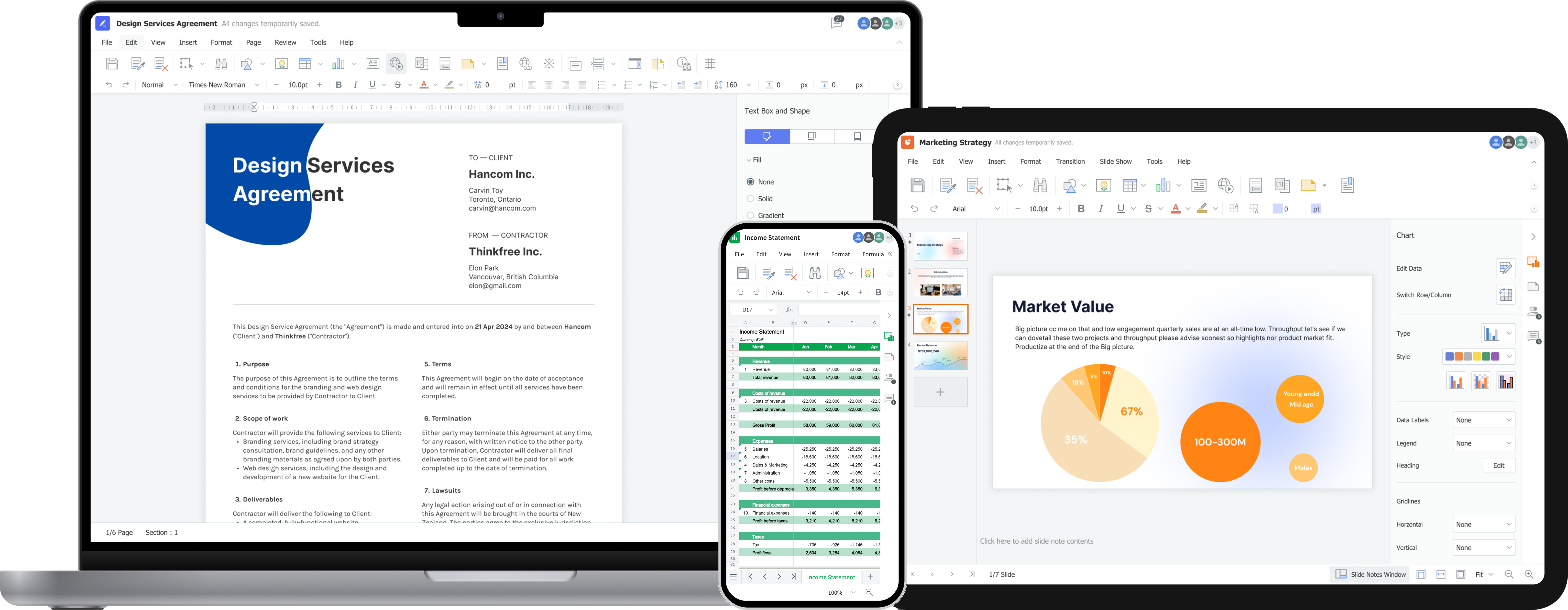
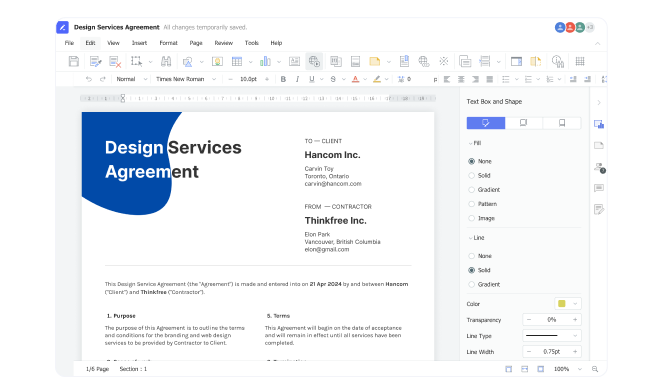
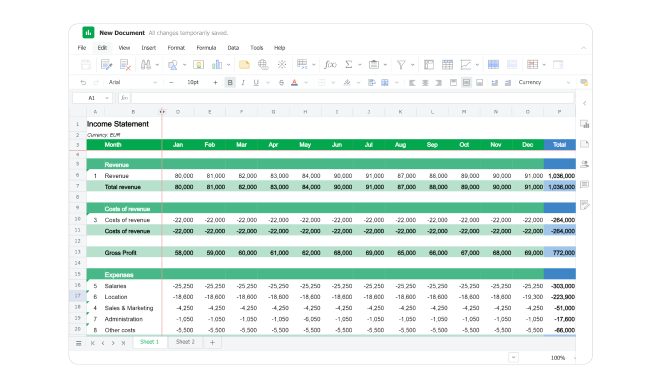
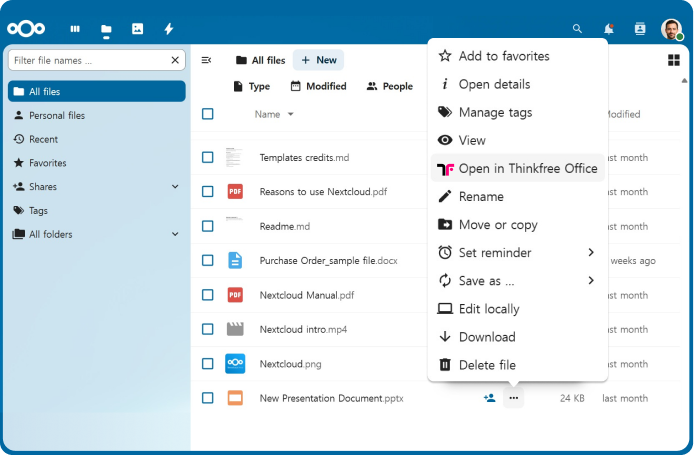
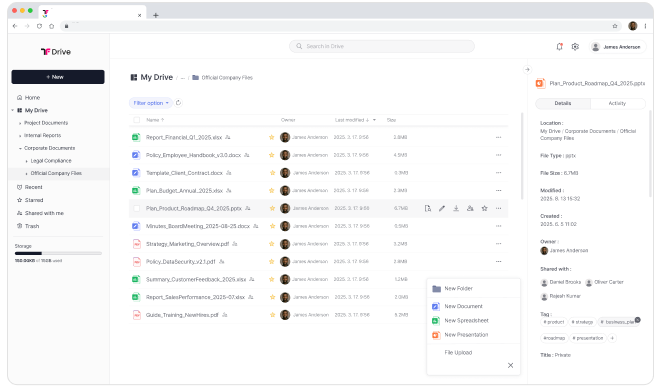
Screenshot of the on-premise Online Office Suite for Secure Document Editing.Screenshot of the enterprise-grade on-premise word processor for document creation, editing, and team collaboration with full data control.Screenshot of the on-premise online spreadsheet that delivers secure, real-time collaboration without compromising data privacy.Screenshot of the presentation software.Screenshot of Thinkfree Office appearing in Nextcloud, with integrated viewing, editing, and collaboration features available.Screenshot of Thinkfree's self-hosted cloud storage with integrated online office.