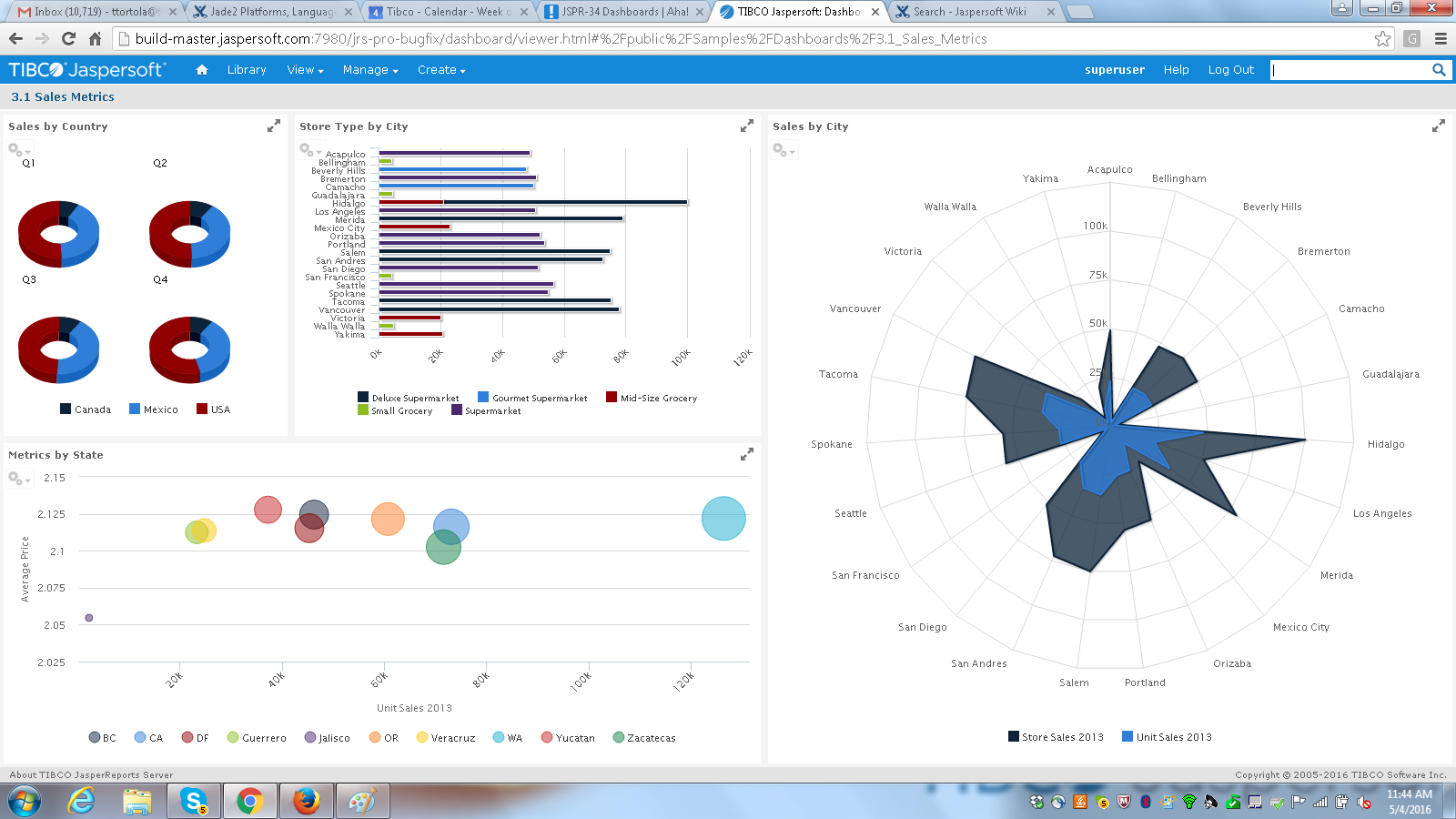
Jaspersoft commercial edition is an embedded business intelligence suite designed to be built-into SaaS products as an integrated reporting engine. It provides reports and dashboards for customer-facing applications without requiring app developers to build their own reporting engine.
N/A
Looker Studio
Score8.2 out of 10
N/A
Looker Studio is a data visualization platform that transforms data into meaningful presentations and dashboards with customized reporting tools.
$9
per month per user per project
Pricing
Jaspersoft
Looker Studio
Editions & Modules
No answers on this topic
Looker Studio Pro
$9
per month per user per project
Looker Studio
No charge
Offerings
Pricing Offerings
Jaspersoft
Looker Studio
Free Trial
Yes
No
Free/Freemium Version
Yes
Yes
Premium Consulting/Integration Services
Yes
No
Entry-level Setup Fee
No setup fee
No setup fee
Additional Details
Jaspersoft offers flexible pricing for ISVs and SaaS per customer or by CPU core.
It is well suited for the fact of scalability itself and the breadth of features this application has in order to make the migration from legacy systems to the newer different versions more seamless and effective. Data integrity and security are the main aspects of this tool which does not lose their value when doing day-to-day operations for data mapping.
A de minimis incentive was given to thank the reviewer for their time. The incentive was not used to bias or drive a particular response, nor was the incentive contingent on a positive endorsement. More Info
Visualizing cross-channel campaign performance can blend data from a few different sources to compare performance metrics like spend, clicks, and conversions side-by-side in a single view, which helps in quick budget reallocation decisions. When dealing with massive volumes of data (millions of rows) or highly complex queries, Looker Studio dashboards can become slow, laggy, or even crash. Performance issues are a frequent complaint when working with large datasets, making it unsuitable for enterprise-level companies
A de minimis incentive was given to thank the reviewer for their time. The incentive was not used to bias or drive a particular response, nor was the incentive contingent on a positive endorsement. More Info
TIBCO Jaspersoft allows you to embed reports into your own application, which gives users the feeling they are using a single product.
TIBCO Jaspersoft Studio allows for more advanced report development, such as adding subreports, drilldown to detail reports, images, page headers, page footers, maps, and more.
TIBCO's Jaspersoft Domain Designer is very easy to use and navigate.
A de minimis incentive was given to thank the reviewer for their time. The incentive was not used to bias or drive a particular response, nor was the incentive contingent on a positive endorsement. TR verified that a representative sample of customers was invited. More Info
Breath of data - the number of ways to interrogate the data is endless, and the options to view metrics alongside each other make for comprehensive datasets.
Data visualisation and customisation - the options for presenting data and separating out across pages allow for clean visuals and segmented information.
Easy shareability/usability - a quick and simple tool to introduce colleagues to, and easy to grant access for them to be able to view the data, without having to understand the setup itself.
A de minimis incentive was given to thank the reviewer for their time. The incentive was not used to bias or drive a particular response, nor was the incentive contingent on a positive endorsement. More Info
One of the issues we found during our implementation was that the reporting software would work faster for certain data sources and not the others. Extracting CSVs and XML was slower in comparison to JSON in our experience.
Jaspersoft Studio was the main IDE we used for development. Built atop the Eclipse IDE, we found that the tool was really resource intensive and generally take long time to initialize.
A de minimis incentive was given to thank the reviewer for their time. The incentive was not used to bias or drive a particular response, nor was the incentive contingent on a positive endorsement. TR verified that a representative sample of customers was invited. More Info
It needs better handling of complex logic. We often need workarounds to perform complex custom calculations, and it can be really unpleasant at times.
Felt it got slow with a larger data set, and in one minor report, we had to set up time filters so that calculations during spikes could be traced more quickly.
Compare to competition they need to improve with notification things.
A de minimis incentive was given to thank the reviewer for their time. The incentive was not used to bias or drive a particular response, nor was the incentive contingent on a positive endorsement. More Info
JasperSoft has been amazing. It is well documented, fast, and transparent in how it functions. We have been very confident in JasperSoft in every aspect of our business and offerings where we've used it. On top of that, their improvements to the product have been fantastic. I am really looking forward to seeing where they take their product and how we can leverage that to please our clients
A de minimis incentive was given to thank the reviewer for their time. The incentive was not used to bias or drive a particular response, nor was the incentive contingent on a positive endorsement. TR verified that a representative sample of customers was invited. More Info
It is the simplest and least expensive way for us to automate our reporting at this time. I like the ability to customize literally everything about each report, and the ability to send out reports automatically in emails. The only issue we have been having recently is a technical glitch in the automatic email report. Sadly, there is almost no support for this tool from Google, but is also free, so that is important to take into consideration
A de minimis incentive was given to thank the reviewer for their time. The incentive was not used to bias or drive a particular response, nor was the incentive contingent on a positive endorsement. More Info
I think it's a tool well suited for a software developer. Others with less coding skills could struggle somewhat with the tool. I find java a little unforgiving as a language for expressions and not very user friendly for the technically dis-inclined. Sometimes the numeric conversions cause issues (who knew that 0 and 0.0 would cause different things to happen). Previous experience with a reporting tool that used visual basic for its' expressions that I found much simpler to use. On the other hand, java is so widespread, you can easily google the syntax to accomplish what you need to do.
A de minimis incentive was given to thank the reviewer for their time. The incentive was not used to bias or drive a particular response, nor was the incentive contingent on a positive endorsement. TR verified that a representative sample of customers was invited. More Info
Looker Studio is easy to use, and it offers a sufficient variety of predefined visualizations to choose from. It's easy for us, and anyone can set up basic reporting without extensive data visualization skills. The interface layout is easy to understand, and it doesn't take long to get used to.
A de minimis incentive was given to thank the reviewer for their time. The incentive was not used to bias or drive a particular response, nor was the incentive contingent on a positive endorsement. More Info
A de minimis incentive was given to thank the reviewer for their time. The incentive was not used to bias or drive a particular response, nor was the incentive contingent on a positive endorsement. More Info
A de minimis incentive was given to thank the reviewer for their time. The incentive was not used to bias or drive a particular response, nor was the incentive contingent on a positive endorsement. TR verified that a representative sample of customers was invited. More Info
They have a great customer support ticketing system in which they always respond same-day. They offer conference calls with srcreensharing as well in order to better understand your issues.
I wish that the lower level support access came with more than just 12 cases per year though as this makes us less likely to reach out for questions on things that we then instead try to solve ourselves which results in loss of time in trying to acquire new features and or solve a problem.
A de minimis incentive was given to thank the reviewer for their time. The incentive was not used to bias or drive a particular response, nor was the incentive contingent on a positive endorsement. TR verified that a representative sample of customers was invited. More Info
I give it a lower support rating because it seems like our Dev team hasn't gotten the support they need to set up our database to connect. Seems like we hit a roadblock and the project got put on pause for dev. That sucks for me because it is harder to get the dev team to focus on it if they don't get the help they need to set it up.
A de minimis incentive was given to thank the reviewer for their time. The incentive was not used to bias or drive a particular response, nor was the incentive contingent on a positive endorsement. More Info
It did the job of getting us to our deadline we set for ourselves for initial launch. The customer we launched the product for was also there to learn about it at the same in order to better understand the capabilities. This helped greatly so that the customer was on the same page on what was possible when using jaspersoft. I think most people would not want their customers aware the product they are using is third-party but in this case it was a new experience for us both and so as we learned more about jaspersoft, we both had better communication on what the future road map was for their business needs in BI.
A de minimis incentive was given to thank the reviewer for their time. The incentive was not used to bias or drive a particular response, nor was the incentive contingent on a positive endorsement. TR verified that a representative sample of customers was invited. More Info
Resources available in the TIBCO Knowledge Base are covering almost everything. They are well organized, and covering almost every possibility. There is always the change to get back to the TIBCO support or to the dedicated Customer Success Manager whenever something very specific or bound to a customization is not covered.
A de minimis incentive was given to thank the reviewer for their time. The incentive was not used to bias or drive a particular response, nor was the incentive contingent on a positive endorsement. TR verified that a representative sample of customers was invited. More Info
Having just completed an upgrade to the latest version of Jaspersoft, I am happy to say their support was very good. There were a couple of small challenges which were not easily resolved, but they were primarily related to the fact that we had skipped updates for a couple of versions. The current update procedures assumed we were upgrading from the prior latest version (6.4) to to the new version (7.1).
A de minimis incentive was given to thank the reviewer for their time. The incentive was not used to bias or drive a particular response, nor was the incentive contingent on a positive endorsement. TR verified that a representative sample of customers was invited. More Info
When looking at the different features of these reporting engines, and what we were going to be using it for, the answer seemed clear. Jasper offered exactly what we were looking for, and did so for a price that we were happy with. For a scalable, feature-rich reporting engine that doesn't break the bank, Jaspersoft is the way to go.
A de minimis incentive was given to thank the reviewer for their time. The incentive was not used to bias or drive a particular response, nor was the incentive contingent on a positive endorsement. TR verified that a representative sample of customers was invited. More Info
Looker Studio is far easier to implement, stand up, and learn. The interface is simpler and user-friendly for various levels of data visualization/analysis knowledge and experience. The biggest benefit of Looker Studio, however, is its ease of connection to GA data and speed. Furthermore, since it is an online program/tool, it requires less CPU/battery/storage on the user's device.
A de minimis incentive was given to thank the reviewer for their time. The incentive was not used to bias or drive a particular response, nor was the incentive contingent on a positive endorsement. More Info
A de minimis incentive was given to thank the reviewer for their time. The incentive was not used to bias or drive a particular response, nor was the incentive contingent on a positive endorsement. TR verified that a representative sample of customers was invited. More Info
When we demo our Jaspersoft environment to potential clients, their eyes light up and they sit up in their chairs a bit more. A lot of our meetings have ended with with the client very interested in our product due to Jaspersoft.
Our existing clients have been very satisfied with the adhoc features of Jaspersoft. We've been able to provide them better access to their data on their terms instead of ours. Of course this turns into a huge win for us.
We've always used SQL Server Reporting Services to deliver our reports to our clients. Converting to Jaspersoft has allowed us to generate the reporting layer that our clients demand. They no longer feel like they are settling for what we offer.
A de minimis incentive was given to thank the reviewer for their time. The incentive was not used to bias or drive a particular response, nor was the incentive contingent on a positive endorsement. More Info