JumpTrack® Proof-of-Delivery (POD) system speeds up the delivery process by helping dealers plan, capture, and track deliveries. The mobile friendly solution is used to reduce fuel costs, minimize driver errors, and save time with route optimization.
N/A
Onfleet
Score 9.8 out of 10
N/A
Onfleet in San Francisco offers a fleet management platform containing route optimization and planning, GPS, in-app driver communication (e.g. messaging), task sequencing and linking, and other features.
It is appropriate when you have high value items that you are delivering like computers and printers to offices. You need proof of delivery many times and this provides that with pictures that can easily be stored in our database. It is not appropriate for businesses that are just delivering goods where proof of delivery is not needed or you are working with low value items.
Where this really saved us is that we have a piece of software that is cutting edge when it comes to building and supply. This tracker was point point to the second accurate as to where our driver was when the the gps on our software said it was missing, this made the decision to keep this product in perpetuity.
When looking at warehouses, consider not only the rent but also how close you are to your consumers. In the long term, the latter may save you a lot more money by reducing delivery times, costs, and fuel consumption.
To cover more land and be closer to more customers, your warehouses and fulfillment facilities should be widely distributed. Many businesses maintain an East and West warehouse, at the very least, to allow them to deliver items to customers on opposite ends of the coast more quickly.
Route design can significantly reduce delivery times.
Onfleet recommends the most effective delivery routes by automatically factoring for time, location, truck capacity, and traffic. Any real-time traffic updates that may affect these routes are given to drivers through SMS, reducing travel time and empowering drivers.
Onfleet makes this easy by automatically assigning deliveries to your drivers. It works by looking at all of your drivers who are now "on the clock" or "active." It then selects an available driver in close proximity to the delivery.
It essentially means that you can't unintentionally assign the same item to many drivers, or assign too much or too little to any single driver. You can set limits, such as two tasks per driver, which will force them to leave.
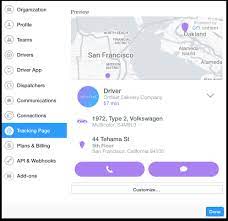
Keep consumers updated with regular updates throughout the delivery process to keep them up to date on their package's progress.
This benefits both the consumer and the driver because it ensures that the customer will be present at the time and location of delivery.
Support is lacking and finding information is very difficult. Actual issues are rarely resolved or followed up on.
If a delivery does not sync properly the data is permanently stuck and all further delivery information is lost. The app then needs to have it's data and cache erased to restore functionality. This is a major bug that needs to be fixed.
Automated POD email function is too time consuming to setup. When an email is added to one master account number there needs to be an option to populate that information to all sub accounts.
Report function needs improvement. The 'Planned vs Actual' and 'Delivery Efficiency' reports each do things that overlap, but a single report with selectable options for needed data would be much more user friendly. Currently to get the data needed I have to run both reports then copy/paste the data I want into a third spreadsheet.
Map feature on the app sometimes works well - IF the accounts are all formatted the same. If there is a suite number in the address it does not.
When changes are made to the delivery manifest through DDMS those changes do not automatically update Jumptrack, it has to be done manually.
Onfleet is amazing. What I love the most is that after the 2 years that I've been working on this software, I had no problems or issues. It was easy to edit information to drivers' routes, add on, etc. Good overall software, easy to use.
The software's least appealing feature was that it indicated that an order would be late when, in fact, all we needed to do was refresh the drivers profile so that times could be altered.
Overall it's pretty simple but there are bugs, and they are glaring. losing data and functionality midway through the day is a major detriment. The map/navigation function is effectively useless. Piece counts should be shown on the 'in transit' list instead of having to click all the way through to the individual invoices to see how many pieces you have
Onfleet is usable and provides sufficient training material, however it's very complex and the software has some nuances that can only be learned with time. Operating with multiple regions or areas can become cluttered and hard to navigate. More customization of appearance, features, etc. would help usability and prevent irrelevant information or features from being shown.
I have never contacted customer support. Your question clearly states " If you have never contacted support for this product, please skip this question. "When attempting to skip, I get an error "Explanation required Please provide a response." For this reason alone, I have given a rating of 1.
Onfleet has given great support and worked with our organization when we're trying to figure out a solution or work through a glitch. Their team seems small, personable, and laid-back. Sometimes there is a delay/wait after contacting support, but the answers are always thorough and the problems are usually solved.
We use JumpTrack over other programs out there because of how well it integrates with DDMS, our ERP software. We also like that nothing has to be installed on any computers. It's fully web-based/cloud based product. We like it's developed by Eci who made our ERP software so we already have a working relationship with it's creator
With, Onfleet assists Automated SMS notifications may be used to let customers know when a delivery has started, when they can expect it, and when it will arrive. Use Onfleet's integrated feedback form to find out firsthand how each client felt after receiving their order. Onfleet easily connects with your existing tools, making it simple to establish or shift a delivery business. Connect to hundreds of third-party apps, such as Shopify and Google Sheets, using Zapier without writing a single line of code, or importing CSV or Excel files. For complete control, integrate with our developer-friendly API.