Overview
ProductRatingMost Used ByProduct SummaryStarting Price
Kantata PS Cloud
Score 8.5 out of 10
Mid-Size Companies (51-1,000 employees)
Kantata Cloud (formerly Mavenlink + Kimble) provides project management and collaboration software for small to mid-sized professional services companies. Features include resource management, project dependencies, time and expense tracking, file sharing, versatile user permissions, private messaging, planning and reporting.N/A
SAS 360 Plan
Score 8.9 out of 10
N/A
Formerly SAS Marketing Operations Management, a solution to integrate and manage all marketing processes for greater consistency, efficiency and effectiveness – from marketing strategy development and planning to content creation, campaign execution and post-campaign analysis.N/A
CELUM Creative Collaboration
Score 7.7 out of 10
N/A
WorkRooms blends agile task management with file organization. Users get a visual overview of projects, reviews and approvals and can share files with anyone. Built with a content-centric approach, WorkRooms focuses on the production, management and approval of content such as photos and graphics, audio or video material. Kanban-style boards are enhanced by clearly defined processes, smart access…N/A
Pricing
Kantata PS CloudSAS 360 PlanCELUM Creative Collaboration
Editions & Modules
Premier
Contact Sales Team
per month per seat
Enterprise
Contact Sales Team
No answers on this topic
Offerings
Pricing Offerings
Kantata PS CloudSAS 360 PlanCELUM Creative Collaboration
Free Trial
NoNoYes
Free/Freemium Version
NoNoNo
Premium Consulting/Integration Services
YesNoYes
Entry-level Setup FeeRequiredNo setup feeNo setup fee
Additional Details
More Pricing Information
Community Pulse
Kantata PS CloudSAS 360 PlanCELUM Creative Collaboration
Features
Kantata PS CloudSAS 360 PlanCELUM Creative Collaboration
Project Management
Comparison of Project Management features of Product A and Product B
Kantata PS Cloud
-
Ratings
SAS 360 Plan
-
Ratings
CELUM Creative Collaboration
6.8
2 Ratings
13% below category average
Task Management00 Ratings00 Ratings7.02 Ratings
Scheduling00 Ratings00 Ratings9.02 Ratings
Mobile Access00 Ratings00 Ratings1.02 Ratings
Search00 Ratings00 Ratings7.02 Ratings
Visual planning tools00 Ratings00 Ratings10.02 Ratings
Communication
Comparison of Communication features of Product A and Product B
Kantata PS Cloud
-
Ratings
SAS 360 Plan
-
Ratings
CELUM Creative Collaboration
5.3
2 Ratings
41% below category average
Chat00 Ratings00 Ratings3.01 Ratings
Notifications00 Ratings00 Ratings6.02 Ratings
Discussions00 Ratings00 Ratings6.02 Ratings
Internal knowledgebase00 Ratings00 Ratings6.02 Ratings
File Sharing & Management
Comparison of File Sharing & Management features of Product A and Product B
Kantata PS Cloud
-
Ratings
SAS 360 Plan
-
Ratings
CELUM Creative Collaboration
6.9
2 Ratings
15% below category average
Versioning00 Ratings00 Ratings7.02 Ratings
Video files00 Ratings00 Ratings6.02 Ratings
Audio files00 Ratings00 Ratings4.02 Ratings
Document collaboration00 Ratings00 Ratings6.02 Ratings
Access control00 Ratings00 Ratings9.02 Ratings
Advanced security features00 Ratings00 Ratings8.02 Ratings
Device sync00 Ratings00 Ratings8.02 Ratings
Best Alternatives
Kantata PS CloudSAS 360 PlanCELUM Creative Collaboration
Small Businesses
Teamwork.com
Teamwork.com
Score 8.5 out of 10
Adobe Marketing Cloud
Score 9.2 out of 10
Stackby
Stackby
Score 8.9 out of 10
Medium-sized Companies
Teamwork.com
Teamwork.com
Score 8.5 out of 10
Brandfolder
Brandfolder
Score 7.3 out of 10
Troop Messenger
Troop Messenger
Score 9.8 out of 10
Enterprises
Planview AdaptiveWork
Score 8.2 out of 10
Adobe Marketing Cloud
Score 9.2 out of 10
HCL Connections
HCL Connections
Score 9.0 out of 10
All AlternativesView all alternativesView all alternativesView all alternatives
User Ratings
Kantata PS CloudSAS 360 PlanCELUM Creative Collaboration
Likelihood to Recommend
9.1
(50 ratings)
8.0
(1 ratings)
7.0
(2 ratings)
Likelihood to Renew
9.0
(6 ratings)
-
(0 ratings)
-
(0 ratings)
Usability
8.0
(8 ratings)
-
(0 ratings)
-
(0 ratings)
Availability
9.0
(2 ratings)
-
(0 ratings)
-
(0 ratings)
Performance
7.0
(3 ratings)
-
(0 ratings)
-
(0 ratings)
Support Rating
9.0
(8 ratings)
-
(0 ratings)
-
(0 ratings)
In-Person Training
9.0
(2 ratings)
-
(0 ratings)
-
(0 ratings)
Online Training
9.0
(2 ratings)
-
(0 ratings)
-
(0 ratings)
Implementation Rating
9.0
(5 ratings)
-
(0 ratings)
-
(0 ratings)
Configurability
8.2
(1 ratings)
-
(0 ratings)
-
(0 ratings)
Ease of integration
8.2
(1 ratings)
-
(0 ratings)
-
(0 ratings)
Product Scalability
9.0
(2 ratings)
-
(0 ratings)
-
(0 ratings)
Vendor post-sale
9.0
(2 ratings)
-
(0 ratings)
-
(0 ratings)
Vendor pre-sale
9.0
(2 ratings)
-
(0 ratings)
-
(0 ratings)
User Testimonials
Kantata PS CloudSAS 360 PlanCELUM Creative Collaboration
Likelihood to Recommend
Kantata (Kimble + Mavenlink)
It is appropriate and even exceeds expectations 90% of the time. It makes project tracking very easy and visually accessible for most cases. The only occasion where Mavenlink came slightly short was for a special project that required more interaction options among project members. I am certain there are ways to work around that issue, but we did not find them.
Read full review
SAS
No answers on this topic
CELUM
If you are debating how on getting an easy to use or more advanced solution. I would recommend going for WorkRooms. It has the perfect balance that you are looking for. It is very easy for small companies that want to grow and make it easy for employees and costumers.
Read full review
Pros
Kantata (Kimble + Mavenlink)
  • With Mavenlink when starting to assign tasks to people, set deadlines and milestones, and add files to our projects we can look at it all from a variety of perspectives, including a task tracker view and a Gantt chart view
  • Through Mavenlink each project also includes an activity stream where we can view all project details as they come up, as well as an activity feed for all the projects it is linked to.
Read full review
SAS
  • Create and manage a detailed plan for a marketing campaign: when you create detailed project plans and then task and role levels, SAS Marketing Operations Management (SAS MOM) makes it easier to coordinate between projects with very little, if any, issues.
  • Share, reuse and leverage existing marketing assets: Like some marketing tools, SAS MOM allows you to create and reuse assets across various channels.
  • Manage project collaboration and execution: You are allowed to set up a workflow that helps move processes along without having to manage each step of the project.
Read full review
CELUM
  • Task management
  • File management using tags and simple search
  • Adding external users for a restricted set of information
Read full review
Cons
Kantata (Kimble + Mavenlink)
  • The Gantt chart does not allow for baselines to be stored
  • There is no means to upload an excel task tracker and build a plan using an upload
  • The schedule does not allow for planning of holidays
  • The status report functionality needs to be improved
Read full review
SAS
  • It would be good to have a Storyboard feature to summarize and tie together some of the dashboard metrics.
  • Missing feature: Hubspot CRM integration.
Read full review
CELUM
  • Finding it online
  • Downloading it
  • Subscribing/buying
Read full review
Likelihood to Renew
Kantata (Kimble + Mavenlink)
Although the company I currently work for does not use the product I have recommended that we do switch to Mavenlink. We will be opening some new sites internationally this year and I can see that Mavenlink would be a great product for us to use
Read full review
SAS
No answers on this topic
CELUM
No answers on this topic
Usability
Kantata (Kimble + Mavenlink)
I think Kantata is one of the most robust and best project management tools out there for an organization like ours. However, some of our staff feel like it isn't as user-friendly as it could be. From a Director point of view or a Project Manager point of view, Kantata is exceptional. From the point of view of a task-doer, it could be more visually appealing. Also, the mobile version isn't great.
Read full review
SAS
No answers on this topic
CELUM
No answers on this topic
Reliability and Availability
Kantata (Kimble + Mavenlink)
Mavenlink gives advance notice for system upgrades, and they're not during our business day. Mavenlink has always been available when we needed it.
Read full review
SAS
No answers on this topic
CELUM
No answers on this topic
Performance
Kantata (Kimble + Mavenlink)
Very good integration with Google apps. Some complexity is called however in the synchronization between Google Tasks and Maven links tasks. This can sometimes lead to duplicate records in Google Tasks. It has been dissolvable that becomes cumbersome if not properly curated.
Read full review
SAS
No answers on this topic
CELUM
No answers on this topic
Support Rating
Kantata (Kimble + Mavenlink)
Kantata support is fantastic! Any issues that arise are always handled quickly and efficiently. Granted, we haven't had many issues to report. Typically, my team tends to only reach out to support if they need assistance remembering how to do something or asking about an improvement. We had Kantata build an integration when we first started using the software, and the support team worked hard to listen and improve the integration.
Read full review
SAS
No answers on this topic
CELUM
No answers on this topic
In-Person Training
Kantata (Kimble + Mavenlink)
We prepared questions in advance, and our trainer was an expert in what Mavenlink was and wasn't able to do. We were able to have multiple people trained at once.
Read full review
SAS
No answers on this topic
CELUM
No answers on this topic
Online Training
Kantata (Kimble + Mavenlink)
The training was very well-organized. We were able to send questions in advance so the instructor knew what to cover, and the brought up related topics to maximize the usefulness of what they were teaching us.
Read full review
SAS
No answers on this topic
CELUM
No answers on this topic
Implementation Rating
Kantata (Kimble + Mavenlink)
Dedicate as much internal time to the implementation effort as possible, even if you're using a 3rd party or Mavenlink services. Your team knows your processes the best
Read full review
SAS
No answers on this topic
CELUM
No answers on this topic
Alternatives Considered
Kantata (Kimble + Mavenlink)
We have since switched over to JIRA and let me tell you, it was probably the best decision we have made as a company. We chose Mavenlink based on promises from the sales team about future roadmap work that really never happened. We thought Mavenlink would easily integrate with our billing software but we couldn't have been more wrong. We ended up never utilizing Mavenlink invoices as they don't even allow you to fully customize your invoices that go out to clients!
Read full review
SAS
No answers on this topic
CELUM
Read full review
Scalability
Kantata (Kimble + Mavenlink)
It's very easy to add users and contractors into Mavenlink. There's also an option that let's you manage access for teams in multiple locations.
Read full review
SAS
No answers on this topic
CELUM
No answers on this topic
Return on Investment
Kantata (Kimble + Mavenlink)
  • Manvenlink is perfect for showing expenses and income over time and across people.
  • Manvenlink is adaptable for the integration and automation of the processes of each of our projects in order to optimize resources and improve operational performance.
  • Mavenlink allows us to determine if our projects are profitable or not, as well as save significant time by automating components such as recurring tasks and having templates, among other things.
  • Manvenlink is advantageous for our operations due to its simple portfolio management of our projects: manage several projects at once and receive a complete perspective of the development of each one at a glance.
  • Manvenlink kindly provides us with robust discussion threads, access restrictions, and built-in document management, allowing us to contextualize communications.
Read full review
SAS
No answers on this topic
CELUM
  • More productivity
  • More spare time
  • Not accessible on phones
Read full review
ScreenShots

Kantata PS Cloud Screenshots

Screenshot of real-time project status tracking.Screenshot of visualizations that help track resources with confidence.Screenshot of at a glance capacity and staffing monitoring.Screenshot of financials and project margin monitoring.Screenshot of revenue tracking, to scale a business with confidence.

CELUM Creative Collaboration Screenshots
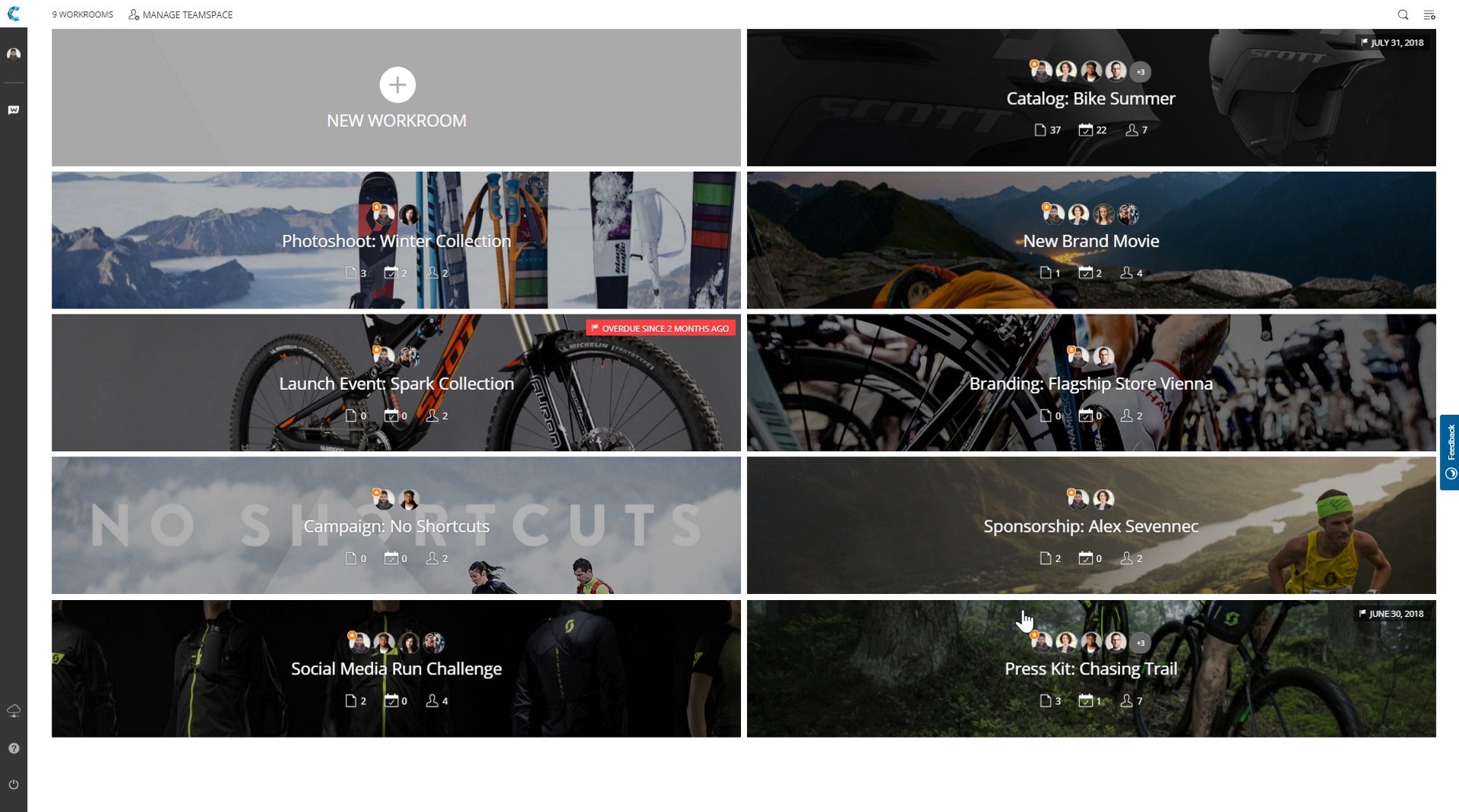
Screenshot of Screenshot of Screenshot of Screenshot of
