Overview
ProductRatingMost Used ByProduct SummaryStarting Price
KeePass
Score 8.9 out of 10
N/A
KeePass is an open source password manager which secures passwords in a database locked with a master password or key file.N/A
Keeper
Score 6.6 out of 10
N/A
Keeper's password security and management platform boasts millions of people and thousands of businesses as users, who manage, secure and enforce strong passwords across all employee logins, applications and sites. Employees can access Keeper natively on all mobile operating systems, desktops and browsers. Keeper enables businesses to auto-generate high-strength passwords, protect sensitive files in an encrypted digital vault, securely share records with teams and integrate with SSO, LDAP and…
$2
per month per user
Lightning Tools DeliverPoint
Score 8.2 out of 10
Enterprise companies (1,001+ employees)
DeliverPoint supports reporting and managing SharePoint permissions. Site Owners, Site Collection Administrators, and SharePoint Administrators can run permission reports that reflect the permissions of every user. Site collections, Teams Channels, Hub Sites, SharePoint Sites, OneDrive, Lists, Folders and Items can all be reported on individually or in bulk. Permissions can be modified, transferred, copied or deleted between accounts as staff changes occur.
$2,500
per year per installation
Pricing
KeePassKeeperLightning Tools DeliverPoint
Editions & Modules
No answers on this topic
Keeper Business Starter
$2.00
per month per user
Keeper Enterprise
Contact Keeper for pricing
DeliverPoint OnPrem
From $1950
per year per installation
DeliverPoint OnPrem Enterprise Edition
POA
per year per installation
DeliverPoint Online
From $2500
per year per installation
DeliverPoint Online Enterprise Edition (>10,000 users)
POA
per year per installation
Offerings
Pricing Offerings
KeePassKeeperLightning Tools DeliverPoint
Free Trial
NoYesYes
Free/Freemium Version
NoNoNo
Premium Consulting/Integration Services
NoYesYes
Entry-level Setup FeeNo setup feeNo setup feeNo setup fee
Additional DetailsPrices listed are starting prices for "stock" product. $2.50 per user/year on top of base price Enterprise product is designed for 10,000+ users, and can be customised if required to meet business needs. Prices are based on 12 month contract from 1st purchase month. Installation included in price. Full technical support available. Online versions will have access to free product updates during contract period.
More Pricing Information
Community Pulse
KeePassKeeperLightning Tools DeliverPoint
Features
KeePassKeeperLightning Tools DeliverPoint
Identity Management
Comparison of Identity Management features of Product A and Product B
KeePass
-
Ratings
Keeper
-
Ratings
Lightning Tools DeliverPoint
7.7
1 Ratings
7% below category average
ID-Management Access Control00 Ratings00 Ratings7.31 Ratings
Account Provisioning and De-provisioning00 Ratings00 Ratings8.21 Ratings
Best Alternatives
KeePassKeeperLightning Tools DeliverPoint
Small Businesses
RoboForm
RoboForm
Score 9.0 out of 10
Bitwarden
Bitwarden
Score 9.2 out of 10
1Password
1Password
Score 9.2 out of 10
Medium-sized Companies
1Password
1Password
Score 9.2 out of 10
Bitwarden
Bitwarden
Score 9.2 out of 10
RSA Access Manager (Discontinued)
Score 10.0 out of 10
Enterprises
Norton 360
Norton 360
Score 7.2 out of 10
Delinea Secret Server
Score 7.9 out of 10
RSA Access Manager (Discontinued)
Score 10.0 out of 10
All AlternativesView all alternativesView all alternativesView all alternatives
User Ratings
KeePassKeeperLightning Tools DeliverPoint
Likelihood to Recommend
8.7
(23 ratings)
9.0
(21 ratings)
8.2
(1 ratings)
Likelihood to Renew
10.0
(1 ratings)
-
(0 ratings)
-
(0 ratings)
Usability
7.0
(4 ratings)
9.0
(1 ratings)
-
(0 ratings)
Support Rating
9.7
(7 ratings)
10.0
(2 ratings)
-
(0 ratings)
User Testimonials
KeePassKeeperLightning Tools DeliverPoint
Likelihood to Recommend
Open Source
[KeePass] works extremely well for personal work passwords and personal-use passwords for home. It allows users to remember 1 single complex password in order to gain access to the entire database of passwords. It doesn't work so well if you want to sync passwords to multiple devices such as your computer or phone. It can be done, but it's not simple.
Read full review
Keeper Security
I can only think of scenarios where Keeper is well-suited, in my experience. I work in small business (i.e., sole proprietor, 1 employee) environments and Keeper is well-suited to my needs. I imagine it would also be well-suited to multi-user environments, but would require a great deal more management and organization in such environments.
Read full review
Lightning Tools
Copy user permissions through the whole sites of SharePoint farm
Read full review
Pros
Open Source
  • Very secure - no worries about our passwords being stored insecurely or in the wrong place.
  • Easy to share access to passwords used company-wide.
  • Integrates with Chrome and other browsers for ease of use and speed.
  • Price - free to use.
Read full review
Keeper Security
  • Ease of use. User find it simple and intuitive to use and I find they rapidly adjust to the software with minimal training.
  • Single-sign-on. Super important and really makes things simple for the users and easy to manage for us in the IT team.
  • Sharing features. We knew sharing was a key component of our password management solution. Keeper makes it easy for users and simple to administer.
Read full review
Lightning Tools
  • Discover Site Permisions
  • Sheduled reports of required lists, libraries, sites...
  • Compact set of commands which works with user permissions
Read full review
Cons
Open Source
  • The user-friendliness could be better. The interface looks outdated and is sometimes quite technical.
  • If you're on the road a lot, KeePass isn't very user-friendly on a smartphone or tablet. It's fine to use on a laptop, though.
  • Sharing passwords with colleagues who are temporarily unable to log into KeePass independently could be improved.
Read full review
Keeper Security
  • I find that Keeper could use some work with their desktop interface, a sleeker and friendlier user interface would definitely benefit them.
  • Keeper doesn’t have a Security Dashboard, which makes it more complicated to evaluate the strengths and weaknesses of your passwords.
  • The automatic web form filling is somewhat limited at the time, but im sure they will improve it soon.
Read full review
Lightning Tools
  • Linking basic information to the object selected in the left panel (site structure view)
Read full review
Likelihood to Renew
Open Source
My very good experience in the past 15 years of usage of KeePass makes it easy to decide for a renewal of this friendship. I was never disappointed and KeePass always meets my expectations. The software runs stable and if there should be a software error, it will be fixed in no time. This is customer satisfaction.
Read full review
Keeper Security
No answers on this topic
Lightning Tools
No answers on this topic
Usability
Open Source
KeePass is easy to use and requires no prior training using it. I would rate KeePass a score 9 out of 10. It stands out in managing credentials securely and efficiently. No other similar app performs its core function as well, making KeePass an essential tool for password management and security.
Read full review
Keeper Security
It's just easy to use, plain and simple. It has the complexity and user-interface that gives you confidence in its build but the ease-of-use that keep things from getting too complicated. A huge plus when you have to onboard new members of the team or summer interns when you need them to step in and make orders on your behalf.
Read full review
Lightning Tools
No answers on this topic
Support Rating
Open Source
I have almost never had to contact support. This product has a wide community, a very expansive documentation/forum site where generally any question/issue already has an answer/fix or explanation/workaround, or plans for improvement in a future version. On the occasions that I have reached out, answers were fairly quick, useful, and respectful.
Read full review
Keeper Security
Because it is so good. It always works, has not crashed even in 3 years; I have a lot of data in it (never any problems).
Read full review
Lightning Tools
No answers on this topic
Alternatives Considered
Open Source
KeePass is free and compatible with all the devices you or your customers and it has a lot of different uses. Is not only a password manager like Norton safe password or the avast's one. Like the password managers of the browsers, no, with KeePass every customer can find a useful way to share and keep secure I formations
Read full review
Keeper Security
I have used the Apple cloud, but if you forget your password into that, once again, you’re at the mercy of calling customer service. With Keeper, you can use the thumbprint option to log on, and there’s any of your needed passwords. It’s fast and simple, and you don’t have to wait online to unlock the app you’ve locked yourself out of.
Read full review
Lightning Tools
No answers on this topic
Return on Investment
Open Source
  • Positive. All of our usernames and passwords for service accounts are in one convenient location.
  • Positive. The ability to organize everything into separate locations/folders is great.
  • Positive. Password generator makes it easy for us to generate a secure password for our accounts.
Read full review
Keeper Security
  • The spreadsheets and printed papers being passed around the office with passwords on them have gone! This is a huge security hole plugged.
  • Users actively use the software which says something - it is easy to use and intuitive. When software is not intuitive, it tends to not get used.
  • It gives IT control over who does what with passwords, and while difficult to quantify it is certainly a dramatically positive impact on the organization.
Read full review
Lightning Tools
  • Speeds up the management of user permissions
  • Provides a comprehensive overview of permissions and settings of individual security levels across areas of company informations
Read full review
ScreenShots

Keeper Screenshots

Screenshot of Autofill Passwords in Websites & AppsScreenshot of Business & Enterprise ProtectionScreenshot of Dark Web Monitoring & AlertsScreenshot of Enhanced Two-Factor AuthenticationScreenshot of Increase Organization with SubfoldersScreenshot of Secure File & Password Sharing

Lightning Tools DeliverPoint Screenshots
Screenshot of CONTEXTUAL SHAREPOINT PERMISSION REPORTING
SharePoint Permissions are not just the responsibility of IT. Business Users (Content Owners) can create sites, lists, libraries and of course list and library content. The business user is capable of sharing the content with internal users, but perhaps also external users. Sharing such content can result in users gaining permissions to sites or content not intended to be shared. For example, if a site is shared, the user who the site is shared with becomes a member of the members group by default. That members group may have Edit permissions to other sites or content elsewhere within the site collection. DeliverPoint gives visibility of such permissions to support better SharePoint permission decisions from within the Site, List or Library itself.Screenshot of GRANULAR SHAREPOINT CONTENT PERMISSION REPORTS
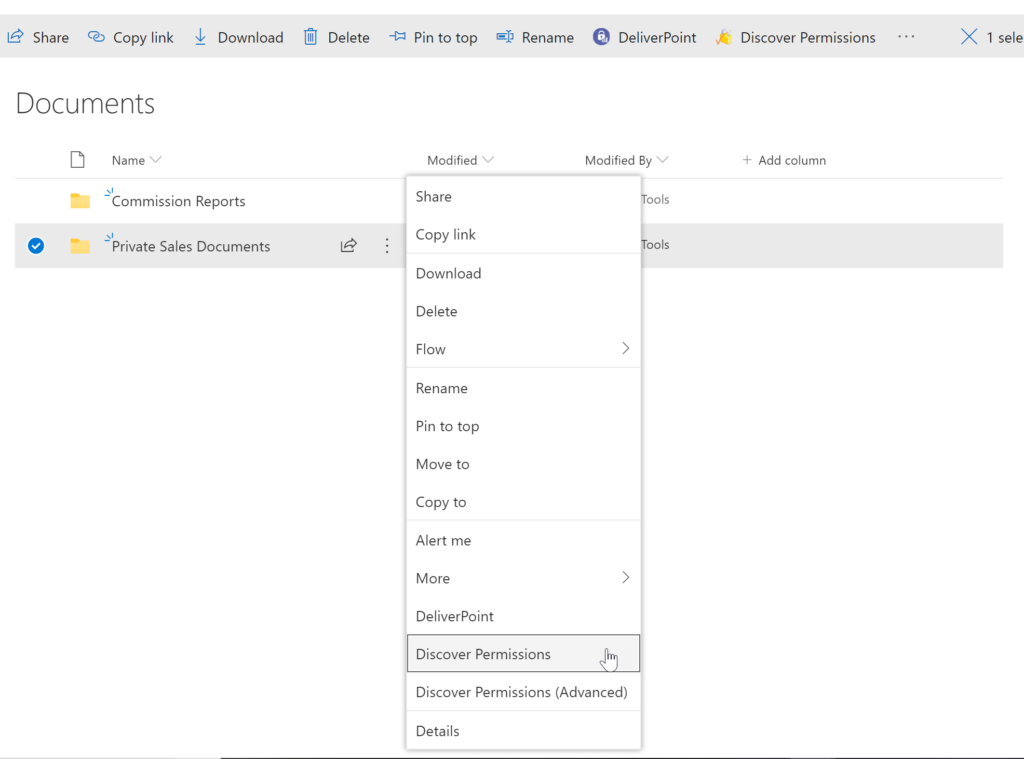
The DeliverPoint Discover Permissions report displays a full transparent report of all users that have permissions to the site, list/library or item. This displays what permissions each account has to the selected object, as well as how the permissions were assigned. Filter can be used for each user to check for duplicate permissions, filter by Permission Level to see which users are granted each permission level, and also filter by the ‘Permissioned Via’ column to see who has received permissions via a particular SharePoint, Microsoft 365 Group, or Azure AD Security group. The Discover Permissions report can be executed against multiple documents or items, lists and within the site or subsites.Screenshot of EXTERNAL SHARING LINKS REPORTING AND MANAGEMENT
Within SharePoint, users can share links with anyone, internal users and external users. DeliverPoint provides an External Sharing Links report that can be used within a site or across sites. The user can see who shared the link, when they shared the link, and optionally remove the link if it’s required.Screenshot of REPORT AND MANAGE PERMISSIONS FROM WITHIN MICROSOFT TEAMS
DeliverPoint is also available within Microsoft Teams. Team Owners can produce Microsoft Teams Permission reports within their Teams Channels and across Private Channels. The reports provide confidence and assurance that permissions are set correctly and that sharing isn’t out of control. Changes to permissions can be made contextually within a Team or centrally across multiple Teams should permissions need to be removed or managed.Screenshot of MANAGE SHAREPOINT PERMISSIONS
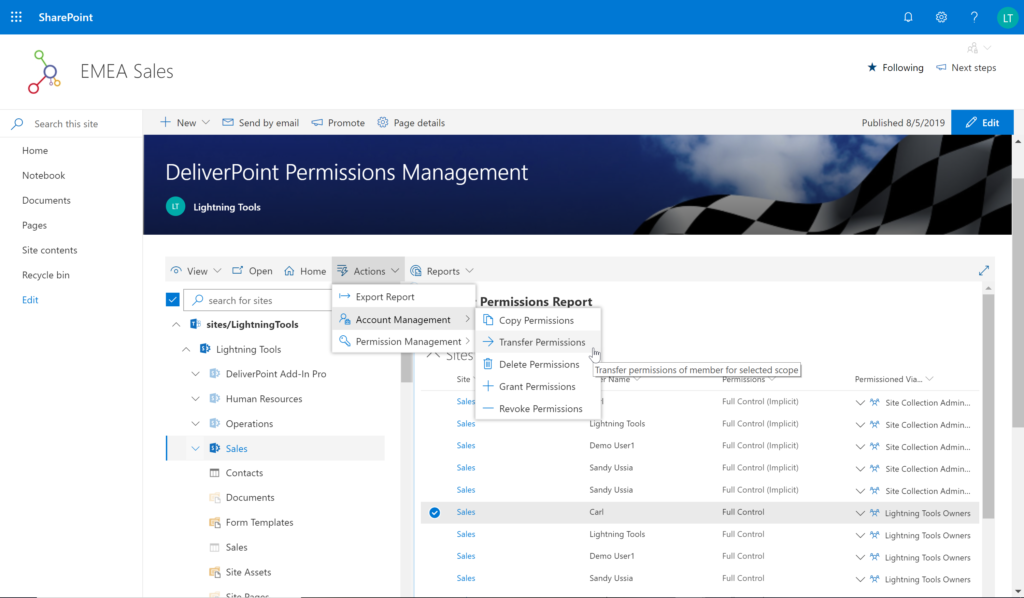
Using DeliverPoint, Site Owners, Site Collection Administrators and Tenant Administrators can manage permissions across the objects that they have Full Control to. Within organizations, users change roles, leave organizations, or join organizations. Making permission changes to accounts to reflect these changes is time consuming. DeliverPoint can be used to simply select the scope to change, and perform the change as one operation. The operations include Transfer, Delete, Copy or Revoke Permissions.Screenshot of UNIQUE PERMISSION REPORTING
The DeliverPoint Unique Permissions Report enables Site Collection Administrators or SharePoint Administrators to view the permissions assigned to a specific user account or group throughout site collections. The report includes all Microsoft 365 Groups, SharePoint Groups and Active Directory Security Groups that the user is a member of. A list of Site Permissions, List Permissions and Item Permissions that the user has been assigned permissions to are listed, allowing  the permissions to be removed or transferred if they are incorrect.