LinkedIn Sales Navigator vs. Reo.Dev

Overview
ProductRatingMost Used ByProduct SummaryStarting Price
LinkedIn Sales Navigator
Score 8.6 out of 10
N/A
LinkedIn Sales Navigator is a sales intelligence software solution offered by LinkedIn.
$79.99
per month
Reo.Dev
Score 10.0 out of 10
N/A
Reo.Dev is a revenue intelligence tool tailored for developer-focused Go-To-Market teams. It identifies intent signals from a variety of developer-specific sources including GitHub interactions, package manager installations (e.g., npm, pip, helm), open-source telemetry, cloud sign-ups, and technical documentation and converts it into accounts and developer leads who are active around the customer’s product.N/A
Pricing
LinkedIn Sales NavigatorReo.Dev
Editions & Modules
Professional
$79.99
per month
Team
$134.99
per license
Enterprise
Contact sales team
No answers on this topic
Offerings
Pricing Offerings
LinkedIn Sales NavigatorReo.Dev
Free Trial
NoNo
Free/Freemium Version
NoNo
Premium Consulting/Integration Services
NoYes
Entry-level Setup FeeNo setup feeNo setup fee
Additional Details
More Pricing Information
Community Pulse
LinkedIn Sales NavigatorReo.Dev
Features
LinkedIn Sales NavigatorReo.Dev
Prospecting
Comparison of Prospecting features of Product A and Product B
LinkedIn Sales Navigator
7.6
182 Ratings
2% below category average
Reo.Dev
9.7
1 Ratings
22% above category average
Advanced search9.2182 Ratings10.01 Ratings
Identification of new leads9.1180 Ratings10.01 Ratings
List quality8.1176 Ratings10.01 Ratings
List upload/download4.8121 Ratings10.01 Ratings
Ideal customer targeting8.2175 Ratings10.01 Ratings
Load time/data access6.5162 Ratings8.01 Ratings
Sales Intelligence Data Standards
Comparison of Sales Intelligence Data Standards features of Product A and Product B
LinkedIn Sales Navigator
8.0
180 Ratings
3% above category average
Reo.Dev
9.7
1 Ratings
22% above category average
Contact information7.7159 Ratings10.01 Ratings
Company information8.1180 Ratings10.01 Ratings
Industry information8.2175 Ratings9.01 Ratings
Data Augmentation & Lead Qualification
Comparison of Data Augmentation & Lead Qualification features of Product A and Product B
LinkedIn Sales Navigator
8.0
177 Ratings
7% above category average
Reo.Dev
9.6
1 Ratings
25% above category average
Lead qualification process7.8136 Ratings10.01 Ratings
Smart lists and recommendations7.5159 Ratings9.01 Ratings
Salesforce integration7.8130 Ratings10.01 Ratings
Company/business profiles8.6173 Ratings9.01 Ratings
Alerts and reminders8.1154 Ratings9.01 Ratings
Data hygiene7.6155 Ratings9.01 Ratings
Automatic data refresh6.8135 Ratings10.01 Ratings
Tags8.3129 Ratings10.01 Ratings
Filters and segmentation9.1163 Ratings10.01 Ratings
Sales Intelligence Email Features
Comparison of Sales Intelligence Email Features features of Product A and Product B
LinkedIn Sales Navigator
6.6
79 Ratings
12% below category average
Reo.Dev
8.5
1 Ratings
13% above category average
Sales email templates6.972 Ratings8.01 Ratings
Append emails to records6.367 Ratings9.01 Ratings
Best Alternatives
LinkedIn Sales NavigatorReo.Dev
Small Businesses
Lead411
Lead411
Score 8.3 out of 10
Lead411
Lead411
Score 8.3 out of 10
Medium-sized Companies
Lead411
Lead411
Score 8.3 out of 10
Lead411
Lead411
Score 8.3 out of 10
Enterprises
TechTarget Priority Engine
Score 10.0 out of 10
TechTarget Priority Engine
Score 10.0 out of 10
All AlternativesView all alternativesView all alternatives
User Ratings
LinkedIn Sales NavigatorReo.Dev
Likelihood to Recommend
8.6
(183 ratings)
10.0
(1 ratings)
Likelihood to Renew
8.0
(3 ratings)
-
(0 ratings)
Usability
7.4
(11 ratings)
10.0
(1 ratings)
Support Rating
9.0
(3 ratings)
-
(0 ratings)
Implementation Rating
8.0
(2 ratings)
-
(0 ratings)
User Testimonials
LinkedIn Sales NavigatorReo.Dev
Likelihood to Recommend
LinkedIn
LinkedIn Sales Navigator is hands down the best tool for identifying targeted contacts or leads. You can drill down on a company and look at its entire workforce, or search by the exact title that is your key target. The information is up to date, as people tend to keep their LinkedIn profiles current. In terms of other marketing functions LI Sales Navigator is extremely limited. BUT if you are looking to identify contacts for prospecting purposes, then this tool is what you need.
Read full review
Reo.Dev
Good Intent data is available. I got access to good mature leads for certain ABM campaigns.
Read full review
Pros
LinkedIn
  • Search Functionality: LinkedIn Sales Navigator has one of the most powerful search functions. The filters are not unnecessary and some are very well thought of. You can drill down to finding a needle in a haystack of 20000 employee company when it comes to using LinkedIn Sales Navigator if done in the right manner.
  • Smart Links: Gone are the days of attached Decks. One can simply create their deck online using this feature on LinkedIn Sales Navigator, or even upload an existing ppt. A smart link is shareable as well as trackable for opens and clicks.
  • Fewer Clicks: With a single click, I can filter out decision-makers in any company. With a single click, I can import contacts from LinkedIn Sales Navigator to Salesforce. Lesser clicks are actually less stressful if you think.
Read full review
Reo.Dev
  • Buyer Intent Signal
  • Data Enrichment
Read full review
Cons
LinkedIn
  • Inbox needs work - too much confusion around your LinkedIn inbox and Sales Nav inbox
  • Sorting - need a better, faster way to sort by for prospect lists and account lists
  • Only voluntarily shared information. No cross checking or using API’s like a ZoomInfo
Read full review
Reo.Dev
No answers on this topic
Likelihood to Renew
LinkedIn
This question is a no-brainer. The tool is the industry standard for anyone tied to sales and marketing. The name "LinkedIn Sales Navigator" is synonymous with streamlining relevant customer and account data in an easy to use format that is actionable and intelligent. The focus on continuous improvement and richer means of communicating with customers and prospects is evident each time new features are rolled out. The social component of the tool even includes a gamification component to ensure that peers remain relevant among each other, which is refreshing and enjoyable for those who engage the tool on a daily basis.
Read full review
Reo.Dev
No answers on this topic
Usability
LinkedIn
Overall, it's very user-friendly. It's hard for a tool to make sorting through loads of data easy, but Sales Nav does this very well. Its advanced search features enable us to be selective in finding the right people to talk to and connect with.
Read full review
Reo.Dev
The ability to map buyer journey stages using real usage signals is something I haven’t seen elsewhere. It’s helped align marketing and sales around a shared source of truth.
Read full review
Support Rating
LinkedIn
I would recommend LinkedIn Sales Navigator entirely. It has been the most user-friendly tool to use starting off in a sales role. I genuinely enjoy the navigation of the tool and how easy it is to save lists and see job changes within those lists. Generating leads and finding the most up to date information on prospects is all housed within this tool.
Read full review
Reo.Dev
No answers on this topic
Implementation Rating
LinkedIn
I am unsure of the rollout, as I was not involved. I was an early adopter, and I have had a lot of success with the tool personally at multiple organizations, but I have no idea whether the implementation process encountered any errors. I can personally say that it works, and that I have not encountered significant issues with the tool since adoption, although a few issues like messages showing up as being unread even though they have been opened have been an on-again/off-again issues throughout the past few years. Overall, the company is doing a great job, and our implementation seems to have been effective.
Read full review
Reo.Dev
No answers on this topic
Alternatives Considered
LinkedIn
LinkedIn Sales Navigator is much more valuable than Dice or Cognism, as we do most of our prospecting on LinkedIn. Therefore, it means we can build lists of our prospects based on activity, connections, and buying intention. With Cognism and Dice, you cannot do this as they do not work alongside the LinkedIn platform and, therefore, lack the functionality that is essential to what we are using the platform for.
Read full review
Reo.Dev
Reo.Dev has better quality data as compared to Common Room, and more specifically Reo.Dev is dev tool focused and hence that expertise shines through in leads received.
Read full review
Return on Investment
LinkedIn
  • Helped warm up a few leads that I was having trouble getting in touch with via phone and email
  • Allowed me to better identify the key stakeholders at companies I was targeting
  • Kept me up to date on what was happening with my prospects and their companies.
Read full review
Reo.Dev
  • 20% increase in Sales
Read full review
ScreenShots

Reo.Dev Screenshots

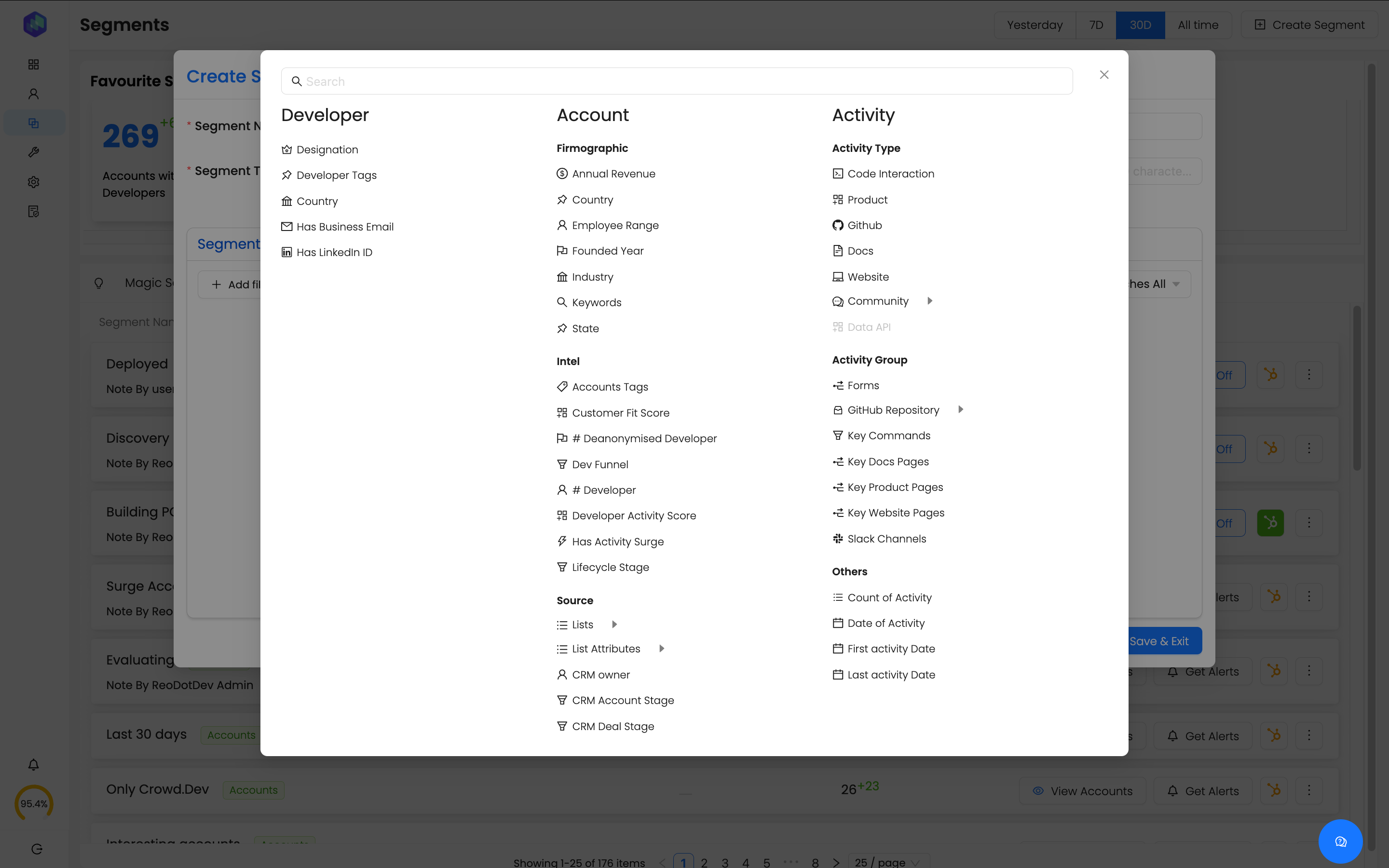
Screenshot of the Accounts Panel, which provides a 360-degree view of developer engagement within target accounts. Filters can be used to analyze activity, intent signals, and firmographic data. Users can identify high-fit accounts based on customer fit, dev activity, and engagement trends to prioritize outreach.Screenshot of the Activity Timeline, which gives a detailed chronological view of all interactions happening in an account. Filter activities by source (GitHub, Documentation, Slack, Website, Product Logins, etc) to track developer intent, feature adoption, and research patterns in real-time.Screenshot of where Reo.Dev allows users to create precise audience segments by combining multiple data signals such as designation, job change, activity type, and source. Perfect for ABM (Account-Based Marketing) and sales targeting, ensuring outreach is focused on high-converting prospects.Screenshot of analytics that help understand where accounts are in the developer adoption journey—from Exploring (early research) to Deploying (active usage). Sales, marketing, and DevRel teams can leverage this funnel to time outreach, nurture leads, and convert developers into paying customers.Screenshot of the Prospects Tab, which auto-segregates decision-makers and developers based on account activity. Here, users can select profiles and sync them to CRM, Apollo.io, or Outreach.io for personalized engagement.Screenshot of where to build custom Buyer & Developer Personas based on job titles, seniority, and specialization. Pre-defined personas help streamline lead generation and outreach within any ideal customer profile (ICP).