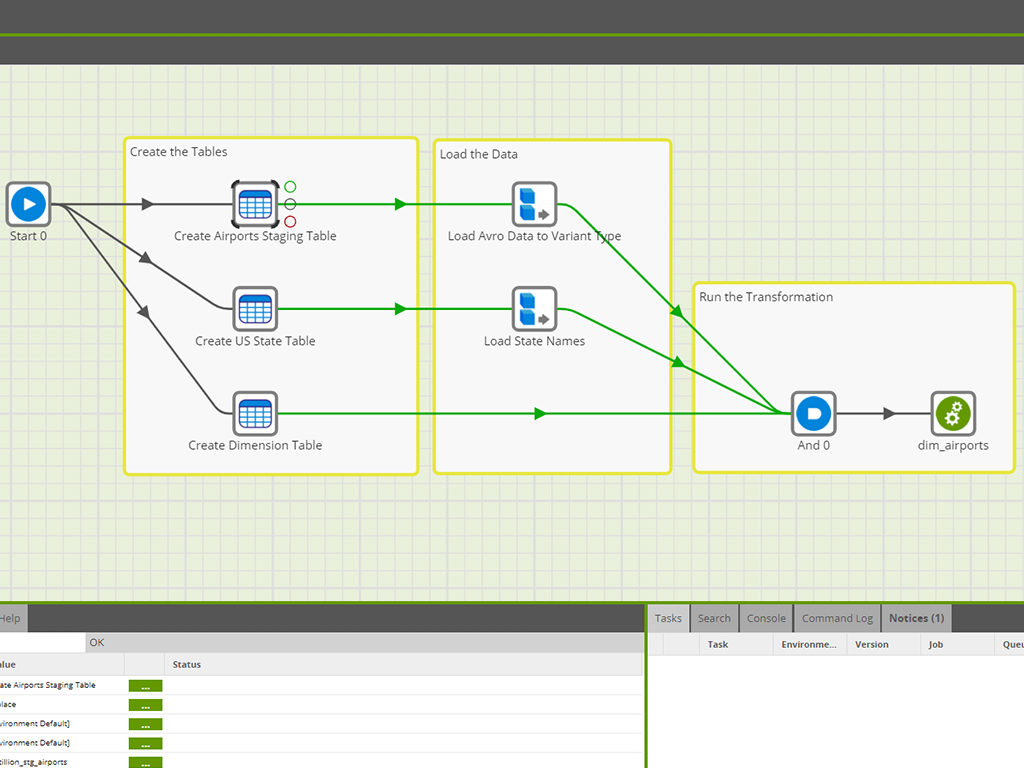
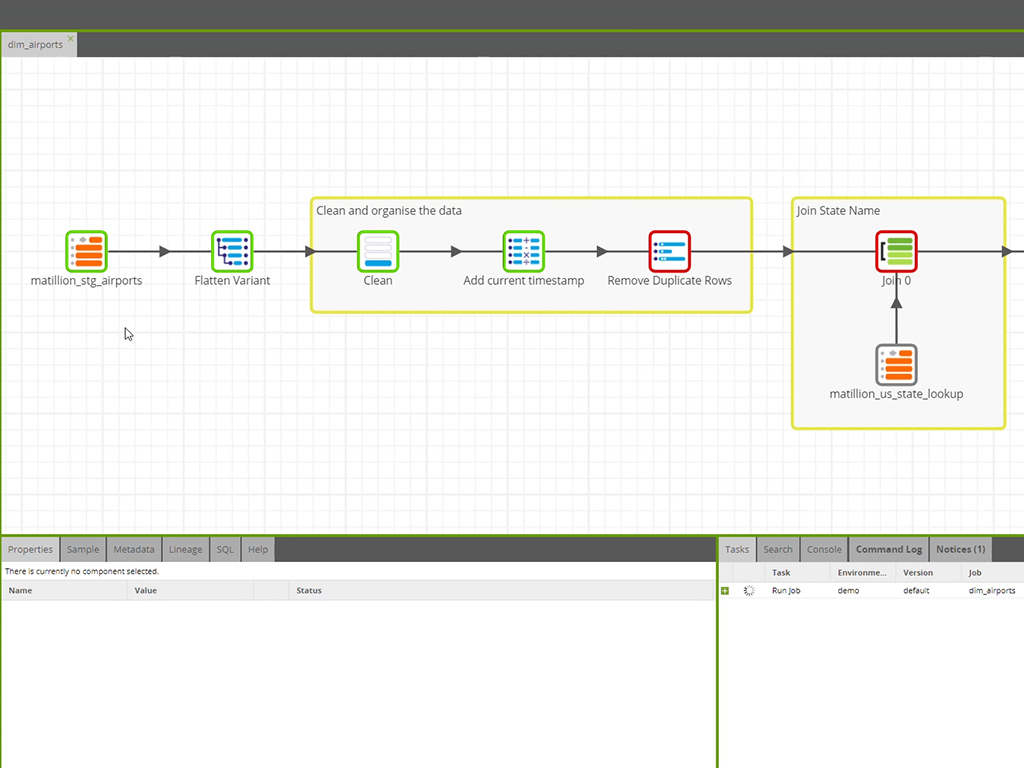
Maia by Matillion is an autonomous data engineering platform designed to automate the lifecycle of data pipelines through AI-driven orchestration. The solution functions as an enterprise "digital workforce" that translates natural language requirements into production-ready DataPipelines, leveraging a Pushdown Architecture to execute transformations natively within cloud data warehouses.
N/A
SSIS
Score8 out of 10
N/A
Microsoft's SQL Server Integration Services (SSIS) is a data integration solution.
N/A
Pricing
Maia by Matillion
SSIS
Editions & Modules
No answers on this topic
No answers on this topic
Offerings
Pricing Offerings
Maia by Matillion
SSIS
Free Trial
Yes
No
Free/Freemium Version
No
No
Premium Consulting/Integration Services
Yes
No
Entry-level Setup Fee
No setup fee
No setup fee
Additional Details
Billed directly via cloud marketplace on an hourly basis, with annual subscriptions available depending on the customer's cloud data warehouse provider.
Senior Data Specialist in Engineering at Lime Intelligence (Information Technology & Services, 11-50 employees)
Chose Maia by Matillion
The only other ETL tool I've used was SSIS. At first I thought Matillion seemed "kiddish" after using the polished Microsoft tool but now I think Matillion is easier and can do much more as it has so many built-in connectors etc. We selected Matillion at our job because of …
A de minimis incentive was given to thank the reviewer for their time. The incentive was not used to bias or drive a particular response, nor was the incentive contingent on a positive endorsement. More Info
Senior Database Architect in Information Technology at InnovAge (Hospital & Health Care, 1001-5000 employees)
Chose Maia by Matillion
We selected Matillion primarily because of it's ability to connect to numerous data sources and easily create transformation jobs. While Fivetran does a better job managing and examining deltas, it is not easy to use and is very non user friendly. SSIS was not a good fit for …
A de minimis incentive was given to thank the reviewer for their time. The incentive was not used to bias or drive a particular response, nor was the incentive contingent on a positive endorsement. More Info
Sr. Data Engineer in Research & Development at HireVue (Information Technology and Services, 201-500 employees)
Chose Maia by Matillion
SQL Server Integration Services (SSIS) is built around the Microsoft ecosystem; we needed something that was either "ecosystem-agnostic" or focused on AWS, which Matillion is. SSIS has very limited ability to parameterize jobs/packages compared to Matillion, reducing the …
A de minimis incentive was given to thank the reviewer for their time. The incentive was not used to bias or drive a particular response, nor was the incentive contingent on a positive endorsement. More Info
Verified User
Chose Maia by Matillion
Matillion has more security and better version control features. The support of amazing with new connectors introduced every day.
A de minimis incentive was given to thank the reviewer for their time. The incentive was not used to bias or drive a particular response, nor was the incentive contingent on a positive endorsement. TR verified that a representative sample of customers was invited. More Info
Verified User
Chose Maia by Matillion
The Matillion selection was not my decision. But I think it's a good enough choice. It is especially valuable that the team can learn Matillion easily and that the project can be understood by the entire team with the visual environment instead of complex ETLs.
A de minimis incentive was given to thank the reviewer for their time. The incentive was not used to bias or drive a particular response, nor was the incentive contingent on a positive endorsement. More Info
Verified User
Chose Maia by Matillion
Matillion was chosen by Schibsted due to the seamless integration with Snowflake. The ease of use and fast workflow have made it an essential tool in our setup, and with the option to integrate nearly every data source there is, plus the ease of use, it really gives a lot of …
A de minimis incentive was given to thank the reviewer for their time. The incentive was not used to bias or drive a particular response, nor was the incentive contingent on a positive endorsement. More Info
Verified User
Chose Maia by Matillion
Matillion is much easier to set up and easier to work for the team. Offers a lot more connections which are easier to set up. Environment variables make it easy to set up once and job creation is easy. We use Metadata tables to just loop through the list of tables that need to …
A de minimis incentive was given to thank the reviewer for their time. The incentive was not used to bias or drive a particular response, nor was the incentive contingent on a positive endorsement. More Info
Verified User
Chose Maia by Matillion
It's browser-based and well suited for snowflake and redshift DWH. Matillion is Python-scripting friendly.
A de minimis incentive was given to thank the reviewer for their time. The incentive was not used to bias or drive a particular response, nor was the incentive contingent on a positive endorsement. More Info
Verified User
Chose Maia by Matillion
Matillion is cloud-native, therefore it doesn't need virtual machines to set up. It is easier to use compared with some of them. It always does query pushdown, while other ones don't'. It is integrated with Snowflake, while other ETLs need to use workarounds in order to perform …
A de minimis incentive was given to thank the reviewer for their time. The incentive was not used to bias or drive a particular response, nor was the incentive contingent on a positive endorsement. More Info
Business Intelligence Engineer in Information Technology at 3Q Digital (Marketing & Advertising, 201-500 employees)
Chose Maia by Matillion
Similar simple GUI but Matillion's is much cleaner, easier to manage and debug, and easier to connect to cloud databases. Matillion is also much faster.
A de minimis incentive was given to thank the reviewer for their time. The incentive was not used to bias or drive a particular response, nor was the incentive contingent on a positive endorsement. More Info
A de minimis incentive was given to thank the reviewer for their time. The incentive was not used to bias or drive a particular response, nor was the incentive contingent on a positive endorsement. More Info
Verified User
Chose Maia by Matillion
Matillion ease of use and feature set along with integration capabilities and built in integrations are definitely a step ahead than the other tools and it provides the ability for us ti integrate with refshift, Snowflake and on premise data sources and hence becomes a …
A de minimis incentive was given to thank the reviewer for their time. The incentive was not used to bias or drive a particular response, nor was the incentive contingent on a positive endorsement. More Info
Verified User
Chose Maia by Matillion
Matillion seemed more robust than Fivetran and was easier to use.
A de minimis incentive was given to thank the reviewer for their time. The incentive was not used to bias or drive a particular response, nor was the incentive contingent on a positive endorsement. More Info
Data Practice Lead in Engineering at InterWorks, Inc (Utilities, 201-500 employees)
Chose Maia by Matillion
Matillion is much easier to use than the other tools that I've worked with in the past and has a more complete forward-thinking cloud strategy. Legacy ETL tools struggle to make use of modern cloud data warehouse patterns.
A de minimis incentive was given to thank the reviewer for their time. The incentive was not used to bias or drive a particular response, nor was the incentive contingent on a positive endorsement. More Info
A de minimis incentive was given to thank the reviewer for their time. The incentive was not used to bias or drive a particular response, nor was the incentive contingent on a positive endorsement. More Info
Verified User
Chose Maia by Matillion
Being a fairly new player in the market, Matillion is coming up against some well-established names such as Pentaho and Talend. The primary benefit for our use case was the fact that Matillion is built specifically for Amazon Redshift. While Pentaho and Talend are more mature …
A de minimis incentive was given to thank the reviewer for their time. The incentive was not used to bias or drive a particular response, nor was the incentive contingent on a positive endorsement. More Info
Verified User
Chose Maia by Matillion
Overall from an ease of use and set up standpoint, it stacks up better than most of the other tools I've used. However, Matillion doesn't quite expand and scale up as well as the other solutions.
A de minimis incentive was given to thank the reviewer for their time. The incentive was not used to bias or drive a particular response, nor was the incentive contingent on a positive endorsement. More Info
Microsoft
Verified User
Chose SSIS
When looking to evaluate different options, we looked first to the experience and software we had in-house that would accomplish the job. When assessing alternatives outside we were looking for the tool that would offer the most flexibility.
A de minimis incentive was given to thank the reviewer for their time. The incentive was not used to bias or drive a particular response, nor was the incentive contingent on a positive endorsement. More Info
Great: Need to query simpler APIs, or utilize well known services such as GSheets etc.? Matillion has got some of the best and easiest to use connectors out there. Not so great: Do you need have a competent CI/CD flow that you will be able to update / compare from Matillion as well as other sources at the same time? Good luck, you will need to be extra careful, as you might have to have a deeper dive into your servers Terminal each time you have a git conflict.
A de minimis incentive was given to thank the reviewer for their time. The incentive was not used to bias or drive a particular response, nor was the incentive contingent on a positive endorsement. TR verified that a representative sample of customers was invited. More Info
As I mentioned earlier SQL Server Integration Services is suitable if you want to manage data from different applications. It really helps in fetching the data and generating reports. Its automation make it very easy and time efficient. It works well with large database as well. But it doesn't work well with real time data, it will take some time to gather the real time data. I would not recommend using it in a real time/fast-paced environment.
A de minimis incentive was given to thank the reviewer for their time. The incentive was not used to bias or drive a particular response, nor was the incentive contingent on a positive endorsement. More Info
A de minimis incentive was given to thank the reviewer for their time. The incentive was not used to bias or drive a particular response, nor was the incentive contingent on a positive endorsement. TR verified that a representative sample of customers was invited. More Info
A de minimis incentive was given to thank the reviewer for their time. The incentive was not used to bias or drive a particular response, nor was the incentive contingent on a positive endorsement. More Info
Matillion is brilliant at importing data -- it would be amazing to have more ways to export data, from emailed exports to API pushes.
Any Python that takes more than a few lines of code requires an external server to run it. It would be great to have more integration (perhaps in a connected virtual environment) to easily integrate customized code.
Troubleshooting server logs requires quite a bit of technical expertise. More human readable detailed error handling would be greatly appreciated.
A de minimis incentive was given to thank the reviewer for their time. The incentive was not used to bias or drive a particular response, nor was the incentive contingent on a positive endorsement. TR verified that a representative sample of customers was invited. More Info
Connection managers for online data sources can be tricky to configure.
Performance tuning is an art form and trialing different data flow task options can be cumbersome. SSIS can do a better job of providing performance data including historical for monitoring.
Mapping destination using OLE DB command is difficult as destination columns are unnamed.
Excel or flat file connections are limited by version and type.
A de minimis incentive was given to thank the reviewer for their time. The incentive was not used to bias or drive a particular response, nor was the incentive contingent on a positive endorsement. More Info
With the current experience of Matillion, we are likely to renew with the current feature option but will also look for improvement in various areas including scalability and dependability. 1. Connectors: It offers various connectors option but isn't full proof which we will be looking forward as we grow. 2. Scalability: As usage increase, we want Matillion system to be more stable.
A de minimis incentive was given to thank the reviewer for their time. The incentive was not used to bias or drive a particular response, nor was the incentive contingent on a positive endorsement. More Info
Some features should be revised or improved, some tools (using it with Visual Studio) of the toolbox should be less schematic and somewhat more flexible. Using for example, the CSV data import is still very old-fashioned and if the data format changes it requires a bit of manual labor to accept the new data structure
A de minimis incentive was given to thank the reviewer for their time. The incentive was not used to bias or drive a particular response, nor was the incentive contingent on a positive endorsement. More Info
We are able to bring on new resources and teach them how to use Matillion without having to invest a significant amount of time. We prefer looking for resources with any type of ETL skill-set and feel that they can learn Matillion without problem. In addition, the prebuilt objects cover more than 95% of our use cases and we do not have to build much from scratch.
SSIS is a great tool for most ETL needs. It has the 90% (or more) use cases covered and even in many of the use cases where it is not ideal SSIS can be extended via a .NET language to do the job well in a supportable way for almost any performance workload.
A de minimis incentive was given to thank the reviewer for their time. The incentive was not used to bias or drive a particular response, nor was the incentive contingent on a positive endorsement. More Info
SQL Server Integration Services performance is dependent directly upon the resources provided to the system. In our environment, we allocated 6 nodes of 4 CPUs, 64GB each, running in parallel. Unfortunately, we had to ramp-up to such a robust environment to get the performance to where we needed it. Most of the reports are completed in a reasonable timeframe. However, in the case of slow running reports, it is often difficult if not impossible to cancel the report without killing the report instance or stopping the service.
A de minimis incentive was given to thank the reviewer for their time. The incentive was not used to bias or drive a particular response, nor was the incentive contingent on a positive endorsement. More Info
Overall, I've found Matillion to be responsive and considerate. I feel like they value us as a customer even when I know they have customers who spend more on the product than we do. That speaks to a motive higher than money. They want to make a good product and a good experience for their customers. If I have any complaint, it's that support sometimes feels community-oriented. It isn't always immediately clear to me that my support requests are going to a support engineer and not to the community at large. Usually, though, after a bit of conversation, it's clear that Matillion is watching and responding. And responses are generally quick in coming.
A de minimis incentive was given to thank the reviewer for their time. The incentive was not used to bias or drive a particular response, nor was the incentive contingent on a positive endorsement. More Info
The support, when necessary, is excellent. But beyond that, it is very rarely necessary because the user community is so large, vibrant and knowledgable, a simple Google query or forum question can answer almost everything you want to know. You can also get prewritten script tasks with a variety of functionality that saves a lot of time.
A de minimis incentive was given to thank the reviewer for their time. The incentive was not used to bias or drive a particular response, nor was the incentive contingent on a positive endorsement. More Info
A de minimis incentive was given to thank the reviewer for their time. The incentive was not used to bias or drive a particular response, nor was the incentive contingent on a positive endorsement. More Info
The implementation may be different in each case, it is important to properly analyze all the existing infrastructure to understand the kind of work needed, the type of software used and the compatibility between these, the features that you want to exploit, to understand what is possible and which ones require integration with third-party tools
A de minimis incentive was given to thank the reviewer for their time. The incentive was not used to bias or drive a particular response, nor was the incentive contingent on a positive endorsement. More Info
Fivetran offers a managed service and pre-configured schemas/models for data loading, which means much less administrative work for initial setup and ongoing maintenance. But it comes at a much higher price tag. So, knowing where your sweet spot is in the build vs. buy spectrum is essential to deciding which tool fits better. For the transformation part, dbt is purely (SQL-) code-based. So, it is mainly whether your developers prefer a GUI or code-based approach.
A de minimis incentive was given to thank the reviewer for their time. The incentive was not used to bias or drive a particular response, nor was the incentive contingent on a positive endorsement. TR verified that a representative sample of customers was invited. More Info
I think SQL Server Integration Services is better suited for on-premises data movement and ADF is more suited for the cloud. Though ADF has more connectors, SQL Server Integration Services is more robust and has better functionality just because it has been around much longer
A de minimis incentive was given to thank the reviewer for their time. The incentive was not used to bias or drive a particular response, nor was the incentive contingent on a positive endorsement. More Info
We're using Matillion on EC2 instances, and we have about 20 projects for our clients in the same instance. Sometimes, we're struggling to manage schedules for all projects because thread management is not visible, and we can't see the process at the instance level.
A de minimis incentive was given to thank the reviewer for their time. The incentive was not used to bias or drive a particular response, nor was the incentive contingent on a positive endorsement. More Info
A de minimis incentive was given to thank the reviewer for their time. The incentive was not used to bias or drive a particular response, nor was the incentive contingent on a positive endorsement. TR verified that a representative sample of customers was invited. More Info
Without this, we would have to manually update a spreadsheet of our SQL Server inventory
We would also have poor alerting; if an instance was down we wouldn't know until it was reported by a user
We only have one other person who uses SQL Server Integration Services , he's the expert. It would fall to me without him and I would not enjoy being responsible for it.
A de minimis incentive was given to thank the reviewer for their time. The incentive was not used to bias or drive a particular response, nor was the incentive contingent on a positive endorsement. More Info