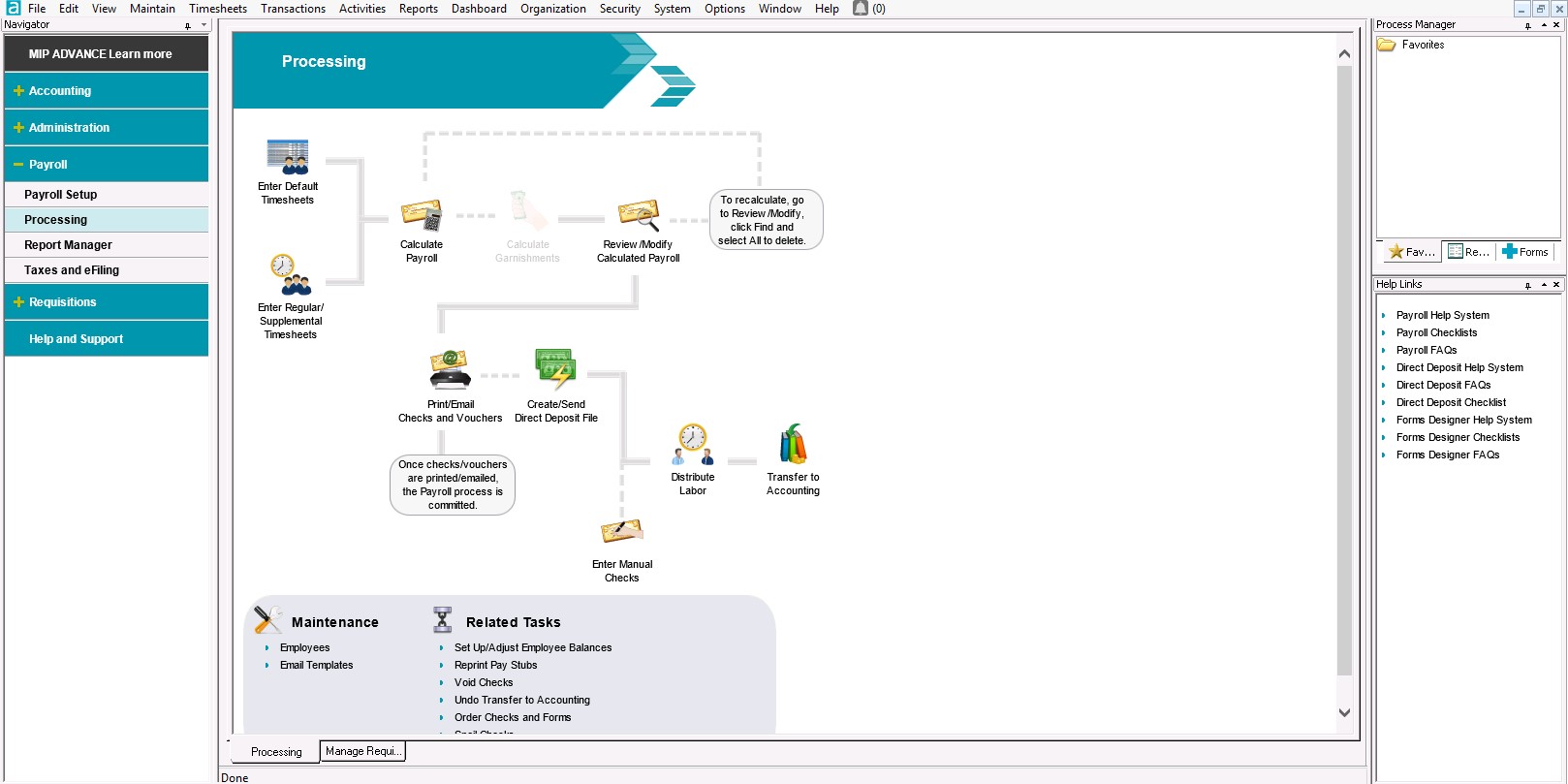
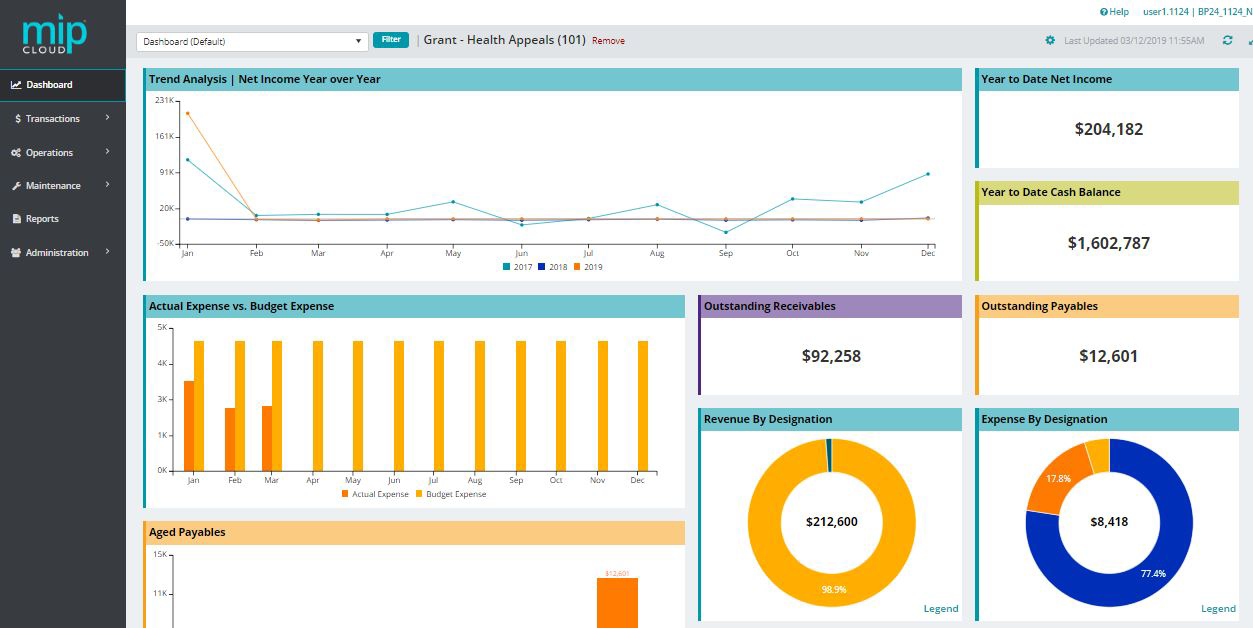
MIP Fund Accounting™ is a configurable fund accounting solution. The solution includes functionality for fund accounting, procurement, budgeting, payroll, human resources, timekeeping, fixed asset management, grant management, and dashboards for nonprofits and government agencies.
N/A
Sage 50
Score 7.6 out of 10
Small Businesses (1-50 employees)
Sage 50cloud Accounting (formerly Sage 50 Accounting) is accounting software designed for small businesses. Sage 50cloud Accounting (formerly Sage 50, and formerly Peachtree) lets businesses invoice customers, pay bills, manage inventory, control costs, and pay employees. The solution includes high-level dashboards and in-depth reports.
$61.92
per month per user
Pricing
MIP Fund Accounting
Sage 50
Editions & Modules
No answers on this topic
Sage 50 Pro Accounting
$61.92
per month
Sage 50 Premium Accounting
$103.92
per month per user
Sage 50 Quantum Accounting 3 User
$177.17
per month per user
Offerings
Pricing Offerings
MIP Fund Accounting
Sage 50
Free Trial
No
Yes
Free/Freemium Version
No
No
Premium Consulting/Integration Services
Yes
Yes
Entry-level Setup Fee
No setup fee
No setup fee
Additional Details
—
Annual billing plans also available for all products.
I haven't used any other fund accounting software. I have used peachtree, Quickbooks, and PeopleSoft (but not a not for profit version). If you chose a program that does not offer the tracking of funds, you have to do that yourself. This leaves too much room for error or …
Despite it's higher cost, MIP offers the most flexibility with reporting than other programs which while less expensive, were more cumbersome to use and reporting set up was more labor intensive.
Utilized Oracle in a manufacturing instance, and it was great! The expense would not have been practical for a company of this size. It was much more user friendly and streamlined. MIP Fund Accounting is a major improvement over the QuickBooks programs.
QuickBooks and Peachtree just didn't have the multi-user environment depth that MIP has. As such, our clients transitioned over the years. From the Sage days onwards we have used MIP to great effect. Sure there have been bumps in the road but it is an intuitive product. With an …
Each not-for-profit is different. If it's an association QuickBooks works fine. Generally once you have restricted funds either blackbaud or MIP becomes the better solution. Many nonprofits use Great Plains Microsoft GP but with its inability to report multiple grant periods …
I don't think there are many comparable alternatives. I have used Financial Edge/Raisers Edge in the past. I felt the reporting was not as robust but I did like the ability to enter donations into Raiser's Edge and import them.
The less expensive alternatives such as QuickBooks …
Our company chose Abile MIP because a former employee (that was held in high esteem) recommended it. Since then, we have felt stuck with it due to the cost of switching over to another platform. I personally feel, as do many of my colleagues, that another platform would be …
The previous products that I've used were Quickbooks, Peachtree and MAS 90. None of these products were close in comparison to the ease of tracking and reporting capabilities.
Prior to selecting MIP, I was using Peachtree Accounting which was adequate for the much smaller organization we were at that point. However, we were quickly outgrowing its capabilities. MIP offers a far greater level of sophistication in all of its capabilities. The integrated …
MIP Fund Accounting works very well for general fundraising. The form creation process is easy and allows you to set parameters and add fees, quantities, images, etc. This process is smooth on the customer (forward-facing) side as well. Reports are generated once the transactions have gone through, making tracking and reconciliation with accounting easy.
Sage 50 Accounts is well-suited for small to medium-sized enterprises, where there is a moderate number of expenses and invoices that need processing, typically by a company with a smaller finance team. Sage 50 is probably less suitable for a large organisation that needs to handle a higher volume of transactions and manage significant stock levels.
We can build "templates" for recurrent charges/invoices. This saves some time and also ensures that we always use the right accounting rubric.
A lot of additional information can be filled out such as client information (name, address, ...) which makes the software a little more complete.
If you don't need an updated version every year (my case) then the software is not too expensive. The pro version that I'm using was just a little over $300.
I really like the banking statement consolidation which allows you to ensure you got the right information registered.
With the payroll process, if there is an error in sending the stubs through email, there is no option to resend without a restore. That really needs to change.
Being able to void encumbrance at the same time as a PO would be an incredible time saver.
Sage 50 could use some improvement in the Invoicing Module to allow for more flexibility in the design of the Invoice fields. The report customization tools could use some upgrading for easier use.
Fixed assets management module needs to be included with unlimited number of fixed assets.
I give MIP a 10 because Our organization use MIP Fund Accounting ever since I've been there and that's been for over 20 plus years for all of our accounting and payroll. MIP has stayed on the cutting edge of technology, ever evolving to meet the needs of the times, especially post pandemic, while many are working remotely! MIP support staff are very knowledgeable and efficient. Even new users can get up to speed quickly with MIP Fund Accounting.
I use this rating simply because I have a thriving Sage 50 consulting practice and will continue to keep my expertise in the product. I have consulted on both Sage 50 and QuickBooks for over 25 years so I have to maintain expertise in the solution as well as accounting and verticals.
I have used this system for about 12 years now and I still learning how to use it. It always surprises me how there is another report to learn to achieve my data reporting goals. It is great to have a system that you have used long enough to feel comfortable with but also a system that allows you to learn new ways to report and enter data into the system
I think Sage 50 is a trusted product and is reliable from a product delivery and support perspective. They have deep domain expertise in the non-profit space and should be a consideration for new non-profit startups or existing non-profits looking to migrate from other platforms. Overall, I believe that Sage 50 does many things well with few limitations.
I have rarely encountered any issues accessing MIP Fund Accounting over the years. On the rare occasions when availability was interrupted, the reasons were always found in-house when using the on-premises version. Since we have migrated to the MIP cloud, we have had no issues with availability. Any maintenance or updates are always communicated to us and are usually done outside of business hours.
We have 18 programs and the CFO has the ability through MIP Fund Accounting to generate separate and/or collective reporting for those programs. Each program has its own grant or funding source. Each has its own reporting guidelines that must be met so the ability to run reporting separately or collectively is a plus.
I have not reached out to MIP for technical support; however, their website offers great help resources so I can solve an issue on my own. Another team member reached out to MIP for support and was helped quickly. The transition process took longer than expected due to a lag in communication.
They were very knowledgeable of the product, understood my timeline was limited for a software issue and allowed me to get back to my day to day work. The dial into your computer is great so you can monitor what they are doing and learn some tricks yourself
There are no specifics on what happens if you make one choice or another to know which is the best selection. This is true for JVs and AP. In training we were not given specifics of what happens when one possibility is selected over another.
Denise O'Malley provided training for the HR module when we added it to our system. Denise also gave us a demo of the EWS module which we were able to see that it would not meet our needs. She was very kind about and understanding regarding the functions we needed with a time clock system.
Don't waste your time with MIP. There are plenty of other softwares out there that will do the job better. Do your homework. Get references from actual users. Make sure that what you choose will truly integrate. Make sure that there is local support. Get training. You will be glad that you passed this one by. Trust me.
We implemented Sage 50 Premium Accounting in house, not using any third party or professional service. It was a relatively trouble free process, but can be tricky. Just read all instructions carefully, especially if you need to load the program on a network with more than one user
I've utilized other ERP accounting software like Infor, NetSuite, and MS Dynamics, to name a few. MIP Fund Accounting offers flexibility and room for growth while not being overly heavy on your team to maintain it. And, we're now learning more about the add-on's and more advanced capabilities to leverage with our team.
As we did the conversion almost 10 years ago it is hard to answer this question. At the time it was the ease of being able to produce both cash and accrual financial statements and reporting that led us to pick Sage
The flexibility to create certain features are helpful and are designed to be easier on MIP Accounting Cloud. It has been easier than the MIP Accounting classic version. I may have not fully utilized the software to deploy across multiple departments other than generating revenue reports or expenses. As well as developing budget worksheets for our departments. Which are great as it is, but have not gone farther than that.
I define scalable from two perspectives; 1) the scalability to handle more bookkeepers/accountants using the product, and 2) the scalability to handle increasing customer/vendor/employee and transactional data. Sage 50 does a good job on both fronts. From the single users operating a micro-business accounting for customer invoices and bill payments only, to the multi-staff, multi-location, multi-departmental complex transactional operation. Although Sage 50 is quite expensive for that smallest user, it is quite inexpensive for the larger business entity. So, for the new enterprise expecting rapid growth, Sage 50 is the application of choice.
We converted to the cloud version a few years ago to reduce our dependency on a dedicated internal IT server which needed to be replaced. The cost of the product switched to a monthly fee which increased cost somewhat but probably is matched with IT savings over time in doing upgrades.
We have an efficient team of two people doing the transactional work, so we don't really have much incentive to further automate our processes. And with the turnover in the CFO position we have had, has helped us maintain consistency in our processing.
Once I learned how to memorize and recall transactions it was a huge timesaver and increased the accuracy and consistency of our entry.
The cost of training is sometimes prohibitive. Example is my accounting clerk MIGHT benefit from additional training but at about $200 for a lot of the courses, it is more than we have budgeted.
Sage definitely needs to do a better job with customer service. I have had to use them only a handful of times and it was not a great experience but not the worse I've seen. They didn't make us a priority and I felt that they didn't have a sense of urgency. They did address my lack of satisfaction and I can see that they are at least aware of the issues and they are trying to correct them.
Sage is exactly what we need in my current organization and I wouldn't change it for another system. I have used quite a few in my lifetime and I would say that it fits our needs.