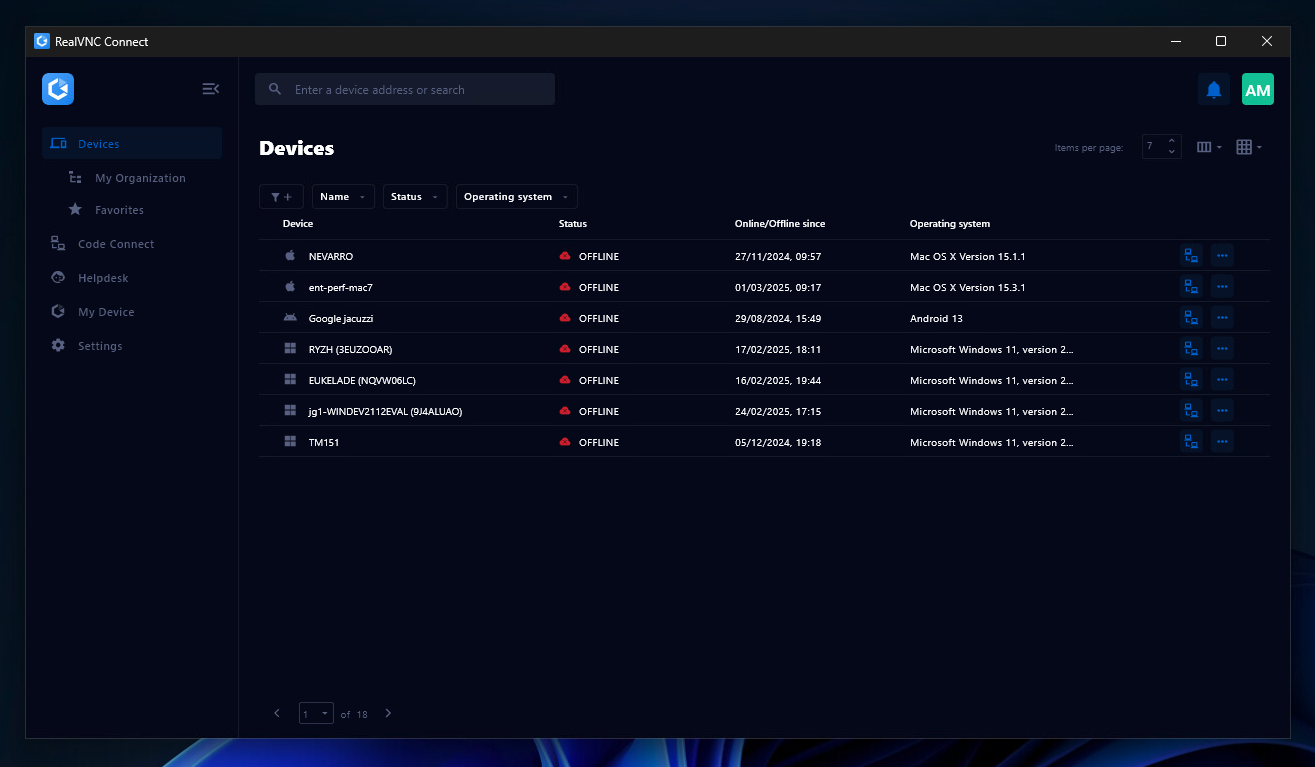
RealVNC® Connect is a secure remote access solution from RealVNC. It can be used to connect to a remote device anywhere in the world to view its desktop in real-time and take control as though sitting in front of it.
$99
per year (one concurrent session)
Pricing
Moovweb XDN
RealVNC Connect
Editions & Modules
Community
$0
Hyper
$500
per month
Enterprise
Contact Sales
Essentials
$8.25
per month (billed annually) per concurrent session
Plus
$16.50
per month (billed annually) per concurrent session (add up to 3)
Premium
$29.75
per month (billed annually) per concurrent session (add up to 5)
Enterprise
Custom Pricing
per year
Enterprise
Custom Pricing
Offerings
Pricing Offerings
Moovweb XDN
RealVNC Connect
Free Trial
No
Yes
Free/Freemium Version
Yes
Yes
Premium Consulting/Integration Services
No
No
Entry-level Setup Fee
No setup fee
No setup fee
Additional Details
Open Source projects on Layer0 can qualify to be FREE FOREVER.
Plans work on a Per Concurrent Session basis. Each plan gives access to a bundled number of devices, but limits apply to the amount of devices that can be connected at any given time.
The Premium plan includes On-Demand Assist, a useful tool for providing just-in-time remote support to end-users without them needing RealVNC Connect installed on their device.
It depends on who you are. If you are very small it won't be worth the money. If you have a very cranky site with nested tables coming out of every orifice, maybe you should look at a replatform or desktop rewrite first. If you have a site with vast numbers of custom content pages, it will work but may not be cost effective. Moovweb is well suited to you if you need the ability to control mobile experiences and respond to changes in mobile and the demands of mobile aware executives who want to move more quickly than your current IT processes allow. It is well suited if you need something quickly but also want the option to bring mobile development and support in-house some time in the next year or two (which you should). It is well suited if your desire to improve a responsive experience has been thwarted by internal fears over the impact that it might have on desktop. It is well suited if you want to experiment on mobile but do more than just change the color of a button or make a font larger. It's very good at letting a UX team try things out and see what real customers do.
It is very easy to use if the remote device is already set up to receive connections, so if you are setting up devices before deploying them, it is a great tool to have. It is well-suited to use when shadowing users or using it as a teaching tool. There are other products that are better if you are trying to help someone on a one-use basis.
A de minimis incentive was given to thank the reviewer for their time. The incentive was not used to bias or drive a particular response, nor was the incentive contingent on a positive endorsement. More Info
Moovweb takes the time to really understand your needs and challenges and is willing to work with and address them. They are partners during and AFTER implementation.
Moovweb and their implementation partner 64Labs has a fantastic response time and work ethic. They really will do what it takes.
Moovweb takes the time to share their product road map with customers.
A de minimis incentive was given to thank the reviewer for their time. The incentive was not used to bias or drive a particular response, nor was the incentive contingent on a positive endorsement. More Info
VNC Connect does an excellent job in remotely connecting to a computer through either your local area network or even another computer on the internet. As long as the VNC Connect services is installed and the client is running in the background.
VNC Connect provides password protection to prevent unauthorized users from attempting to remotely access your computer. There's an option to have a separate password to remotely view vs view & access a computer. You can even add an additional level of security by turning on the feature to require Windows login credentials.
VNC Connect provides an additional set of controls after a remote connection has been established with another computer. You can have special keystrokes like Ctrl+Alt+Del sent as a command sequence to the other computer as well as access more than a single screen when in use at the remote computer location.
A de minimis incentive was given to thank the reviewer for their time. The incentive was not used to bias or drive a particular response, nor was the incentive contingent on a positive endorsement. More Info
Depending on how your site is built and maintained, there may be a different solution that will be a better option for your business and customer needs.
At the end of the day, this is another layer that is added to your development plan and time to ensure updates work across multiple devices. Moovweb is really good about the turn-time for these updates, but there still needs to be the added QA step for M&T optimization per release.
A de minimis incentive was given to thank the reviewer for their time. The incentive was not used to bias or drive a particular response, nor was the incentive contingent on a positive endorsement. More Info
Personally as a Mobile Architect I am a huge proponent of building mobile-first responsive websites. I will always fight for a lobby for businesses to build sites with all devices in mind and not focus their attention on desktop driven sites which are then adaptively scaled to meet the demands of the business, in my opinion leading to a never ending cycle of building separate media queries to compensate for every device the business chooses to market to
A de minimis incentive was given to thank the reviewer for their time. The incentive was not used to bias or drive a particular response, nor was the incentive contingent on a positive endorsement. More Info
VNC is a solid product for the price. It simply works and its reliable across different platforms. Some products state they work well in the Mac environment but don't deliver. This one does what it says. Connections are reliable, but of course, this depends on internet connections. The product works well over wireless connections as well. It delivers on what a remote tool should deliver on. My technicians are happy with the product and customers appreciate the ease of use when letting us connect to their systems. Some also appreciate the remote support while they are multi-task.
A de minimis incentive was given to thank the reviewer for their time. The incentive was not used to bias or drive a particular response, nor was the incentive contingent on a positive endorsement. More Info
It's a niche product and in that niche they try to cater to as many use cases as they can. Other as a TCO aspect i don't see many use cases where you can't use this product as the one tool for all remote session use cases in your company
A de minimis incentive was given to thank the reviewer for their time. The incentive was not used to bias or drive a particular response, nor was the incentive contingent on a positive endorsement. More Info
Good set of customer success people combined with the flexibility to use high-quality onshore partners if workload increases at busy times. I think Moovweb's support efforts are pretty solid.
VNC Connect is a reliable product that has been around for a long time. It is reasonably priced and works well in the Mac & PC environment. When you have a small team that supports many users we need tools that we can rely upon and that will get the job done on the first try. Many customers appreciate the quick assistance and can multi-task while our team works on their computer issues remotely. From a customer service point of view, this tool gives us transparency and efficient effectiveness.
A de minimis incentive was given to thank the reviewer for their time. The incentive was not used to bias or drive a particular response, nor was the incentive contingent on a positive endorsement. More Info
The training is very informative, quick and to the point. All of the details one would need are present so the user doesn't have to go searching for additional information just to use the application. The layout of the training was also neat and concise, some of the other training sessions for other companies I've done in the past were confusing and not well thought out, this one is much more superior
Don't spend weeks in design. Because of the way the technology works nuances of design can change very quickly further down the line. We have changed the look of the product list for a client a week before launch.
Push for getting the project into UAT within four weeks of the kickoff of the project. There are few retailer projects that need to take more than that. In my experience the more concentrated the timeline the more effective the implementation.
Check that there are no major changes planned on desktop during the time of your implementation (another reason to keep the development to four weeks).
If you have custom mobile content requirements, get them to your implementer at the start. Moovweb is great at heavy-lifting existing content, but your implementer will need to recommend solutions for custom content that will need to be tested. Get these requirements out at the start.
Make a list of your desktop plugins. Moovweb can handle them all, but they can be handled in different ways
If you have Paypal/Google Wallet and want it on mobile as part of your project, talk about that early on.
A de minimis incentive was given to thank the reviewer for their time. The incentive was not used to bias or drive a particular response, nor was the incentive contingent on a positive endorsement. More Info
This is the only mobile technology we have used. We went through an extensive research and vetting process. In the end Moovweb was the best choice for technology and business needs. We considered the following companies: Moovweb,Mobify, Usablenet, Mad Mobile, SKAVA, Wompmobile. Forrester has a mobile infrastrucutre services report that could be very helpful.
A de minimis incentive was given to thank the reviewer for their time. The incentive was not used to bias or drive a particular response, nor was the incentive contingent on a positive endorsement. More Info
VNC is light and sleek with the quick setup, was impressed with the quick setup despite poor Internet connection outdoor. TeamViewer is good, but the pricing is not as good as VNC. Both do the basic job, but VNC still outperform TeamViewer in terms of performance and ease of use.
A de minimis incentive was given to thank the reviewer for their time. The incentive was not used to bias or drive a particular response, nor was the incentive contingent on a positive endorsement. More Info
The implementation was 4 months from start to finish. Mobile is about 10% of our visits today and our mobile revenue for the first half is about $200K so we will have a payback in 1 -2 years.
Moovweb is not the most economical solution out there. It is one of the most comprehensive for sites needing all their content available for mobile.
I have just used the software for about 1 month and so far so god. I am saving time whenever I can access my client's computers from my desk as opposed to having to leave my office to go to their offices. Saves me time and the client money.
A de minimis incentive was given to thank the reviewer for their time. The incentive was not used to bias or drive a particular response, nor was the incentive contingent on a positive endorsement. More Info