TrustRadius: an HG Insights company

Save this comparison

Save this comparison

Add Product

Recommended Comparisons

    Overview
    ProductRatingMost Used ByProduct SummaryStarting Price

    OpenText Hightail

    Score9.3 out of 10
    N/AOpenText Hightail is a cloud-based collaboration software for creative content reviews and approvals. With one place for teams to share large, multimedia files, collect precise feedback and approve content, Hightail streamlines the creative process and helps teams keep projects on schedule.

    $0

    100MB per file upload

    TeamGantt

    Score10 out of 10
    N/ATeamGantt is a project management solution built to provide users with gantt chart software through online deployment.

    $59

    per month per manager

    Pricing
    OpenText HightailTeamGantt
    Editions & Modules
    Lite
    $0
    100MB per file upload
    Pro
    $15
    per user, per month
    Teams
    $30
    per user/per month
    Business
    Custom
    per user, per month
    Pro
    $59
    per month per manager
    Offerings
    Pricing Offerings
    OpenText HightailTeamGantt
    Free Trial
    YesNo
    Free/Freemium Version
    YesYes
    Premium Consulting/Integration Services
    NoNo
    Entry-level Setup FeeNo setup feeNo setup fee
    Additional DetailsLite: Send large files with anyone. Files are limited to 100MB for each file size uploaded, 2GB storage max. Files expire after 7 days. Pro: Send large files with anyone and set advanced security permissions such as expiration dates and access codes. Files are limited to 25GB for each file size uploaded, with unlimited storage. Teams: Send large files, collaborate in real-time and manage creative projects with your team. The Hightail Teams plan allows you to purchase multiple users online (from 1-30 users per organization) and allows users to send file sizes up to 50GB with unlimited storage. The Teams plan also includes features such as file previews, organization, annotations, version control, discussions, follow-ups, approval routing and more. Business: Create unlimited visual project folders (called a Space) with collaboration and project management features such as approval routing and assigning to-dos, upload unlimited files up to 100GB each, protect them with access codes and manage user permissions., plus intuitive admin controls , detailed activity analysis for your entire company, advanced organization options and priority support.20% discount for annual pricing.
    More Pricing Information
    Community Pulse
    OpenText HightailTeamGantt
    Considered Both Products
    OpenText
    No answer on this topic
    TeamGantt
    No answer on this topic
    Key User Insights
    Would buy again
    No answers on this topic
    100%
    Would buy again
    6 Answers
    Delivers good value for the price
    No answers on this topic
    100%
    Delivers good value for the price
    6 Answers
    Happy with the feature set
    No answers on this topic
    100%
    Happy with the feature set
    6 Answers
    Lived up to sales and marketing promises
    No answers on this topic
    100%
    Lived up to sales and marketing promises
    6 Answers
    Implementation went as expected
    No answers on this topic
    100%
    Implementation went as expected
    6 Answers
    Features
    OpenText HightailTeamGantt
    Project Management
    Comparison of Project Management features of OpenText Hightail and TeamGantt
    Feature
    OpenText Hightail
    -
    Ratings
    TeamGantt
    8.4
    10 Ratings
    9% above category average
    Task Management00 Ratings9.010 Ratings
    Resource Management00 Ratings8.09 Ratings
    Gantt Charts00 Ratings9.010 Ratings
    Scheduling00 Ratings8.010 Ratings
    Workflow Automation00 Ratings8.05 Ratings
    Team Collaboration00 Ratings8.010 Ratings
    Support for Agile Methodology00 Ratings6.05 Ratings
    Support for Waterfall Methodology00 Ratings9.06 Ratings
    Document Management00 Ratings8.07 Ratings
    Email integration00 Ratings8.05 Ratings
    Mobile Access00 Ratings10.06 Ratings
    Timesheet Tracking00 Ratings9.04 Ratings
    Change request and Case Management00 Ratings9.03 Ratings
    Budget and Expense Management00 Ratings9.02 Ratings
    Professional Services Automation
    Comparison of Professional Services Automation features of OpenText Hightail and TeamGantt
    Feature
    OpenText Hightail
    -
    Ratings
    TeamGantt
    8.8
    4 Ratings
    14% above category average
    Quotes/estimates00 Ratings8.02 Ratings
    Invoicing00 Ratings10.02 Ratings
    Project & financial reporting00 Ratings9.04 Ratings
    Integration with accounting software00 Ratings8.01 Ratings
    Best Alternatives
    OpenText HightailTeamGantt
    Small Businesses
    Frame.io
    Score9 out of 10
    Any.do
    Score8 out of 10
    Medium-sized Companies
    No answers on this topic
    KanbanFlow
    Score7.3 out of 10
    Enterprises
    No answers on this topic
    Microsoft To Do
    Score7.9 out of 10
    All AlternativesView all alternativesView all alternatives
    User Ratings
    OpenText HightailTeamGantt
    Likelihood to Recommend
    9.0
    (8 ratings)
    9.0
    (10 ratings)
    Support Rating
    -
    (0 ratings)
    9.3
    (3 ratings)
    User Testimonials
    OpenText HightailTeamGantt
    Likelihood to Recommend
    OpenText
    Hightail is my go-to source when I need to send large files that would never fit as regular attachments. That being said, sometimes there are files that would perfectly fit as attachments but I want the security that Hightail provides when sending sensitive or private material. It's very comforting knowing that the content I'm sending is only being received and viewed by the intended parties. It's also comforting for my clients when it's THEIR content that I'm sending for review.
    Incentivized
    Read full review
    TeamGantt
    TeamGantt is wonderful for organizing long and short term projects that have lots of tasks and or people involved. I love that it's "in the cloud" so I can manage no matter where I am or what device I'm using. There is a mobile app that is quite easy to use and sized nicely for people who have trouble reading small/fine print. I find it to be a well-suited tool for ongoing projects where the tasks change weekly - I use it for my newsletter planning. You can assign and label tasks which is super convenient for me and my Team. All through the week we are making changes and suggestions in TeamGantt and as we get closer to publication day we mark the stories and objects as done so we know we will finish everything before our deadline.
    Incentivized
    Read full review
    Pros
    OpenText
    • Management of content, communication, spaces, and projects in general.
    • Control of processes, tasks and activities between the different members of teams.
    • Collaborative work through different media and channels.
    Incentivized
    Read full review
    TeamGantt
    • In TeamGantt, clients can remark on any undertaking and keep their visits inside the errands.
    • Reports can likewise be connected to any undertaking. Clients can channel the errands by the due date and what their identity is relegated to, and they can change over Gantt graphs into PDFs.
    • The arrangement is accessible for each client each month's membership premise and offers support using telephone and email.
    Incentivized
    Read full review
    Cons
    OpenText
    • Some of our recipients are not very tech-savvy and can get confused with how to download a file. There is some room for improvement by making it clearer where the user should click to download the file.
    Incentivized
    Read full review
    TeamGantt
    • Task assignment matrix is a bit clunky. It's a bit difficult to see distribution of work for each assignee, but not impossible.
    Incentivized
    Read full review
    Support Rating
    OpenText
    No answers on this topic
    TeamGantt
    I never interacted with them. That, in itself, I feel represents their quality. They made the resources available to me so that when I started to have a question, the answer was either right there for me, or easy to figure out without any trouble. So, I never felt the need!
    Incentivized
    Read full review
    Alternatives Considered
    OpenText
    Honestly, once we started using Google Drive more efficiently and saw what improvements OpenText Hightail had made, it was hard to choose. But now that we more consistently use Google Drive, I use it probably 75% more than I use OpenText Hightail for the same tasks. I'm not sure how much longer I'll be a customer at OpenText but it's great to have both options.
    Incentivized
    Read full review
    TeamGantt
    Our team uses ClickUp for task management. ClickUp has a Gantt chart feature, but it's based solely on the tasks we create in ClickUp, so in order to create a client-facing chart, we'd have to completely change the way we assign tasks to our internal team. We use TeamGantt for the sole purpose of creating project plans and viewing project statuses at-a-glance. You might be able to use it for task management, but we don't.
    Incentivized
    Read full review
    Return on Investment
    OpenText
    • Hightail simply saves time. We no longer struggle with trying to meet the requirements of OutLook. When we have a file that is too large to send via OutLook we just "hightail it".
    Incentivized
    Read full review
    TeamGantt
    • TeamGantt has had an overall incredible return on investment.
    • In the past, we have tracked strategies/projects manually (MS Excel, etc.). Having a tool like TeamGantt has improved our efficiency greatly.
    • The ability to see where a project stands (intra-department) at-a-glance has improved our ability to observe statuses.
    • TeamGantt has definitely helped remind me to drive on projects that would normally have gone "stale."
    Incentivized
    Read full review
    ScreenShots

    OpenText Hightail Screenshots

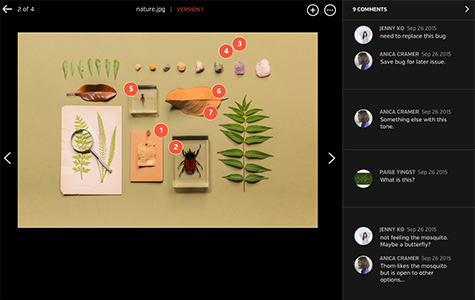
    Screenshot of Improve review process with inline commenting for visual files.Screenshot of Compare each update instantly with visual versions.Screenshot of Bring everyone and everything together in a Space.Screenshot of Improve the audio and video review process with time-stamped commenting.