TrustRadius: an HG Insights company

Save this comparison

Save this comparison

Add Product

Recommended Comparisons

    Overview
    ProductRatingMost Used ByProduct SummaryStarting Price

    OpenText Magellan

    Score9 out of 10
    N/AOpenText Magellan Analytics Suite leverages a comprehensive set of data analytics software to identify patterns, relationships and trends through data visualizations and interactive dashboards.N/A

    Progress Telerik

    Score9.4 out of 10
    N/AWith Telerik UI libraries, Progress aims to equip .NET ninjas with a full arsenal of weapons, helping to create beautiful, modern and future-proof applications quickly and intuitively. The vendor states that with its over 1,250 UI components for all .NET platforms, as well as various themes, skins and customization options, Telerik users report cutting development time by up to 50 percent. Web

    $999

    per developer, royalty-free

    Pricing
    OpenText MagellanProgress Telerik
    Editions & Modules
    No answers on this topic
    Individual Product Licence
    $999
    per developer, royalty-free
    DevCraft UI
    $1,299
    per developer, royalty-free
    DevCraft Complete
    $1,499
    per developer, royalty-free
    DevCraft Ultimate
    $2,199
    per developer, royalty-free
    Offerings
    Pricing Offerings
    OpenText MagellanProgress Telerik
    Free Trial
    NoYes
    Free/Freemium Version
    NoNo
    Premium Consulting/Integration Services
    NoYes
    Entry-level Setup FeeNo setup feeNo setup fee
    Additional Details——
    More Pricing Information
    Community Pulse
    OpenText MagellanProgress Telerik
    Considered Both Products
    OpenText
    No answer on this topic
    Progress Software
    No answer on this topic
    Key User Insights
    Would buy again
    No answers on this topic
    97%
    Would buy again
    28 Answers
    Delivers good value for the price
    No answers on this topic
    92%
    Delivers good value for the price
    24 Answers
    Happy with the feature set
    No answers on this topic
    97%
    Happy with the feature set
    28 Answers
    Lived up to sales and marketing promises
    No answers on this topic
    96%
    Lived up to sales and marketing promises
    23 Answers
    Implementation went as expected
    No answers on this topic
    96%
    Implementation went as expected
    26 Answers
    Features
    OpenText MagellanProgress Telerik
    BI Standard Reporting
    Comparison of BI Standard Reporting features of OpenText Magellan and Progress Telerik
    Feature
    OpenText Magellan
    7.0
    2 Ratings
    15% below category average
    Progress Telerik
    -
    Ratings
    Customizable dashboards7.02 Ratings00 Ratings
    Report Formatting Templates7.01 Ratings00 Ratings
    Ad-hoc Reporting
    Comparison of Ad-hoc Reporting features of OpenText Magellan and Progress Telerik
    Feature
    OpenText Magellan
    8.3
    3 Ratings
    4% above category average
    Progress Telerik
    -
    Ratings
    Drill-down analysis8.03 Ratings00 Ratings
    Formatting capabilities8.03 Ratings00 Ratings
    Integration with R or other statistical packages9.01 Ratings00 Ratings
    Report sharing and collaboration8.02 Ratings00 Ratings
    Report Output and Scheduling
    Comparison of Report Output and Scheduling features of OpenText Magellan and Progress Telerik
    Feature
    OpenText Magellan
    8.3
    2 Ratings
    1% above category average
    Progress Telerik
    -
    Ratings
    Publish to Web8.02 Ratings00 Ratings
    Publish to PDF8.02 Ratings00 Ratings
    Report Versioning9.02 Ratings00 Ratings
    Report Delivery Scheduling8.02 Ratings00 Ratings
    Data Discovery and Visualization
    Comparison of Data Discovery and Visualization features of OpenText Magellan and Progress Telerik
    Feature
    OpenText Magellan
    8.0
    1 Ratings
    0% above category average
    Progress Telerik
    -
    Ratings
    Pre-built visualization formats (heatmaps, scatter plots etc.)9.01 Ratings00 Ratings
    Predictive Analytics7.01 Ratings00 Ratings
    Access Control and Security
    Comparison of Access Control and Security features of OpenText Magellan and Progress Telerik
    Feature
    OpenText Magellan
    9.0
    2 Ratings
    6% above category average
    Progress Telerik
    -
    Ratings
    Role-Based Security Model9.02 Ratings00 Ratings
    Multiple Access Permission Levels (Create, Read, Delete)9.02 Ratings00 Ratings
    Single Sign-On (SSO)9.02 Ratings00 Ratings
    Mobile Capabilities
    Comparison of Mobile Capabilities features of OpenText Magellan and Progress Telerik
    Feature
    OpenText Magellan
    7.0
    2 Ratings
    10% below category average
    Progress Telerik
    -
    Ratings
    Responsive Design for Web Access7.02 Ratings00 Ratings
    Dashboard / Report / Visualization Interactivity on Mobile7.02 Ratings00 Ratings
    Application Program Interfaces (APIs) / Embedding
    Comparison of Application Program Interfaces (APIs) / Embedding features of OpenText Magellan and Progress Telerik
    Feature
    OpenText Magellan
    6.2
    1 Ratings
    22% below category average
    Progress Telerik
    -
    Ratings
    REST API5.01 Ratings00 Ratings
    Javascript API9.01 Ratings00 Ratings
    Java API5.01 Ratings00 Ratings
    Themeable User Interface (UI)7.01 Ratings00 Ratings
    Customizable Platform (Open Source)5.01 Ratings00 Ratings
    Best Alternatives
    OpenText MagellanProgress Telerik
    Small Businesses
    Cyfe
    Score4 out of 10
    Syncfusion Essential Studio
    Score7.3 out of 10
    Medium-sized Companies
    Qlik Cloud Analytics (Qlik Sense)
    Score8.1 out of 10
    D3.js
    Score8.9 out of 10
    Enterprises
    Jaspersoft Community Edition
    Score7 out of 10
    Progress Kendo UI
    Score8 out of 10
    All AlternativesView all alternativesView all alternatives
    User Ratings
    OpenText MagellanProgress Telerik
    Likelihood to Recommend
    9.0
    (11 ratings)
    9.3
    (44 ratings)
    Likelihood to Renew
    3.9
    (9 ratings)
    10.0
    (5 ratings)
    Usability
    9.0
    (1 ratings)
    9.0
    (30 ratings)
    Support Rating
    9.0
    (2 ratings)
    9.3
    (28 ratings)
    Implementation Rating
    -
    (0 ratings)
    9.0
    (3 ratings)
    Data Sharing and Collaboration
    9.0
    (8 ratings)
    -
    (0 ratings)
    Data Sources
    8.0
    (8 ratings)
    -
    (0 ratings)
    User Testimonials
    OpenText MagellanProgress Telerik
    Likelihood to Recommend
    OpenText
    If you do not have a large budget and are a large organization, I would steer clear of Actuate. If you are looking to do very complex washboarding, I would not use them. Your developers have to be very skilled to work with this. Plan to bring in consultants if necessary to help your process. Adhoc reporting is weak. If your pricing is user based and you expand, this could be very expensive.
    Read full review
    Progress Software
    We have used the Telerik UI controls for our Admin user experience. We found that this lead to consistent user experience, with feature rich functions already provided. Effectively this meant that hour for hour, using the Telerik UI improved productivity in creating screens with more functions than using the default controls in ASP.NET. At this point most of our focus with the Telerik controls is User Interface oriented.
    Read full review
    Pros
    OpenText
    • The report outputs can vary across different types such as HTML, PDF, and Excel
    • Their open source offering is very sufficient
    • There are great boards and blogs for developers and engineers to expand and use their features.
    • The people from the company that I've worked with are professional and courteous.
    Incentivized
    Read full review
    Progress Software
    • Easy to configure with application.
    • It provides flexibility for complex grid customizations.
    • Takes less time for quick development UI elements.
    • UI is very responsible, which can be viewable in any device.
    • Great support from Telerik team. It only takes 24 to 48 hours to resolve your issues.
    Incentivized
    Read full review
    Cons
    OpenText
    • The documentation on all the available features, but most importantly on the scripting side, can be improved
    • The standard look & feel of some basic options, like parameter selection or sorting and filtering, looks dated and can't be customized
    • The server portal needs to provide better tools
    • More integration is needed with other OpenText products
    Incentivized
    Read full review
    Progress Software
    • I have not worked with the App Builder but I think a GUI for dragging and dropping components to build a web page would be great.
    • In addition to the app builder there should some tools to design a responsive web application to see the results for different screen sizes.
    Incentivized
    Read full review
    Likelihood to Renew
    OpenText
    I am no longer working for the company that was using Actuate but I believe they would continue to use it because the stitching costs would be to high. It would require a complete rewrite of the reports and the never version of Actuate (BIRT) even required an almost complete report rewrite
    Incentivized
    Read full review
    Progress Software
    The Telerik UI has become part of our staple development tools. We can not be as productive without the feature set available to us in the Telerik UI ASP.NET AJAX control package.
    Read full review
    Usability
    OpenText
    It is quite intuitive to use. It is fit specifically for doing sentiment, emotion, and intention analysis as well as text classification and text summarization. I would have given 10 if it is fit for the purpose of doing image processing and analysis as well. There is a huge market to analyze video and image data.
    Incentivized
    Read full review
    Progress Software
    Progress Telerik UI is very usable and one of the best tools to use by the front-end development engineers in our team. It has helped us to improve the overall design of our existing and new applications. Also, the time to build applications has also been reduced effectively and we are able to focus on other areas of improvement to deliver a better user experience for our customers.
    Incentivized
    Read full review
    Support Rating
    OpenText
    Always there on the front and backend for us and the client.
    Read full review
    Progress Software
    Telerik UI support is what you are paying for. If something does not work you ask them for an example of how to solve your use case. The SEO on their sites is awesome and so well bedded into Google. The videos are good, [they're] not used much but their examples and DoJo examples make all the difference.
    Read full review
    Implementation Rating
    OpenText
    No answers on this topic
    Progress Software
    The controls work very well as long as they are used as intended. Built-in functionality should be used whenever possible,
    Incentivized
    Read full review
    Alternatives Considered
    OpenText
    It is vastly superior to these in many ways, for complex reporting it is a much more sophisticated solution. Visualizations are very good. Javascript extensibility is very powerful, others don't support this or as well. Pentaho and MS are both OLAP oriented. Pentaho is moving more toward big data, which was not our primary focus. Others are stuck in the Crystal Reports Band metaphor.
    Read full review
    Progress Software
    Progress Telerik UI provides a large amount of language support, demos, and documentation. While the competition is still great in their own right, Progress Telerik UI has provided enough resources to cover a number of current and future projects without having to expand to other libraries.
    Incentivized
    Read full review
    Return on Investment
    OpenText
    • Actuate can handle 50 to 60 sub reports inside a report very well.
    • Dynamically creating the datasource, chart, graph, reports are the main advantages. We can do any level of drilling, and can create a performance matrix dashboard efficiently.
    Read full review
    Progress Software
    • Telerik enabled us to demonstrate our vision for new flagship software with only a years worth of effort.
    • Telerik provided out of the box solutions for some of our more challenging UI problems.
    • Telerik support has been extremely helpful and critical to our success.
    Incentivized
    Read full review
    ScreenShots

    OpenText Magellan Screenshots

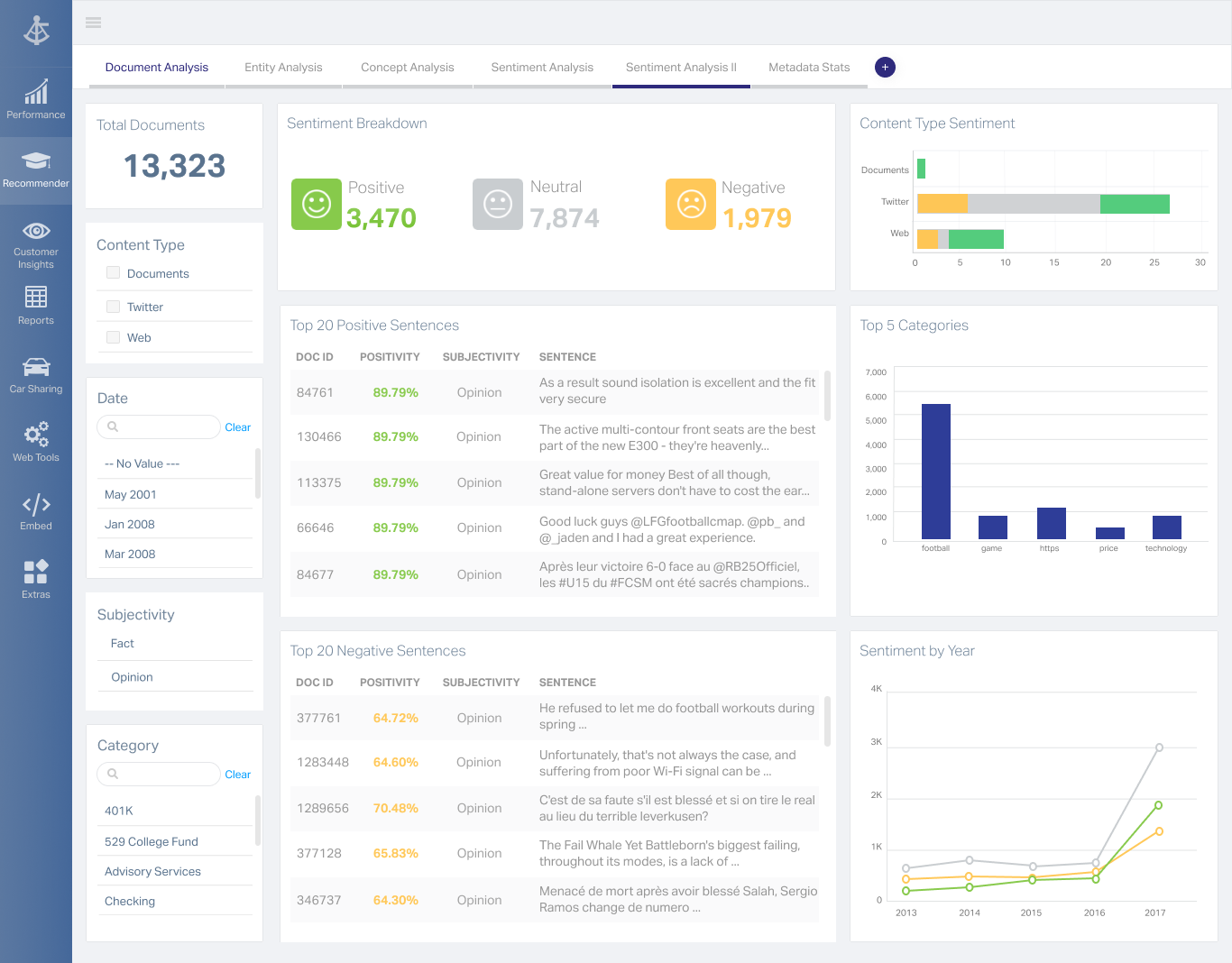
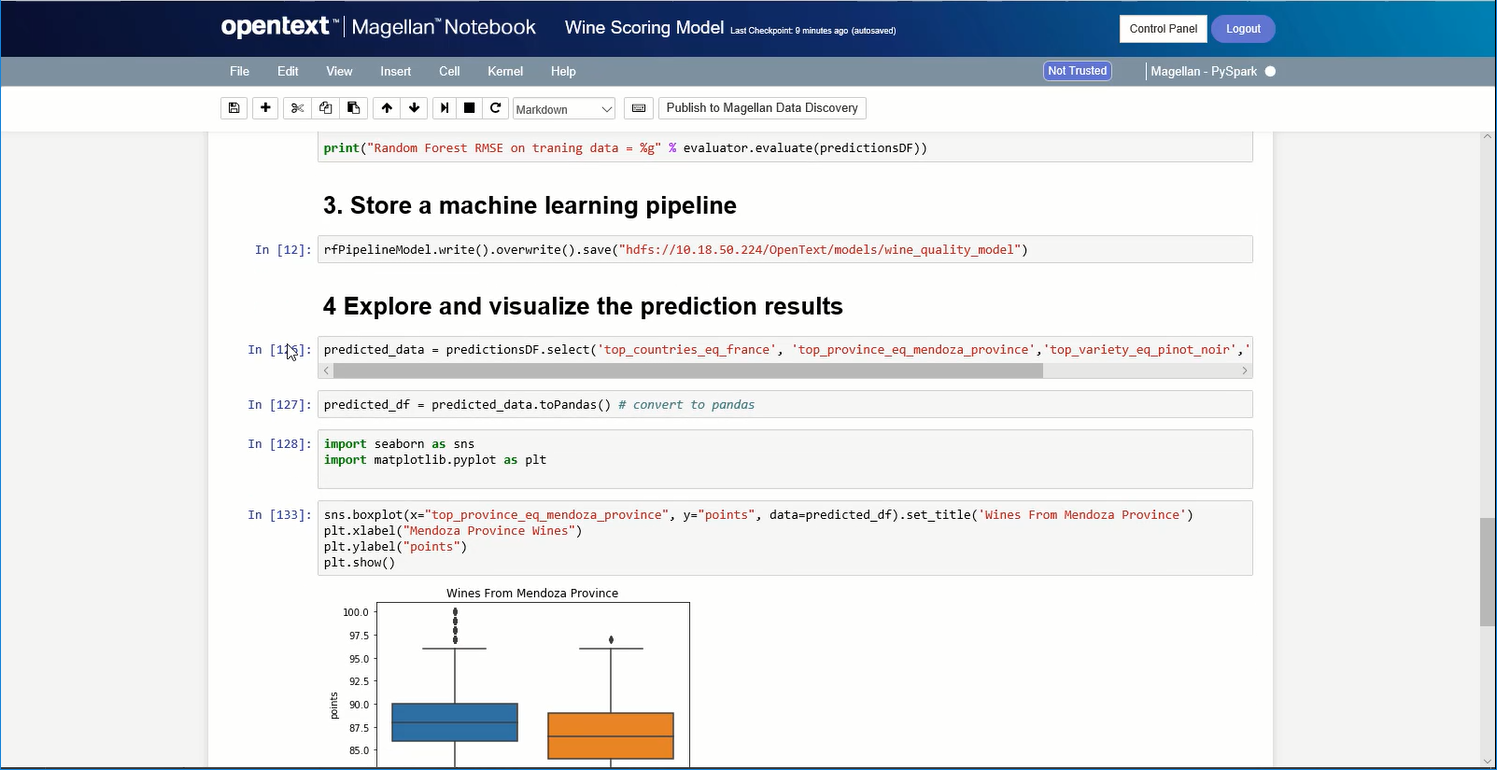
    Screenshot of A Magellan BI & Reporting dashboard that an individual can interact with and personalize to their needs, such as changing chart types or computations.Screenshot of Magellan Data Discovery provides a Smart User Interface, designed to equip new users and users seeking a more streamlined set of features for insightsScreenshot of Magellan Data Discovery provides an Advanced User Interface that allows data analytics pros to leverage its breadth of sophisticated capabilities for insightsScreenshot of Magellan Text Mining insights can be displayed within easy-to-use dashboards.Screenshot of Data scientists can create visualizations within the Magellan Notebook and see it dynamically update as they write changes to it.

    Progress Telerik Screenshots

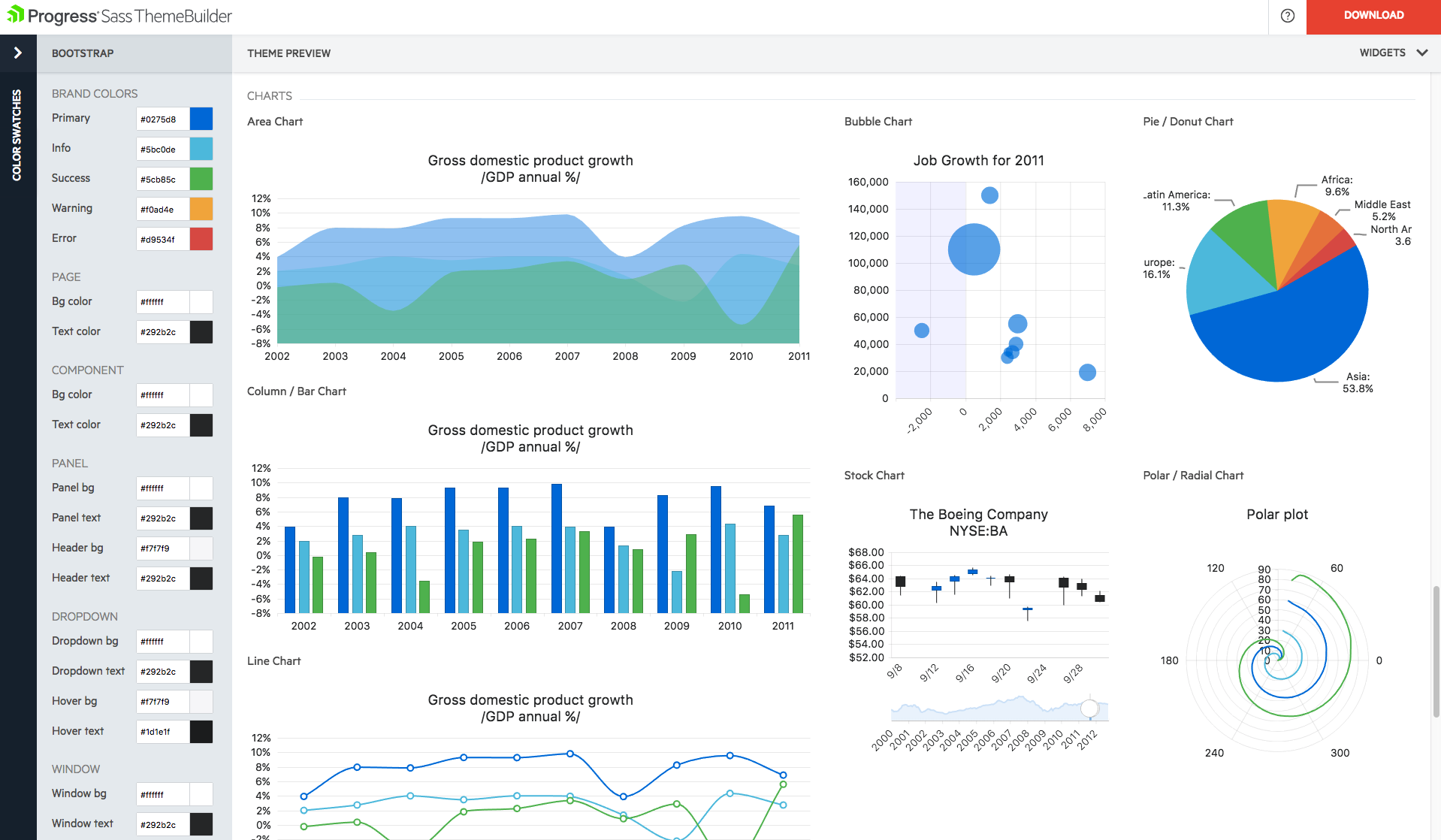
    Screenshot of Easily create eye-catching and full-featured user interface for web, mobile and desktop by selecting from our rich library of components. Use advanced features like our grid component to create tables that display data in a wide range of formats from both local and remote sources.Screenshot of Create rich dashboard applications by taking advantage of the breadth of UI widgets available within the Telerik UI toolset. Easily wire up the UI controls to any backend to display any and all kind of data that you need to surface in your applications.Screenshot of Need to add reporting and analytics capabilities to your applications? Telerik Reporting is a complete, lightweight .NET embedded reporting tool for web and desktop applications. Use Telerik Reporting to create, style, view and export rich, interactive and reusable reports to attractively and beautifully present analytical and business data.Screenshot of With Telerik UI for Xamarin you can build native iOS and Android applications, with rich user experience and outstanding performance. Enjoy all the components you need to build your mobile application.Screenshot of Build modern desktop applications with Telerik UI for WinForms and Telerik UI for WPF. The most complete desktop UI suites, with rich feature set and modern look and feel.Product screenshot