Parature was a self-service customer support platform providing a self-service knowledge base to connect with customers across multiple channels. The company was acquired by Microsoft in January 2014 and reached EOL in 2017.
N/A
SolarWinds Web Help Desk (WHD)
Score6.1 out of 10
N/A
SolarWinds
Web Help Desk is ticketing and IT asset management software. It is designed to
simplify help desk management. This solution includes built-in ticketing
management, asset management, change management, and knowledge base
capabilities.
$533
per year per user
Pricing
Parature (Discontinued)
SolarWinds Web Help Desk (WHD)
Editions & Modules
No answers on this topic
No answers on this topic
Offerings
Pricing Offerings
Parature (Discontinued)
SolarWinds Web Help Desk (WHD)
Free Trial
No
Yes
Free/Freemium Version
No
No
Premium Consulting/Integration Services
No
No
Entry-level Setup Fee
No setup fee
No setup fee
Additional Details
—
SolarWinds also offers Perpetual licensing starting at $1129 per technician.
System Administrator in Information Technology at Canaveral Port Authority (E-Learning, 1001-5000 employees)
Chose Parature (Discontinued)
I'm currently using Solarwinds Web Help Desk and I think the 2 are very comparable. I didn't select either product but I'd rate Parature at the same level as WHD or better.
A de minimis incentive was given to thank the reviewer for their time. The incentive was not used to bias or drive a particular response, nor was the incentive contingent on a positive endorsement. More Info
The single element of Parature I've not seen in any other system of this kind is the Download Module. You can post files in the open, or protect them by any number of entitlement methods. The solution is also appealing to those who don't want to manage the back-end/IT needs as it is a hosted solution and has proven to be very reliable.
A de minimis incentive was given to thank the reviewer for their time. The incentive was not used to bias or drive a particular response, nor was the incentive contingent on a positive endorsement. More Info
SolarWinds WHD is well suited if you have a limited budget, as it costs less than many help desk software packages that are more full featured and modern in their design. It is not well suited to an environment where you want to manage inventory, users, purchases and tickets all in one package. It has an asset feature that we don't use but that looks quite limited. We track our assets and users separately from this.
A de minimis incentive was given to thank the reviewer for their time. The incentive was not used to bias or drive a particular response, nor was the incentive contingent on a positive endorsement. More Info
Clean/Friendly UI. It was extremely easy to navigate around Parature's menus at a high level, and you could take advantage of the more robust features as you became more comfortable and familiar with how Parature operates!
Strong Knowledge Base. Writing KB articles or ticket summaries and making use of the search function within Parature allows for expedient recovery of past ticket information. Being able to search for a fix action, or at least a troubleshooting article that can guide you towards a resolution is extremely valuable.
Enhanced Notation Capability. Being able to send/post internal or external updates to a ticket is great! You can leave the wordy technical details for other employees while making sure to communicate the high-points and fix action to the end-user.
A de minimis incentive was given to thank the reviewer for their time. The incentive was not used to bias or drive a particular response, nor was the incentive contingent on a positive endorsement. More Info
Customized reporting allows us to track our service and support better, and find where we need improvements. This allows us to constantly upgrade our service levels and keep the customers happy.
Detailed tracking and response to the end users have led to quicker remediation of tickets. We are able to see where we need a better response or where to add additional resources for support.
Overall metrics allow us to staff properly for our tickets by location and remote users.
A de minimis incentive was given to thank the reviewer for their time. The incentive was not used to bias or drive a particular response, nor was the incentive contingent on a positive endorsement. More Info
Reporting is barebones at best. If you need special reports, we had to go through Parature to have them built.
The use of frames on a website is very 1990s. It actually impacts usability of the product, especially when combined with how Parature handled sessions. An engineer could only work one ticket at a time which, honestly, isn't very realistic for a busy support team that is working on several issues at a time.
Support was often unresponsive when contacted for unplanned problems.
The knowledge base was not very friendly for clients and it provided no real encouragement for it to be used.
It took several clicks to do something as simple as edit and assign a ticket or to close a ticket.
A de minimis incentive was given to thank the reviewer for their time. The incentive was not used to bias or drive a particular response, nor was the incentive contingent on a positive endorsement. More Info
Because of AD integration, users sometimes try logging in with their email address and not AD credentials. The user then calls stating they can't put a ticket in, it would be nice if there was a method of matching the AD Email field with a login.
Setting up new techs with the building they are responsible for can be a little messy
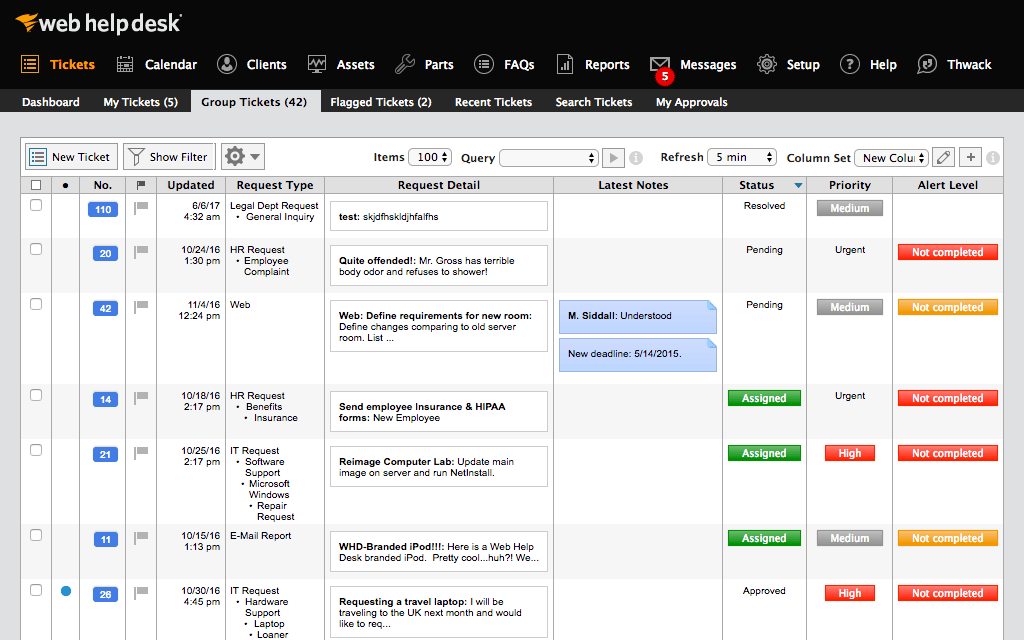
I would like to see the UI updated. It looks old, even in the latest releases.
A de minimis incentive was given to thank the reviewer for their time. The incentive was not used to bias or drive a particular response, nor was the incentive contingent on a positive endorsement. More Info
A de minimis incentive was given to thank the reviewer for their time. The incentive was not used to bias or drive a particular response, nor was the incentive contingent on a positive endorsement. More Info
We are definitely going to be sticking with Web Help Desk for the foreseeable future since the product is very inexpensive for the features that it provides, the integration that it has with our existing systems, and the ease for managing users, assets, locations, and tickets. Web Help Desk is a great product that is backed by even better support, which is well worth looking into if you are considering moving to a new ticketing system.
A de minimis incentive was given to thank the reviewer for their time. The incentive was not used to bias or drive a particular response, nor was the incentive contingent on a positive endorsement. More Info
It was bulky, cumbersome, and didn't allow us to handle the volume of cases we received on a daily basis. Many of our issues were highly technical in nature and we would often need to work on 2 or 3 at once. The poor design choices prevented this, which was unfortunate.
A de minimis incentive was given to thank the reviewer for their time. The incentive was not used to bias or drive a particular response, nor was the incentive contingent on a positive endorsement. More Info
I give it this rating based on my experience with SNOW which I would rate lower because it is so difficult to find anything in SNOW. It might be better with more time to configure but we "had a box to check" and it met that requirement and I haven't had time to refine it.
A de minimis incentive was given to thank the reviewer for their time. The incentive was not used to bias or drive a particular response, nor was the incentive contingent on a positive endorsement. More Info
They recently had one very extended outage. It was a data center issue - but they were not diversified enough so in the end the system was down for almost 8 hours. There are also periods of time where for no reason the system simply doesn't respond. This small outages are usually short (just a few minutes), and have in fact been occurring less often, so it appears some corrective actions have been taken.
A de minimis incentive was given to thank the reviewer for their time. The incentive was not used to bias or drive a particular response, nor was the incentive contingent on a positive endorsement. More Info
A de minimis incentive was given to thank the reviewer for their time. The incentive was not used to bias or drive a particular response, nor was the incentive contingent on a positive endorsement. More Info
SolarWinds is a great customizable and affordable ticketing system. We use SolarWinds Web Help Desk for IT and Software Development trouble ticket tracking and resolution. The reporting that SolarWinds provides is great since it helps us discover problem areas and fix those areas so they don't keep reoccurring
A de minimis incentive was given to thank the reviewer for their time. The incentive was not used to bias or drive a particular response, nor was the incentive contingent on a positive endorsement. More Info
Take the time to roll out a test VM to configure and make changes to before doing a live deployment, this way you don't end up with a VM that has been tweaked and re-tweaked until it's perfect and instead end up with a final, polished product. I would also recommend taking the time to read through the support forums for figuring out minor issues that may pop up, chances are that you aren't going to be the first one to encounter them. When all is said and done, SolarWinds Support is VERY responsive and you shouldn't hesitate to contact them.
A de minimis incentive was given to thank the reviewer for their time. The incentive was not used to bias or drive a particular response, nor was the incentive contingent on a positive endorsement. More Info
A de minimis incentive was given to thank the reviewer for their time. The incentive was not used to bias or drive a particular response, nor was the incentive contingent on a positive endorsement. More Info
Web Help Desk is definitely lacking in the UI/UX department compared to most other ticketing systems I have used int he past. It's very utilitarian; however, what it lacks in UI it makes up for in extensibility and customization. The main issue that the developers need to address is the use of a Web Objects back-end.
A de minimis incentive was given to thank the reviewer for their time. The incentive was not used to bias or drive a particular response, nor was the incentive contingent on a positive endorsement. More Info
A de minimis incentive was given to thank the reviewer for their time. The incentive was not used to bias or drive a particular response, nor was the incentive contingent on a positive endorsement. More Info
A de minimis incentive was given to thank the reviewer for their time. The incentive was not used to bias or drive a particular response, nor was the incentive contingent on a positive endorsement. More Info