SolarWinds
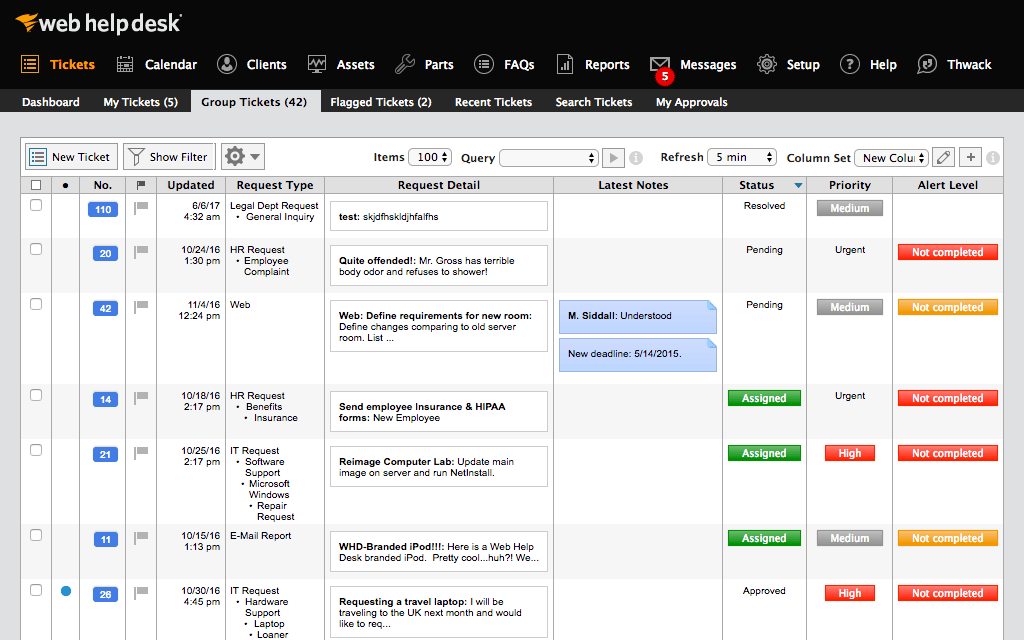
Web Help Desk is ticketing and IT asset management software. It is designed to
simplify help desk management. This solution includes built-in ticketing
management, asset management, change management, and knowledge base
capabilities.
$533
per year per user
Pricing
SolarWinds Web Help Desk (WHD)
Editions & Modules
No answers on this topic
Offerings
Pricing Offerings
SolarWinds Web Help Desk (WHD)
Free Trial
Yes
Free/Freemium Version
No
Premium Consulting/Integration Services
No
Entry-level Setup Fee
No setup fee
Additional Details
SolarWinds also offers Perpetual licensing starting at $1129 per technician.
More Pricing Information
Community Pulse
SolarWinds Web Help Desk (WHD)
Considered Both Products
SolarWinds
Verified User
Chose SolarWinds Web Help Desk (WHD)
I've only had experience with Service Now and I like this better. Maybe because I was just a user in Service Now but now I'm the owner of Web Help Desk.
A de minimis incentive was given to thank the reviewer for their time. The incentive was not used to bias or drive a particular response, nor was the incentive contingent on a positive endorsement. More Info
Senior Network Administrator in Information Technology at County of El Paso 911 District (Public Safety, 11-50 employees)
Chose SolarWinds Web Help Desk (WHD)
Many years ago at a different employer, we utilized CA Service Desk, which is now under the Broadcom umbrella; previously it was under Computer Associates. What a nightmare to configure and set up ... it took months to get this product off the ground. SolarWinds Web Help …
A de minimis incentive was given to thank the reviewer for their time. The incentive was not used to bias or drive a particular response, nor was the incentive contingent on a positive endorsement. More Info
System Administrator in Information Technology at Colorado Coalition for the Homeless (Non-profit Organization Management, 501-1000 employees)
Chose SolarWinds Web Help Desk (WHD)
I used ManageEngine ServiceDesk and ServiceNow at previous jobs. SolarWinds Web Help Desk was in place when I came to this job and I was disappointed when I started using it as it has a more clunky, less intuitive interface, and lacks the features of those products. And it gets …
A de minimis incentive was given to thank the reviewer for their time. The incentive was not used to bias or drive a particular response, nor was the incentive contingent on a positive endorsement. More Info
Director of Technology in Information Technology at Bristol Township School District (Education Management, 501-1000 employees)
Chose SolarWinds Web Help Desk (WHD)
This product is "fine" if you need a basic ticketing solution and your users are on prem. It ties nicely to an on prem active directory solution, but not Azure or Google workspace. The reports are decent, but there are better options available.
A de minimis incentive was given to thank the reviewer for their time. The incentive was not used to bias or drive a particular response, nor was the incentive contingent on a positive endorsement. More Info
Director of IT in Information Technology at HopeHealth, Inc. (Medical Practice, 501-1000 employees)
Chose SolarWinds Web Help Desk (WHD)
SolarWinds Web Help Desk (WHD) holds its own among the top competitors for help desk systems. Some advanced functionality, and more-so the lack of polished interface knocks it down compared to some competitors. I selected SolarWinds Web Help Desk (WHD) simply because I came …
A de minimis incentive was given to thank the reviewer for their time. The incentive was not used to bias or drive a particular response, nor was the incentive contingent on a positive endorsement. More Info
CEO in Corporate at US DataVault, Inc (Computer & Network Security, 11-50 employees)
Chose SolarWinds Web Help Desk (WHD)
From a quality and use standpoint, they leave ALL of them in the dust. As far as support is concerned, they are faster and more accurate at resolving issues. Their software goes in easily, and functions as it is supposed to with minimal problems. And, as I have said before, …
A de minimis incentive was given to thank the reviewer for their time. The incentive was not used to bias or drive a particular response, nor was the incentive contingent on a positive endorsement. More Info
Verified User
Chose SolarWinds Web Help Desk (WHD)
We looked at Zoho CRM but it was more expensive and not as robust as SolarWinds.
A de minimis incentive was given to thank the reviewer for their time. The incentive was not used to bias or drive a particular response, nor was the incentive contingent on a positive endorsement. More Info
A de minimis incentive was given to thank the reviewer for their time. The incentive was not used to bias or drive a particular response, nor was the incentive contingent on a positive endorsement. More Info
Infrastructure Manager in Information Technology at AccruePartners (Computer Software, 51-200 employees)
Chose SolarWinds Web Help Desk (WHD)
SolarWinds Help Desk's overall package of tools is superior in our opinion to the other Help Desk products we have evaluated and tried in the past. We selected SolarWinds because the overall ROI was greater and the efficiencies that we could implement immediately made more …
A de minimis incentive was given to thank the reviewer for their time. The incentive was not used to bias or drive a particular response, nor was the incentive contingent on a positive endorsement. More Info
Network Systems Administrator in Information Technology at The University of the Arts (Higher Education, 201-500 employees)
Chose SolarWinds Web Help Desk (WHD)
Web Help Desk is definitely lacking in the UI/UX department compared to most other ticketing systems I have used int he past. It's very utilitarian; however, what it lacks in UI it makes up for in extensibility and customization. The main issue that the developers need to …
A de minimis incentive was given to thank the reviewer for their time. The incentive was not used to bias or drive a particular response, nor was the incentive contingent on a positive endorsement. More Info
A de minimis incentive was given to thank the reviewer for their time. The incentive was not used to bias or drive a particular response, nor was the incentive contingent on a positive endorsement. More Info
Systems Administrator in Information Technology at John E. Green Company (Construction, 501-1000 employees)
Chose SolarWinds Web Help Desk (WHD)
BMC Track-It! was my first choice for a help desk solution, but we chose SolarWinds Web Help Desk primarily based on cost alone, a now regrettable decision. Track-It! is a far superior product and is better than SolarWinds WHD in every way. That being said, for the cost and …
A de minimis incentive was given to thank the reviewer for their time. The incentive was not used to bias or drive a particular response, nor was the incentive contingent on a positive endorsement. More Info
Server Engineer in Information Technology at Peterson Management LLC (Non-Profit Organization Management, 51-200 employees)
Chose SolarWinds Web Help Desk (WHD)
SolarWinds is probably the most basic of the 3 that I've worked with. SolarWinds was selected because it was the cheapest and we just wanted to use something that was fairly quick to set up and get going. Autotask is quite robust and might be a bit too much for what we need. …
A de minimis incentive was given to thank the reviewer for their time. The incentive was not used to bias or drive a particular response, nor was the incentive contingent on a positive endorsement. More Info
Network Engineer in Information Technology at DialAmerica (Telecommunications, 1001-5000 employees)
Chose SolarWinds Web Help Desk (WHD)
SharePoint is a tool that you make fit your requirements. This takes a lot of time and effort. WHD had most of the features our organization was looking for without the hassle of having to write HTML and pay licensing fees for a product that needed to be tailored to be properly …
A de minimis incentive was given to thank the reviewer for their time. The incentive was not used to bias or drive a particular response, nor was the incentive contingent on a positive endorsement. More Info
Network Support Specialist in Information Technology at WhiteHall District Schools (Education Management, 201-500 employees)
Chose SolarWinds Web Help Desk (WHD)
UI overall was poorly implemented and work flow seemed wonky at best. Ease of use of SolarWinds Web Help Desk was simple and implementation was a breeze. Major plus was asset tracking over old product.
A de minimis incentive was given to thank the reviewer for their time. The incentive was not used to bias or drive a particular response, nor was the incentive contingent on a positive endorsement. More Info
Verified User
Chose SolarWinds Web Help Desk (WHD)
We have used other systems. The simplicity of SolarWinds Web Help Desk, its ease of setup and use have made it a valuable tool in our toolbox. You can pay hundreds of thousands of dollars for a sprawling Help Desk package, but if your needs are like most companies, SolarWinds …
A de minimis incentive was given to thank the reviewer for their time. The incentive was not used to bias or drive a particular response, nor was the incentive contingent on a positive endorsement. More Info
Technology Specialist in Information Technology at School District of the Chathams (Education Management, 51-200 employees)
Chose SolarWinds Web Help Desk (WHD)
We primarily selected SolarWinds Web Help Desk because of the rich feature set and low price point. When we were doing comparisons of the different suites available, we wanted to find an easy to deploy, feature rich, and inexpensive solution. Web Help Desk met all these …
A de minimis incentive was given to thank the reviewer for their time. The incentive was not used to bias or drive a particular response, nor was the incentive contingent on a positive endorsement. More Info
SolarWinds WHD is well suited if you have a limited budget, as it costs less than many help desk software packages that are more full featured and modern in their design. It is not well suited to an environment where you want to manage inventory, users, purchases and tickets all in one package. It has an asset feature that we don't use but that looks quite limited. We track our assets and users separately from this.
A de minimis incentive was given to thank the reviewer for their time. The incentive was not used to bias or drive a particular response, nor was the incentive contingent on a positive endorsement. More Info
Customized reporting allows us to track our service and support better, and find where we need improvements. This allows us to constantly upgrade our service levels and keep the customers happy.
Detailed tracking and response to the end users have led to quicker remediation of tickets. We are able to see where we need a better response or where to add additional resources for support.
Overall metrics allow us to staff properly for our tickets by location and remote users.
A de minimis incentive was given to thank the reviewer for their time. The incentive was not used to bias or drive a particular response, nor was the incentive contingent on a positive endorsement. More Info
Because of AD integration, users sometimes try logging in with their email address and not AD credentials. The user then calls stating they can't put a ticket in, it would be nice if there was a method of matching the AD Email field with a login.
Setting up new techs with the building they are responsible for can be a little messy
I would like to see the UI updated. It looks old, even in the latest releases.
A de minimis incentive was given to thank the reviewer for their time. The incentive was not used to bias or drive a particular response, nor was the incentive contingent on a positive endorsement. More Info
We are definitely going to be sticking with Web Help Desk for the foreseeable future since the product is very inexpensive for the features that it provides, the integration that it has with our existing systems, and the ease for managing users, assets, locations, and tickets. Web Help Desk is a great product that is backed by even better support, which is well worth looking into if you are considering moving to a new ticketing system.
A de minimis incentive was given to thank the reviewer for their time. The incentive was not used to bias or drive a particular response, nor was the incentive contingent on a positive endorsement. More Info
I give it this rating based on my experience with SNOW which I would rate lower because it is so difficult to find anything in SNOW. It might be better with more time to configure but we "had a box to check" and it met that requirement and I haven't had time to refine it.
A de minimis incentive was given to thank the reviewer for their time. The incentive was not used to bias or drive a particular response, nor was the incentive contingent on a positive endorsement. More Info
SolarWinds is a great customizable and affordable ticketing system. We use SolarWinds Web Help Desk for IT and Software Development trouble ticket tracking and resolution. The reporting that SolarWinds provides is great since it helps us discover problem areas and fix those areas so they don't keep reoccurring
A de minimis incentive was given to thank the reviewer for their time. The incentive was not used to bias or drive a particular response, nor was the incentive contingent on a positive endorsement. More Info
Take the time to roll out a test VM to configure and make changes to before doing a live deployment, this way you don't end up with a VM that has been tweaked and re-tweaked until it's perfect and instead end up with a final, polished product. I would also recommend taking the time to read through the support forums for figuring out minor issues that may pop up, chances are that you aren't going to be the first one to encounter them. When all is said and done, SolarWinds Support is VERY responsive and you shouldn't hesitate to contact them.
A de minimis incentive was given to thank the reviewer for their time. The incentive was not used to bias or drive a particular response, nor was the incentive contingent on a positive endorsement. More Info
Web Help Desk is definitely lacking in the UI/UX department compared to most other ticketing systems I have used int he past. It's very utilitarian; however, what it lacks in UI it makes up for in extensibility and customization. The main issue that the developers need to address is the use of a Web Objects back-end.
A de minimis incentive was given to thank the reviewer for their time. The incentive was not used to bias or drive a particular response, nor was the incentive contingent on a positive endorsement. More Info
A de minimis incentive was given to thank the reviewer for their time. The incentive was not used to bias or drive a particular response, nor was the incentive contingent on a positive endorsement. More Info