The makers of Screenhero now offer Pop, a remote collaboration platform with features like multiple mouse cursors, voice chat, and high definition screen resolution. Pop supports voice and video collaboration, screen sharing, multiplayer meetings, drawing and highlighting, and the ability to interact from a variety of devices (Mac, Windows, Linux, mobile devices, etc.).
$0
per month
UiPath Task Capture
Score9.9 out of 10
N/A
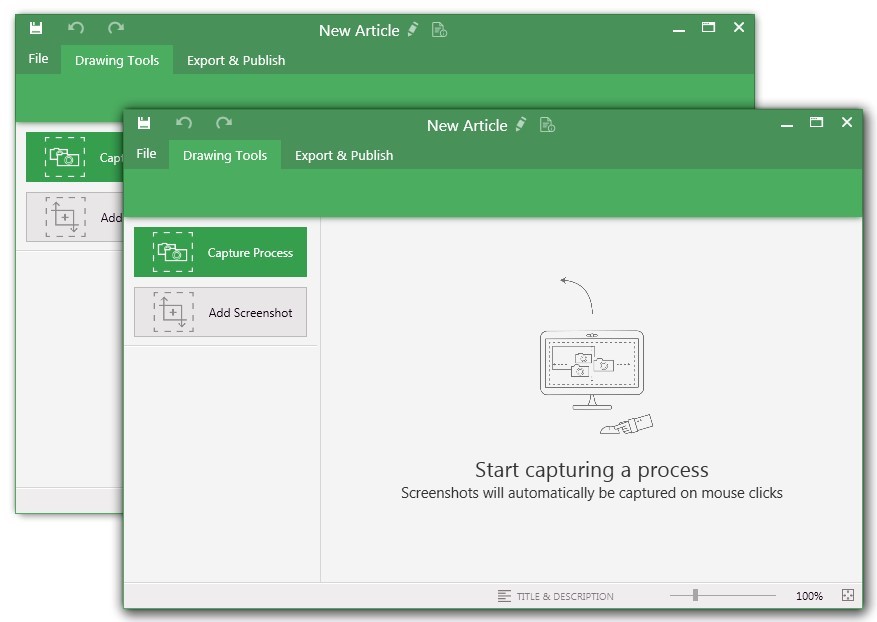
UiPath Task Capture (formerly StepShot, acquired October 2019) is a tool designed for quick and easy step-by-step documentation. During a recording mode, the software creates a separate screenshot on every click, groups them into a manual with automatically added metadata. Users can annotate captured images and structure documents in the way they want them to look.
N/A
Pricing
Pop
UiPath Task Capture
Editions & Modules
No answers on this topic
No answers on this topic
Offerings
Pricing Offerings
Pop
UiPath Task Capture
Free Trial
No
Yes
Free/Freemium Version
Yes
Yes
Premium Consulting/Integration Services
No
Yes
Entry-level Setup Fee
No setup fee
No setup fee
Additional Details
—
We have some discounts available all the time depending on the amount of ordered licenses.
Copy/Paste works flawlessly from my computer to another screenhero users computer.
Screenhero works with screen-recording software, so not only can I pair-develop, I can take video of a pair development session.
I can't think of any reason why Screenhero wouldn't be suited for any situation. I would say that they need to bring back the option for a native app capability outside of the slack app like they did during the Slack merge transition.
A de minimis incentive was given to thank the reviewer for their time. The incentive was not used to bias or drive a particular response, nor was the incentive contingent on a positive endorsement. More Info
StepShot is perfect for showing your audience how they are supposed to navigate a new system you have implemented. You can take them from a login screen all the way through any technical process you want them to follow. The product is not ideal, however, for documenting a process that does not have tangible steps. For example, a process we have created includes some reflective thinking about alignment or outcomes in order to work, this can be articulated in the text area of the screen captures but doesn't really capture our message.
A de minimis incentive was given to thank the reviewer for their time. The incentive was not used to bias or drive a particular response, nor was the incentive contingent on a positive endorsement. More Info
EASY! A simply to use and understand UI cannot be understated. I needed no additional training and did not need to reference and support documentation to pick up and use Screenhero with my team. It's easy to add new folks to connect with, easy to call them, easy to end the call, and so forth. I would liken the UI to a more sleek Yahoo Instant Messenger (for those who remember that service!).
Painless. I rarely ever had connectivity issues or grainy audio/video quality. When I did occasionally encounter that (rough guess maybe 1 in 20), it usually cleared itself up after a few seconds. I think it's only ever "locked up" on me twice, meaning I had to disconnect and reconnect in order for the issue to be resolved. Overall, a painless experience.
A de minimis incentive was given to thank the reviewer for their time. The incentive was not used to bias or drive a particular response, nor was the incentive contingent on a positive endorsement. More Info
A de minimis incentive was given to thank the reviewer for their time. The incentive was not used to bias or drive a particular response, nor was the incentive contingent on a positive endorsement. More Info
I'm not sure how to sign up right now. I guess until it's integrated into Slack as a full-blown feature it'll stay like that.
Most probably it'll be monetized as an extra feature.
This is true for most of the remote management solutions: security concerns. Slack had some break-ins in the past, giving remote control to your computer can be dangerous.
Another issue which is problematic for similar product too: watch out if there's an extra remote server is involved. Say you and your client you want to guide with Screenhero both log in to a remote server through RDP. Both the RDP and Screenhero capture hotkeys, and depenfing on if your other peer logs into screenhero on the server itself or his machine, things like copy-paste won't work because the RDP is interfering with the remote management software.
A de minimis incentive was given to thank the reviewer for their time. The incentive was not used to bias or drive a particular response, nor was the incentive contingent on a positive endorsement. More Info
The "export & publish" button is kind of tiny and tucked away. It should be more prominent. After not using it for a couple weeks, I always forget where it is.
Updates aren't as frequent. Which is fine, since I haven't come across many bugs, it would just be cool to see some added features/functionality a bit more often.
The blur looks fine in the preview mode, but when exported, it's not the best.
A de minimis incentive was given to thank the reviewer for their time. The incentive was not used to bias or drive a particular response, nor was the incentive contingent on a positive endorsement. More Info
I have only run into an issue once, which I believe was due to a newly released feature (cloud storage). I was running into issues with the functionality on my Mac. The team was incredibly helpful in both troubleshooting the issue by jumping on screen sharing sessions, as well as providing multiple releases for me to test to fix the problem!
A de minimis incentive was given to thank the reviewer for their time. The incentive was not used to bias or drive a particular response, nor was the incentive contingent on a positive endorsement. More Info
Screenhero being acquired by Slack was honestly the primary reason we selected it over TeamViewer. Our organization is heavily invested in Slack's enterprise solution, so choosing Screenhero was a pretty easy decision. On top of that, Screenhero delivers very well on its core competencies, so there doesn't seem to be a very good reason to not use it given its relationship with Slack.
A de minimis incentive was given to thank the reviewer for their time. The incentive was not used to bias or drive a particular response, nor was the incentive contingent on a positive endorsement. More Info
A de minimis incentive was given to thank the reviewer for their time. The incentive was not used to bias or drive a particular response, nor was the incentive contingent on a positive endorsement. More Info
A de minimis incentive was given to thank the reviewer for their time. The incentive was not used to bias or drive a particular response, nor was the incentive contingent on a positive endorsement. More Info
This has saved us MANY HOURS in either walking clients through processes in person or having to create a one-off guide through taking screenshots and creating our own documents with the screenshots hand placed.
Client satisfaction is high when they receive these guides. It is documentation that they can refer to at anytime that is personalized to their use or individual needs.
A de minimis incentive was given to thank the reviewer for their time. The incentive was not used to bias or drive a particular response, nor was the incentive contingent on a positive endorsement. More Info