PowerSchool Student Information System vs. Totango

Overview
ProductRatingMost Used ByProduct SummaryStarting Price
PowerSchool SIS
Score 6.8 out of 10
Mid-Size Companies (51-1,000 employees)
The PowerSchool Student Information System covers administrative needs, such as scheduling, attendance, reporting, data management, faculty management, emergency/medical and health management, registration, and more for K-12 schools and districts. It is easy to use and boasts an industry-leading gradebook, PowerTeacher Pro. Users enjoy a fully web-based SIS that is flexible, configurable, and scalable with real-time updates on any operating system, browser or device.N/A
Totango
Score 7.8 out of 10
N/A
Totango customer success software, now with Catalyst, helps enterprise businesses and cross-functional teams accelerate customer outcomes in productivity, retention, and expansion. Totango and Catalyst will become a unified product, following the merger in February 2024.N/A
Pricing
PowerSchool Student Information SystemTotango
Editions & Modules
No answers on this topic
Offerings
Pricing Offerings
PowerSchool SISTotango
Free Trial
NoNo
Free/Freemium Version
NoNo
Premium Consulting/Integration Services
NoNo
Entry-level Setup FeeNo setup feeOptional
Additional DetailsEach package gives teams a 360° customer account profile, customer health scoring, customer journey program templates (SuccessBLOCS), automated workflows (SuccessPlays), email campaigns, self-paced onboarding, and customer support.
More Pricing Information
Community Pulse
PowerSchool Student Information SystemTotango
Considered Both Products
PowerSchool SIS
Chose PowerSchool SIS
Each software I used in my career had special features which were specifically unique for them. PowerSchool Student Information System was an impressive software that offered the ability to ease student registrations and admissions online using web forms where students and …
Chose PowerSchool SIS
Price and features way back just were much better in PowerSchool. We have not evaluated much in the recent years.
Chose PowerSchool SIS
I have heard good things for Infinite Campus and Skyward. I would [evaluate] each of them and see what fits your needs. Each has their strengths and weaknesses and so picking the right one for your needs is important. PowerSchool [Student Information System] does have some …
Chose PowerSchool SIS
PowerSchool was the learning management system that was in place when I started at this institution but I approve of it. It definitely does help simplify the amount of work that goes into the grading process. Grades can easily be calculated as long as a proper setup has been …
Chose PowerSchool SIS
I have been a PowerSchool Student Information System user since 2003 and we were one of the very first districts to adopt it. Since I have used it for so long, entertaining the idea of moving to another platform is not on the table.
Chose PowerSchool SIS
PowerSchool Student Information System does a great job of organizing information in ways that other educational software does not.
Chose PowerSchool SIS
I have used Desire 2 Learn (D2L) and Synergy Student Information System (Synergy SIS) and PowerSchool Student Information System stacks up against them this way:

Chose PowerSchool SIS
We moved away from Jupiter because we found that Jupiter did not handle all aspects of the school that we needed it to.
Chose PowerSchool SIS
I was a huge advocator for Boardingware and worked closely with them to try and create a more well-rounded program for the private school I worked at, but definitely think PowerSchool works best and most effectively for public school. In terms of grading PowerSchool works much …
Chose PowerSchool SIS
PowerSchool replaced an old version of Apple School. PowerSchool outperforms Apple's product and is so much easier to use. It was even simple to convert the old Apple student files to the PowerSchool system for a seamless transition. Once we transitioned, we were able to see …
Chose PowerSchool SIS
PowerSchool has many more features than Blackboard such as attendance, grades, performance review standards platform, lunch, etc. Blackboard makes it easy to find a parent’s email or phone number quickly which is not in PowerSchool.
Chose PowerSchool SIS
Our previous SIS went out of business, and we needed something fairly soon. PowerSchool was the SIS that had the best ability for our state reporting. We liked what we heard from other states and districts about the innovation and continued improvement by PowerSchool.

Admin, …

Chose PowerSchool SIS
Nothing stacks up against PowerSchool in terms of usability and flexibility. Every other product I have used has not come close to the user friendliness of PowerSchool, nor they do not allow immediate flexibility.
Chose PowerSchool SIS
We used a different grade management system over 5 years ago that was efficient but not as user-friendly as Powerschool. I cannot remember the name of that application. Our school system has been using PowerSchool for over 5 years and so far it has served our purpose. Each year …
Chose PowerSchool SIS
As noted, I think it would be hard to find anything else that is better than this tool for your school or district, this SIS is really the total package. It has a great teacher grade book, and while there are always things that can be improved, because you can customize it, the …
Chose PowerSchool SIS
Each of the above products has great features, but PowerSchool has features that each of the above products has, all in one system. This means that you could more easily use JUST PowerSchool without needing extensions and other systems to supplement features. This is less …
Chose PowerSchool SIS
I used Blackbaud at a different school system so there was not a choice or selection. I feel that it was pretty similar to PowerSchool so I had a very smooth transition from one platform to the other. The gradebooks felt very similar, along with the recording and reports …
Chose PowerSchool SIS
We found that PowerSchool Student Information System provided the platform we needed to manage student information, assignments and grades, school schedules, etc. Although Schoolnet provided assessment and instructional management tools, it did not allow us to keep track of the …
Chose PowerSchool SIS
I have used a product called SASI. It does not compare to this at all. SASI was a site based system and the backend was not a true database. I have also use Sungard Pentamation before. Although it was a centralized system, it wasn't as user-friendly and the interface was has to …
Chose PowerSchool SIS
PowerSchool Student Information is the gold standard for Student Information Systems. They know what they are doing, how to serve K-12 schools and school districts. The other Student Information Systems did not meet our districts minimum standards for the needs that we have, …
Chose PowerSchool SIS
PowerSchool blows the other Student Information System that my school used out of the water. The other Student Information System was a glorified grade book/report creator, and had no other function. PowerSchool has so many functions and elements inside of one program that it …
Chose PowerSchool SIS
I used Infinite Campus previously while working at a different school. My position was the same at both schools. PowerSchool is more user-friendly than Infinite Campus for those staff members who are not strong with utilizing technology. Infinite Campus allows users to print …
Chose PowerSchool SIS
The systems seem to stack up pretty well, however we have stuck with PowerSchool mostly due to our history with the product. The cost and feature set differences wasn't substantial enough to warrant a migration. The amount of work involved with training staff and end users is …
Totango
Chose Totango
Our organization has successfully unlocked more value from Totango than I've seen with the two other CS platforms I've used at prior organizations
Chose Totango
I've implemented dozens of systems over the last 15 years and, I feel, Totango was by far the most challenging. I have a background in several areas, but the most applicable to Totango is my background in data management, systems administration, programming, web design, web …
Chose Totango
Pipedrive is a great CRM for Sales purposes but it doesnt give much tools for CX management. Totango is all the opposite, it is an excellent product for Customer Management . We currently use both platforms integrated with each other and it gives great results to both Sales and …
Chose Totango
Totango's UI is clean, very easy to find whatever you need on the account. Its ability to search using the company domain of a customer definitely saves time and effort instead of switching to other databases. It also allows me to view my task on a weekly basis instead of …
Chose Totango
All systems have positives and negatives but Totango fit immediate needs best
Chose Totango
I have not assessed others myself, but I had colleagues that did prior to committing to Totango.
Chose Totango
Totango was the best platform for our needs, particularly the ability to segment and the ease of use versus other products for the day to day work of our CSMs
Chose Totango
I think Totango has features and implementation very similar to top-of-the-line CRMs but is easier to implement. Its incredibly visibly pleasing and out-of-the-box dashboards make it easy to get immediate visibility into your customer landscape. They also have a great customer …
Chose Totango
I don't make the purchasing decisions, and I don't know which other companies were in the running, but as far as the expectation of what we had anticipated TT doing for us, and what we see in our day-to-day, I think it answers the biggest questions we had which were - "how do …
Chose Totango
Totango was a good fit and middle ground between Gainsight which was overwhelming for our needs and ChurnZero which at the time was not as mature as it is today. Simple to use straightforward interface which is also flexible and customizable. The Totango product team has been …
Chose Totango
Totango seemed the best way to have quick wins, long term wins, and work through optimizations and iterations along the way. We could launch piecemeal and adapt to our business needs as we saw value in Totango, instead of having to create a masterpiece that would be complex to …
Chose Totango
Totango had a much cleaner UI and was much more affordable for a small company. Totango also looked like it would be more straightforward and easier to use for my customer success team. Other companies didn't handle the multi-level customer hierarchies as cleanly as Totango and …
Chose Totango
Not relevant. Do not have experience working with other customer success platforms.
Chose Totango
Totango is easy to use and has great demos.
Chose Totango
Planhat feels like Pandora's box. It was very cool, shiny, complete but felt like an empty canvas. We felt so overwhelmed by the amount of possibilities that we didn't know where to begin. Because we sought out a tool which could help us out with the best 'time-to-value' due to …
Chose Totango
We had previously used Salesforce for years for our CSMs and other functions but found that it never quite met what we needed it to do for our CSMs. It was cumbersome with reporting and showing workflow. It was also more manual with detailing engagements or reaching our clients …
Chose Totango
Totango felt like a great option that was beyond entry-level, but not a sledgehammer for a nail for what, at the time, was a brand new Customer Experience team being formed.
Features
PowerSchool Student Information SystemTotango
Student and Faculty Administration
Comparison of Student and Faculty Administration features of Product A and Product B
PowerSchool Student Information System
8.5
Ratings
2% above category average
Totango
-
Ratings
Integrations with 3rd-Party Education Technology9.00 Ratings00 Ratings
Online Registration Management10.00 Ratings00 Ratings
District Communications, such as messaging and alerting8.10 Ratings00 Ratings
Roster Management9.00 Ratings00 Ratings
Platform Customization7.70 Ratings00 Ratings
Teacher Self-Service9.00 Ratings00 Ratings
Student Data Security9.40 Ratings00 Ratings
Community Support7.40 Ratings00 Ratings
Class Scheduling9.40 Ratings00 Ratings
State and National-level Reporting7.10 Ratings00 Ratings
Compliance Support7.60 Ratings00 Ratings
Teacher and Parent Mobile Application8.00 Ratings00 Ratings
Security
Comparison of Security features of Product A and Product B
PowerSchool Student Information System
-
Ratings
Totango
8.5
Ratings
3% below category average
Role-based user permissions00 Ratings8.50 Ratings
Platform & Infrastructure
Comparison of Platform & Infrastructure features of Product A and Product B
PowerSchool Student Information System
-
Ratings
Totango
8.5
Ratings
2% below category average
API00 Ratings6.90 Ratings
Integration with Salesforce.com00 Ratings9.50 Ratings
Integration with Marketo00 Ratings9.00 Ratings
Customer Data Extraction / Integration
Comparison of Customer Data Extraction / Integration features of Product A and Product B
PowerSchool Student Information System
-
Ratings
Totango
8.1
Ratings
8% below category average
Product usage00 Ratings8.10 Ratings
Help desk / support tickets00 Ratings8.20 Ratings
Customer Success Management
Comparison of Customer Success Management features of Product A and Product B
PowerSchool Student Information System
-
Ratings
Totango
8.1
Ratings
6% below category average
NPS surveys00 Ratings9.40 Ratings
Sponsor tracking00 Ratings6.10 Ratings
Customer profiles00 Ratings7.90 Ratings
Automated workflow00 Ratings9.10 Ratings
Internal collaboration00 Ratings7.70 Ratings
Customer health scoring00 Ratings7.50 Ratings
Customer segmentation00 Ratings8.70 Ratings
CSM Reporting & Analytics
Comparison of CSM Reporting & Analytics features of Product A and Product B
PowerSchool Student Information System
-
Ratings
Totango
8.3
Ratings
1% below category average
Customer health trends00 Ratings8.40 Ratings
Engagement analytics00 Ratings8.80 Ratings
Revenue forecasting00 Ratings7.70 Ratings
Dashboards00 Ratings8.40 Ratings
Best Alternatives
PowerSchool Student Information SystemTotango
Small Businesses

No answers on this topic

ChurnZero
ChurnZero
Score 7.9 out of 10
Medium-sized Companies
Schoolmint Hero
Schoolmint Hero
Score 9.7 out of 10
CustomerSuccessBox
CustomerSuccessBox
Score 9.5 out of 10
Enterprises
Schoolmint Hero
Schoolmint Hero
Score 9.7 out of 10
Gainsight CS
Gainsight CS
Score 8.8 out of 10
All AlternativesView all alternativesView all alternatives
User Ratings
PowerSchool Student Information SystemTotango
Likelihood to Recommend
9.0
(0 ratings)
9.1
(0 ratings)
Likelihood to Renew
10.0
(0 ratings)
7.3
(0 ratings)
Usability
8.0
(0 ratings)
8.6
(0 ratings)
Availability
-
(0 ratings)
9.9
(0 ratings)
Performance
-
(0 ratings)
8.8
(0 ratings)
Support Rating
8.5
(0 ratings)
7.7
(0 ratings)
Online Training
-
(0 ratings)
7.0
(0 ratings)
Implementation Rating
8.0
(0 ratings)
10.0
(0 ratings)
Configurability
-
(0 ratings)
8.2
(0 ratings)
Ease of integration
-
(0 ratings)
8.0
(0 ratings)
Product Scalability
-
(0 ratings)
9.8
(0 ratings)
Vendor post-sale
10.0
(0 ratings)
8.0
(0 ratings)
Vendor pre-sale
10.0
(0 ratings)
8.0
(0 ratings)
User Testimonials
PowerSchool Student Information SystemTotango
Likelihood to Recommend
PowerSchool is great for schools to keep track of student information, schedules, and grades. It integrates with other programs to make setting up classes easier and faster. PowerSchool gives teachers a singular place to find information or input students' grades. It also has an app for parents or guardians to use to check their student's grades which is very useful.
Read full review
for a CSM it´s marvelous, you have in one window everything,the agenda for your day by day work, the workload you have in a day,all the customers database and call history added by tasks and toutch points, the to do thing in each customer you know what to do next, with renewal you hace an digital engadgement with customers inform they need to renew in order to keep using the app.
Read full review
Pros
  • PowerSchool houses student or staff information that can be easily accessed by those teachers and administrators who need the information. This allows everyone to go to one place to access information.
  • Parents can view their child's grades at any time with their protected login on a parent portal. This allows teachers to keep parents informed and involved in their child's progress at school. When everyone works together it increases our students' chance for success.
  • PowerSchool offers videos to train new users. When we have new employees, the videos can be accessed at any time the employee needs as opposed to them waiting for someone to help them.
Read full review
  • Totango easily integrates with other tools to pull information in one place.
  • Totango is extremely easy to configure how you want, including adding new attributes that are important to you, creating segments relevant to your business, and automating processes through SuccessPlays and Campaigns.
  • Totango Support is amazing! Very knowledgeable and prompt!
  • Totango provides so many resources for users, including tutorials, a knowledge base, and the new creator campus. It's awesome.
Read full review
Cons
  • The user interface could be more intuitive. Because of the many features, it can sometimes be difficult for administrators to find what they are looking for.
  • A recent upgrade allowing for more flexibility in the relationship between students and parents was long in coming and didn't go very smoothly. We are now dealing with a ton of clean-up after the upgrade. Even after we have cleaned everything up, there is still a ways to go before PowerSchool is on par with other SIS systems in that area. In their defense though, they are actively working on getting caught up.
Read full review
  • Editing templates can be slow and confusing.
  • Building items across teams can be a challenge.
  • Reports and segments seem to be the same thing and it's a challenge telling people to build a segment when they are looking to build a report.
Read full review
Likelihood to Renew
The district is unlikely to change systems due to the cost of training and tech support to facilitate such a switch.
Read full review
We like the tool enough to keep it in the long run. It does what we need it exactly to do, and I think there's still a lot for us to uncover in terms of its capabilities. There are a lot of functions we want to take the time to learn, but we've been strapped on resources so are just staying afloat.
Read full review
Usability
Great features, but it can feel very cumbersome at times
Read full review
It is easy to use and understand, and simple to follow day to day. Logging notes and tasks is one of the key areas this is utilised along with tracking reports and accessing key data points for conversations with customers which is helpful. Mobile app helps too to access information on the go.
Read full review
Reliability and Availability
No answers on this topic
Totango is available all the time . the only problem is that some times it takes time to load specially the records of the customers. The data loading inside the customer account is fast. It may be because of internet service but still it can i,prove a lot. i have seen other competitors software which is faster
Read full review
Performance
No answers on this topic
At times the integration sync can be really slow when it comes to touchpoints. I can't say the same for customer health syncing, but I do tend to notice the lag from email syncing, and in those cases, I will need to refresh the Totango page a couple of times or wait a couple of extra seconds/minutes for it to show up.
Read full review
Support Rating
Overall, I have not had to use support for PowerSchool Student Information System because our school district gives us training in each area in which we will be utilizing PowerSchool Student Information System. In terms of in-user support, I feel that there is mild to moderate user support that is built into PowerSchool SIS.
Read full review
I give Totango a support rating of 10 because I can always get support whenever needed. If its a technical issue, I know I can email their support team for help. If it's a more in depth question with respect to our instance of Totango, I can reach out to our CSM and always get help in a very reasonable amount of time. I always look to Totango as the standard when I think of how to best communicate and support our own customers.
Read full review
Online Training
No answers on this topic
Our CSM did a great job of conducting the training so we understand, at the very least, the functionality that is directly relevant to us. This also allowed us to train our own new team mates when onboarding based on the training flow that was first presented to us. This was also conducted as a interactive sessions, as training are notoriously known to be dry
Read full review
Implementation Rating
No answers on this topic
Totango has been easy for our team to integrate most of our new features into, which is great considering we have to factor in the customers' usage of the new features into all of the health and usage metrics we have. It has taken a while to integrate our second product however, which is why I would rank this a 7.
Read full review
Alternatives Considered
Each software I used in my career had special features which were specifically unique for them. PowerSchool Student Information System was an impressive software that offered the ability to ease student registrations and admissions online using web forms where students and parents could submit and upload their information and necessary documents to the school/institute with just a few clicks. Even though this feature is available on a few other similar software, PowerSchool Student Information System was the only software that was specialized in this area.
Read full review
I've implemented dozens of systems over the last 15 years and, I feel, Totango was by far the most challenging. I have a background in several areas, but the most applicable to Totango is my background in data management, systems administration, programming, web design, web dev. Totango was very challenging to set-up. Other systems have more intuitive UIs and onboarding. For anyone wanting to use Totango, don't. For those that are still not convinced, I would make sure you are game for a very long implementation and the ongoing maintenance of syncing/resyncing. If you are in charge of implementation, in my experience, this is a not a 'set it and forget it' type of platform. It does require someone who is highly technical to partner with your customer success team to make sure it is functioning properly.
Read full review
Scalability
No answers on this topic
Information keeps missing and changing in totango . Because of that there is are lot of problems with it. We need to manually keep the backup in an another file. More over if in case we take the backup its so hard to track since its all in numbers. Totango can be much better if the cloud storage is working fine. My company is planning to discontinue due to this factor
Read full review
Return on Investment
  • Having one system within the school district is beneficial. Teachers are able to access a variety of information and also do input all within the same program.
  • Communication with parents has been impacted greatly, as they always have information at their fingertips without teachers having to call or email them with a grade update. Parents are able to check student's grades at any time.
Read full review
  • Definitely enables to improve overall client retention, our target is 97%, we're at 96%.
  • A significant contribution to our increasing client conversion from starter package to the subscribed client within the first 90 days or less.
  • ROI continues to increase with every new release from Totango, and it will ultimately become our primary source of truth for all customer data.
Read full review
ScreenShots

PowerSchool SIS Screenshots

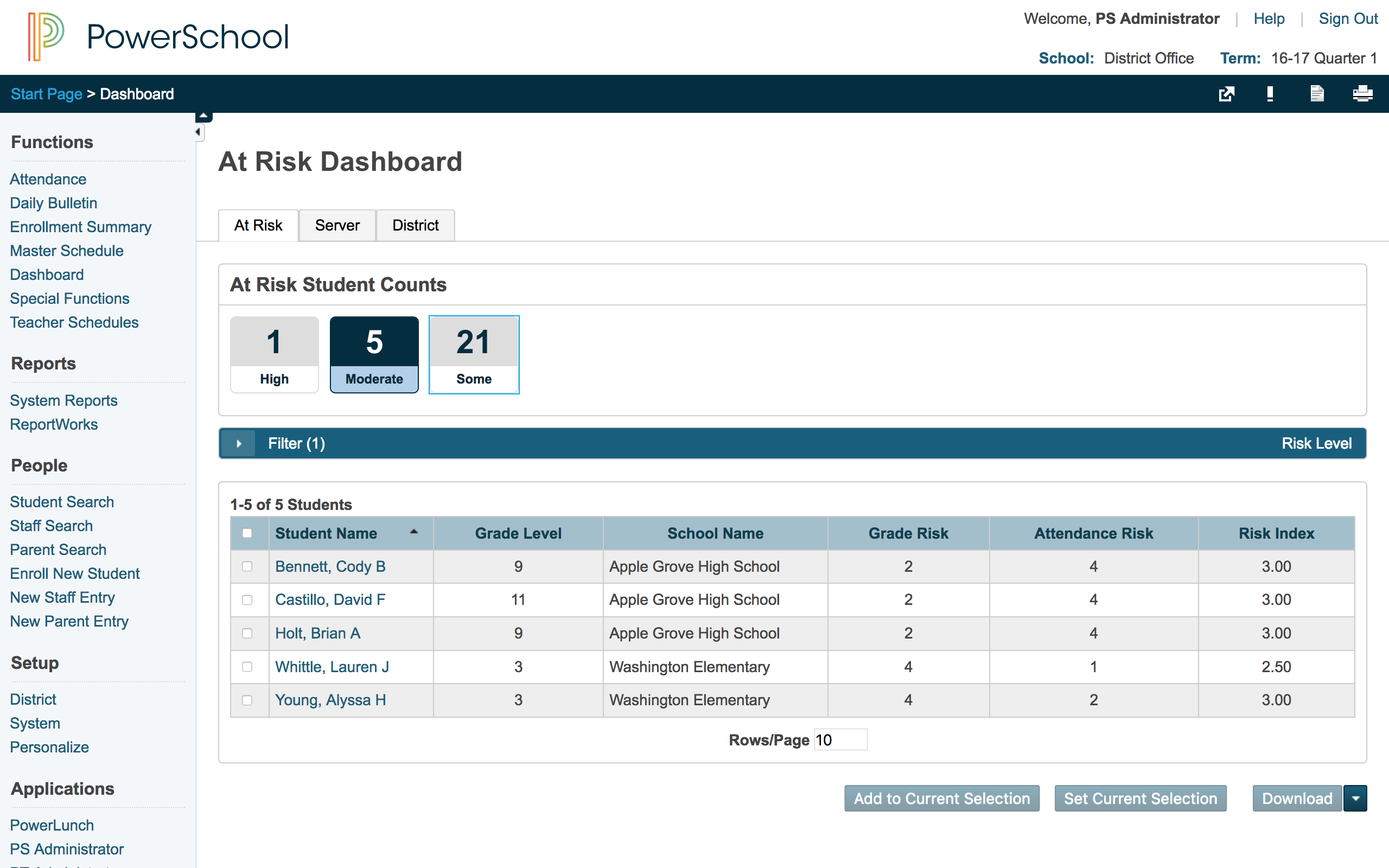
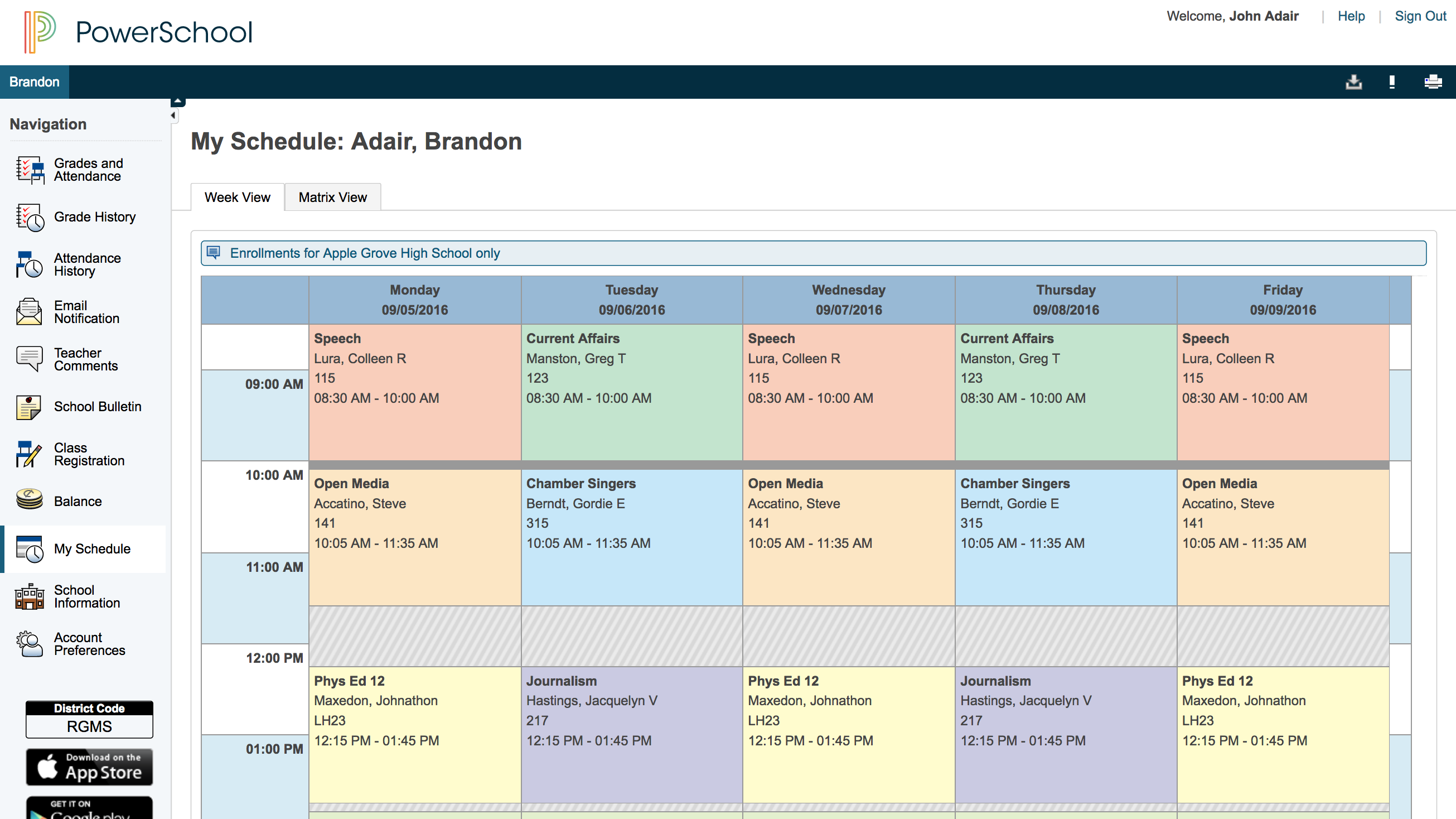
Screenshot of Student attendanceScreenshot of Standards-based gradingScreenshot of At-risk dashboardScreenshot of Parent view of student schedule

Totango Screenshots

Screenshot of collaboration tools to manage a customer portfolioScreenshot of a 360° view of customer healthScreenshot of the dashboard to monitor customer metricsScreenshot of engaging in-app experiences and email campaigns to improve customer retentionScreenshot of integrated data in the Customer Data Hub