TrustRadius: an HG Insights company

Save this comparison

Save this comparison

Add Product

Recommended Comparisons

    Overview
    ProductRatingMost Used ByProduct SummaryStarting Price

    Planview ProjectPlace

    Score8.3 out of 10
    N/AProjectplace is a collaborative work management solution. The vendor says the product is built with teams of all sizes and complexity in mind, from virtual teams of five to entire global enterprises with tens of thousands of active users. It is also designed to incorporate waterfall and agile workflows.N/A

    Teams Manager

    Score8 out of 10
    Mid-Size Companies (51-1,000 employees)
    IT administrators can keep control of their Microsoft 365 environment with Teams Manager. Teams Manager is used to prevent the uncontrolled creation of Teams and Groups and automate governance processes. Key Features: • Governance Dashboard and Reports – provides an overview of the M365 environment (inactive or ownerless teams, teams with guests etc.) • Provisioning of new teams & SharePoint sites – with channels,…

    $1.60

    per year

    Pricing
    Planview ProjectPlaceTeams Manager
    Editions & Modules
    No answers on this topic
    Extra Large (4,000+ users)
    $1.60
    per year per user
    Small (up to 249 users)
    1,599
    per year per installation
    Medium (up to 999 users)
    4,049
    per year per installation
    Large (up to 4000 users)
    6,499
    per year per installation
    Offerings
    Pricing Offerings
    Planview ProjectPlaceTeams Manager
    Free Trial
    YesYes
    Free/Freemium Version
    NoNo
    Premium Consulting/Integration Services
    YesYes
    Entry-level Setup FeeNo setup feeOptional
    Additional Details—Prices are starting prices. Not listed here are the different support and service packages.
    More Pricing Information
    Community Pulse
    Planview ProjectPlaceTeams Manager
    Considered Both Products
    Planview
    No answer on this topic
    Solutions2Share
    No answer on this topic
    Key User Insights
    Would buy again
    94%
    Would buy again
    88 Answers
    90%
    Would buy again
    9 Answers
    Delivers good value for the price
    98%
    Delivers good value for the price
    80 Answers
    100%
    Delivers good value for the price
    8 Answers
    Happy with the feature set
    97%
    Happy with the feature set
    91 Answers
    100%
    Happy with the feature set
    10 Answers
    Lived up to sales and marketing promises
    97%
    Lived up to sales and marketing promises
    60 Answers
    No answers on this topic
    Implementation went as expected
    94%
    Implementation went as expected
    63 Answers
    100%
    Implementation went as expected
    5 Answers
    Features
    Planview ProjectPlaceTeams Manager
    Project Management
    Comparison of Project Management features of Planview ProjectPlace and Solutions2Share Teams Manager
    Feature
    Planview ProjectPlace
    7.7
    198 Ratings
    0% above category average
    Solutions2Share Teams Manager
    -
    Ratings
    Task Management8.4191 Ratings00 Ratings
    Resource Management6.7158 Ratings00 Ratings
    Gantt Charts7.7171 Ratings00 Ratings
    Scheduling7.7169 Ratings00 Ratings
    Team Collaboration8.7193 Ratings00 Ratings
    Support for Agile Methodology8.7151 Ratings00 Ratings
    Support for Waterfall Methodology7.8140 Ratings00 Ratings
    Document Management9.0184 Ratings00 Ratings
    Email integration6.4163 Ratings00 Ratings
    Mobile Access7.7147 Ratings00 Ratings
    Timesheet Tracking6.0129 Ratings00 Ratings
    Best Alternatives
    Planview ProjectPlaceTeams Manager
    Small Businesses
    Any.do
    Score8 out of 10
    No answers on this topic
    Medium-sized Companies
    KanbanFlow
    Score7.3 out of 10
    No answers on this topic
    Enterprises
    Microsoft To Do
    Score7.9 out of 10
    No answers on this topic
    All AlternativesView all alternativesView all alternatives
    User Ratings
    Planview ProjectPlaceTeams Manager
    Likelihood to Recommend
    8.1
    (198 ratings)
    8.0
    (10 ratings)
    Likelihood to Renew
    9.2
    (9 ratings)
    -
    (0 ratings)
    Usability
    10.0
    (75 ratings)
    8.0
    (1 ratings)
    Availability
    9.1
    (2 ratings)
    -
    (0 ratings)
    Performance
    9.1
    (2 ratings)
    -
    (0 ratings)
    Support Rating
    8.0
    (72 ratings)
    -
    (0 ratings)
    Implementation Rating
    9.1
    (1 ratings)
    -
    (0 ratings)
    Configurability
    6.4
    (1 ratings)
    -
    (0 ratings)
    Ease of integration
    9.1
    (1 ratings)
    -
    (0 ratings)
    Product Scalability
    9.1
    (2 ratings)
    -
    (0 ratings)
    Vendor post-sale
    6.4
    (1 ratings)
    -
    (0 ratings)
    Vendor pre-sale
    6.4
    (1 ratings)
    -
    (0 ratings)
    User Testimonials
    Planview ProjectPlaceTeams Manager
    Likelihood to Recommend
    Planview
    Planview ProjectPlace is a vibrant platform that manages all activities and schedules different roles based on their urgency, importance, and requests. Further, Planview ProjectPlace outlines the need for proper documentation with the aim of accurate referencing. Tasks are credibly shared, and proper reporting is enhanced to transform firms' work environment. ; Lastly, Planview ProjectPlace brings sustainable email integration for enterprises.
    Incentivized
    Read full review
    Solutions2Share
    It's well suited if you or your organization performs tasks incorporating other Microsoft programs such as OneNote or Planner. Teams Manager allows for easy management of that software usage; if you do not use any of those, I'm not sure if there is much advantage in using it to manage workflow.
    Incentivized
    Read full review
    Pros
    Planview
    • Easy of use. Modules are well define.
    • Navigation: Users can use the tool's search functionality to find what they are looking for easily. The home page is configurable to the users' needs.
    • The knowledge center is a key function to understand the tool capabilities.
    Incentivized
    Read full review
    Solutions2Share
    • Handles different teams and teams members
    • Giving them permissions as per their job profile and necessity
    • Seeing the projects' progress through one platform
    Incentivized
    Read full review
    Cons
    Planview
    • Under the time tracking, it would be nice to have a set template that would load each week and not have to click a button to load the previous week's template.
    • Somehow making it more intuitive.
    • Having to add in each service line and each detail that I cover for every service line each week is a bit ridiculous.
    Incentivized
    Read full review
    Solutions2Share
    • user interface can be enhanced to seperate the color coding for different channels
    • It would be great to receive notifications in Outlook for Shifts and be able to approve/deny requests and schedule changes there while it's synced with the Outlook calendar.
    Incentivized
    Read full review
    Likelihood to Renew
    Planview
    We're committed now & have >50 users on Projectplace. All our projects are now tracked in the tool. We this investment of time & training, the cost of maintaining Projectplace is relatively low for the benefit. So we will renew, even if there are some idiosyncrasies in the tool & there are opportunities for improvement.
    Incentivized
    Read full review
    Solutions2Share
    No answers on this topic
    Usability
    Planview
    Easy to use platform and provides the user with an amazing experience and straightforward tools that empower and help execute tasks with fast performances that allow quick and easy service delivery. Easy on implementation and get started immediately with enterprise-ready Planview Projectplace and start to connect with teams and departments at once.
    Incentivized
    Read full review
    Solutions2Share
    It is a well-designed and polished application on Teams. Most of its issues stem from Teams UI and UX, which could be improved further. However, if you can fit the team manager to your needs, it can become a very powerful tool to manage data flow.
    Incentivized
    Read full review
    Reliability and Availability
    Planview
    No downtime-issues since the implementation. It has been very stable
    Incentivized
    Read full review
    Solutions2Share
    No answers on this topic
    Support Rating
    Planview
    I haven't needed to get in touch with support because the product is quite well structured and understandable. There were no issues initially when making payments or later for monthly payments. The project manager using the software is quite skilled in the software and has not needed much help. New licenses are easy to acquire, and there is no delay in getting them. I know there are several ways of support available, so that's a plus.
    Incentivized
    Read full review
    Solutions2Share
    No answers on this topic
    Implementation Rating
    Planview
    create an extensive change management process to help folks embrace the change
    Read full review
    Solutions2Share
    No answers on this topic
    Alternatives Considered
    Planview
    [In my experience] Jira is more refined, better looking, and easier to become familiar with. Also, the massive market share of Jira helps in consultancy as you can switch between clients easily. Projectplace has many powerful tools but so does Jira, and Jira integrates with our suite of software much easier compared to Projectplace.
    Incentivized
    Read full review
    Solutions2Share
    We still use it for our one-off situations, but mostly stick to Teams as it is much more user-friendly and allows better sharing capabilities through virtual meetings. Skype is not as easily customized, so it's a no-brainer to use Microsoft Teams and Team Manager for all of our instant messaging and virtual meeting needs.
    Incentivized
    Read full review
    Scalability
    Planview
    It is a bit more difficult to fluently use in large scale implementations
    Incentivized
    Read full review
    Solutions2Share
    No answers on this topic
    Return on Investment
    Planview
    • [We have the] ability to support remote work through projects that scale across multiple groups
    • We have large-scale quarterly projects, so the ability to save and duplicate project templates are helpful for us to keep track of tasks down to the specific card
    Incentivized
    Read full review
    Solutions2Share
    • Positive in regards to easy access to quick answers through instant messaging
    • Positive in that the Managers have a secure place to go to retrieve sensitive information.
    • Negative in that we do not fully utilize the tool.
    Incentivized
    Read full review
    ScreenShots

    Planview ProjectPlace Screenshots

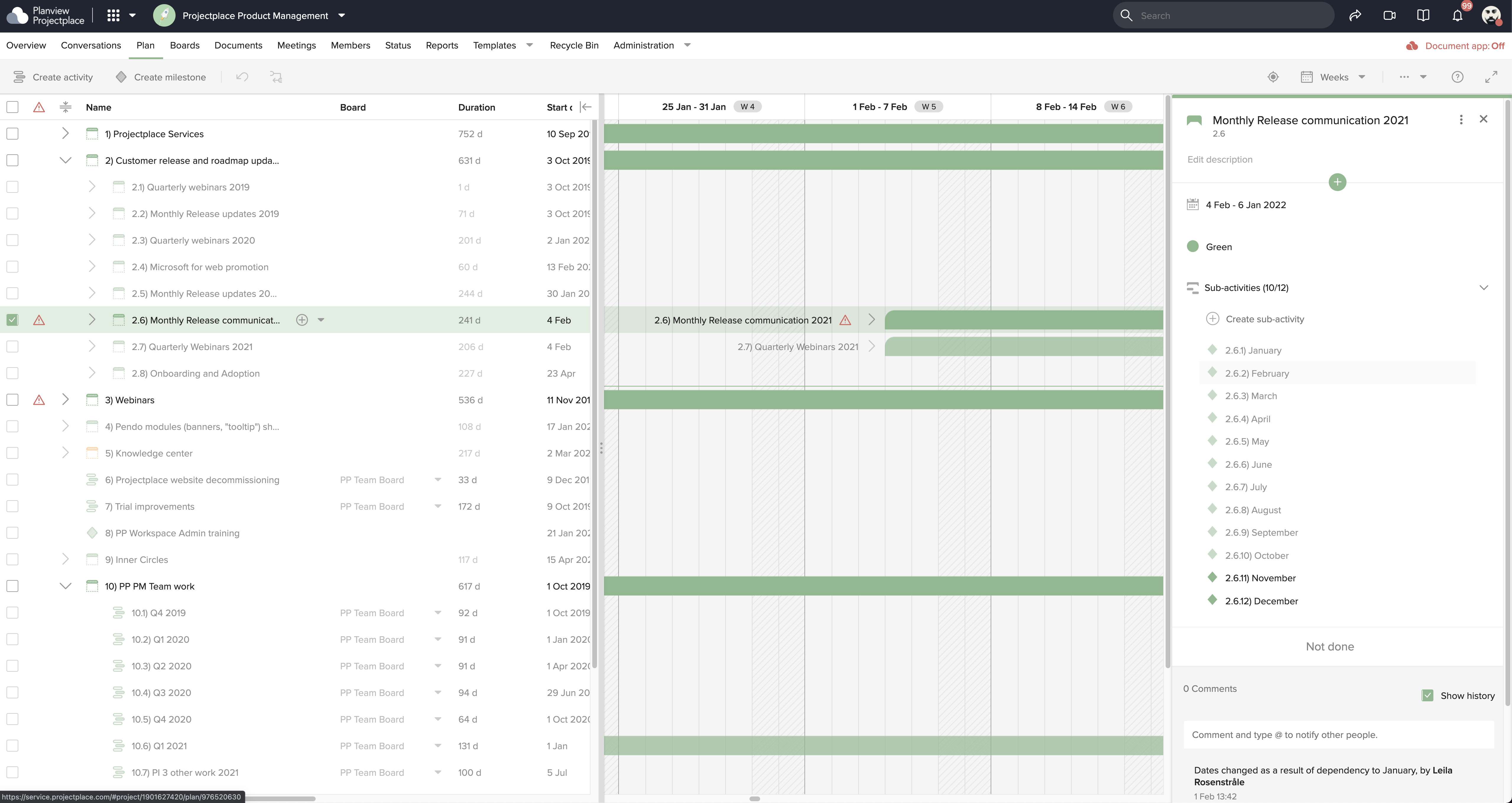
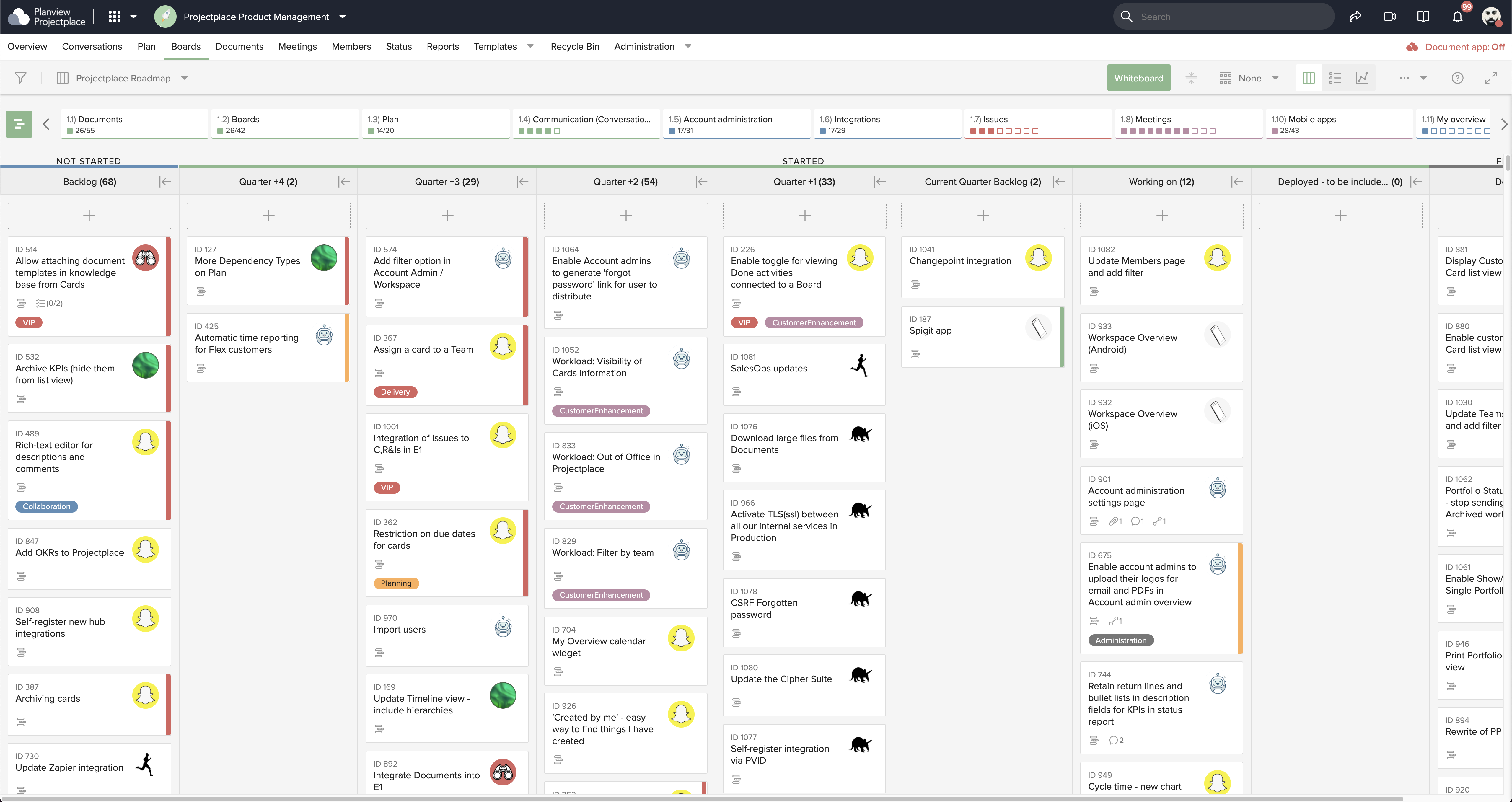
    Screenshot of Collaborative Workstream: Streamlined interaction between activities, boards and cards. Users can plan and follow up in the Gantt while their teams execute and collaborate for optimum productivity on the Kanban boards.Screenshot of Document Management: This helps to ensure changes to documents are visible in real-time. Version control ensures that team members see the latest document versions with access to document history.Screenshot of Gantt Charts: These support planning and visualizing every step of enterprise work and projects with Projectplace Gantt Charts. Track progress to make sure you'll meet your deadlines and know when things are not happening on time.Screenshot of Kanban Boards: This enables teams to execute and collaborate for optimum productivity, and includes activity notifications, messaging and visualizations of progress of day-to-day tasks.Screenshot of Workload View: A visualization of the workload of members in all workspaces, used to determine whether a team member is overloaded with work, or has room to do more.Screenshot of Workspace Overview: This offers an overview of all work and tasks that have been assigned across all workspaces. Personal tasks can be added that help offer a more complete picture of what's left to do.

    Teams Manager Screenshots

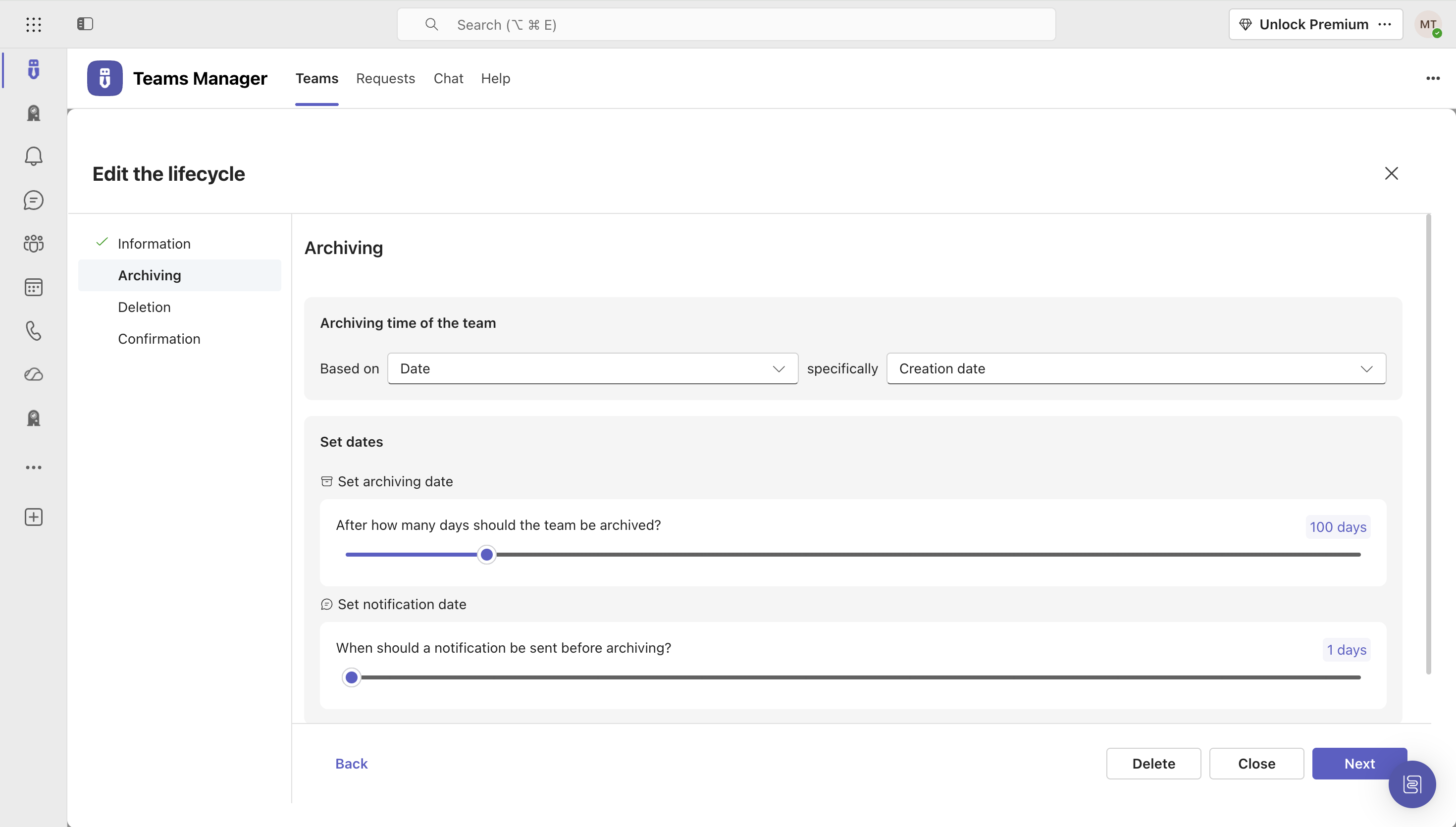
    Screenshot of Governance Dashboard and Reports – for an overview of Microsoft 365 environmentsScreenshot of Automated request and approval process for new teams, M365 groups and SharePoint sitesScreenshot of Templates and provisioning for teams and SharePoint sites (with channels, tabs, apps, folders, Planner with tasks, OneNote with content and more)Screenshot of Lifecycles for teams: inactive or obsolete teams can automatically be archived or even deleted after a specified period of timeScreenshot of Naming conventions for teams, OneNotes, Planners and SharePoint URLs: rules for uniform, relevant names with predefined prefixes and suffixesScreenshot of Policy packages for teams: automatically enforce governance policies for team requests, approvals, access reviews and more