ProWorkflow is a project management software with dashboard, collaboration, and timeline management capabilities.
N/A
WorkflowMax
Score 8.0 out of 10
Small Businesses (1-50 employees)
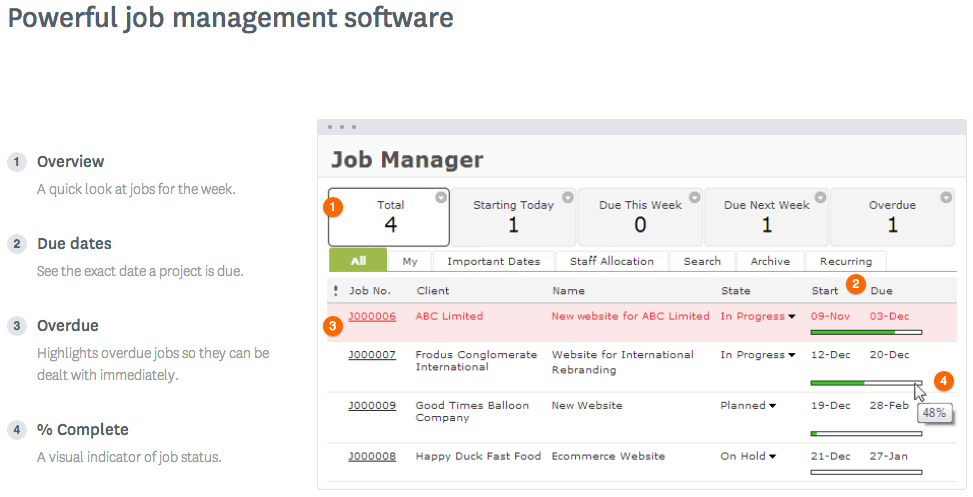
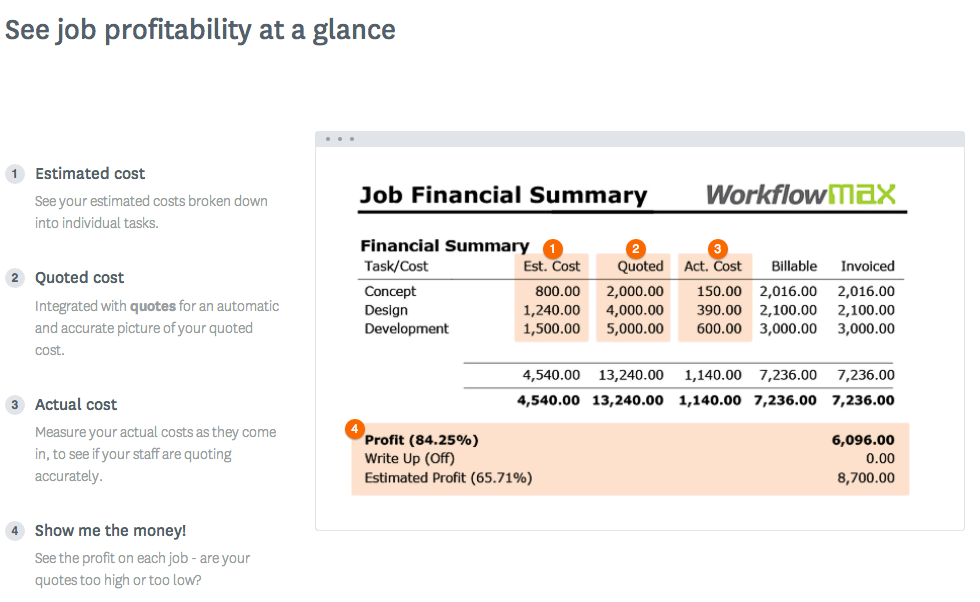
WorkflowMax is a web-based project management solution.The platform offers end-to-end functionality standard to project management software, including time tracking, lead management, collaboration with external stakeholders, invoicing, integrations, and customizable reporting.
$20
per month
Zoho Mail
Score 9.2 out of 10
N/A
Zoho offers their business email suite, which includes Calendar, Tasks, Notes, and Contacts bundled with an inbox.
$1
per user/per month
Pricing
ProWorkflow
WorkflowMax
Zoho Mail
Editions & Modules
No answers on this topic
Standard
$20
per month
Standard
$35
per month
Premium
$70
per month
Mail Lite
$1
per user/per month
Workplace
$3
per user/per month
Mail Premium
$4
per user/per month
Offerings
Pricing Offerings
ProWorkflow
WorkflowMax
Zoho Mail
Free Trial
No
Yes
Yes
Free/Freemium Version
No
No
Yes
Premium Consulting/Integration Services
No
No
Yes
Entry-level Setup Fee
No setup fee
No setup fee
No setup fee
Additional Details
—
—
—
More Pricing Information
Community Pulse
ProWorkflow
WorkflowMax
Zoho Mail
Features
ProWorkflow
WorkflowMax
Zoho Mail
Project Management
Comparison of Project Management features of Product A and Product B
ProWorkflow
8.1
2 Ratings
5% above category average
WorkflowMax
9.3
27 Ratings
18% above category average
Zoho Mail
-
Ratings
Task Management
8.02 Ratings
9.525 Ratings
00 Ratings
Resource Management
9.02 Ratings
9.56 Ratings
00 Ratings
Gantt Charts
8.02 Ratings
9.23 Ratings
00 Ratings
Scheduling
9.02 Ratings
9.419 Ratings
00 Ratings
Workflow Automation
5.02 Ratings
9.54 Ratings
00 Ratings
Team Collaboration
10.02 Ratings
9.519 Ratings
00 Ratings
Support for Agile Methodology
7.02 Ratings
8.93 Ratings
00 Ratings
Support for Waterfall Methodology
7.01 Ratings
9.23 Ratings
00 Ratings
Document Management
10.02 Ratings
9.219 Ratings
00 Ratings
Email integration
7.02 Ratings
9.44 Ratings
00 Ratings
Mobile Access
7.02 Ratings
9.221 Ratings
00 Ratings
Timesheet Tracking
9.02 Ratings
9.624 Ratings
00 Ratings
Change request and Case Management
9.02 Ratings
9.111 Ratings
00 Ratings
Budget and Expense Management
8.02 Ratings
9.418 Ratings
00 Ratings
Professional Services Automation
Comparison of Professional Services Automation features of Product A and Product B
ProWorkflow
9.3
2 Ratings
18% above category average
WorkflowMax
9.5
27 Ratings
20% above category average
Zoho Mail
-
Ratings
Quotes/estimates
10.02 Ratings
9.723 Ratings
00 Ratings
Invoicing
10.02 Ratings
9.527 Ratings
00 Ratings
Project & financial reporting
10.02 Ratings
9.722 Ratings
00 Ratings
Integration with accounting software
7.02 Ratings
9.227 Ratings
00 Ratings
Secure Email Gateway
Comparison of Secure Email Gateway features of Product A and Product B
It's well suited to make understand team on day to day tasks. Manager can see the performance of the team and can assign task based on availability. Our team now works in more collaboration then earlier, this is the strength of the ProWorkflow. Emailing and templates tools are very basic and having room for improvement.
WorkflowMax is very well suited for a business that wants to track time billed by project, to have an easy way to generate invoices for those projects, and to keep track of overall productivity and invoice status. I imagine it can also be adapted to different types of businesses that deal in goods rather than services and time. I am not sure for which scenarios or businesses the program is not appropriate.
If you don't have a huge budget and want something that works with minor quirks here and there then Zoho Mail is definitely something you should look into. For half the price of Google G Suite or Office account you get 5GB of storage per user and can send up to 25MB emails without restrictions. Great for small businesses in my opinion. I have had some issues with their spam filter, but we use SpamTitan and just shut off the one that comes with Zoho Mail. Zoho's spam filter isn't horrible but you should definitely use something in addition or instead of what comes with Zoho.
You can customize the notifications and this has helped us enormously to schedule dates that we overlooked. Also the templates are customizable which gives the company its own branding on its reports.
It is integrated with the Xero platform which makes it very useful to streamline the processes of billing, accounts payable, accounts receivable, petty cash flow and all the accounting and administrative area.
It also has a very complete mobile version, where we can be present and monitor the progress of projects in real time, no matter where we are.
I really like that there is a free version in which a single user can be created. It is really useful because it allows you to evaluate each characteristic of the service without having to buy it.
I also really like the visual aspect of the inbox, which is partially customizable. Because you can make small changes such as changing the color, the language, and among other things.
Currently the timesheet function allows staff to input time for overlapping periods which can cause some headaches when it comes to payroll and invoicing. We understand this is being addressed.
The amount of flexibility in the product can create some challenges when setting up the jobs database at the onset. It is a daunting challenge but worthwhile when completed correctly and rolled out across the firm. Adding new jobs is much easier.
No search function to find a specific job, you have to scroll through all jobs allocated to you.
It is very easy to use and does all you need. It sends newsletters to their own folder. A notification folder for more important things. The Spam folder collect the right amount of spam emails
I have spoken with Zoho several times and their support is always friendly and helpful. I have always been asked for security pins and codes when seeking assistance which helps me to feel my accounts are secure and I have never had to wait on hold to speak with someone for more than 5 minutes. They always seem to have someone available to help. If you call asking for instructions on how to do something they gladly walk you through the process and if you just need something done and don't have time to do it yourself they will happily customize whatever you need without you having to spend all day with it.
Decide how to breakdown your ongoing jobs - are they monthly recurring or annual broken into chunks? What are you going to give clients i.e. how will your proposals and invoices look?
WorkflowMax is much much easier than Streamtime, much more affordable and easier to try out and see if it meets your needs. Streamtime is a great comprehensive product but we lost a year's subscription in investment because we couldn't get answers to the support questions we needed and they had a no refund policy!
Zoho is free. Also, there is no need for a separate IT guy for creating mail, or if any issues come you don't have to find anyone anyone can check and fix all issues from their super admin panel. Zoho overview is much better than outlook and its appearance of getting mail popup and functionality is better than outlook. My friend suggested for this and also after using I have referred my friend
Max enables Loan Assistant to invoice very quickly and easily and integration with Xero for card payments brings our cashflow forward.
Max enables the Loan Assistant team to manage their workflow in an efficient and productive way. The team all work from home. It is the centre of our Loan Assistant universe.