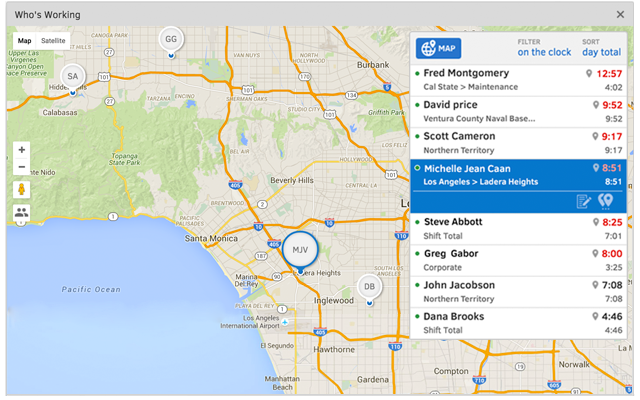
QuickBooks Time (formerly TSheets) is a cloud-based time tracking and scheduling app that allows employees to clock in and out from the job site with the devices they’ve already got in their pockets. The vendor aims to help companies replace paper timesheets with accurate, electronic time data as well as make payroll and invoicing faster and less costly. QuickBooks Time also accurately tracks time and GPS points (even without cell or internet service) then automatically syncs when back…
$0
1 user, unlimited projects
UKG Workforce Central (discontinued)
Score5.1 out of 10
N/A
UKG Workforce Central (formerly Kronos Workforce Central) was a suite of HR Management offerings targeted mainly at enterprise customers with larger-scale and more complex HR and workforce management issues. The product is discontinued.
N/A
Pricing
QuickBooks Time
UKG Workforce Central (discontinued)
Editions & Modules
Free
$0
1 user, unlimited projects
Premium
$8
per user/month + $20 base fee/month (paid annually)
Elite
$10
per user/month + $40 base fee/month (paid annually)
It would be very useful for certain remote jobs that require a high level of presence, as in the case of web development, or remote maintenance sessions, so that when reviewing the work data it is possible to ensure that there will be no failures. By being able to include files in the management, from the equipment tab, it is possible to fully control the hours in which each change in these files were made.
A de minimis incentive was given to thank the reviewer for their time. The incentive was not used to bias or drive a particular response, nor was the incentive contingent on a positive endorsement. More Info
This product was marketed to us as a school and several schools in our area use the program. However, the implementation team we were set-up with had limited school experience and we are still working on the best way to do some of the timekeeping issues where I know that could have been handled better. That being said from a payroll and reporting side it has been great to capture so much data (at times almost too much) and have the system do automatic allocations of salaries and general ledger reports. The reporting takes some getting used to, but overall I've been able to run reports to see and track just about anything I want. Our employees also love the self service compared to our previous products where they can make W4, direct deposit and other updates on their own without having to get HR involved.
A de minimis incentive was given to thank the reviewer for their time. The incentive was not used to bias or drive a particular response, nor was the incentive contingent on a positive endorsement. More Info
Support (their help desk team is incredibly helpful and always quick to respond).
Ease of access and use (the app is user-friendly an intuitive, and the desktop version is equally as approachable).
Manager functionality (it's useful to be able to clock employees in and out at multiple events on the same day by sorting them into different groups by manager/event).
A de minimis incentive was given to thank the reviewer for their time. The incentive was not used to bias or drive a particular response, nor was the incentive contingent on a positive endorsement. More Info
I personally feel like timekeeping is very well thought out and has some powerful tools built in. There is a bit of a learning curve but with strategically placed SMEs we were able to get the use and functionality we needed out of the system.
Workforce planning has been crucial in planning operational support in our retail and customer service centers. It is also editable and modifiable as needed.
A de minimis incentive was given to thank the reviewer for their time. The incentive was not used to bias or drive a particular response, nor was the incentive contingent on a positive endorsement. More Info
The desktop version of the TSheets schedule does not have a search feature. This makes it challenging to find things you are looking for without extra work
The app can be a bit buggy. Though it is a great app, there are many reasons that the app will stop syncing and can cause problems with staff scheduling
A de minimis incentive was given to thank the reviewer for their time. The incentive was not used to bias or drive a particular response, nor was the incentive contingent on a positive endorsement. More Info
A de minimis incentive was given to thank the reviewer for their time. The incentive was not used to bias or drive a particular response, nor was the incentive contingent on a positive endorsement. More Info
TSheets tech support people, like Shawn Sommer, from Tsheets. She has been instrumental, after terminating the person in charge of TSheets I was left with a learning curve too high to climb but after 10 mins of her instructions I was able to make payroll in no time. She cleared all errors that nobody had fixed before. TSheets is not a vendor for me, TSheets is my partner in business. Thank you TSheets.
Now that the system is installed and operational, the "pain is gone"...therefore we see no reason to change to a different application. There is no functionality that is missing from the system that would drive us to consider another solution at this time. Maintenance support from Kronos is sufficient and updates occur regularly.
Our employees find TSheets easy to use and spend minimal time at reporting hours using it. As an administrator and user of the TSheets "data and information" I am extremely positive on the functionality and reporting that it has provided me. From its ease of set-up to training to reporting, TSheets has made us so much more efficient from an administration standpoint
A de minimis incentive was given to thank the reviewer for their time. The incentive was not used to bias or drive a particular response, nor was the incentive contingent on a positive endorsement. More Info
I have never failed to have an issue resolved within minutes of contacting Support. Jen D recently assisted my with an export issue and I was back on track in less the 10 minutes. She was knowledgable and thought about the current and future contexts of the issue and assured there would be no recurrence next payroll.
Having no experience with Kronos prior to using it in March 2016, their customer service team taught me how to use it the right way after my initial training at work. I am well-versed in data analysis using Excel and Access primarily, so once I discovered that Kronos had a reporting feature built in, I've used the feature quite a few times to help our properties evaluate their production costs and make good labor decisions. I give Kronos a 10 because once a person takes the time to learn how to use the software, they'll realize that Kronos is far more effective than most, and gives users more ways to access their information where and when they want to.
A de minimis incentive was given to thank the reviewer for their time. The incentive was not used to bias or drive a particular response, nor was the incentive contingent on a positive endorsement. More Info
A de minimis incentive was given to thank the reviewer for their time. The incentive was not used to bias or drive a particular response, nor was the incentive contingent on a positive endorsement. More Info
Besides Intuit Payroll (Sage), the only program I've used is WorkBrain through Menards, and it's more as a scheduling guideline for management, employees don't use it to punch in or out or record hours. However, WorkBrain does show scheduling and it matches with a punch clock to record those hours. Every other place I've used has used either punch clocks or handwritten time cards. I think the TSheets is modern, user-friendly, convenient, accessible, and cost-effective for the owners. It also streamlines payroll for the Accountant instead of manually entering all hours for multiple employees by hand into a software program like Sage.
A de minimis incentive was given to thank the reviewer for their time. The incentive was not used to bias or drive a particular response, nor was the incentive contingent on a positive endorsement. More Info
Kronos and Dayforce are the two timekeeping systems I’ve worked with in recent years. Kronos feels a little more comprehensive and is my primary timekeeping tool both for myself as well as my staff. Kronos is a great tool for a wide range of shifts, working locations, and pay codes. In this context, I would pick Kronos over Dayforce. On the opposite side, Dayforce is extremely user-friendly and has a “cleaner” user interface if that is a contributing factor for anyone. Also, for managers who oversee large teams (30-50 team members) then Dayforce is a bit more simple to approve time cards, hours, and leave. Kronos is a bit clunky with all the clicks, and managing large teams of hourly employees would be a huge time suck to go in to review/approve all.
A de minimis incentive was given to thank the reviewer for their time. The incentive was not used to bias or drive a particular response, nor was the incentive contingent on a positive endorsement. More Info
A de minimis incentive was given to thank the reviewer for their time. The incentive was not used to bias or drive a particular response, nor was the incentive contingent on a positive endorsement. More Info
Kronos is much more expensive than the previous systems we were using, so at this point the ROI is negative. The idea is that it will allow us to scale and grow the company more easily so time will tell if that is the case.
A de minimis incentive was given to thank the reviewer for their time. The incentive was not used to bias or drive a particular response, nor was the incentive contingent on a positive endorsement. More Info