Microsoft Project is a project management software. It provides core PM functionality, including agile workflow support and resource management. Project can be deployed in the cloud or on-premise.
$120
per year per user
RationalPlan
Score7.7 out of 10
Small Businesses (1-50 employees)
RationalPlan is project management software that has been designed to help project managers keep their projects on time and within budget. The main goal of this software is to make the process of planning projects as short and as straightforward as possible and to guide novice project managers through each step but offer enough tools to those who are more experienced.
$0
per month per user
Pricing
Microsoft Project
RationalPlan
Editions & Modules
Project Server
$0
Planner Plan 1
$10
per month per user
Planner and Project Plan 3
$30
per month per user
Planner and Project Plan 5
$55
per month per user
Project Standard 2024
$679.99
one-time fee per installation
Project Professional 2024
$1,129.99
one-time fee per installation
Free
$0
Beginner
$4
per user
Master
$12
per user
Production
$19
per user
Stakeholder
$64 USD
Lifetime License per Seat
Single
$145 USD
Lifetime License per Seat
Multi
$288 USD
Lifetime License per Seat
Server
$668 USD
Lifetime License per Seat
Offerings
Pricing Offerings
Microsoft Project
RationalPlan
Free Trial
Yes
Yes
Free/Freemium Version
No
Yes
Premium Consulting/Integration Services
No
Yes
Entry-level Setup Fee
No setup fee
Optional
Additional Details
Plans are billed annually.
—
More Pricing Information
Community Pulse
Microsoft Project
RationalPlan
Considered Both Products
Microsoft
No answer on this topic
Stand By Soft
Verified User
Chose RationalPlan
RationalPlan has what we need license Costs, runs on Linux, and Windows fits precisely what we need.
A de minimis incentive was given to thank the reviewer for their time. The incentive was not used to bias or drive a particular response, nor was the incentive contingent on a positive endorsement. More Info
Operations Project Management in Corporate at Vodacom (Telecommunications, 5001-10,000 employees)
Chose RationalPlan
I use Multi which is the standalone platform. While there is no team collaboration it does have an email feature built in. Rational Plan does have the Server option but it all comes at a price the same as Wrike.
I have used many free and commercial platforms and rationalplan …
A de minimis incentive was given to thank the reviewer for their time. The incentive was not used to bias or drive a particular response, nor was the incentive contingent on a positive endorsement. More Info
Microsoft Project Online is suited to Turnkey Projects where more Collaboration is required in Project Progress monitoring, risk assessment and conveying, issue recording and tracking. It is less appropriate when ERP Suites other than MS Dynamics are used, i.e when Enterprises need to integrate Finance / Accounting with It and having straight project management workflow
Appropriate as a great alternative to MS Project. RationalPlan provides most of the features needed to develop and maintain mid-level complex schedules. Less Appropriate for large complex schedules of long duration. These can be a challenge due to Duration at top-level. It is also a challenge to generate reports for management - reporting feature is limited.
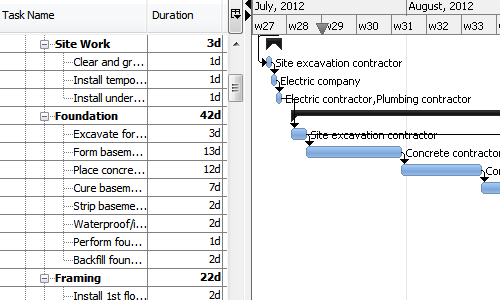
I love the Gantt Chart that Microsoft Project offers me, because it provides me with a view from various aspects, it provides me with exact details about the fulfillment of tasks over a period of time, it also allows me to make comparisons with the necessary data and the fulfilled data. by the employees, in order to know exactly if the project's expectations have been met.
I love the Gantt Chart that Microsoft Project offers me, because it provides me with a view from various aspects, it provides me with exact details about the fulfillment of tasks over a period of time, it also allows me to make comparisons with the necessary data and the fulfilled data by the employees, in order to know exactly if the project's expectations have been met.
The alert system for the fulfillment and delay of assignments is perfect. Microsoft Project allows me to configure the task system, I can assign the necessary tasks to fulfill the project, and the software alerts me immediately if the managers are fulfilling the assignments.
A de minimis incentive was given to thank the reviewer for their time. The incentive was not used to bias or drive a particular response, nor was the incentive contingent on a positive endorsement. More Info
Portfolio view is great to get a feel for how your programme is running at a glance and which areas possibly might require attention. The fact that you can customise your view by adding your own columns is another plus.
All project information in one tool is a big plus for me considering the amount of projects we run with. This really improves efficiency and saves me time. You have the ability to add documents to tasks, manage risks, email resources tasks due for projects they are assigned to(might need some refinement depending on your requirements), material db with costing etc.
A de minimis incentive was given to thank the reviewer for their time. The incentive was not used to bias or drive a particular response, nor was the incentive contingent on a positive endorsement. More Info
A de minimis incentive was given to thank the reviewer for their time. The incentive was not used to bias or drive a particular response, nor was the incentive contingent on a positive endorsement. More Info
A de minimis incentive was given to thank the reviewer for their time. The incentive was not used to bias or drive a particular response, nor was the incentive contingent on a positive endorsement. More Info
Microsoft Project is easy to operate because data could be inserted, changed and deleted like you are in an Excel timesheet. Besides, it provides a great level of automation beween his fields allowing few data changes. Also, its funcionalities are well defined and grouped in upper menus, so you can find a funcionality quickly
Microsoft in recent years has transformed itself and gives a positive feeling when one interacts with the company. The company is focusing on its customers and willing to go extra mile to make customers happy.The company continues to invest in its products and bringing new features from time to time. Overall it is a positive feeling to be associated with such an iconic company.
A de minimis incentive was given to thank the reviewer for their time. The incentive was not used to bias or drive a particular response, nor was the incentive contingent on a positive endorsement. More Info
A de minimis incentive was given to thank the reviewer for their time. The incentive was not used to bias or drive a particular response, nor was the incentive contingent on a positive endorsement. More Info
While many of the above tools are extremely well-versed, Microsoft Project's largest advantage comes from it being related to the largest business productivity company in the world. Project does have its sharing limitations - but regardless, offers one of the most robust tools in the market today. Microsoft Project is built with large-scale projects in mind but is more than up to the task for smaller projects as well. However, there are options available (especially cloud-based options) that may be more fitting for higher-level projects that do not require going into the weeds.
A de minimis incentive was given to thank the reviewer for their time. The incentive was not used to bias or drive a particular response, nor was the incentive contingent on a positive endorsement. More Info
RationalPlan is cost-effective and allows most users to prepare and manage their schedule. The software lacks comprehensive reporting and duration changes at the top level of a project.
Project saved me, as the project manager, countless hours of digging through tickets and schedules to plan everything out. It also saved me time in adjusting the project triangle as needed, since it does so much automatically.
It is costly, and since it requires extensive training to master, it's not just the high licensing cost that you need to take into account.
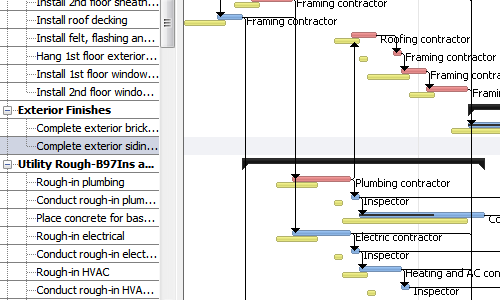
The reporting features - even just printing out Gantt charts - makes it far easier to communicate with stakeholders. That means less time for PMs doing all of this manually, and it means less follow-up questions and delays moving forward.
A de minimis incentive was given to thank the reviewer for their time. The incentive was not used to bias or drive a particular response, nor was the incentive contingent on a positive endorsement. More Info
A de minimis incentive was given to thank the reviewer for their time. The incentive was not used to bias or drive a particular response, nor was the incentive contingent on a positive endorsement. More Info