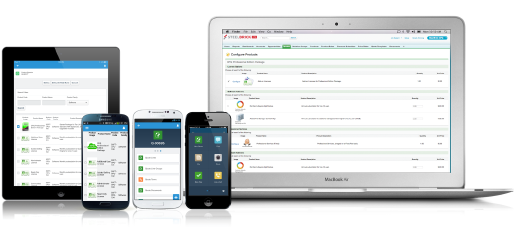
Salesforce Revenue Cloud (formerly Salesforce CPQ or SteelBrick) is built and delivered on the Salesforce Platform and Salesforce1 Mobile App which enables users to create accurate sales quotes quickly and submit error-free orders on the fly from any device.
$30
Per User per Month
Pricing
Salesforce Agentforce Revenue Management
Editions & Modules
Basic
$30
Per User per Month
Professional
$50
Per User per Month
Enterprise
$75
Per User per Month
Offerings
Pricing Offerings
Agentforce Revenue Management
Free Trial
Yes
Free/Freemium Version
No
Premium Consulting/Integration Services
Yes
Entry-level Setup Fee
Optional
Additional Details
—
More Pricing Information
Community Pulse
Salesforce Agentforce Revenue Management
Considered Both Products
Agentforce Revenue Management
Verified User
Administrator
Chose Salesforce Agentforce Revenue Management
I think Revenue Cloud definitely gives a lot more functionality, whereas you can't do contracts management contracts and order management inside of Sales Cloud and Service Cloud. So I guess it's just a different product that's used for a different use case.
It's good in some ways and bad in others. I would say it's good in that it has the building blocks to have way more functionality than many other products, but it's much more complicated to administer.
This software is so complex we can say that Salesforce works so much better in the interface. Also, the features provided by Salesforce are far better than this software. It also includes Storing data, API development, and so many other functionalities which help a developer …
Verified User
Account Manager
Chose Salesforce Agentforce Revenue Management
This has better product capabilities like Manage Order, Mobile, pricing module, select product offers service channel. What I like best is the integration with Salesforce, the ability to create and connect opportunities and there is a lot of flexibility in this tool. It has a …
There is no comparison to a fully functional instance of CPQ. Nothing comes close due to the amount of customization and ease of use that CPQ offers once it's fully built out. Other solutions may be easier to build or administer, but for the users and business needs, CPQ is the …
SalesForce Revenue Cloud has been leaps and bounds ahead of the softwares I used to use! I had used Google Sheets at first (since it was free), then bought Excel briefly thinking that would suffice as a good CRM layout. Turns out I was wrong and needed something more. Revenue …
This program is just more advanced and customizable. It worked for our diverse team needs considering the size and complexity of our portfolio. This was just the right choice for us. The other CRM's were great for smaller-scale enterprises at the time that I used them.
Salesforce CPQ [(formerly SteelBrick)] seamlessly integrates with Salesforce allowing us to have less integrations to manage. Releases don't break a connection causing delays in the sales process.
Salesforce stacks well in terms of features like lead, quote and pricing management than other software like Zoho, bichon, agile or HubSpot, personally I believe if the entire set of tools and solutions provided by Salesforce are employed they would work like a well-oiled …
Salesforces CPQ compares very highly to Apparound CPQ, because of the integration with the Salesforce platform. Because of the integration with the regular Salesforce platform, the tools work interchangeably with one another. This process creates a great deal of efficiency, and …
CPQ is a more inline, integrated and user-friendly product compared to Apttus's offering. The fact that it was bought and embedded by Salesforce into the platform and the support that entails, was the big differentiator for us.
Salesforce CPQ is much better in user interaction, automation, AI, and integration with CRM, and other business systems.
Verified User
Project Manager
Chose Salesforce Agentforce Revenue Management
It is a strong offering if your a Salesforce customer. We previously used Panda Doc and the integration with Saleforce was just not robust enough as we've expanded. Panda Doc allowed for much more customization and control of templates. However, the pricing rules, …
It was not my choice to move to Salesforce CPQ. Our organization chose to move to this platform because Octiv gave the reps too much flexibility. They wanted to tighten the reins. Everyone hates Salesforce CPQ and the guy who implemented it isn't even at the company anymore.
We looked into using BigMachines and FPX but decided to implement Apttus many years ago. The Apttus implementation never went live after several hiccups along the way and we shifted our focus to Salesforce CPQ which has had it's moments as well. Overall, Salesforce CPQ is the …
What I like best is the ease of use to be able to track all opportunities and quotes in my daily sales tracker I also like the fact that you can reorganize the view for your opportunities. For instance, it is very similar to a spreadsheet where you can filter them by date, dollar amount, name, and several other ways. I found this to be less appropriate when we have to do multiple roles while assigning one task to multiple users. Column resizing within the Quote Line Editor is not supported in the Salesforce mobile app.
Our Salesforce is very messy, which tells me it's not super easy to clean up.
I always have a really hard time removing a contacts from an account - it seems like you can't simply remove the relationship so we have lots of people named DO NOT CONTACT or things of that nature.
Sometimes when saving it doesn't seem like things actually save.
I would give it an eight because it's very customizable in the way that you want to create it. I think I'm just docking points because sometimes there can be a little too much customization, which can make it a little complicated, but it just depends on the complexity of your business and how you guys build it out in the first place.
There have been some issues with multi-year pricing of certain products and services which we have been assured will be resolved but I guess are still underway, the support team apart from this has not been needed much and in the rare scenarios, it has been needed the resolutions of conflicts has been prompt and quick, so the overall support would have my high regards for being so helpful and customer-oriented so as to assure good performance of their toolset and customer satisfaction.
There is no comparison to a fully functional instance of CPQ. Nothing comes close due to the amount of customization and ease of use that CPQ offers once it's fully built out. Other solutions may be easier to build or administer, but for the users and business needs, CPQ is the best solution possible.
Easy access to reporting on closed-won, closed-lost, and open quotes.
Accuracy in data referenced in a quote - it's typically accurate as it is pulled directly from opportunity, looking up to associated subscription start/end dates, etc..
We lose valuable time in creating quotes ourselves. Quotes were requested and created through sales ops previously, sales did not have access to the excel templates used to generate quotes.