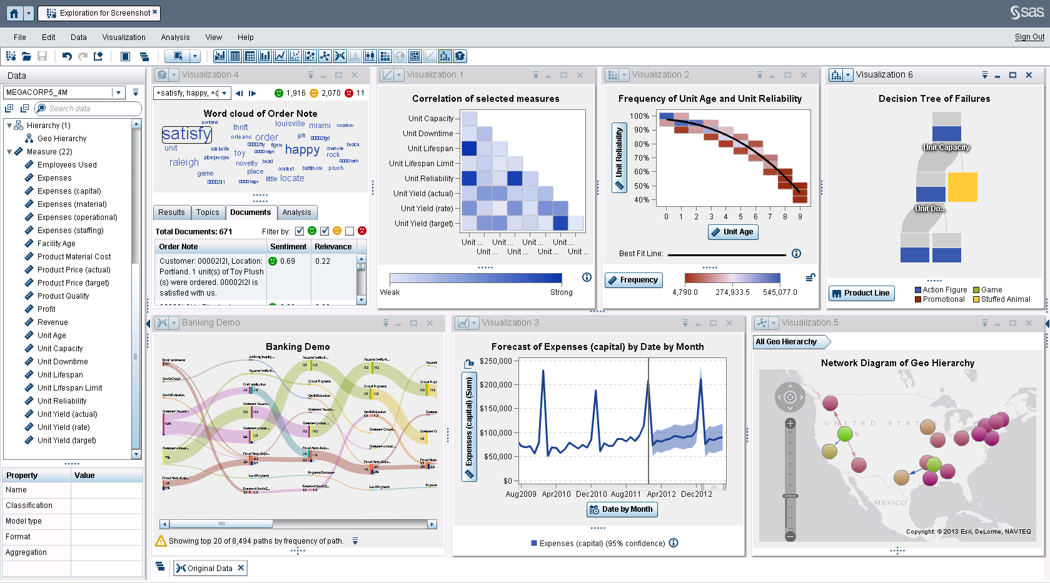
SAS Visual Analytics provides a complete platform for analytics visualization, enabling users to identify patterns and relationships in data that weren't initially evident. Interactive, self-service BI and reporting capabilities are combined with out-of-the-box advanced analytics so everyone can discover insights from any size and type of data, including text.
N/A
InsideSales.com / XANT PowerDialer for Salesforce (discontinued)
Score3.2 out of 10
N/A
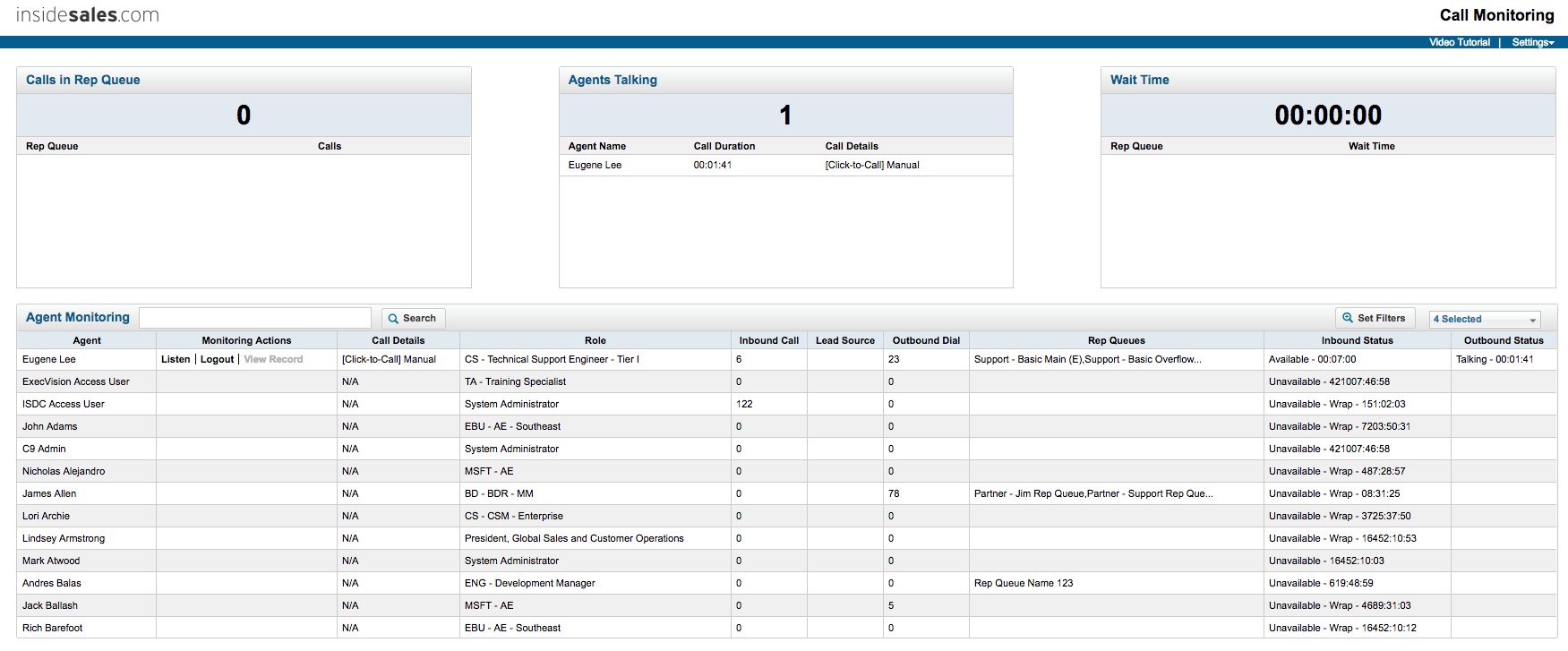
PowerDialer for Salesforce, from InsideSales.com / XANT is a discontinued sales dialer.
N/A
Pricing
SAS Visual Analytics
InsideSales.com / XANT PowerDialer for Salesforce (discontinued)
Editions & Modules
SAS Visual Analytics for SAS Cloud
$0
Annual By Users: 5, 10, 20
No answers on this topic
Offerings
Pricing Offerings
SAS Visual Analytics
InsideSales.com / XANT PowerDialer for Salesforce (discontinued)
Free Trial
Yes
No
Free/Freemium Version
No
No
Premium Consulting/Integration Services
Yes
Yes
Entry-level Setup Fee
No setup fee
Required
Additional Details
SAS Visual Statistics and SAS Office Analytics are also available as add-ons.
—
More Pricing Information
Features
SAS Visual Analytics
InsideSales.com / XANT PowerDialer for Salesforce (discontinued)
BI Standard Reporting
Comparison of BI Standard Reporting features of SAS Visual Analytics and InsideSales.com / XANT PowerDialer for Salesforce (discontinued)
Feature
SAS Visual Analytics
8.3
11 Ratings
2% above category average
InsideSales.com / XANT PowerDialer for Salesforce (discontinued)
-
Ratings
Pixel Perfect reports
8.011 Ratings
00 Ratings
Customizable dashboards
8.011 Ratings
00 Ratings
Report Formatting Templates
9.010 Ratings
00 Ratings
Ad-hoc Reporting
Comparison of Ad-hoc Reporting features of SAS Visual Analytics and InsideSales.com / XANT PowerDialer for Salesforce (discontinued)
Feature
SAS Visual Analytics
8.8
12 Ratings
9% above category average
InsideSales.com / XANT PowerDialer for Salesforce (discontinued)
-
Ratings
Drill-down analysis
9.012 Ratings
00 Ratings
Formatting capabilities
8.012 Ratings
00 Ratings
Integration with R or other statistical packages
8.010 Ratings
00 Ratings
Report sharing and collaboration
10.011 Ratings
00 Ratings
Report Output and Scheduling
Comparison of Report Output and Scheduling features of SAS Visual Analytics and InsideSales.com / XANT PowerDialer for Salesforce (discontinued)
Feature
SAS Visual Analytics
9.2
12 Ratings
11% above category average
InsideSales.com / XANT PowerDialer for Salesforce (discontinued)
-
Ratings
Publish to Web
9.011 Ratings
00 Ratings
Publish to PDF
9.012 Ratings
00 Ratings
Report Versioning
9.09 Ratings
00 Ratings
Report Delivery Scheduling
10.011 Ratings
00 Ratings
Delivery to Remote Servers
9.06 Ratings
00 Ratings
Data Discovery and Visualization
Comparison of Data Discovery and Visualization features of SAS Visual Analytics and InsideSales.com / XANT PowerDialer for Salesforce (discontinued)
Feature
SAS Visual Analytics
9.7
10 Ratings
19% above category average
InsideSales.com / XANT PowerDialer for Salesforce (discontinued)
Comparison of Mobile Capabilities features of SAS Visual Analytics and InsideSales.com / XANT PowerDialer for Salesforce (discontinued)
Feature
SAS Visual Analytics
8.7
9 Ratings
11% above category average
InsideSales.com / XANT PowerDialer for Salesforce (discontinued)
-
Ratings
Responsive Design for Web Access
10.09 Ratings
00 Ratings
Mobile Application
9.07 Ratings
00 Ratings
Dashboard / Report / Visualization Interactivity on Mobile
9.08 Ratings
00 Ratings
Application Program Interfaces (APIs) / Embedding
Comparison of Application Program Interfaces (APIs) / Embedding features of SAS Visual Analytics and InsideSales.com / XANT PowerDialer for Salesforce (discontinued)
Feature
SAS Visual Analytics
9.2
5 Ratings
17% above category average
InsideSales.com / XANT PowerDialer for Salesforce (discontinued)
-
Ratings
REST API
10.04 Ratings
00 Ratings
Javascript API
9.04 Ratings
00 Ratings
iFrames
9.04 Ratings
00 Ratings
Java API
9.04 Ratings
00 Ratings
Themeable User Interface (UI)
9.04 Ratings
00 Ratings
Customizable Platform (Open Source)
9.03 Ratings
00 Ratings
Preview Dialer
Comparison of Preview Dialer features of SAS Visual Analytics and InsideSales.com / XANT PowerDialer for Salesforce (discontinued)
Feature
SAS Visual Analytics
-
Ratings
InsideSales.com / XANT PowerDialer for Salesforce (discontinued)
7.3
14 Ratings
0% above category average
Contact preview
00 Ratings
8.012 Ratings
Dialer-CRM integration
00 Ratings
8.014 Ratings
Call notes & tags
00 Ratings
7.014 Ratings
Automatic call logging
00 Ratings
6.014 Ratings
Core Dialer
Comparison of Core Dialer features of SAS Visual Analytics and InsideSales.com / XANT PowerDialer for Salesforce (discontinued)
Feature
SAS Visual Analytics
-
Ratings
InsideSales.com / XANT PowerDialer for Salesforce (discontinued)
7.0
14 Ratings
10% below category average
Outbound dialing
00 Ratings
8.014 Ratings
Inbound routing
00 Ratings
7.011 Ratings
Custom caller ID
00 Ratings
7.012 Ratings
Click-to-call
00 Ratings
7.013 Ratings
Recorded voicemail drop
00 Ratings
6.08 Ratings
Dialer contact import
00 Ratings
7.011 Ratings
Campaign & list management
00 Ratings
7.09 Ratings
Call Follow-up and Quality Assurance
Comparison of Call Follow-up and Quality Assurance features of SAS Visual Analytics and InsideSales.com / XANT PowerDialer for Salesforce (discontinued)
Feature
SAS Visual Analytics
-
Ratings
InsideSales.com / XANT PowerDialer for Salesforce (discontinued)
6.7
11 Ratings
13% below category average
Follow-up calls
00 Ratings
7.010 Ratings
Dialer reporting & analytics
00 Ratings
6.010 Ratings
Dialer compliance
00 Ratings
7.010 Ratings
Best Alternatives
SAS Visual Analytics
InsideSales.com / XANT PowerDialer for Salesforce (discontinued)
InsideSales.com / XANT PowerDialer for Salesforce (discontinued)
Likelihood to Recommend
SAS
I was in a meeting with the client and there I have to show them some analytic data to them. But I was confused about how I will manage to show big data to clients with accuracy. But then the SAS Visual Analytics software helps me in presenting accurate data at the moment and it was very presentable and through that, I got the deal for that business.
A de minimis incentive was given to thank the reviewer for their time. The incentive was not used to bias or drive a particular response, nor was the incentive contingent on a positive endorsement. More Info
Outbound dialing is where it excels. It's especially good with larger teams of reps. Organizing through campaigns and seek lists is very powerful once you understand how to use it. There is definitely a learning curve with seek lists (I've spent tons of time on the phone with their support staff) but once you understand it the possibilities are endless. You can sort which leads show up by a variety of filters. Even with a list of 10,000+ leads and 5 reps calling on it, you can ensure no leads show up in two reps lists, the reps are calling specific territories, and even skipping leads that are likely on their lunch break! One my of favorite tricks with seek lists and only calling people with titles like Director/VP/C-Level before 8:30am or after 5pm their time, when those people are more willing to pick up the phone. They also appreciate a sales rep who is putting in the extra time to call during those blocks.
A de minimis incentive was given to thank the reviewer for their time. The incentive was not used to bias or drive a particular response, nor was the incentive contingent on a positive endorsement. More Info
Provides the flexibility to the end user to slice and dice the data.
Anyone can make predictive models with the help of in-built algorithms without the need to write a single line of code or knowledge of what's under the hood of algorithms.
The feature to simply ask a question related to data and getting a response in form of text, chart or graph is amazing.
A de minimis incentive was given to thank the reviewer for their time. The incentive was not used to bias or drive a particular response, nor was the incentive contingent on a positive endorsement. More Info
A de minimis incentive was given to thank the reviewer for their time. The incentive was not used to bias or drive a particular response, nor was the incentive contingent on a positive endorsement. More Info
SAS is relatively expensive when compared to other BI tools and requires a large amount of upfront fee which becomes an issue for smaller organizations.
UI for the dashboards looks a little date in comparison to competitors like Tableau and Microstrategy.
Integration with other open source software like Python needs to be built in.
A de minimis incentive was given to thank the reviewer for their time. The incentive was not used to bias or drive a particular response, nor was the incentive contingent on a positive endorsement. More Info
A de minimis incentive was given to thank the reviewer for their time. The incentive was not used to bias or drive a particular response, nor was the incentive contingent on a positive endorsement. More Info
SAS really is the cutting edge in Business Intelligence. That is all they do! They are constantly coming out with new products, product upgrades, and their tech support is second to none. In addition, their support of Education has made our ability to acquire their product possible.
SAS BI is good for creating reports and dashboards and then sharing it with the users. It also has ability to manage access to the reports and dashboards but somehow with most of the world moving to open source languages R, Python and Julia, SAS BI feels to be archaic in terms of feature set and integrations it allow[s]. Also, comparing it with other Business Intelligence tools like Tableau and Microsoft BI, the functionality of SAS BI is very limited and doesn't justify the pricing.
A de minimis incentive was given to thank the reviewer for their time. The incentive was not used to bias or drive a particular response, nor was the incentive contingent on a positive endorsement. More Info
I like that it is simple, functional and I can rely on it to help me get my work done everyday. My job became much harder without InsideSales.com. The new CRM I am using has confusing features and too much going on sometimes. There are so many fields and functions that I find unnecessary--what sucks is when I look at my screen at all these empty fields, it makes me feel incomplete. With InsideSales.com, I knew what to put in every box and why it would be important. I could put it in once and whether it was my manager, case admin or data analyst or me, we all knew where to find it. With our new system, I find myself having to do more input and data entry for other people to benefit--no longer a "one shot, one kill" deal.
A de minimis incentive was given to thank the reviewer for their time. The incentive was not used to bias or drive a particular response, nor was the incentive contingent on a positive endorsement. More Info
When you call tech support, you are immediately routed to a person who can answer your question. Often they can answer on the spot. However, if they cannot, you are given a track number and then followed up with. There have been times when I have had multiple track numbers open and they will actually TRACK YOU DOWN to ensure that your problem has been resolved. Issues do not fall into black holes with SAS. They are also willing to do a WebEx with you to diagnose the problem by seeing your environment, which is always helpful.
A de minimis incentive was given to thank the reviewer for their time. The incentive was not used to bias or drive a particular response, nor was the incentive contingent on a positive endorsement. More Info
I have used Crystal Reports, Jaspersoft and SQL Server Reporting Services (SSRS). I would recommended Business Intelligence over SSRS and Crystal Reports. SSRS is very SQL-centric and Crystal Reports is more of an end-user tool. I would recommend Jaspersoft over Business Intelligence for developing a seamless web-based reporting interface but I highly recommend Business Intelligence for end-user ad-hoc reporting.
A de minimis incentive was given to thank the reviewer for their time. The incentive was not used to bias or drive a particular response, nor was the incentive contingent on a positive endorsement. More Info
I am actually not on the decision making side, but we used PowerDialer because of the easy to use integration with our CRM with Salesforce. Having these two tools in tandem was a great platform for us to do prospecting.
A de minimis incentive was given to thank the reviewer for their time. The incentive was not used to bias or drive a particular response, nor was the incentive contingent on a positive endorsement. More Info
A de minimis incentive was given to thank the reviewer for their time. The incentive was not used to bias or drive a particular response, nor was the incentive contingent on a positive endorsement. More Info
Improved Connect Rates - Knowing when our team has the highest chance of success has helped us optimize our call blocks, leading to an improved connect rate.
Dials - With dialer lists and click to call functionality, we are able to make more dials to the right people.
Rep achievement - Though harder to quantify, the gamification has focused the team around the right KPIs.
A de minimis incentive was given to thank the reviewer for their time. The incentive was not used to bias or drive a particular response, nor was the incentive contingent on a positive endorsement. More Info