Datto Autotask PSA vs. Syncro

Overview
ProductRatingMost Used ByProduct SummaryStarting Price
Autotask PSA
Score 7.7 out of 10
N/A
Autotask PSA is designed as a complete IT Business Management Platform for MSPs, now from Datto (resulting from the Autotask merger with Datto in 2017).N/A
Syncro
Score 7.5 out of 10
N/A
Syncro offers an Extended Monitoring and Management (XMM) platform for midsized MSPs and internal IT teams. The platform integrates RMM (endpoint management), professional services automation (PSA), and Microsoft 365 multi-tenant management to help organizations simplify operations, strengthen security, and scale.
$159
per month per user
Pricing
Datto Autotask PSASyncro
Editions & Modules
No answers on this topic
Core
$159
per month per user
Team
$209
per month per user
Offerings
Pricing Offerings
Autotask PSASyncro
Free Trial
NoYes
Free/Freemium Version
NoNo
Premium Consulting/Integration Services
NoNo
Entry-level Setup FeeNo setup feeNo setup fee
Additional DetailsDiscount available for annual payment.
More Pricing Information
Community Pulse
Datto Autotask PSASyncro
Considered Both Products
Autotask PSA
Chose Autotask PSA
We tested several solutions ranging from short-term trials to extended 6-month production runs and found the other solutions to lack what we needed. Autotask PSA was a more mature, thought-out, and developed product that had everything we needed in a single solution. Over the …
Chose Autotask PSA
Atera is an RMM first with PSA features so it falls short of a PSA. The essentials are there for a fledgling MSP, but for more advanced ticket handling and contract management, it falls short. When I used Zendesk at the beginning (about 10 years ago), it was really only a …
Chose Autotask PSA
Kaseya BMS, Kaseya VSA, Datto Alto, Datto Cloud Continuity, Datto Backupify, Datto RMM, Datto Routers and ServiceNow IT Service Management
Chose Autotask PSA
ServiceNow was faster to use to create tickets in a fast-paced call center style helpdesk. I preferred it to Autotask, but from a business perspective, I felt that Autotask covers a lot more ground than ServiceNow. My Experience with Solar Winds was minimal although it was a …
Chose Autotask PSA
Datto Autotask is much more complex than Atera's ticketing platform but is much more customizable.
Chose Autotask PSA
Datto Autotask PSA is probably the best all-in-one platform for MSPs. It's targeted and designed specifically for MSPs, whilst most service desk software/PSA is often just general service desk software.
Chose Autotask PSA
Autotask is more robust than simple ticketing systems. It provides better billing ability that many ticketing systems and works well with existing clients. The invoicing options provided are beneficial to the business and streamline the process. The ticketing system provides …
Chose Autotask PSA
The portion of Autotask that we've used other companies for prior to using Autotask is the Endpoint Management. The Autotask Endpoint Management (AEM) portal integrates perfectly with their PSA/CRM tools. It's alerting features are much better than the above software as there …
Chose Autotask PSA
Everything else either has multiple modules or you need separate suites to do everything you want.
Chose Autotask PSA
It has been many years since we compared Autotask to the competition. We made the decision early on because of the overall solution that Autotask provides. It suits our needs well and we have not had a need to change since.
Chose Autotask PSA
Cost was a factor. Our small company size meant less licenses to pay for each month for a web based product that our clients could easily use.
Chose Autotask PSA
Its definitely has a better layout. Easier to customize. Easier search.
Chose Autotask PSA
ConnectWise would be a close second however the overall functionality hasn't been great in the past, I've learned they've implemented a more robust web interface however the client was not stable. Autotask is easy to manage from service requests, reporting and time management.
Chose Autotask PSA
I've used OTRS and Autotask gives a better overall experience as it isn't just simply a ticketing system it gives greater breadth over what you can accomplish. It allows for better interdepartmental communication rather than just a place for end users and clients to dump more …
Chose Autotask PSA
Autotask stacks up fairly well against software like Kaseya, ConnectWise, and Tigerpaw. They all have their own strengths and weaknesses, however I feel that ConnectWise and Autotask have improved the most as of the last 10 years. The reason we chose Autotask is because it …
Chose Autotask PSA
Except for multi-tenancy and permissioning for external users, Autotask beats BMC Remedy in every category for an ITSM Incident/Request Management suite. From allowing legitimate multi-tasking to the streamlined and more-straightforward user experience, Autotask takes the focus …
Syncro
Chose Syncro
Solarwinds is really good one, more expensive than Syncro through. Two other platforms that are good but not listed in the production search are NinjaRMM and Bluetrait. These are a few other alternatives to Syncro a business should consider when choosing which software will …
Chose Syncro
Syncro does not have every bell or whistle (especially when compared with Kaseya VSA). However from a cost versus feature perspective, Syncro wins hands down.

Syncro versus Atera - they are very similar products and also use the per agent pricing. This was a big driver for us …
Features
Datto Autotask PSASyncro
Application Performance Management
Comparison of Application Performance Management features of Product A and Product B
Datto Autotask PSA
-
Ratings
Syncro
6.6
Ratings
5% below category average
Virtualization monitoring00 Ratings7.40 Ratings
IT Asset Discovery00 Ratings5.70 Ratings
Monitoring Tasks
Comparison of Monitoring Tasks features of Product A and Product B
Datto Autotask PSA
-
Ratings
Syncro
7.5
Ratings
3% above category average
Remote monitoring00 Ratings8.40 Ratings
Network device monitoring00 Ratings6.60 Ratings
Activity Monitoring00 Ratings7.60 Ratings
Management Tasks
Comparison of Management Tasks features of Product A and Product B
Datto Autotask PSA
-
Ratings
Syncro
7.4
Ratings
7% above category average
Patch Management00 Ratings7.80 Ratings
Policy-based automation00 Ratings7.00 Ratings
Remote Access
Comparison of Remote Access features of Product A and Product B
Datto Autotask PSA
-
Ratings
Syncro
7.3
Ratings
8% above category average
Attended device access00 Ratings8.80 Ratings
Unattended device access00 Ratings7.60 Ratings
Mobile device access00 Ratings7.00 Ratings
Virtual device access00 Ratings8.00 Ratings
Multiple-display support00 Ratings4.50 Ratings
Multiple concurrent sessions00 Ratings8.00 Ratings
Best Alternatives
Datto Autotask PSASyncro
Small Businesses
HaloPSA
HaloPSA
Score 8.1 out of 10
Panda Systems Management
Score 7.4 out of 10
Medium-sized Companies
Planview AdaptiveWork
Score 8.4 out of 10
Action1
Action1
Score 9.5 out of 10
Enterprises
Planview AdaptiveWork
Score 8.4 out of 10
TeamViewer
TeamViewer
Score 8.6 out of 10
All AlternativesView all alternativesView all alternatives
User Ratings
Datto Autotask PSASyncro
Likelihood to Recommend
10.0
(0 ratings)
6.6
(0 ratings)
Likelihood to Renew
9.0
(0 ratings)
-
(0 ratings)
Usability
9.0
(0 ratings)
7.0
(0 ratings)
Support Rating
8.4
(0 ratings)
-
(0 ratings)
User Testimonials
Datto Autotask PSASyncro
Likelihood to Recommend
In my opinion, Datto Autotask is exceptionally complicated to set up, manage, and use on a daily basis. I would think the target market for this product would be someone managing a team of 20 - 50 people, possibly more. In my experience, for it to run properly you will need to dedicate at least half an FTE to running this product in an organization of that size per month. I would not recommend it for companies with less than 10 people or for companies that value quick communication with their clients. I would not recommend it for companies using Datto's RMM product. The integration exists, but it is clearly a bolt-on. They were not developed together and they are slow to talk to each other. Frequently you cannot add details from RMM sessions into the PSA without manually copying the ticket number, and if the ticket is more than a week old, then you can't even find it with the ticket number.
Read full review
The good is pretty good when it comes to Syncro. Window patching works well. They add features often. No hidden fees and good pricing. The bad, are inconvenient when it comes to Syncro but could be worse. Reporting does not look good. Support only through email. There are no forums or network scanning/SNMP
Read full review
Pros
  • AutoTask allows for us to receive and work support tickets very easily. We've setup various 'Issue Types' that in turn are bound to SLAs ensuring that items are worked appropriately as they are received.
  • The automation that AutoTask allows for with regards to various emails/requests coming through has been great. It allows for us to not have to constantly "watch the queue" as when a critical item arrives the appropriate persons are notified and can work it.
  • I feel that the management of AutoTask for both user setup, and various automations is done well. We're able to copy settings as needed, and create templates for multiple items.
Read full review
  • Decent UI
  • Things generally work
  • Not too expensive
Read full review
Cons
  • The GUI is a little dated.
  • Some integrations are limited for not being a Datto product.
  • While not as complex to set up as Connectwise, it definitely requires some serious thought during the initial setup.
  • Email processing could offer more options for parsing keywords and allow for more automation.
  • The mobile app is just not worth using in my experience.
Read full review
  • Ticketing. Whilst the ticketing system works, it is fairly basic compared to specific ticketing solutions. Some improvements here would be great.
  • Remote Management - granular options on accounts. You are unable to have some clients or systems which do not require a password for remote access, whilst having this set for other clients/accounts. This makes it a problem if you want to use the remote management component on servers where there is no one available to approve access
  • Better "built in" remote access software. Whilst the base remote access software works and that the system integrates with larger remote management vendors, some improvements to the remote management component would be beneficial
Read full review
Likelihood to Renew
After using multiple products on the market, Autotask was intuitive and easy to manage.
Read full review
No answers on this topic
Usability
Datto Autotask PSA is a full featured product that can do almost anything you need. There is a significant learning curve to get started which requires several hours spent in product training. Additionally, several hours / days are needed to get clients imported, contracts configured, and integrations implemented. Once the setup and user training is complete, the product is very functional, but it's imperative to not get overwhelmed when starting out.
Read full review
The overall value of Syncro is good due to cost of software and the things that it does do well. However, there are some limitations that will be frustrating and may require extra software or time to complete or format in other platforms. So, can cause some setbacks to some organizations but be work well for others, based on their needs
Read full review
Support Rating
They are fairly quick at returning a response to a problem and have been able to fix all issues for the most part.
Read full review
No answers on this topic
Alternatives Considered
The portion of Autotask that we've used other companies for prior to using Autotask is the Endpoint Management. The Autotask Endpoint Management (AEM) portal integrates perfectly with their PSA/CRM tools. It's alerting features are much better than the above software as there aren't a bunch of superfluous and unneeded alerts. Instead, it only alerts for things that you specify that you want. Alerts aside, for the PSA/CRM, I don't have much to compare it to as Autotask was the first PSA we tried. It's hard to imagine a PSA having more features or doing a better job than Autotask.
Read full review
Syncro does not have every bell or whistle (especially when compared with Kaseya VSA). However from a cost versus feature perspective, Syncro wins hands down. Syncro versus Atera - they are very similar products and also use the per agent pricing. This was a big driver for us and Syncro came out at cheaper priced option. Atera does have more features and is a more mature product - however the features that we required were perfect in SyncroMSP
Read full review
Return on Investment
  • We were able to identify the profitability of our entire client base.
  • We identified a loss of over 1 million dollars for time unbilled consultancy fees using metrics derived from Autotask.
  • Autotask helped us serve our client base in a professional manner, it's like having an entire department at your finger tips.
  • Autotask is the heartbeat of our operation.
Read full review
  • Saved us hundreds of dollars switching from previous provider
Read full review
ScreenShots

Syncro Screenshots

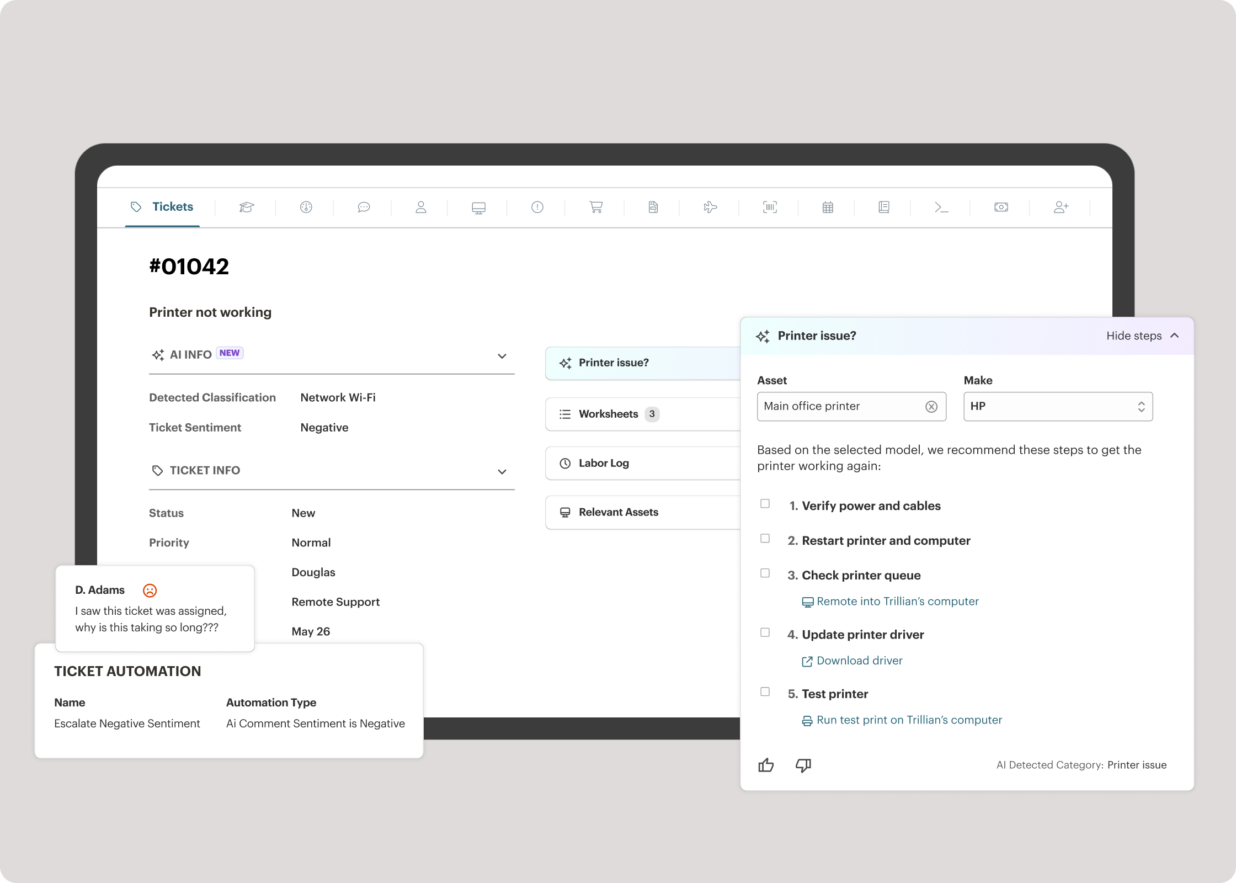
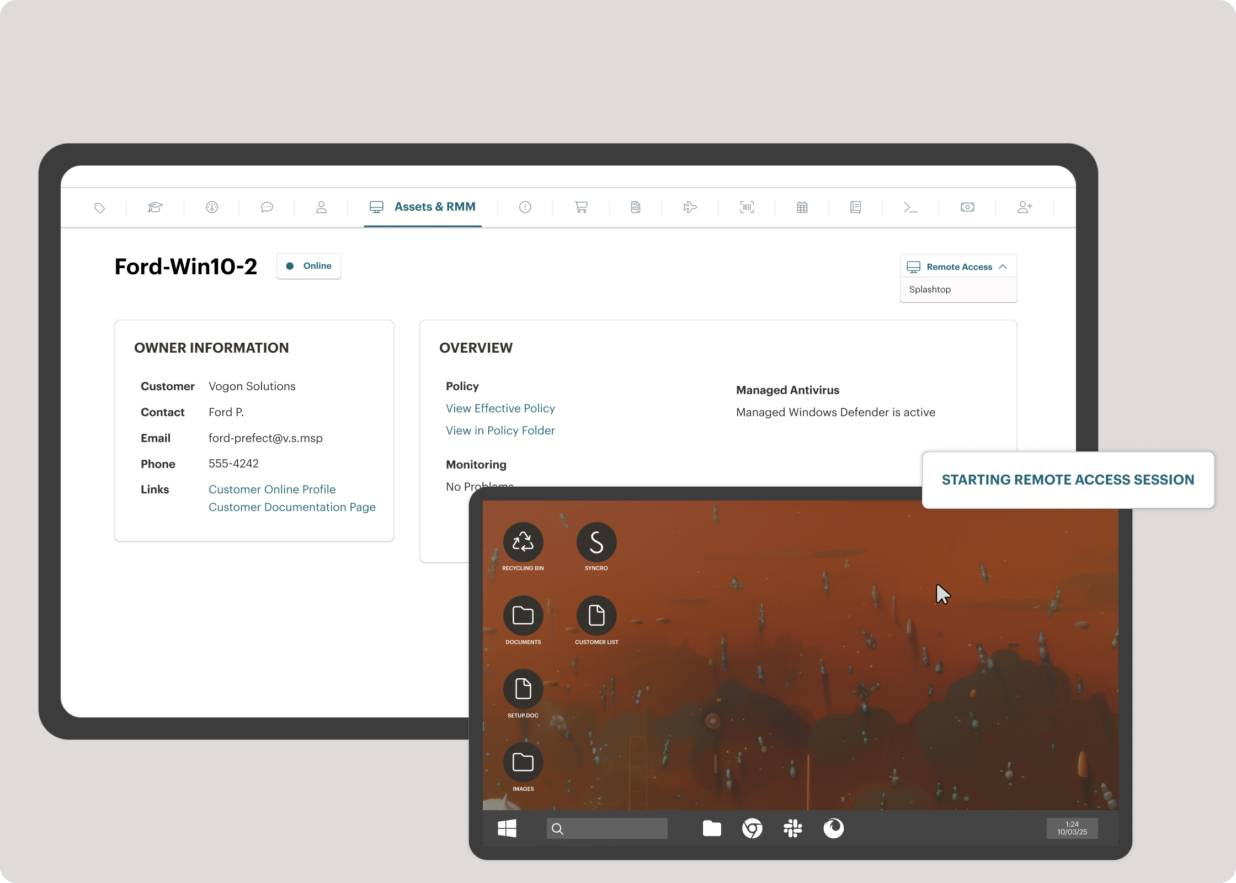
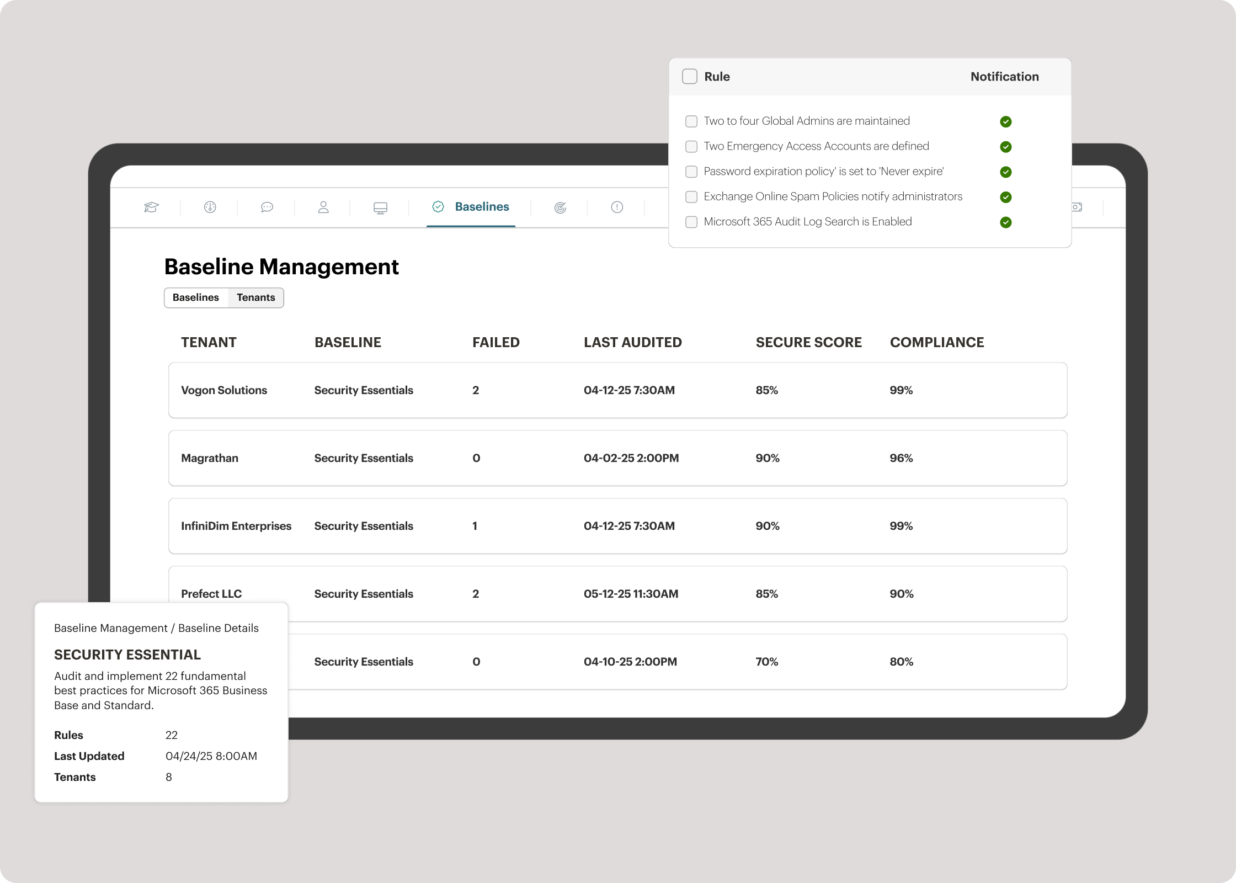
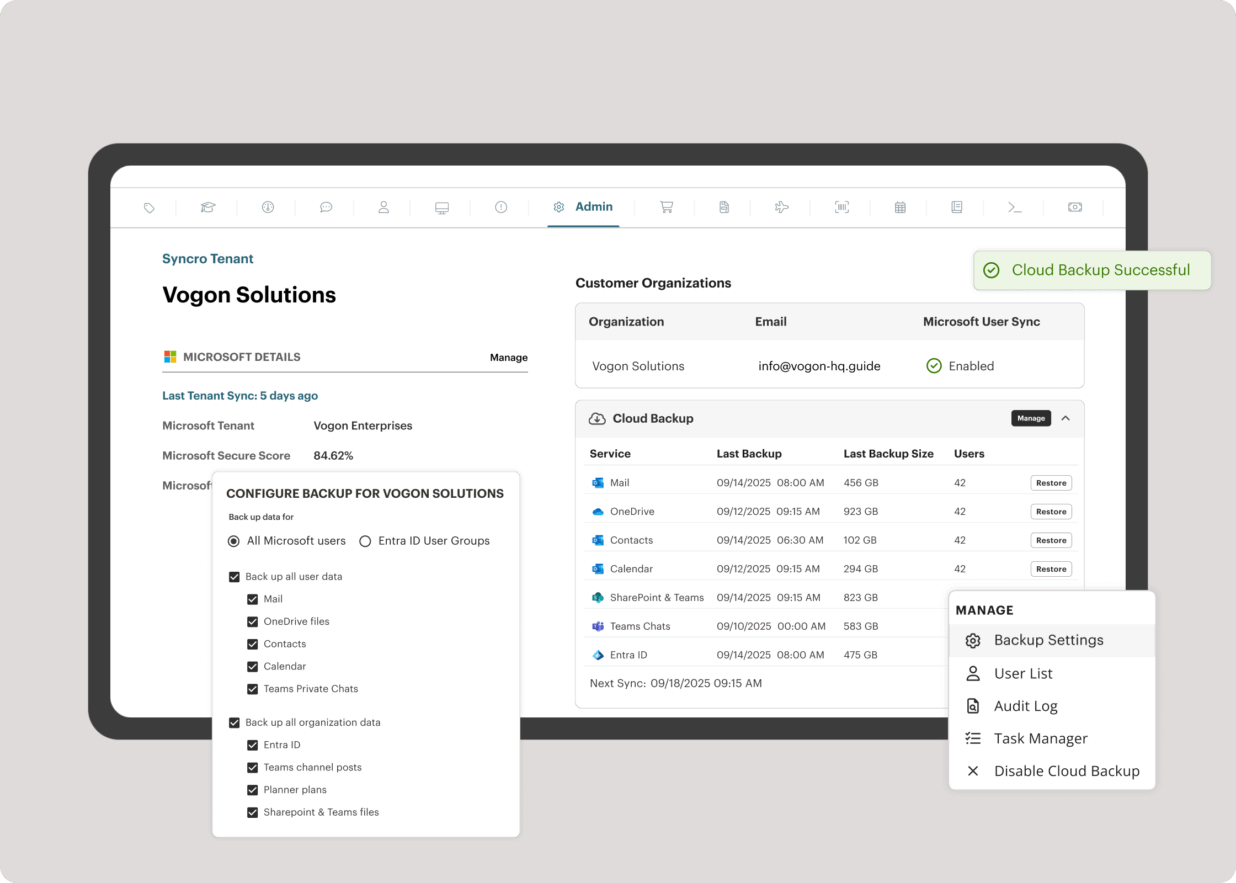
Screenshot of the interface to monitor unlimited endpoints, run scripts, deploy patches, customize alerts, and proactively address potential issues before they become problems.Screenshot of Syncro’s intelligent Smart Ticket Management, which automatically routes tickets and gets information in front of techs, displays relevant context from prior tickets, and surfaces recommended remediation steps to speed up resolution times.Screenshot of where to securely access endpoints and resolve issues anytime, from anywhere, via Splashtop — included with the Syncro subscription at no extra cost.Screenshot of Syncro automating Entra ID tasks and admin work including user syncs, password resets, and license billing.Screenshot of the interface to benchmark M365 tenants against CIS-aligned best practices — offering guided configuration, centralized visibility, drift detection, and automated alerts to help maintain compliance.Screenshot of Microsoft 365 and Entra ID backup, which helps to safeguard against data loss, reinforce compliance, and ensure business continuity without compromise.