Tableau Cloud (formerly Tableau Online) is a self-service analytics platform that is fully hosted in the cloud. Tableau Cloud enables users to publish dashboards and invite colleagues to explore hidden opportunities with interactive visualizations and accurate data, from any browser or mobile device.
$15
per month per user
Vena
Score8.1 out of 10
Mid-Size Companies (51-1,000 employees)
Vena Solutions provides a financial process automation solution to automate Corporate Performance Management, accounting and budgeting, Regulatory & Compliance, and other finance-related processes. It is scaled for medium to large-sized organizations.
N/A
Pricing
Tableau Cloud
Vena
Editions & Modules
Tableau Viewer
$15
per month billed annually per user
Enterprise Viewer
$35
per month billed annually per user
Tableau Explorer
$42
per month billed annually per user
Enterprise Explorer
$70
per month billed annually per user
Tableau Creator
$75
per month billed annually per user
Enterprise Creator
$115
per month billed annually per user
Tableau+
Contact Sales
Professional
N/A
Complete
N/A
Offerings
Pricing Offerings
Tableau Cloud
Vena
Free Trial
No
No
Free/Freemium Version
No
No
Premium Consulting/Integration Services
No
Yes
Entry-level Setup Fee
No setup fee
Optional
Additional Details
—
The Professional Plan is the most flexible way to get started quickly and can be added onto as a company grows. The plan includes: Vena Platform, Customer Success Manager, Standard Support and Customer Portal.
Complete Plan includes everything in Professional, plus: Vena Insights, Premium Support, Sandbox Environment, and Expert Managed Services.
For a limited time, new customers who use Microsoft Dynamics 365 Business Central (Online) as their primary ERP can get a free year of Vena and 40% off implementation costs.
Vena also offers special pricing for not for profit organizations. To learn more, speak to an expert.
We formally used Microsoft Power BI as our reporting software throughout our organization. I believe Tableau Cloud is a step above Power BI and is our preferred program. The end reports are look cleaner and are easier to work with than Power BI. There are more options and …
A de minimis incentive was given to thank the reviewer for their time. The incentive was not used to bias or drive a particular response, nor was the incentive contingent on a positive endorsement. More Info
Vena Solutions
Verified User
Chose Vena
Vena has an easier/more user-friendly setup and integrates well with Microsoft Office Suite. This is important because it keeps a feeling of familiarity for all users.
A de minimis incentive was given to thank the reviewer for their time. The incentive was not used to bias or drive a particular response, nor was the incentive contingent on a positive endorsement. More Info
Verified User
Chose Vena
Tableau is by far the best tool I've used. Vena in comparison is very good but it's missing the master data link to SAP, and the ability of data to refresh when the hierarchies move. It's also lacking standard reports on system set up like basic P&L's, etc. It's also missing …
A de minimis incentive was given to thank the reviewer for their time. The incentive was not used to bias or drive a particular response, nor was the incentive contingent on a positive endorsement. More Info
Verified User
Chose Vena
When debating if we would add Vena Insights to our system, we looked into Tableau and Power BI. Vena was more expensive per user, but because we already pay for Vena for FP&A, it would have ended up costing us more money, time, and effort to maintain a BI system that lives …
A de minimis incentive was given to thank the reviewer for their time. The incentive was not used to bias or drive a particular response, nor was the incentive contingent on a positive endorsement. More Info
Manager of FP&A in Finance and Accounting at Pipedrive (Computer Software, 501-1000 employees)
Chose Vena
Different software has different pros and cons. The pros of Vena is that it is Excel-based. One can do a lot in Excel if the user is already Excel-proficient. Other software may be better for those who are less Excel-proficient.
A de minimis incentive was given to thank the reviewer for their time. The incentive was not used to bias or drive a particular response, nor was the incentive contingent on a positive endorsement. More Info
Verified User
Chose Vena
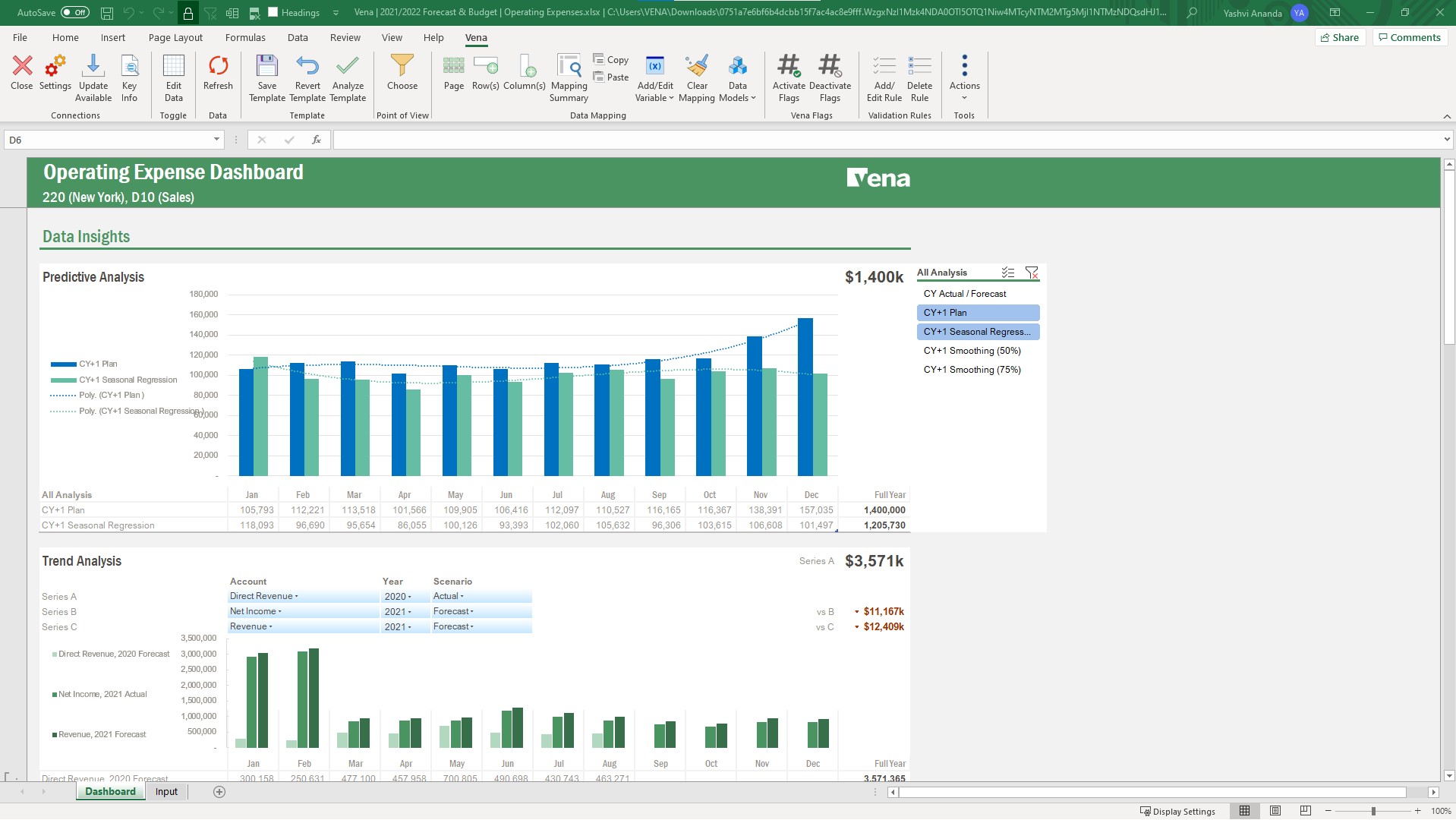
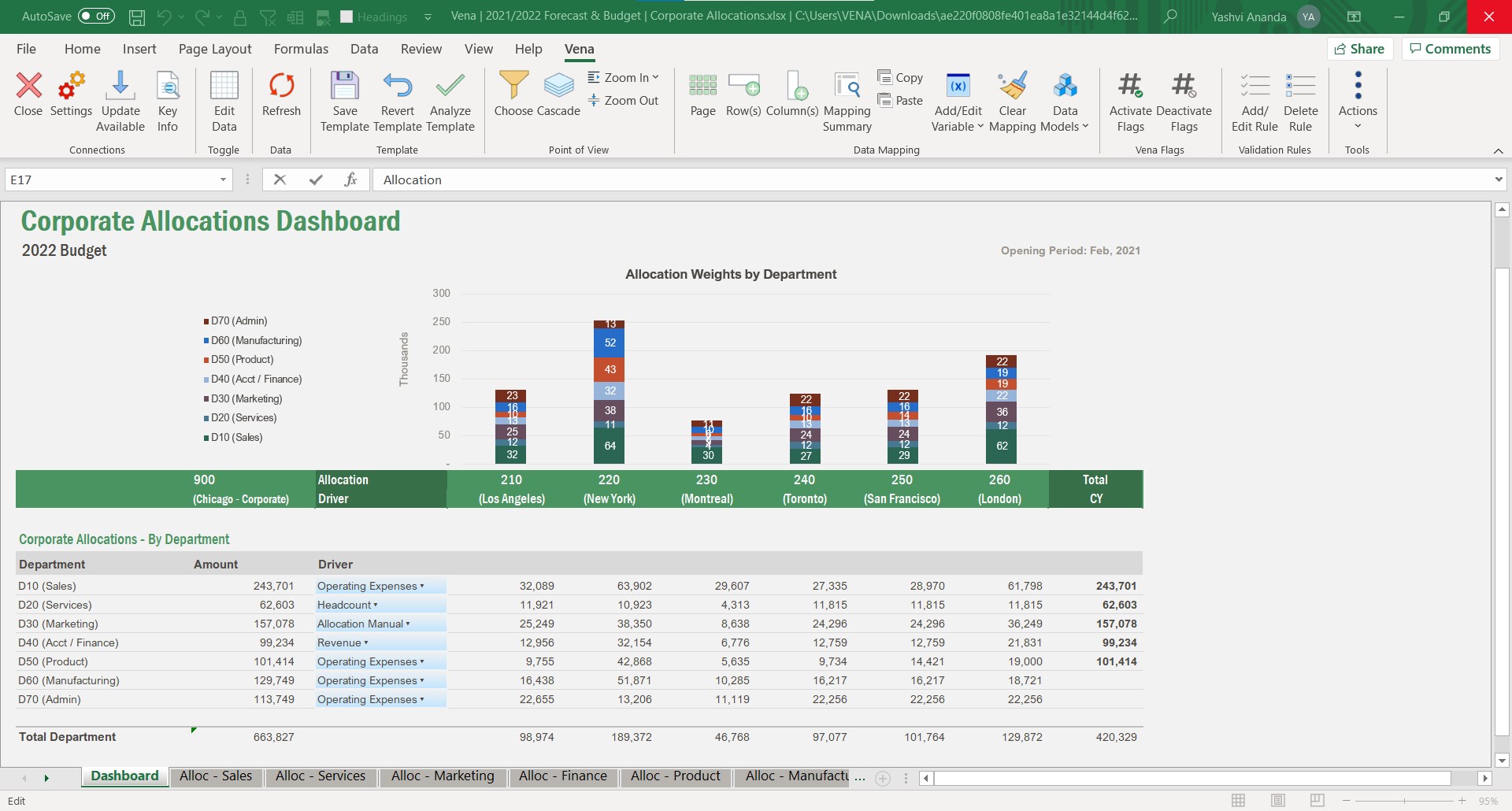
Assuming a staff-member has excellent MS Excel skills, Vena Solutions is (most likely) capable of producing just about anything one can imagine. That said, Excel's visuals leave something to be desired. Most folks would choose a Tableau dashboard over a Vena dashboard any day. …
A de minimis incentive was given to thank the reviewer for their time. The incentive was not used to bias or drive a particular response, nor was the incentive contingent on a positive endorsement. More Info
Verified User
Chose Vena
At the end of the day, many of Vena's competitors will offer more web-based capabilities. At the time when we made the decision, we primarily chose Vena due to the steeply discounted price tag. However, over the past couple of years, Vena has added the web-based capabilities …
A de minimis incentive was given to thank the reviewer for their time. The incentive was not used to bias or drive a particular response, nor was the incentive contingent on a positive endorsement. More Info
Financial Analyst in Finance and Accounting at LifeVantage Corporation (Health, Wellness and Fitness, 51-200 employees)
Chose Vena
Vena is really an easy to use and powerful data centralization tool. If you are proficient the with Excel, Vena takes very little time to learn and use. Other tools have steep learning curves or don’t provide the financial reporting agility of Excel and Vena.
A de minimis incentive was given to thank the reviewer for their time. The incentive was not used to bias or drive a particular response, nor was the incentive contingent on a positive endorsement. More Info
If you're using Tableau as the primary BI tool, then Tableau Cloud is well suited to publish and share the results with a wide(r) audience. It is well suited for various degrees of self-service proficiency, from pure consumers of analytical work to more advanced users who can use web editing for smaller or larger adjustments, and even for desktop power users who will publish their work to Tableau Cloud. It has many good ways to organize the content and make it easily accessible via search, favorites, folders, collections ("playlists for your data"), or history ("recents"). It might not be ideally suited if there are many on-prem sources to be used (even though there are options to connect them) or if you have very special requirements regarding custom server setup, which is limited in a shared cloud environment like Tableau Cloud.
A de minimis incentive was given to thank the reviewer for their time. The incentive was not used to bias or drive a particular response, nor was the incentive contingent on a positive endorsement. More Info
It is well suited for planning, budgeting, and forecasting. Using its capabilities also allows you to use it for reporting, whether it's month-end reporting or other reporting where you want to rely on data from a source that can be nicely presented and adjusted in Excel.
A de minimis incentive was given to thank the reviewer for their time. The incentive was not used to bias or drive a particular response, nor was the incentive contingent on a positive endorsement. More Info
Tableau Online is completely cloud based and that's why the reports and dashboards are accessible even on the go. One doesn't always need to access the office laptop to access the reports.
The visualizations are interactive and one can quickly change the level at which they want to view the information. For example, one person might be more interested in looking at the country level performances rather than client level. This is intuitive and one doesn't need to create multiple reports for the same.
The feature to ask questions in plain vanilla English language is great and helpful. For quick adhoc fact checks one can simply type what they are looking for and the Natural Language Programming algorithms under the hood parse the query, interpret it and then fetch the results accordingly in a visual form.
A de minimis incentive was given to thank the reviewer for their time. The incentive was not used to bias or drive a particular response, nor was the incentive contingent on a positive endorsement. More Info
The Admin function of Vena, being able to set up the users in the user categories and the different groups and assigning the groups and the task bindings, is particularly easy and very helpful because as we have so many different departments and disciplines in our organization, we do need to establish pretty specific user access so this process works really well for us.
Running reports in Vena is fairly easy, and we do enjoy being able to just push a button and get some budget versus actuals.
A de minimis incentive was given to thank the reviewer for their time. The incentive was not used to bias or drive a particular response, nor was the incentive contingent on a positive endorsement. More Info
A de minimis incentive was given to thank the reviewer for their time. The incentive was not used to bias or drive a particular response, nor was the incentive contingent on a positive endorsement. More Info
Have another license between power user and contributor that allows building reports that aren't ad hoc, but don't have all the admin rights of a power user.
Have a session on best in class Workforce Planning prior to implementation.
A de minimis incentive was given to thank the reviewer for their time. The incentive was not used to bias or drive a particular response, nor was the incentive contingent on a positive endorsement. More Info
Vena has become an integral part of finance and our daily process. Without it we would take longer to prepare results and decisions will be delayed. Vena has given the whole organization more visibility of results and budgets so that all departments participate more actively in managing their budgets rather than it being the sole responsibility of finance.
A de minimis incentive was given to thank the reviewer for their time. The incentive was not used to bias or drive a particular response, nor was the incentive contingent on a positive endorsement. More Info
Based on comments from our clients, I awarded it this grade. Non-technical customers frequently compliment us on the ease with which they can utilize Tableau Online. Usability is rarely a source of contention amongst our customers. Few complaints have come from me as a user of our internal products.
A de minimis incentive was given to thank the reviewer for their time. The incentive was not used to bias or drive a particular response, nor was the incentive contingent on a positive endorsement. TR verified that a representative sample of customers was invited. More Info
Vena is somehow easy to manipulate. If you want to map accounts, or change mapping. there are clear instructions and guidance. and also Vena AI is on the way, so i think we can leverage it more and let AI help us mapping and check errors. overall a very good product and easy to learn and set up.
A de minimis incentive was given to thank the reviewer for their time. The incentive was not used to bias or drive a particular response, nor was the incentive contingent on a positive endorsement. More Info
Vena is seemingly always available. They plan maintenance windows well in advance and always off hours (typically over a weekend) and communicate clearly throughout maintenance about what will be affected. Over 5 years of using the product, I can only remember one time when the platform was unavailable (I believe due to an underlying server hosting issue from their provider), and they resolved the issue and had everything up and running again within 8 hours.
A de minimis incentive was given to thank the reviewer for their time. The incentive was not used to bias or drive a particular response, nor was the incentive contingent on a positive endorsement. More Info
The performance is dependent on how much data and calculations are involved and how complex the security settings are. A simple template or report loads in seconds. A complex template or report can take a while. If there are many users with complex security settings, that will be a factor in the load time.
A de minimis incentive was given to thank the reviewer for their time. The incentive was not used to bias or drive a particular response, nor was the incentive contingent on a positive endorsement. More Info
I have not had any issues that require customer support from Tableau at this time, which speaks well to Tableau. I have taken an online course with Tableau and it was very professional and well done, so based on that I would assume a similar level of quality for their customer service.
A de minimis incentive was given to thank the reviewer for their time. The incentive was not used to bias or drive a particular response, nor was the incentive contingent on a positive endorsement. More Info
When I reach out to our support team, they are always able to fix any issues we are having in a timely manner. It is always resolved quickly which proves that customer support always helps out our support team with any issues so they can in turn help us quickly
A de minimis incentive was given to thank the reviewer for their time. The incentive was not used to bias or drive a particular response, nor was the incentive contingent on a positive endorsement. More Info
This is the best way to learn and buy-in. The in person effect gives students both a hands on approach but an instruction to be there to customize assistance and understanding. In person also builds greater buy in with your future team on creators. However if your audience is better at on line learning this is another good option.
A de minimis incentive was given to thank the reviewer for their time. The incentive was not used to bias or drive a particular response, nor was the incentive contingent on a positive endorsement. More Info
The training was structured as a group training to learn the basics of creating a data model and mapping a template. While we had nearly 10 participants, I was the only actual implementer so we probably didn't actually need the training and could have just learned the initial skills from the implementation consultant. Two years later, when we hired a new team member, they completed several modules in Vena Academy (a self paced learning course) which allowed them to get up to speed on the basics with just a bit of supplemental guidance from me as our existing admin.
A de minimis incentive was given to thank the reviewer for their time. The incentive was not used to bias or drive a particular response, nor was the incentive contingent on a positive endorsement. More Info
The Vena consultant had great knowledge of both the Vena solution and Excel and Excel functions. He was able to help suggest ways to build our templates that met our requirements using Excel functions we had not previously considered using. And we have been able to use the Excel information he provided in other ways outside of Vena. He was very patient and flexible as we learned the Vena tool and created templates
In determining whether to go with Tableau Online versus Alteryx, two important factors stood out in determining our go-to solution. First, while Alteryx is an impressive tool for data cleansing, it did not stack up in terms of data visualization capabilities. Tableau, on the other hand, provided us everything we needed in terms of visualizing our data and analytics. The second factor is cost. Well neither solution would be considered cheap, Tableau was the more cost effective solution for our needs.
A de minimis incentive was given to thank the reviewer for their time. The incentive was not used to bias or drive a particular response, nor was the incentive contingent on a positive endorsement. More Info
Previously used Synario for long-term forecasting. Ultimately moved to Vena for this to keep budgeting and forecasting together in a single solution. Vena's system is much easier to learn on the admin side since it is Excel-based so the transition was pretty simple. Previously used Jenzabar with JICS for budgeting. Vena's budget system is more user-friendly for end users and more flexible so it works better for our specific needs. Vena's reporting system is easier to use and customize.
A de minimis incentive was given to thank the reviewer for their time. The incentive was not used to bias or drive a particular response, nor was the incentive contingent on a positive endorsement. More Info
Vena solutios is a software that provides robust tools that help different departments in their statistics and we can visualize a lot of promising and visually attractive data. Vena Solutions' level of scalability is high and sustainable over time thanks to the fabulous technical support that is ready to help us at all times
A de minimis incentive was given to thank the reviewer for their time. The incentive was not used to bias or drive a particular response, nor was the incentive contingent on a positive endorsement. More Info
A de minimis incentive was given to thank the reviewer for their time. The incentive was not used to bias or drive a particular response, nor was the incentive contingent on a positive endorsement. More Info
Vena has helped save time by reducing the manual work involved with budgeting, reporting, and variance analysis. Instead of spending as much time organizing data and reconciling spreadsheets, I can focus more on reviewing results and making informed decisions. It has improved collaboration between teams and provided better visibility into financial performance, creating more efficient processes overall.
A de minimis incentive was given to thank the reviewer for their time. The incentive was not used to bias or drive a particular response, nor was the incentive contingent on a positive endorsement. More Info