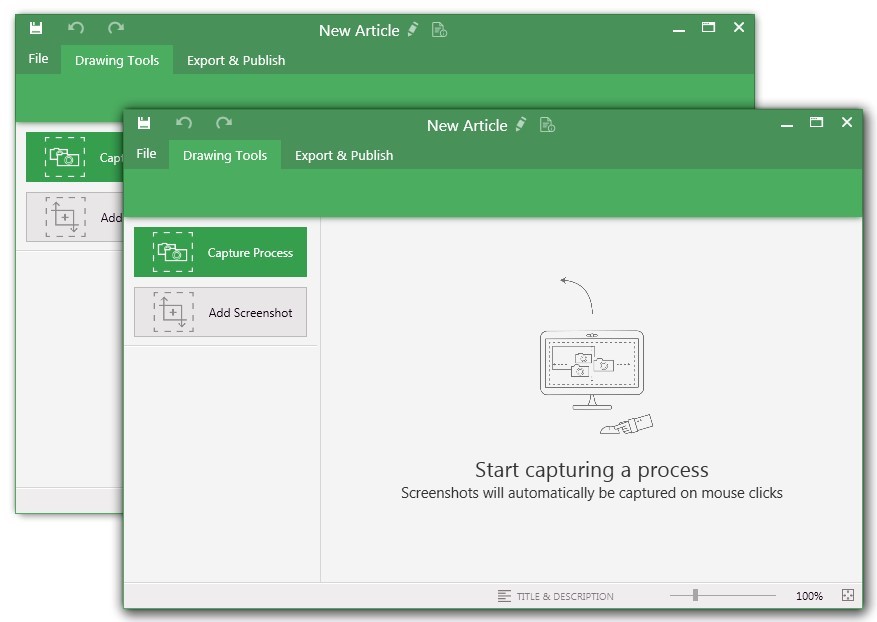
UiPath Task Capture (formerly StepShot, acquired October 2019) is a tool designed for quick and easy step-by-step documentation. During a recording mode, the software creates a separate screenshot on every click, groups them into a manual with automatically added metadata. Users can annotate captured images and structure documents in the way they want them to look.
N/A
Vyond
Score8.3 out of 10
N/A
Vyond (formerly GoAnimate) is a cloud-based platform for producing custom animated videos. It is used by educators as well as in business contexts by advertisers and content marketers, and for demos and presentations.
$99
per month single user
Pricing
UiPath Task Capture
Vyond
Editions & Modules
No answers on this topic
Starter
$99
per month
Professional
$199
per month
Enterprise
$1649
per year per user
Agency
$1999
per year per user
Offerings
Pricing Offerings
UiPath Task Capture
Vyond
Free Trial
Yes
Yes
Free/Freemium Version
Yes
No
Premium Consulting/Integration Services
Yes
No
Entry-level Setup Fee
No setup fee
No setup fee
Additional Details
We have some discounts available all the time depending on the amount of ordered licenses.
Discount available for annual billing on Starter and Professional plans.
StepShot is perfect for showing your audience how they are supposed to navigate a new system you have implemented. You can take them from a login screen all the way through any technical process you want them to follow. The product is not ideal, however, for documenting a process that does not have tangible steps. For example, a process we have created includes some reflective thinking about alignment or outcomes in order to work, this can be articulated in the text area of the screen captures but doesn't really capture our message.
A de minimis incentive was given to thank the reviewer for their time. The incentive was not used to bias or drive a particular response, nor was the incentive contingent on a positive endorsement. More Info
As long as money isn't a major issue (this application is pretty expensive!), it's the best solution I've used so far for creating short explainer videos. It's pretty robust/full-featured and relatively easy to learn to use. Vyond is constantly adding assets and features, too. It would not really appropriate for making full-fledged e-learning, as there's no way to add any interactivity to it, and it's not something I'd used to create long, complex presentations.
A de minimis incentive was given to thank the reviewer for their time. The incentive was not used to bias or drive a particular response, nor was the incentive contingent on a positive endorsement. More Info
A de minimis incentive was given to thank the reviewer for their time. The incentive was not used to bias or drive a particular response, nor was the incentive contingent on a positive endorsement. More Info
In the newest version, the timeline allows you to control each asset individually in a way that mimics video auditing software like Adobe Premiere Pro or Camtasia
I love the way you can replace an object and the new object will automatically take on the formatting of the object it is replacing including, location, size, expression, duration on the timeline, etc.
I really enjoy the spotlights on other user's videos. Even when I don't have time to read the full article, watch the full video, or attend the webinars, this is usually enough to give me new ideas to try out when making my own videos
I appreciate the ample notice when things are changing. For example, the platform will be updated at the end of the year, but I have had access to the new format since June(ish) so I've had time to play around with it and get used to it. By the time the legacy format is retired I won't have any problems adjusting to the new format or functionality.
A de minimis incentive was given to thank the reviewer for their time. The incentive was not used to bias or drive a particular response, nor was the incentive contingent on a positive endorsement. More Info
The "export & publish" button is kind of tiny and tucked away. It should be more prominent. After not using it for a couple weeks, I always forget where it is.
Updates aren't as frequent. Which is fine, since I haven't come across many bugs, it would just be cool to see some added features/functionality a bit more often.
The blur looks fine in the preview mode, but when exported, it's not the best.
A de minimis incentive was given to thank the reviewer for their time. The incentive was not used to bias or drive a particular response, nor was the incentive contingent on a positive endorsement. More Info
The fact that it's on a cloud server means that sometimes the software can get clunky/slow.
There may be extra work involved if you have multiple characters talking in one audio file and you want them to sync their mouths with their appropriate lines.
Characters having multiple actions/expressions means multiple scenes, which can be very cumbersome to manage.
A de minimis incentive was given to thank the reviewer for their time. The incentive was not used to bias or drive a particular response, nor was the incentive contingent on a positive endorsement. More Info
I was recently at a conference where I learned that many of my peers also use Vyond, solidifying my opinion that it is the right tool for out needs. Further more, one of our content vendors also uses it, ensuring that I will continue to use it as I believe this will facilitate our collaborations in the future
A de minimis incentive was given to thank the reviewer for their time. The incentive was not used to bias or drive a particular response, nor was the incentive contingent on a positive endorsement. More Info
This program is great when you have no video experience! There's only a little of a learning curve to the program. In general, the user interface is great and easier than using a program like Adobe premier. It's a great resource to use as a marketer.
A de minimis incentive was given to thank the reviewer for their time. The incentive was not used to bias or drive a particular response, nor was the incentive contingent on a positive endorsement. More Info
A de minimis incentive was given to thank the reviewer for their time. The incentive was not used to bias or drive a particular response, nor was the incentive contingent on a positive endorsement. More Info
Vyond is just an animated video creation tool. You have to use your video content and track its performance through other means. Because it is an online tool it doesn't hog your resources or slow down any other tools that I use. It is a stand-alone product and it doesn't need to integrate with any of our other tools. It does what it does and that is all we need.
A de minimis incentive was given to thank the reviewer for their time. The incentive was not used to bias or drive a particular response, nor was the incentive contingent on a positive endorsement. More Info
I have only run into an issue once, which I believe was due to a newly released feature (cloud storage). I was running into issues with the functionality on my Mac. The team was incredibly helpful in both troubleshooting the issue by jumping on screen sharing sessions, as well as providing multiple releases for me to test to fix the problem!
A de minimis incentive was given to thank the reviewer for their time. The incentive was not used to bias or drive a particular response, nor was the incentive contingent on a positive endorsement. More Info
I haven’t had any issues that required me to contact their support team. However, I believe support in any product starts before you have to call for help. Vyond provides an option for priority queue when you have their professional option. This is great for folks who need things done faster, especially when businesses can’t afford any downtime. Their Live chat feature is also reassuring, because I don’t always want to spend time on the phone or on hold if their call volume is high and I need to solve an issue.
A de minimis incentive was given to thank the reviewer for their time. The incentive was not used to bias or drive a particular response, nor was the incentive contingent on a positive endorsement. More Info
A de minimis incentive was given to thank the reviewer for their time. The incentive was not used to bias or drive a particular response, nor was the incentive contingent on a positive endorsement. More Info
A de minimis incentive was given to thank the reviewer for their time. The incentive was not used to bias or drive a particular response, nor was the incentive contingent on a positive endorsement. More Info
Vyond is the best tool our company has used for creating animated explainer videos and social content. We have tried many other software solutions but Vyond offers the most options for animating characters, text, and scenes. Despite the lack of options for overall styles, it offers a consistent and professional video every time. Plus, Vyond it's constantly adding new templates to their already expanding library
A de minimis incentive was given to thank the reviewer for their time. The incentive was not used to bias or drive a particular response, nor was the incentive contingent on a positive endorsement. More Info
A de minimis incentive was given to thank the reviewer for their time. The incentive was not used to bias or drive a particular response, nor was the incentive contingent on a positive endorsement. More Info
This has saved us MANY HOURS in either walking clients through processes in person or having to create a one-off guide through taking screenshots and creating our own documents with the screenshots hand placed.
Client satisfaction is high when they receive these guides. It is documentation that they can refer to at anytime that is personalized to their use or individual needs.
A de minimis incentive was given to thank the reviewer for their time. The incentive was not used to bias or drive a particular response, nor was the incentive contingent on a positive endorsement. More Info
A de minimis incentive was given to thank the reviewer for their time. The incentive was not used to bias or drive a particular response, nor was the incentive contingent on a positive endorsement. More Info