Maze vs. UXArmy

Overview
ProductRatingMost Used ByProduct SummaryStarting Price
Maze
Score 7.9 out of 10
N/A
Maze is a rapid user testing platform from Maze.design in Paris, designed to give users actionable user insights, in a matter of hours. The vendor states that with it, users can test remotely, autonomously, and collaboratively.
$75
per month 3+ seats
UXArmy
Score 0.0 out of 10
N/A
UXArmy is a remote user research platform designed to get user insights throughout the development cycle. Teams can run unmoderated usability tests, surveys, card sorting, tree testing, interviews and focus groups. Teams can test native mobile apps, live websites, prototypes, images, copies and videos. UXArmy offers recording of the full testing experience across both desktop and mobile devices, and native mobile app testing. Its multilingual…
$29
per month
Pricing
MazeUXArmy
Editions & Modules
Professional
$75
per month 3+ seats
Organization
custom pricing
Starter
$29
per month
Pro
$99
per month
Organization
Custom
per year
Offerings
Pricing Offerings
MazeUXArmy
Free Trial
NoYes
Free/Freemium Version
YesYes
Premium Consulting/Integration Services
NoNo
Entry-level Setup FeeNo setup feeOptional
Additional DetailsUXArmy panel participants are available across all paid plans, providing access to a diverse global audience for research. A discount is available for annual billing.
More Pricing Information
Community Pulse
MazeUXArmy
Considered Both Products
Maze
Chose Maze
1. Ease of use - Maze's user experience is very much better than user testing.com
2. Testing Panel - Although Maze's testing panel is not as much quantity as User testing, QUality is quite good for the testers you hire
3. Analytics after testing - Maze gives detailed analytics …
Chose Maze
We left sprig to use maze because sprig had unreliable Figma questions and integrations. We chose maze as it was partnered with Dovetail and Askable, that's how we heard about them. We're not particularly loyal or wedded to maze.
Chose Maze
We ran a proof of concept exercise between Maze User Testing and Optimal Workshop. We found both products to be as good as each other in the elements of the products that both offered. Optimal Workshop did offer a lot more than what was required for the specific project for …
Chose Maze
A lookback is an alternative option if you think Maze User Testing is quite expensive for you, but look back has a different approach to Maze User Testing. Lookback focuses on qualitative usability testing instead of quantitative UserTesting. And also, Maze User Testing has a …
Chose Maze
Maze User Testing is brilliant to test with a large volume of people and if you’re not after particular qualitative insights, like UserTesting would offer. The card sorting feature is basic and not as mature as Optimal Workshop would offer but it does the job and can be used in …
Chose Maze
When looking for tools that could help us understand our customers better, we needed something that would be easy to use, had the functionality and flexibility of running multiple types of tests and exercises, and allowed our team to be able to do these tests quickly. Only Maze …
Chose Maze
Figma helps to design and prototype out the concept but it does not allow to facilitate feedback gathering on a specific UI or even UX decision. That's where Maze comes into the picture with it's vaious features that helps to get the right insight to build a better product in a …
Chose Maze
UserTesting
  • Expensive
  • Not as modern a UX as Maze for contributors, stakeholders, and testers
UXArmy

No answer on this topic

Best Alternatives
MazeUXArmy
Small Businesses
Smartlook
Smartlook
Score 8.8 out of 10
Smartlook
Smartlook
Score 8.8 out of 10
Medium-sized Companies
Optimal
Optimal
Score 9.0 out of 10
Optimal
Optimal
Score 9.0 out of 10
Enterprises
Optimal
Optimal
Score 9.0 out of 10
Optimal
Optimal
Score 9.0 out of 10
All AlternativesView all alternativesView all alternatives
User Ratings
MazeUXArmy
Likelihood to Recommend
6.9
(0 ratings)
-
(0 ratings)
Usability
8.0
(0 ratings)
-
(0 ratings)
Support Rating
10.0
(0 ratings)
-
(0 ratings)
User Testimonials
MazeUXArmy
Likelihood to Recommend
Suited for: - I think that this software is a must-have for any experience or product designer that needs validation from any audience - Designers that rapidly prototype with Figma - Designers looking to establish an inexpensive way to deliver on user testing Less appropriate for: - If you are looking for a survey replacement this is probably not for you even though it does that quite well, simply due to the cost. Google Forms would be a more fiscal choice. - Marketing visual designers who are adept at visual builder tools (WebFlow, Divi, Elementor, etc) with A/B testing ability would probably find other products more valuable.
Read full review
No answers on this topic
Pros
  • It helps to gather quick and helpful insight
  • It helps greatly to validate design and prototypes
  • Intuitive tool and easy to work with
Read full review
No answers on this topic
Cons
  • Sometimes Maze breaks the responsiveness of our product
  • Also the analytics is not very useful for us. We do manual walkthrough of products
  • Few testers that we hire does not read the instructions very well and will abandon the flow
Read full review
No answers on this topic
Usability
Maze is easy to use most of the times. It is easy to integrate with Figma, It is easy to find testers worldwide with required filters. Maze gives recorded videos which are helpful in debugging and understanding the problem with flows. A/B testing is easy to add and test. Overall Maze is very easy to use
Read full review
No answers on this topic
Support Rating
Any issues that presented themselves were dealt with in a quick and efficient manner and fully rectified by the knowledgeable team over at Maze.
Read full review
No answers on this topic
Alternatives Considered
When looking for tools that could help us understand our customers better, we needed something that would be easy to use, had the functionality and flexibility of running multiple types of tests and exercises, and allowed our team to be able to do these tests quickly. Only Maze could really tick all the above boxes.
Read full review
No answers on this topic
Return on Investment
  • You are able to validate your project or design with a maze User Testing. Maze User Testing is an all-in-one usability tool platform.
  • You are able to create a multi-scenario for a free option with limited features.
  • Pricing is quite expensive. if they have an option for less than $99/month. A freelancer or small company can consider using it.
Read full review
No answers on this topic
ScreenShots

Maze Screenshots

Screenshot of Maze

UXArmy Screenshots

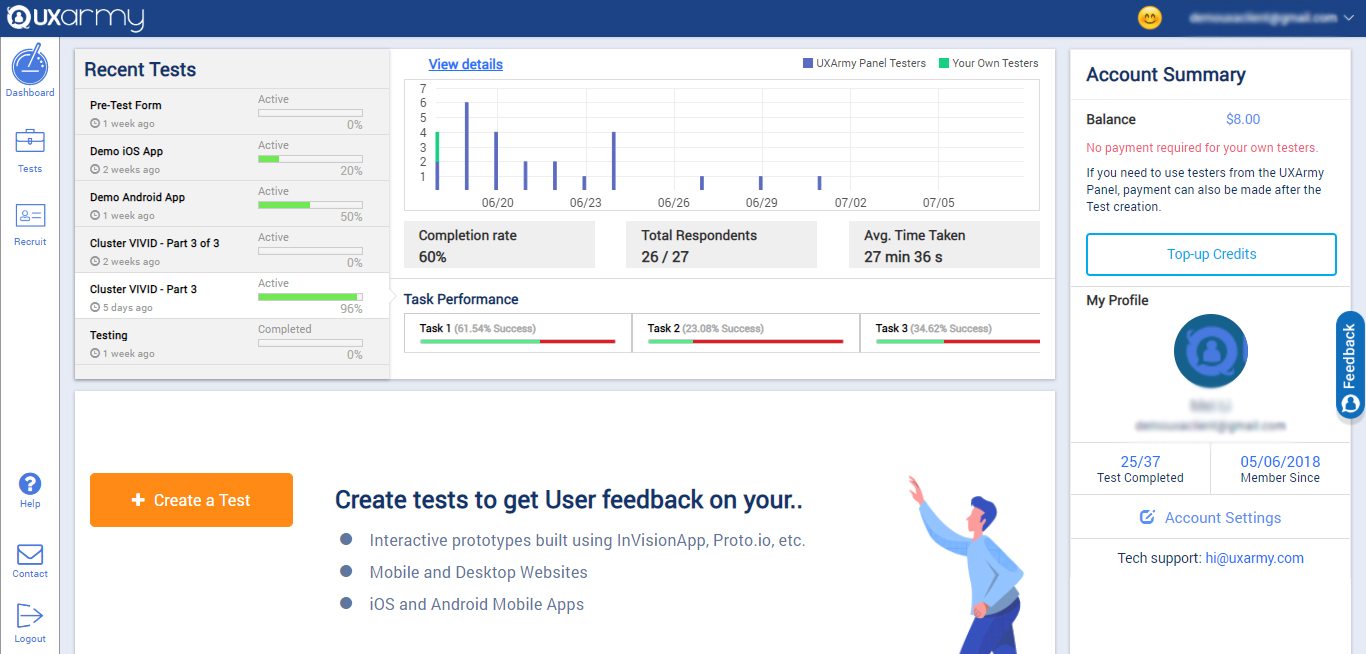
Screenshot of the client dashboard where clients can create tests for their prototypes, websites, mobile Apps, Mobile websites, web apps. They can check the overall progress of every test and they can also navigate to each test and see their progress and details as well.

They can check their account summary, top-up their account (via both PayPal and Debit/Credit cards) with credits to use in recruiting UserAdvocates to take the test.

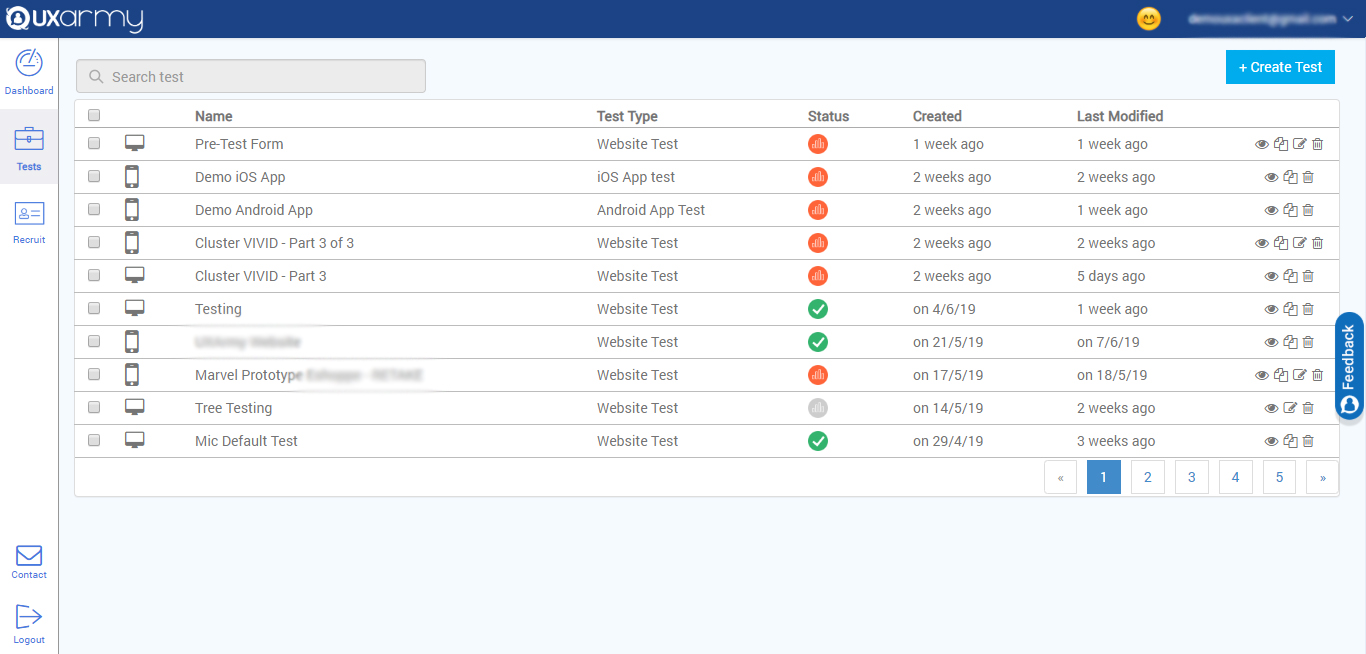
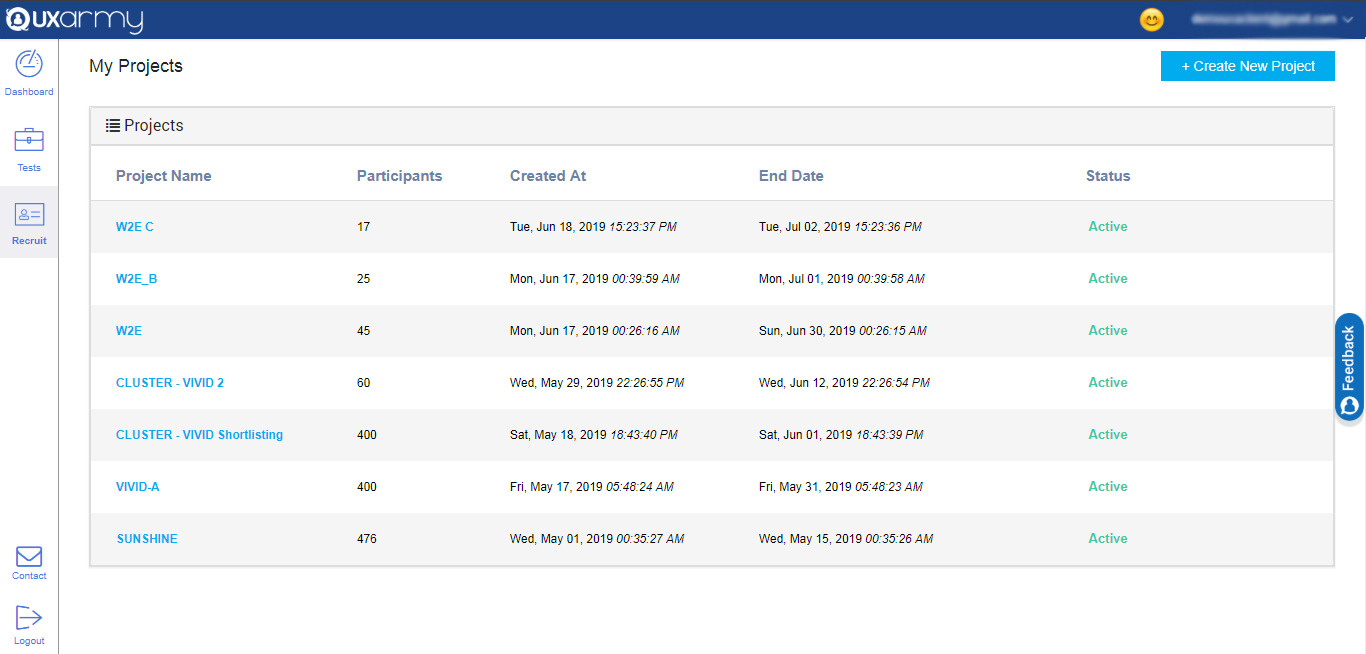
They can also navigate to account settings from the dashboard.Screenshot of a section that displays all the tests and any test can be selected to see the details of the response of the test. A new test can be created from here too by clicking on the "create test" button in the upper right corner of the screen.Screenshot of an example of the 2 ways to recruit for a test:

1. Up to 10  team members can take tests for free.

2. Testers can be recruited from the UXArmy's pool of testers from all around the world with a detailed demographic and behavioral filters like the country they live in or what language they speak, the mobile device they use, what gender they are, what shows they watch on TV, etc.