Planful is a cloud-based enterprise performance management (EPM) suite. It includes financial applications for modeling, planning, consolidation, reporting and analytics.
N/A
Vena
Score8.1 out of 10
Mid-Size Companies (51-1,000 employees)
Vena Solutions provides a financial process automation solution to automate Corporate Performance Management, accounting and budgeting, Regulatory & Compliance, and other finance-related processes. It is scaled for medium to large-sized organizations.
N/A
Pricing
Planful
Vena
Editions & Modules
No answers on this topic
Professional
N/A
Complete
N/A
Offerings
Pricing Offerings
Planful
Vena
Free Trial
No
No
Free/Freemium Version
No
No
Premium Consulting/Integration Services
Yes
Yes
Entry-level Setup Fee
Required
Optional
Additional Details
Pricing is highly dependent on the complexity and scope of the implementation.
The Professional Plan is the most flexible way to get started quickly and can be added onto as a company grows. The plan includes: Vena Platform, Customer Success Manager, Standard Support and Customer Portal.
Complete Plan includes everything in Professional, plus: Vena Insights, Premium Support, Sandbox Environment, and Expert Managed Services.
For a limited time, new customers who use Microsoft Dynamics 365 Business Central (Online) as their primary ERP can get a free year of Vena and 40% off implementation costs.
Vena also offers special pricing for not for profit organizations. To learn more, speak to an expert.
Prior to joining the company, we tried to implement Vena but were unsuccessful. There we're a few reasons it didn't work out, but a lot of it related to the implementation team they provided. In just the first week with Planful, we achieved more progress than we did in several …
A de minimis incentive was given to thank the reviewer for their time. The incentive was not used to bias or drive a particular response, nor was the incentive contingent on a positive endorsement. More Info
Financial Analyst & Accountant in Finance and Accounting at Specialized Dental Partners (Hospital & Health Care, 1001-5000 employees)
Chose Planful
Before my arrival at the company, we attempted to implement Vena but were unsuccessful. We got further with Planful in the first week than in several months with Vena.
A de minimis incentive was given to thank the reviewer for their time. The incentive was not used to bias or drive a particular response, nor was the incentive contingent on a positive endorsement. More Info
Verified User
Chose Planful
Planful seems to have the best price to performance option against the tools listed. Some of the more premium options on the market have outdated UIs and dont get updated as frequently and other in the same price category dont seem to have the same level of options and "ease" …
A de minimis incentive was given to thank the reviewer for their time. The incentive was not used to bias or drive a particular response, nor was the incentive contingent on a positive endorsement. More Info
SR FPA Manager in Finance and Accounting at Integrate (Marketing & Advertising, 51-200 employees)
Chose Planful
EPM tools are all pretty close in general functionality in that they are tables of your data with a finance focused UI stacked on top. The last 5% is what the difference. Planful has a very modern UI and does a great job of updating the system over time, including things like …
A de minimis incentive was given to thank the reviewer for their time. The incentive was not used to bias or drive a particular response, nor was the incentive contingent on a positive endorsement. More Info
BI Analyst (FPnA Manager) in Finance and Accounting at Nisum (Information Technology & Services, 1001-5000 employees)
Chose Planful
Planful was great for its price point. Although workday and hyperion are the more popular bunch, our use case is mostly met through Planful's functionality.
A de minimis incentive was given to thank the reviewer for their time. The incentive was not used to bias or drive a particular response, nor was the incentive contingent on a positive endorsement. More Info
FP&A Manager in Finance and Accounting at Unite Us (Internet, 501-1000 employees)
Chose Planful
Most financial folks user-friendly less technical support needed; most efficient and automated; data host in US; most automated with both the core application and excel spotlight in sync, you can view and sync in web or excel. Process time is fast.
A de minimis incentive was given to thank the reviewer for their time. The incentive was not used to bias or drive a particular response, nor was the incentive contingent on a positive endorsement. More Info
A de minimis incentive was given to thank the reviewer for their time. The incentive was not used to bias or drive a particular response, nor was the incentive contingent on a positive endorsement. More Info
Verified User
Chose Planful
Ease of use, integrations, price, and excel compatibility were the driving factors behind getting off of Adaptive and selecting Planful over these other competitors
A de minimis incentive was given to thank the reviewer for their time. The incentive was not used to bias or drive a particular response, nor was the incentive contingent on a positive endorsement. More Info
Verified User
Chose Planful
Planful is inherently easier (I know Excel and I don't want to have to learn a new coding language) [and] has more capability and power due to the underlying multi-dimensional architecture (i.e. it can scale much better as you grow). The Dynamic Planning piece is very similar …
A de minimis incentive was given to thank the reviewer for their time. The incentive was not used to bias or drive a particular response, nor was the incentive contingent on a positive endorsement. More Info
Accounting Manager in Finance and Accounting at ASI (Consumer Goods, 1001-5000 employees)
Chose Planful
Vena was a close second in our selection process. We liked the smaller price tag and faster start up time. It s use of Excel was attractive. However, we did not feel that it would be able to grow with us. It was only good for the short run. Adaptive had some good features. …
A de minimis incentive was given to thank the reviewer for their time. The incentive was not used to bias or drive a particular response, nor was the incentive contingent on a positive endorsement. More Info
Sr. Financial Analyst in Finance and Accounting at Codexis, Inc. (Biotechnology, 51-200 employees)
Chose Planful
Being a small company with limited cash flow, my goal was to evaluate what functions that are important and how much that we have to pay for them and last how easy it is to maintain without owning internal IT staff. I have evaluated Hyperion, Adaptive, Vena, and Host. …
A de minimis incentive was given to thank the reviewer for their time. The incentive was not used to bias or drive a particular response, nor was the incentive contingent on a positive endorsement. More Info
Vena Solutions
Verified User
Chose Vena
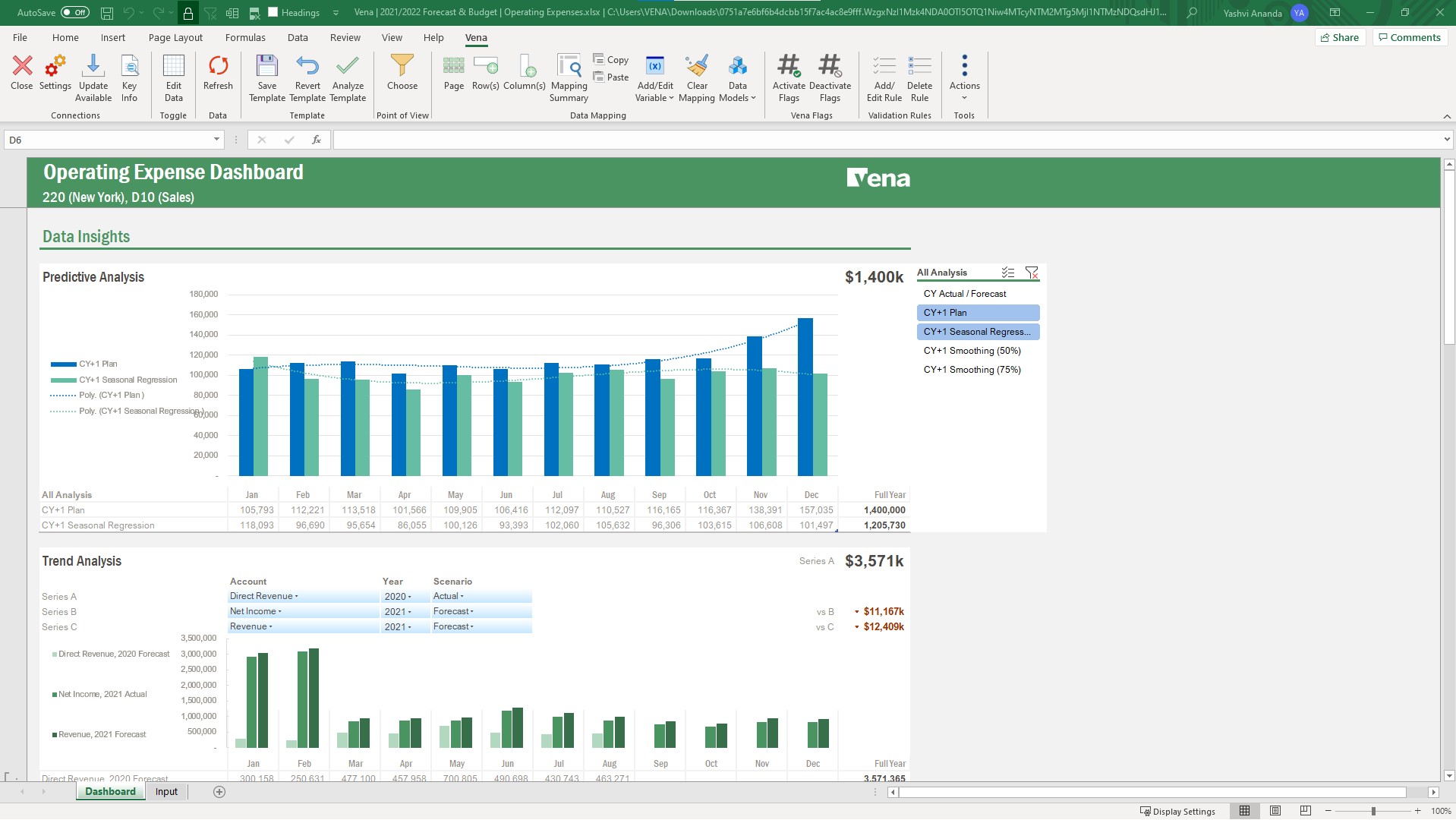
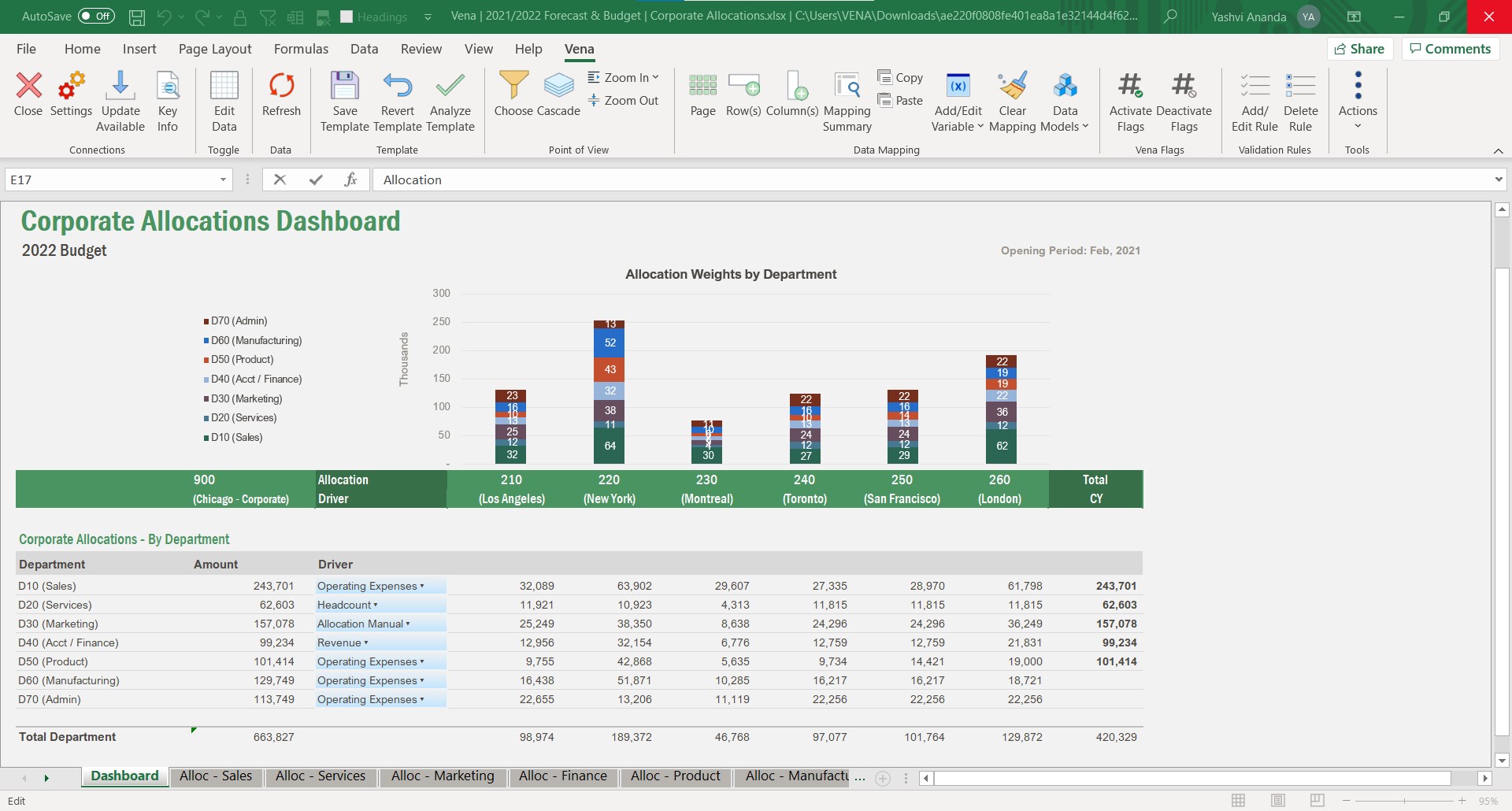
Vena is a strong fit for teams that want to keep working in Excel while adding structure, workflows, and a centralized database. Vena emphasizes its native Excel experience, along with planning templates, workflow automation, and integrations for budgeting/forecasting.
A de minimis incentive was given to thank the reviewer for their time. The incentive was not used to bias or drive a particular response, nor was the incentive contingent on a positive endorsement. More Info
VP Finance in Finance and Accounting at TrueContext Inc (Information Technology & Services, 51-200 employees)
Chose Vena
DataRails - was the closest to Vena but their product development seemed behind and we were concerned about their ability to continue development as well as supporting us. Cube - poor product for us. Seemed applicable to small businesses. Limited features, inexperienced sales …
A de minimis incentive was given to thank the reviewer for their time. The incentive was not used to bias or drive a particular response, nor was the incentive contingent on a positive endorsement. More Info
Global Head of Finance Systems in Finance and Accounting at Colart (Retail, 1001-5000 employees)
Chose Vena
We evaluated Vena alongside DataRails, Planful, and Board during our selection process. Each is a credible platform with real strengths, and the right answer depends heavily on the organization's environment, team composition, and what they're trying to accomplish.
We selected …
A de minimis incentive was given to thank the reviewer for their time. The incentive was not used to bias or drive a particular response, nor was the incentive contingent on a positive endorsement. More Info
Director of Finance in Finance and Accounting at Museum of Science and Industry, Chicago (Museums & Institutions, 201-500 employees)
Chose Vena
Prophix is powerful, and structures data on the back-end in a very similar way with multiple data models, and I have used it before. But the learning curve is steep. Building complex rules, e.g. for a union personnel model, was much harder than designing the same logic in …
A de minimis incentive was given to thank the reviewer for their time. The incentive was not used to bias or drive a particular response, nor was the incentive contingent on a positive endorsement. More Info
Verified User
Chose Vena
We found Vena to be much more intuitive and easy to leverage with our existing models and templates we've built in Excel already. It allowed our finance and ops teams to get traction and value from the solution much faster than we felt the other CPM solutions we looked at.
A de minimis incentive was given to thank the reviewer for their time. The incentive was not used to bias or drive a particular response, nor was the incentive contingent on a positive endorsement. TR verified that a representative sample of customers was invited. More Info
A de minimis incentive was given to thank the reviewer for their time. The incentive was not used to bias or drive a particular response, nor was the incentive contingent on a positive endorsement. More Info
Verified User
Chose Vena
The decision to go with Vena was based mostly on flexibility.
A de minimis incentive was given to thank the reviewer for their time. The incentive was not used to bias or drive a particular response, nor was the incentive contingent on a positive endorsement. More Info
VP, Business Planning & Procurement at First Majestic Silver Corp. (Mining & Metals, 1001-5000 employees)
Chose Vena
We chose Vena mainly due to how flexible it is for our business, and that we would be able to own the software inhouse (finance team) rather than relying heavily on external consultants, just like the case with other software we looked at.
A de minimis incentive was given to thank the reviewer for their time. The incentive was not used to bias or drive a particular response, nor was the incentive contingent on a positive endorsement. More Info
Verified User
Chose Vena
We went with Vena Solutions because it was able to meet the needs in every way for what we were looking for in a budgeting solution. From an admin perspective, it was very intuitive, but from an end user (contributor) perspective, it was outstanding that we were able to keep …
A de minimis incentive was given to thank the reviewer for their time. The incentive was not used to bias or drive a particular response, nor was the incentive contingent on a positive endorsement. More Info
Manager of Business Analytics in Information Technology at Tacala, LLC (Food & Beverages, 5001-10,000 employees)
Chose Vena
We were using Dynamic Budgets before we moved over to Vena and researched many, many, many other products before settling on Vena in the end. One of the things that quickly knocked out other vendors was our unique fiscal calendar. We have 13 periods (4 weeks each) and that …
A de minimis incentive was given to thank the reviewer for their time. The incentive was not used to bias or drive a particular response, nor was the incentive contingent on a positive endorsement. More Info
Vice President Of Accounting and Finance in Corporate at William Lyon Homes (Real Estate, 501-1000 employees)
Chose Vena
They have superior database capacity due to the power of the cloud. Usability and user adoption is quick and immediate due to the direct integration with Excel and ease of use for end users and Vena administrators.
A de minimis incentive was given to thank the reviewer for their time. The incentive was not used to bias or drive a particular response, nor was the incentive contingent on a positive endorsement. More Info
IT Business Analyst in Information Technology at Tacala, LLC (Food & Beverages, 5001-10,000 employees)
Chose Vena
We spent about a year and a half in the selection process for our budgeting system. The issue that we kept coming across was speed, flexibility, and a lack of understanding of our process during the sales cycle. Most of these other products wanted us to change our budgeting …
A de minimis incentive was given to thank the reviewer for their time. The incentive was not used to bias or drive a particular response, nor was the incentive contingent on a positive endorsement. More Info
Planful is initially easy to setup and if a company is already using a mid layer to transform and standardise GL data, management reports can be set up in days, not weeks or months. Budgeting template setup does get some getting used to but the training provided by Planful is sufficient to get going and learn along the way. Building custom reports is straightforward and the interface is user-friendly, therefore the accounting team can get going without the need for technical specialists getting involved. Budget and forecasting is flexible and drivers of revenue and cost can be created in Planful and customised by Unit or Geography.
It is well suited for planning, budgeting, and forecasting. Using its capabilities also allows you to use it for reporting, whether it's month-end reporting or other reporting where you want to rely on data from a source that can be nicely presented and adjusted in Excel.
A de minimis incentive was given to thank the reviewer for their time. The incentive was not used to bias or drive a particular response, nor was the incentive contingent on a positive endorsement. More Info
A de minimis incentive was given to thank the reviewer for their time. The incentive was not used to bias or drive a particular response, nor was the incentive contingent on a positive endorsement. More Info
The Admin function of Vena, being able to set up the users in the user categories and the different groups and assigning the groups and the task bindings, is particularly easy and very helpful because as we have so many different departments and disciplines in our organization, we do need to establish pretty specific user access so this process works really well for us.
Running reports in Vena is fairly easy, and we do enjoy being able to just push a button and get some budget versus actuals.
A de minimis incentive was given to thank the reviewer for their time. The incentive was not used to bias or drive a particular response, nor was the incentive contingent on a positive endorsement. More Info
A de minimis incentive was given to thank the reviewer for their time. The incentive was not used to bias or drive a particular response, nor was the incentive contingent on a positive endorsement. More Info
Have another license between power user and contributor that allows building reports that aren't ad hoc, but don't have all the admin rights of a power user.
Have a session on best in class Workforce Planning prior to implementation.
A de minimis incentive was given to thank the reviewer for their time. The incentive was not used to bias or drive a particular response, nor was the incentive contingent on a positive endorsement. More Info
Our new Comptroller understands the value of Planful, and we plan to utilize it further in the organization to enhance external reporting. Strangely enough, Planful had not previously been embraced by the former CFO, who argued that we were running two sets of books (of course, we were not). Fortunately, the before mentioned reconciliation of EBITDA to Net Income demonstrated that to the banks.
A de minimis incentive was given to thank the reviewer for their time. The incentive was not used to bias or drive a particular response, nor was the incentive contingent on a positive endorsement. More Info
Vena has become an integral part of finance and our daily process. Without it we would take longer to prepare results and decisions will be delayed. Vena has given the whole organization more visibility of results and budgets so that all departments participate more actively in managing their budgets rather than it being the sole responsibility of finance.
A de minimis incentive was given to thank the reviewer for their time. The incentive was not used to bias or drive a particular response, nor was the incentive contingent on a positive endorsement. More Info
The tool is extremely adaptable, and it enables very quick querying to give us opportunity to gain live insights into the business. Given its adaptability, we are also able to create scenario analyses very quickly in rapidly changing environments. The formatting also enables us to provide this information in a very consumable manner.
A de minimis incentive was given to thank the reviewer for their time. The incentive was not used to bias or drive a particular response, nor was the incentive contingent on a positive endorsement. More Info
Vena is somehow easy to manipulate. If you want to map accounts, or change mapping. there are clear instructions and guidance. and also Vena AI is on the way, so i think we can leverage it more and let AI help us mapping and check errors. overall a very good product and easy to learn and set up.
A de minimis incentive was given to thank the reviewer for their time. The incentive was not used to bias or drive a particular response, nor was the incentive contingent on a positive endorsement. More Info
I only give a 9 rating rather than a 10 rating because it seems that every day around 2pm we see a slowdown in the use of Planful. I have requested our internal IT department verify that it is not an internal issue and have been assured it is the tool. We have not yet reached out to Planful to do extensive research to solve this issue.
Vena is seemingly always available. They plan maintenance windows well in advance and always off hours (typically over a weekend) and communicate clearly throughout maintenance about what will be affected. Over 5 years of using the product, I can only remember one time when the platform was unavailable (I believe due to an underlying server hosting issue from their provider), and they resolved the issue and had everything up and running again within 8 hours.
A de minimis incentive was given to thank the reviewer for their time. The incentive was not used to bias or drive a particular response, nor was the incentive contingent on a positive endorsement. More Info
Again, the system is very reliable and, for the most part, runs very quick and smooth. When running larger queries, it does take some time, and during budgeting season our users experienced slower loading times, but nothing that raises concerns outside of normal network issues. Occasionally, as with any software we use, it will crash and you have to restart, but that does not happen very often.
The performance is dependent on how much data and calculations are involved and how complex the security settings are. A simple template or report loads in seconds. A complex template or report can take a while. If there are many users with complex security settings, that will be a factor in the load time.
A de minimis incentive was given to thank the reviewer for their time. The incentive was not used to bias or drive a particular response, nor was the incentive contingent on a positive endorsement. More Info
Sometimes we get great help when using Planful's support team and other times we don't. In particular, there is one person that often responds to our support tickets who is less than helpful, hence the reason for the 5 out of 10 rating. As a result, most of the time we reach out to our Planful consulting group as they provide faster and better support
When I reach out to our support team, they are always able to fix any issues we are having in a timely manner. It is always resolved quickly which proves that customer support always helps out our support team with any issues so they can in turn help us quickly
A de minimis incentive was given to thank the reviewer for their time. The incentive was not used to bias or drive a particular response, nor was the incentive contingent on a positive endorsement. More Info
My team has attended training offered several times before/during the Planful Perform conference. This training has been extremely useful and we always learn something we didn't know prior to the training. The trainers are always very knowledgeable and more than willing to help each and every user after the training with specific questions regarding their environment. Planful also offers training and certifications on their training hub. I have completed a couple of the certifications. The courses are easy to follow along with and very informative. Additionally, Planful schedules webinars pretty regularly. They'll email their customers and allow you to register to participate live. They also record these sessions so you can refer back to them at a later date or if you are unable to attend at the time the webinar is offered, you can register anyway and get access to the recording. Their training has improved year over year!
A de minimis incentive was given to thank the reviewer for their time. The incentive was not used to bias or drive a particular response, nor was the incentive contingent on a positive endorsement. More Info
This is the best way to learn and buy-in. The in person effect gives students both a hands on approach but an instruction to be there to customize assistance and understanding. In person also builds greater buy in with your future team on creators. However if your audience is better at on line learning this is another good option.
A de minimis incentive was given to thank the reviewer for their time. The incentive was not used to bias or drive a particular response, nor was the incentive contingent on a positive endorsement. More Info
Planful provides a lot of online training support. There's so many options for training. Admin Learning Courses, User Learning Courses. Plus they have several webinars devoted to the tool and the new features they release. New Releases can be practiced in a Sandbox Environment prior to going live in Production
A de minimis incentive was given to thank the reviewer for their time. The incentive was not used to bias or drive a particular response, nor was the incentive contingent on a positive endorsement. More Info
The training was structured as a group training to learn the basics of creating a data model and mapping a template. While we had nearly 10 participants, I was the only actual implementer so we probably didn't actually need the training and could have just learned the initial skills from the implementation consultant. Two years later, when we hired a new team member, they completed several modules in Vena Academy (a self paced learning course) which allowed them to get up to speed on the basics with just a bit of supplemental guidance from me as our existing admin.
A de minimis incentive was given to thank the reviewer for their time. The incentive was not used to bias or drive a particular response, nor was the incentive contingent on a positive endorsement. More Info
After going through the initial implementation with Host Analytics and a re-implementation with Cervello (due to an ERP change, not due to a poor initial implementation), I've learned that you really must rely on your internal staff to bear most of the implementation burden. Use the vendor or partners for ideas and best-practice suggestions, and some of the easy-but-time-consuming work. Since you will ultimately be using and maintaining the application, you should be able to do most of it yourself.
A de minimis incentive was given to thank the reviewer for their time. The incentive was not used to bias or drive a particular response, nor was the incentive contingent on a positive endorsement. More Info
The Vena consultant had great knowledge of both the Vena solution and Excel and Excel functions. He was able to help suggest ways to build our templates that met our requirements using Excel functions we had not previously considered using. And we have been able to use the Excel information he provided in other ways outside of Vena. He was very patient and flexible as we learned the Vena tool and created templates
Prior to joining the company, we tried to implement Vena but were unsuccessful. There we're a few reasons it didn't work out, but a lot of it related to the implementation team they provided. In just the first week with Planful, we achieved more progress than we did in several months with Vena.
A de minimis incentive was given to thank the reviewer for their time. The incentive was not used to bias or drive a particular response, nor was the incentive contingent on a positive endorsement. More Info
Previously used Synario for long-term forecasting. Ultimately moved to Vena for this to keep budgeting and forecasting together in a single solution. Vena's system is much easier to learn on the admin side since it is Excel-based so the transition was pretty simple. Previously used Jenzabar with JICS for budgeting. Vena's budget system is more user-friendly for end users and more flexible so it works better for our specific needs. Vena's reporting system is easier to use and customize.
A de minimis incentive was given to thank the reviewer for their time. The incentive was not used to bias or drive a particular response, nor was the incentive contingent on a positive endorsement. More Info
From our experience, Planful is only used in 2 overhead departments in our organization. We easily added another overhead department, but they decided against using Planful for their workforce and financial planning. Removing them from our environment was extremely easy.
A de minimis incentive was given to thank the reviewer for their time. The incentive was not used to bias or drive a particular response, nor was the incentive contingent on a positive endorsement. More Info
Vena solutios is a software that provides robust tools that help different departments in their statistics and we can visualize a lot of promising and visually attractive data. Vena Solutions' level of scalability is high and sustainable over time thanks to the fabulous technical support that is ready to help us at all times
A de minimis incentive was given to thank the reviewer for their time. The incentive was not used to bias or drive a particular response, nor was the incentive contingent on a positive endorsement. More Info
A de minimis incentive was given to thank the reviewer for their time. The incentive was not used to bias or drive a particular response, nor was the incentive contingent on a positive endorsement. More Info
Vena has helped save time by reducing the manual work involved with budgeting, reporting, and variance analysis. Instead of spending as much time organizing data and reconciling spreadsheets, I can focus more on reviewing results and making informed decisions. It has improved collaboration between teams and provided better visibility into financial performance, creating more efficient processes overall.
A de minimis incentive was given to thank the reviewer for their time. The incentive was not used to bias or drive a particular response, nor was the incentive contingent on a positive endorsement. More Info