TrustRadius: an HG Insights company

Paycom

Score8.4 out of 10

1,138 Reviews and Ratings

What is Paycom?

Paycom is an automated HCM platform, built on a single database that eliminates redundant data entry through automation. A payroll and HR software solution, Paycom is used by organizations of all sizes to access employee data without navigating multiple systems.

Read more details.

Media

Screenshot of a new study that reveals that for a composite organization representative of interviewed clients, unifying HR and payroll in a single-database software with automation and streamlined workflows achieved a three-year 362% ROI and resulted in: $1.4M net present value*; over 45% total time saved by HR; 80% time saved on compliance work.
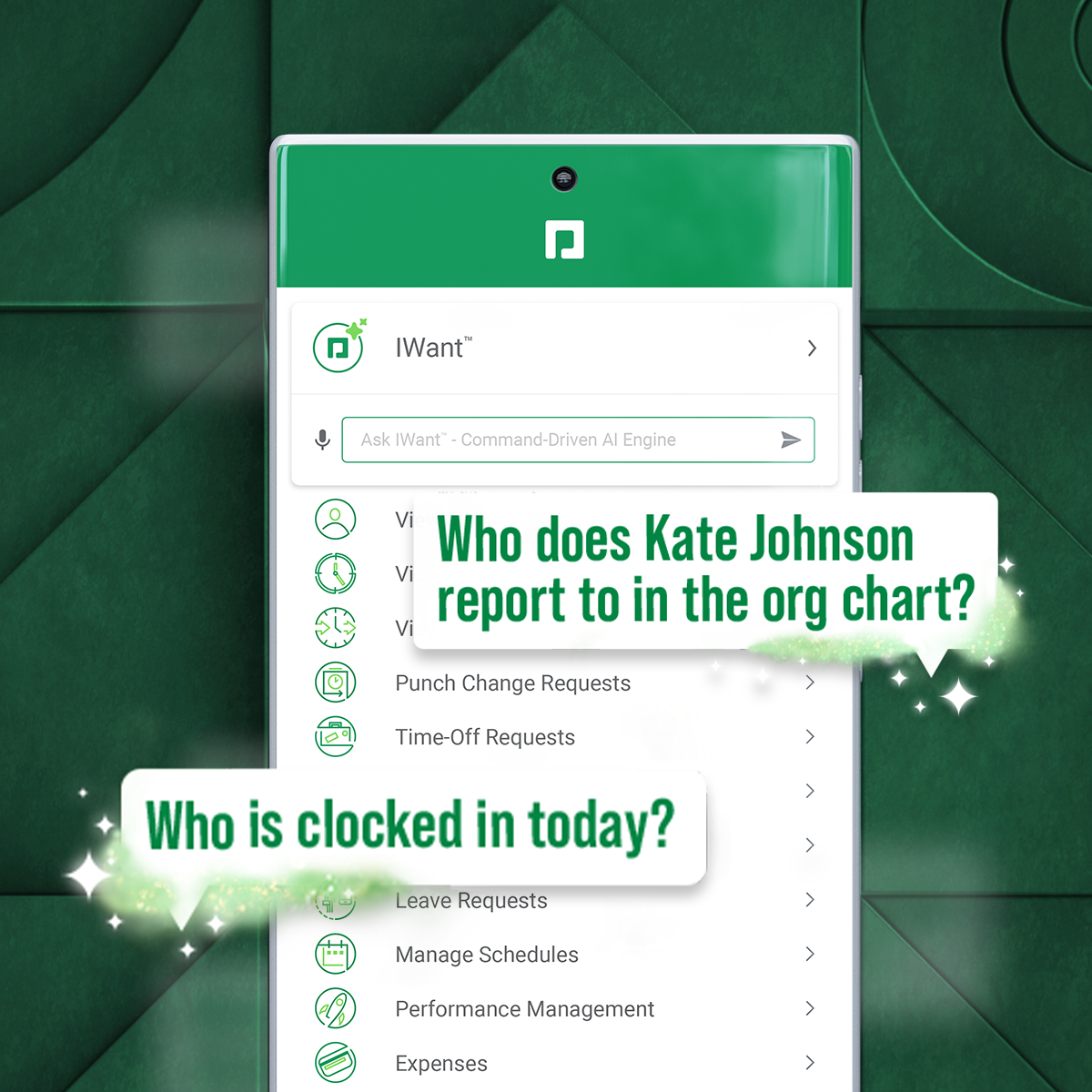
Screenshot of IWant, which is a command-driven AI engine in a single database, for instant access to employee data.
Screenshot of Direct Data Exchange®, which takes a detailed pulse of how employees interact with Paycom. It automatically assigns a dollar value of savings based on Ernst & Young research.

1 / 3

Screenshot of a new study that reveals that for a composite organization representative of interviewed clients, unifying HR and payroll in a single-database software with automation and streamlined workflows achieved a three-year 362% ROI and resulted in: $1.4M net present value*; over 45% total time saved by HR; 80% time saved on compliance work.

Top Performing Features

  • Direct deposit files

    Direct deposit is the ability to electronically transfer pay to an employee’s personal bank account.

    Category average: 8.9

  • Update personal information

    Employees can update personal profile with change of address, dependents, or other personal data.

    Category average: 8.7

  • View and generate pay and benefit information

    Employees can view pay and benefit data and print pay stubs.

    Category average: 8.6

Areas for Improvement

  • Tracking of all physical assets

    Tracking of track laptops, pagers, phones, and other company equipment.

    Category average: 8

  • Line-of sight-visibility

    Line-of-sight visibility is the provision of line-of sight visibility for each goal to see how goals support overall corporate objectives.

    Category average: 7.8

  • Corporate goal setting

    Corporate goal setting is the ability to define corporate goals, and/or vision statements in the system.

    Category average: 7.6

Who Buys & Uses Paycom

Pros

  • Efficient and accurate payroll processing, often reducing processing time significantly.
  • User-friendly and intuitive interface for both administrators and employees.
  • Responsive customer service from dedicated account specialists.

Cons

  • Inconsistent customer support responsiveness and frequent representative turnover.
  • Reporting functionality can be difficult to navigate and less intuitive.
  • System complexity and usability challenges for advanced functions.

Paycom Review

Use Cases and Deployment Scope

For everything. We use it for payroll. We use it for employees, for benefits administration, for refunds, and for updates whenever our employees are utilizing Approve My Check. So almost everything that we can possibly use it for.

One thing that's unique to our organization is how we pay our employees. It's not just a straightforward payroll. We have employees who receive piece pay, mileage, and bonuses, and Paycom has actually been able to meet all of our needs and goals for ensuring that our payroll is processed appropriately.

Pros

  • I would say one thing Paycom does particularly well is that I love being able to send notifications to our employees through the app, and I love that it's user-friendly for our employees.

Cons

  • The most recent update, I'm not a fan of, only because I wasn't prepared for it, and it came right before payroll was processed. So I wasn't a big fan of that, but I was told that if I give it time, I'll get used to it. And I'm open to change.
  • I haven't utilized IWant™ a whole lot yet. I haven't used it much because the information I need in Paycom, I'm familiar enough with that, I can just go and get it myself. So I haven't had to use IWant™, but I know employees who do.

Return on Investment

  • I'm going to go back to the benefits again, only because we've been able to really streamline our benefits, like health, dental, and vision, along with the direct connections we have with all of the companies that we utilize.

Usability

Paycom Review

Use Cases and Deployment Scope

Everything, basically—talent acquisition, benefits, employee self-service, time clocks, and attendance. We use Paycom in almost every way possible except for recruiting and training. For training, we use Relias, so we don't use Paycom's training module.

Pros

  • I like the employee self-service feature. It's very straightforward and easy to use. I also like my representative, Mikey. He's been very helpful—every time I call him, I get the assistance I need. I also appreciate how quickly I can get someone on the phone and get help when needed.

Cons

  • I would say transferring employees from another company can be challenging. If you're rehiring or transferring someone, you often have to re-enter a lot of the information again. It's not always easy to move people around within the system, and it can feel repetitive because you're entering the same information multiple times.

Return on Investment

  • I would say the impact has been positive. Everything I've needed to do for my job has been available within the system, and if there was ever something I couldn't figure out, I could reach out to customer service, and they would help me. Personally, I haven't had any issues with it.

Alternatives Considered

ADP Workforce Now

Usability

Paycom Review

Use Cases and Deployment Scope

We use Paycom for payroll, applicant tracking, leave management, performance reviews, and performance counseling. Overall, we use it for a wide variety of human resources functions.

Pros

  • The payroll system is very easy to use and process compared to what I worked with previously. Onboarding employees is also incredibly simple because they can complete much of the process before arriving at the office on their first day, which saves us a significant amount of time.

Cons

  • One area I'd like to see improved is the applicant tracking system. I wish there were a way to upload resumes from candidates who didn't apply through the system and have Paycom automatically capture their information. That would allow recruiters to move candidates through the process directly, rather than having to send them a link and require them to apply again just to get into the system.

Return on Investment

  • The impact has been very positive, mainly because it's so user-friendly for our employees. It reduces the amount of time my staff and I spend answering routine questions, since employees can go directly into Paycom to find information such as their pay rate and other details. The IWant feature has been especially valuable because it gives employees quick access to the information they need on their own.

Alternatives Considered

TriNet

Usability

Paycom Review

Use Cases and Deployment Scope

What we wanted to do when we went live with Paycom, when we were looking for a new solution, was to try to put our arms around everything because we had a separate payroll system. We had a separate ATS. And Paycom gives us payroll and ATS. We have a new survey tool we'll be using. We have a communication tool called Micom that lets us send messages to all the employees around our company. Texting is something that we're going to start using as well for individual communication.

People today want things now. They want immediacy, and they don't want to come to HR and ask, "How many PTO hours do I have left?" They want to be able to open their phone, log in, and see exactly how much PTO they have left. Did it get approved if they have an expense and they submitted it for approval? They want to see if that has been turned in quickly. It's just 2026. It's like they're in the future.

Pros

  • Paycom does a particularly good job of updating and taking in information. We have a rep named Alex Cisco, who I hear from two or three times a month. He’ll just want to drop by and say, “Hey, how’s the product working? Is there anything I can do to help you with the product? And by the way, do you know about this new feature?” If I have feedback, I give it to Alex, and if he doesn’t know how to fix it that day, he’ll take it to research and development, and we may see an answer for it a month or two down the road.

Cons

  • Apostrophes, quotation marks, dashes. Sometimes when I'm using Micom, and I want to send a message out, and I put in quotation marks or a dash, it tells me that's not allowed, and I have to go back and redo my message because for whatever issue I've got grammatically, it doesn't go through.

Return on Investment

  • You always want to be efficient. You always want to be modern, slick, up with the times, and Paycom does that. It gives us the technology, and it gives us the training on how to show other people how to use the technology. Because if you were a person who had a flip phone and then all of a sudden you're going to a smartphone, it takes a little bit of time to adapt and evolve. Paycom helps us to work with people to adapt and evolve for a modern solution.

Alternatives Considered

Paycor

Other Software Used

Humanly

Usability

Paycom Review

Use Cases and Deployment Scope

We use it starting with applicant tracking. We use it for all of our new hires. We use it for payroll. We use it basically from start to finish for any employees that we hire. It has solved so many problems of keeping everybody in one system because we used to have multiple, and it's just an amazing product overall.

Pros

  • It's very quick, very fast. It keeps everything and everybody in one system, which is amazing, and it helps us save some time during the day and not have to pull up multiple websites.

Cons

  • My only thing is that I wish they would bring back the flag colors on the applicants' side because I really miss them. I like the big bold colors.

Return on Investment

  • Honestly, we just started using the background check feature, and we have seen a major return on investment. It's quickened the process so much that it's now in one system. We don't even have to go to another one.

Other Software Used

Indeed.com, LinkedIn Jobs

Usability