Action1 vs. Syncro

Overview
ProductRatingMost Used ByProduct SummaryStarting Price
Action1
Score 9.5 out of 10
N/A
Action1 is an autonomous endpoint management platform that is cloud-native, scalable, and configurable in 5 minutes. It is free for the first 200 endpoints, with no functional limits. By pioneering autonomous OS and third-party patching - AEM’s foundational use case - through peer-to-peer patch distribution and real-time vulnerability assessment without needing a VPN, it eliminates costly, time-consuming routine labor, preempts ransomware and security risks, and protects the digital…N/A
Syncro
Score 7.4 out of 10
N/A
Syncro offers an Extended Monitoring and Management (XMM) platform for midsized MSPs and internal IT teams. The platform integrates RMM (endpoint management), professional services automation (PSA), and Microsoft 365 multi-tenant management to help organizations simplify operations, strengthen security, and scale.
$159
per month per user
Pricing
Action1Syncro
Editions & Modules
No answers on this topic
Core
$159
per month per user
Team
$209
per month per user
Offerings
Pricing Offerings
Action1Syncro
Free Trial
NoYes
Free/Freemium Version
YesNo
Premium Consulting/Integration Services
NoNo
Entry-level Setup FeeOptionalNo setup fee
Additional DetailsDiscount available for annual payment.
More Pricing Information
Community Pulse
Action1Syncro
Considered Both Products
Action1
Chose Action1
While other RMMs may only be good at one thing, Action1 is really good at everything that their does. If they don't have it in the platform yet, that's because it's not good enough for their standards. From a pricing standpoint on Patch/Software management there is no match for …
Chose Action1
Action1 has a sweet spot with the functionality it provides at a great price point. The product is not overwhelming yet continues to grow with functionality that customers request.
Chose Action1
Freshdesk and Freshservice are great products with Freshservice being the better of the two. However, in comparison to Action1 with regards to our budget, it was an easy choice to select Action1. I selected Action1 not only because of the "free" price tag, but also because I …
Chose Action1
Aforementioned regarding the high cost of Lansweeper. In my experience, it also has a greater effort to configure and isn't as easy to deploy and customize out of the box. In my opinion, their platform is built around the assumption everyone is a long-time customer and/or a big …
Chose Action1
To be honest, I might have been lucky, but Action1 was the first I actually tested.
I've heard from our mother company from Italy, that they have tested NinjaOne but it was not what they were expecting in terms of vulnerability and patch management. I've recently suggested them …
Chose Action1
GFI Languard was pretty nice, but that was ages ago. I do pay for PDQ deploy and inventory though and am happy with that software...however, while its feature set does overlap with Action1, it is not just another flavor of the same thing, so I find that I use both of them.
Chose Action1
Action1 excels with patch management and their ability to show if applications have been marked as vulnerable. It is also hard to beat their free model where the first 200 are free. When I first started with Action1 it was only 50 endpoints so seeing that expand so much is …
Chose Action1
Action1 is cheaper then the competitors that I have used.
Chose Action1
From a functionality point of view the platforms are very similar, when we worked with NinjaOne they tried the hard push for us to onboard our entire organization. We didn't want that and they refused to scale down to the requirements of our small satellite office (<10 …
Chose Action1
For the amount of functionality you get with the cost, no other product compared to Action1 did. The free trial and free endpoints they offer help prove there is no time trial to rush and select a product. The support has been fantastic with the company as well as the Action1 …
Chose Action1
Action1 is a similar but less feature-filled product than ConnectWise or Kaseya. However, Action1 can fulfill the main use-case scenarios of both products at a much lower cost per endpoint. Action1 is also constantly innovating and working with its users to improve upon the …
Chose Action1
Price for one. The cost is extremely reasonable IMO. Action1 is easier to use for a non-technical person and there is zero maintenance since it is cloud hosted.
Chose Action1
After looking at different solutions, Action1 [Cloud Remote Monitoring and Management Solution] was the perfect fit for us that delivered all of the features we wanted without being as costly as some of the others alternatives we've looked at. There was no minimum endpoint …
Chose Action1
Action1 Cloud Remote Monitoring and Management Solution may not be as feature rich as SCCM and Intune, but it does its job without having to set up and support additional infrastructure on your network. It's more user friendly than ManageEngine's Desktop Central but does most …
Syncro
Chose Syncro
Solarwinds is really good one, more expensive than Syncro through. Two other platforms that are good but not listed in the production search are NinjaRMM and Bluetrait. These are a few other alternatives to Syncro a business should consider when choosing which software will …
Chose Syncro
Syncro does not have every bell or whistle (especially when compared with Kaseya VSA). However from a cost versus feature perspective, Syncro wins hands down.

Syncro versus Atera - they are very similar products and also use the per agent pricing. This was a big driver for us …
Features
Action1Syncro
Application Performance Management
Comparison of Application Performance Management features of Product A and Product B
Action1
-
Ratings
Syncro
6.5
Ratings
7% below category average
Virtualization monitoring00 Ratings7.40 Ratings
IT Asset Discovery00 Ratings5.60 Ratings
Monitoring Tasks
Comparison of Monitoring Tasks features of Product A and Product B
Action1
-
Ratings
Syncro
7.5
Ratings
7% above category average
Remote monitoring00 Ratings8.40 Ratings
Network device monitoring00 Ratings6.60 Ratings
Activity Monitoring00 Ratings7.60 Ratings
Management Tasks
Comparison of Management Tasks features of Product A and Product B
Action1
-
Ratings
Syncro
7.4
Ratings
10% above category average
Patch Management00 Ratings7.80 Ratings
Policy-based automation00 Ratings7.00 Ratings
Remote Access
Comparison of Remote Access features of Product A and Product B
Action1
-
Ratings
Syncro
7.3
Ratings
9% above category average
Attended device access00 Ratings8.80 Ratings
Unattended device access00 Ratings7.60 Ratings
Mobile device access00 Ratings7.00 Ratings
Virtual device access00 Ratings8.00 Ratings
Multiple-display support00 Ratings4.50 Ratings
Multiple concurrent sessions00 Ratings8.00 Ratings
Best Alternatives
Action1Syncro
Small Businesses
Avast CloudCare
Avast CloudCare
Score 10.0 out of 10
Panda Systems Management
Score 7.3 out of 10
Medium-sized Companies
KACE Systems Management Appliance
Score 8.5 out of 10
Action1
Action1
Score 9.5 out of 10
Enterprises
KACE Systems Management Appliance
Score 8.5 out of 10
TeamViewer
TeamViewer
Score 8.6 out of 10
All AlternativesView all alternativesView all alternatives
User Ratings
Action1Syncro
Likelihood to Recommend
9.6
(0 ratings)
6.6
(0 ratings)
Likelihood to Renew
9.4
(0 ratings)
-
(0 ratings)
Usability
9.5
(0 ratings)
7.0
(0 ratings)
Support Rating
5.0
(0 ratings)
-
(0 ratings)
Implementation Rating
10.0
(0 ratings)
-
(0 ratings)
User Testimonials
Action1Syncro
Likelihood to Recommend
Any place that has multiple computers that need to be managed can benefit from using Action1. Currently that means Windows PC's and servers, Linux PC's and servers and devices running MacOS can be managed by Action1 and benefit from their patch management and software management tools. Mobile OS need not apply at this point.
Read full review
The good is pretty good when it comes to Syncro. Window patching works well. They add features often. No hidden fees and good pricing. The bad, are inconvenient when it comes to Syncro but could be worse. Reporting does not look good. Support only through email. There are no forums or network scanning/SNMP
Read full review
Pros
  • Automations. We utilize scheduled tasks that we define within Action1 to provide additional controls for reporting, alerting, and for endpoint management. It is a unique way to expand functionality by use of centrally managed scripting events.
  • Able to create and view reports showing detailed information of all types of endpoints within my enterprise. We can also create custom reports from a large set of available data points and can also create custom alerts based on these data points.
  • Vulnerability detection and resolution management. Able to detect vulnerabilities and apply controls or actions based on the vulnerabilities found. Along with the Security patching, this adds and extra layer of visibility and control to secure my environment.
  • Custom application deployments. Action1 provides a large set of third part applications you can deploy and patch updates for, but if you have custom applications built in-house or just an application that is not available in the software repository that Action1 has, you can build your own custom deployments easily.
Read full review
  • Decent UI
  • Things generally work
  • Not too expensive
Read full review
Cons
  • Remote Access could use added functionality
  • The deployment screens for update deferrals can be hard to understand at first and easy to skip since it carries some default info when you create a new automation rather than a more conspicuous prompt to update.
Read full review
  • Ticketing. Whilst the ticketing system works, it is fairly basic compared to specific ticketing solutions. Some improvements here would be great.
  • Remote Management - granular options on accounts. You are unable to have some clients or systems which do not require a password for remote access, whilst having this set for other clients/accounts. This makes it a problem if you want to use the remote management component on servers where there is no one available to approve access
  • Better "built in" remote access software. Whilst the base remote access software works and that the system integrates with larger remote management vendors, some improvements to the remote management component would be beneficial
Read full review
Likelihood to Renew
it is an excellent product
Read full review
No answers on this topic
Usability
Easy to use. Straight Forward. No hidden settings or stuff that's buried several layers deep and you have to watch a video before you do it. Point. Click. It works and I can feel assured that my CVE issues are being handled.
Read full review
The overall value of Syncro is good due to cost of software and the things that it does do well. However, there are some limitations that will be frustrating and may require extra software or time to complete or format in other platforms. So, can cause some setbacks to some organizations but be work well for others, based on their needs
Read full review
Support Rating
I never contacted support services
Read full review
No answers on this topic
Implementation Rating
very easy to start using it.
Read full review
No answers on this topic
Alternatives Considered
Freshdesk and Freshservice are great products with Freshservice being the better of the two. However, in comparison to Action1 with regards to our budget, it was an easy choice to select Action1. I selected Action1 not only because of the "free" price tag, but also because I didn't need a full fledged ITSM product. Action1 is cheaper, easier to setup and use, and is cloud based as well so you don't need to install it on a server to utilize.
Read full review
Syncro does not have every bell or whistle (especially when compared with Kaseya VSA). However from a cost versus feature perspective, Syncro wins hands down. Syncro versus Atera - they are very similar products and also use the per agent pricing. This was a big driver for us and Syncro came out at cheaper priced option. Atera does have more features and is a more mature product - however the features that we required were perfect in SyncroMSP
Read full review
Return on Investment
  • It's pretty hard to negotiate investments / costs in IT when you have a small team in a mid size company. Everything is seen as useless cost and not investment. As of now, I'm pretty sure that if we ever cross the free-tier, I'll have no problems with investment approval since the tool is proven and useful on a daily basis. I believe this was the single most importat decision that Action1 took in their sales model.
Read full review
  • Saved us hundreds of dollars switching from previous provider
Read full review
ScreenShots

Action1 Screenshots

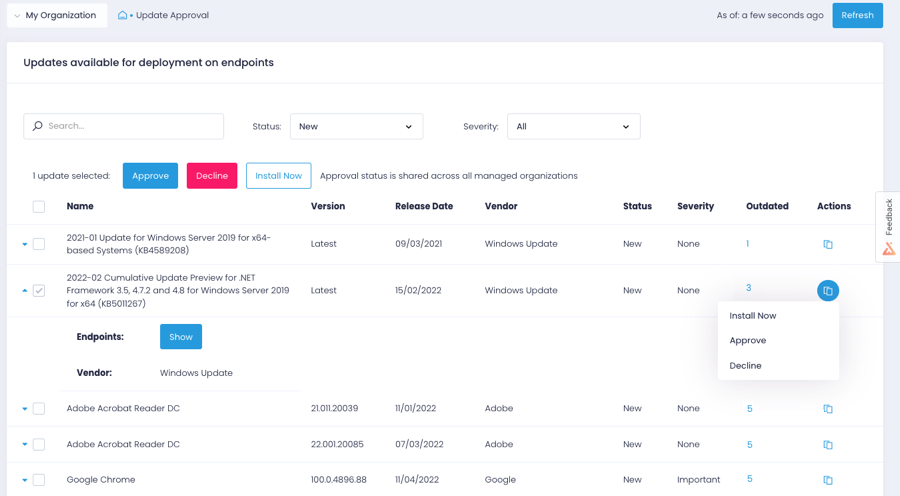
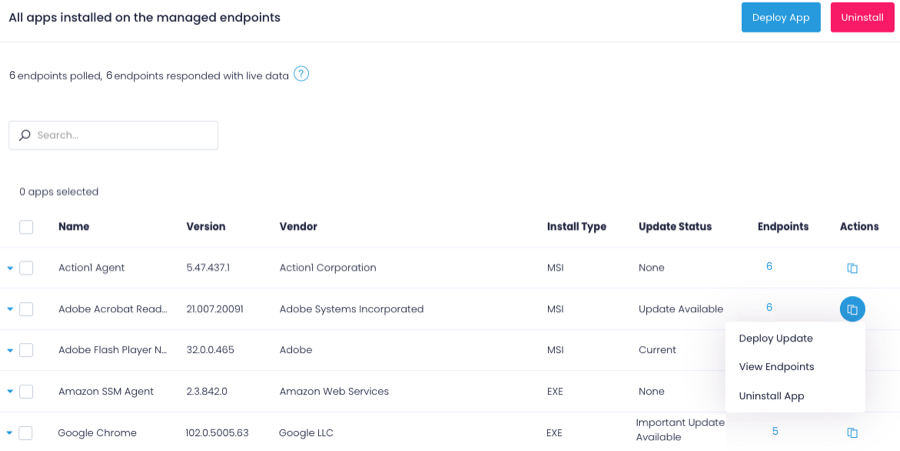
Screenshot of the Action1 dashboardScreenshot of Action1 patch managementScreenshot of Action1 software deploymentScreenshot of Action1 endpoint managementScreenshot of an Action1 vulnerabilities viewScreenshot of Action1 vulnerabilities remediation

Syncro Screenshots

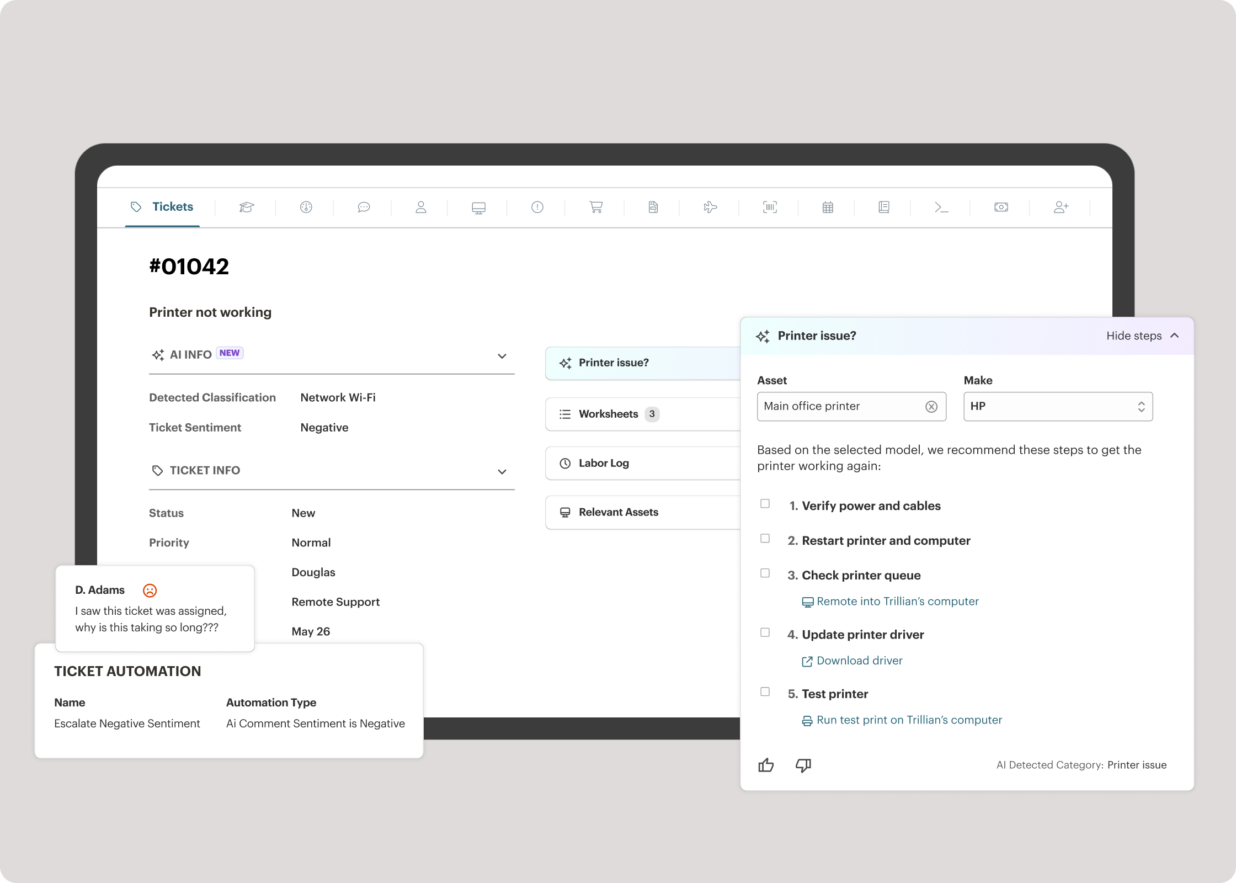
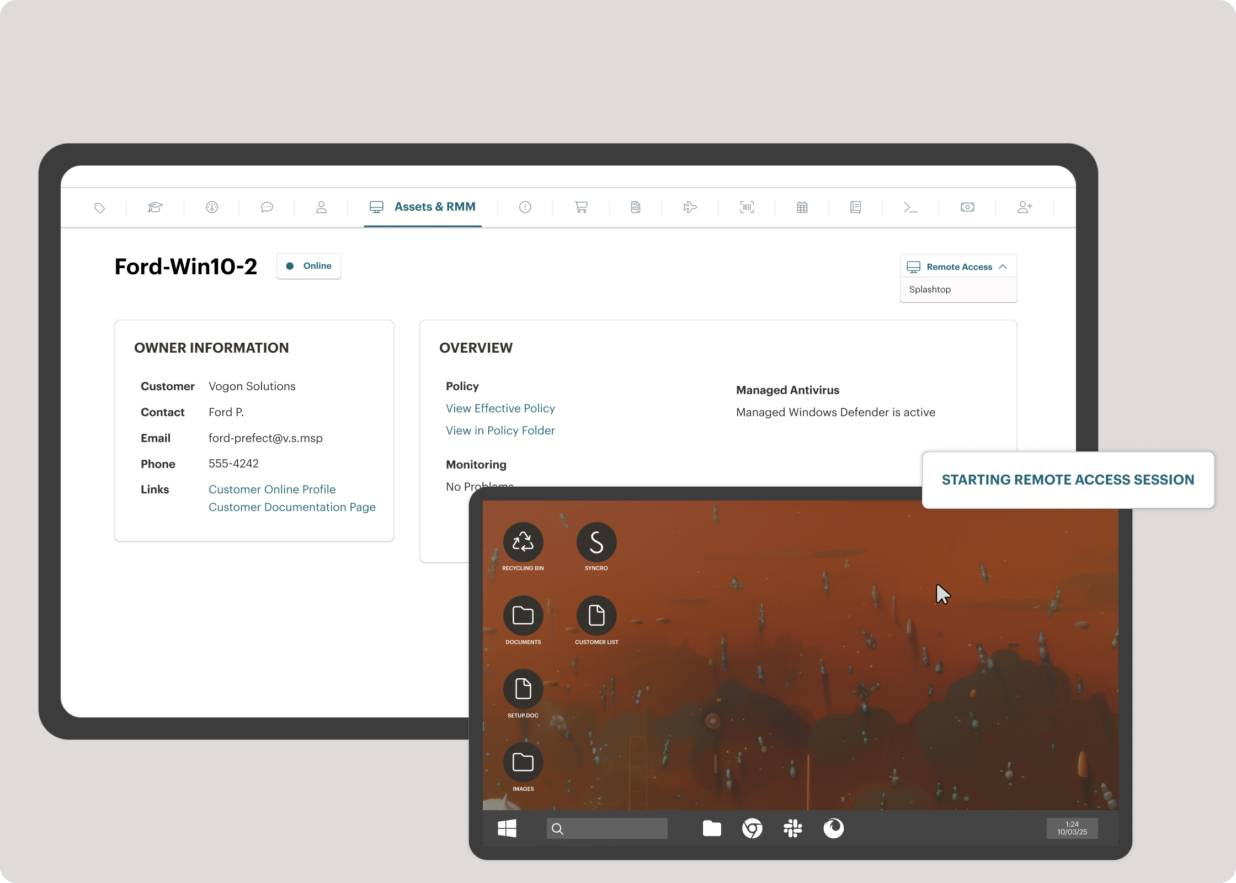
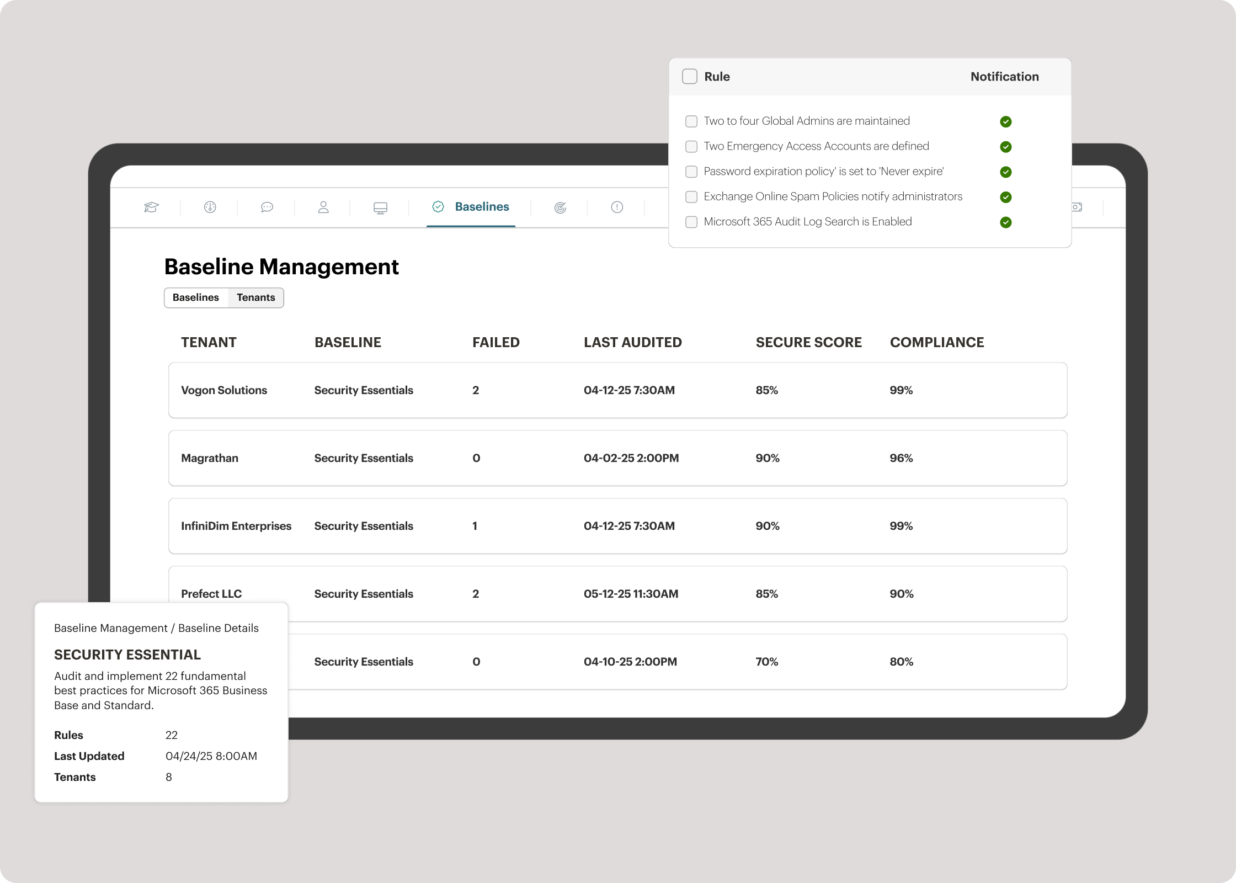
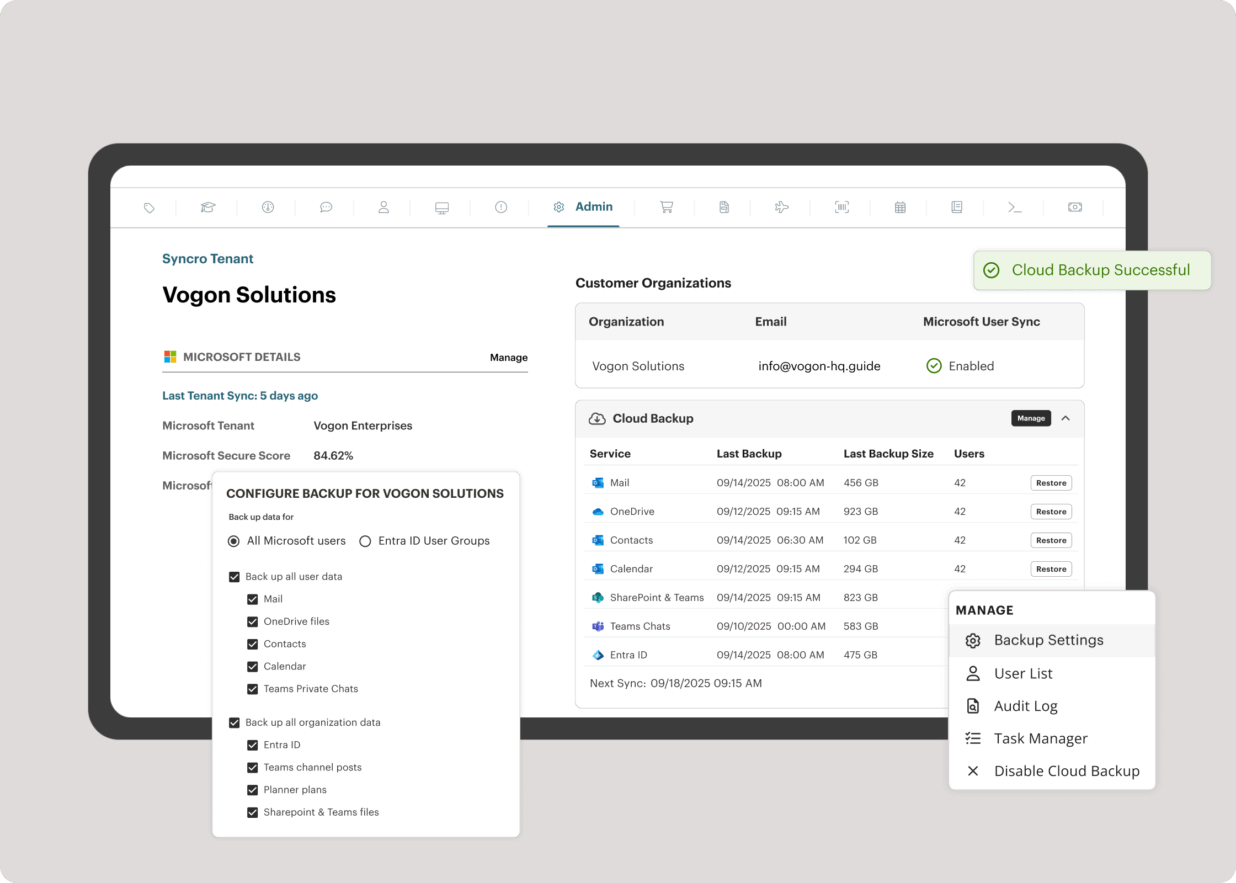
Screenshot of the interface to monitor unlimited endpoints, run scripts, deploy patches, customize alerts, and proactively address potential issues before they become problems.Screenshot of Syncro’s intelligent Smart Ticket Management, which automatically routes tickets and gets information in front of techs, displays relevant context from prior tickets, and surfaces recommended remediation steps to speed up resolution times.Screenshot of where to securely access endpoints and resolve issues anytime, from anywhere, via Splashtop — included with the Syncro subscription at no extra cost.Screenshot of Syncro automating Entra ID tasks and admin work including user syncs, password resets, and license billing.Screenshot of the interface to benchmark M365 tenants against CIS-aligned best practices — offering guided configuration, centralized visibility, drift detection, and automated alerts to help maintain compliance.Screenshot of Microsoft 365 and Entra ID backup, which helps to safeguard against data loss, reinforce compliance, and ensure business continuity without compromise.