TrustRadius: an HG Insights company

Adobe Customer Journey Analytics B2B Edition vs. Google Analytics

Save this comparison

Save this comparison

Add Product

Recommended Comparisons

    Overview
    ProductRatingMost Used ByProduct SummaryStarting Price

    Adobe Customer Journey Analytics B2B Edition

    Score8 out of 10
    N/ALaunched in June of 2025, Adobe Customer Journey Analytics B2B Edition gives marketing sales teams actionable insights that let them optimize customer experiences, expand the sales pipeline, and drive strategic growth across the buyer’s journey.N/A

    Google Analytics

    Score8.3 out of 10
    N/AGoogle Analytics is perhaps the best-known web analytics product and, as a free product, it has massive adoption. Although it lacks some enterprise-level features compared to its competitors in the space, the launch of the paid Google Analytics Premium edition seems likely to close the gap.

    $0

    per month

    Pricing
    Adobe Customer Journey Analytics B2B EditionGoogle Analytics
    Editions & Modules
    No answers on this topic
    Google Analytics 360
    150,000
    per year
    Google Analytics
    Free
    Offerings
    Pricing Offerings
    Adobe Customer Journey Analytics B2B EditionGoogle Analytics
    Free Trial
    NoNo
    Free/Freemium Version
    NoYes
    Premium Consulting/Integration Services
    NoNo
    Entry-level Setup FeeNo setup feeNo setup fee
    Additional DetailsContact Adobe for pricing information.
    More Pricing Information
    Community Pulse
    Adobe Customer Journey Analytics B2B EditionGoogle Analytics
    Considered Both Products
    Adobe
    No answer on this topic
    Google
    No answer on this topic
    Key User Insights
    Would buy again
    No answers on this topic
    96%
    Would buy again
    101 Answers
    Delivers good value for the price
    No answers on this topic
    100%
    Delivers good value for the price
    100 Answers
    Happy with the feature set
    No answers on this topic
    99%
    Happy with the feature set
    104 Answers
    Lived up to sales and marketing promises
    No answers on this topic
    97%
    Lived up to sales and marketing promises
    77 Answers
    Implementation went as expected
    No answers on this topic
    96%
    Implementation went as expected
    87 Answers
    Features
    Adobe Customer Journey Analytics B2B EditionGoogle Analytics
    Web Analytics
    Comparison of Web Analytics features of Adobe Customer Journey Analytics B2B Edition and Google Analytics
    Feature
    Adobe Customer Journey Analytics B2B Edition
    -
    Ratings
    Google Analytics
    8.4
    11 Ratings
    4% above category average
    Lead Conversion Tracking00 Ratings8.210 Ratings
    Bounce Rate Measurement00 Ratings8.410 Ratings
    Device and Browser Reporting00 Ratings9.211 Ratings
    Pageview Tracking00 Ratings9.111 Ratings
    Event Tracking00 Ratings8.411 Ratings
    Reporting in real-time00 Ratings7.810 Ratings
    Referral Source Tracking00 Ratings8.610 Ratings
    Customizable Dashboards00 Ratings7.910 Ratings
    Best Alternatives
    Adobe Customer Journey Analytics B2B EditionGoogle Analytics
    Small Businesses
    No answers on this topic
    Matomo Analytics
    Score9 out of 10
    Medium-sized Companies
    No answers on this topic
    Lead Forensics
    Score8.9 out of 10
    Enterprises
    No answers on this topic
    Chartbeat
    Score9.2 out of 10
    All AlternativesView all alternativesView all alternatives
    User Ratings
    Adobe Customer Journey Analytics B2B EditionGoogle Analytics
    Likelihood to Recommend
    -
    (0 ratings)
    8.5
    (193 ratings)
    Likelihood to Renew
    -
    (0 ratings)
    9.0
    (51 ratings)
    Usability
    -
    (0 ratings)
    7.4
    (19 ratings)
    Availability
    -
    (0 ratings)
    10.0
    (4 ratings)
    Performance
    -
    (0 ratings)
    10.0
    (2 ratings)
    Support Rating
    -
    (0 ratings)
    7.0
    (42 ratings)
    Online Training
    -
    (0 ratings)
    10.0
    (2 ratings)
    Implementation Rating
    -
    (0 ratings)
    9.0
    (7 ratings)
    Configurability
    -
    (0 ratings)
    6.0
    (2 ratings)
    Ease of integration
    -
    (0 ratings)
    10.0
    (1 ratings)
    Product Scalability
    -
    (0 ratings)
    10.0
    (2 ratings)
    Vendor post-sale
    -
    (0 ratings)
    10.0
    (1 ratings)
    Vendor pre-sale
    -
    (0 ratings)
    9.0
    (1 ratings)
    User Testimonials
    Adobe Customer Journey Analytics B2B EditionGoogle Analytics
    Likelihood to Recommend
    Adobe
    No answers on this topic
    Google
    Google Analytics is particularly well suited for tracking and analyzing customer behavior on a grocery e-commerce platform. It provides a wealth of information about customer behavior, including what products are most popular, what pages are visited the most, and where customers are coming from. This information can help the platform optimize its website for better customer engagement and conversion rates. However, Google Analytics may not be the best tool for more advanced, granular analysis of customer behavior, such as tracking individual customer journeys or understanding customer motivations. In these cases, it may be more appropriate to use additional tools or solutions that provide deeper insights into customer behavior.
    Read full review
    Pros
    Adobe
    No answers on this topic
    Google
    • Multiple reports to see website use and behavior
    • Allows you to customize reports with days, weeks, months, and years
    • You can build out a dashboard to easily view stats from multiple websites in one place
    • You can share analytics reports via the dashboard, automatically emailed PDFs or in other formats
    Incentivized
    Read full review
    Cons
    Adobe
    No answers on this topic
    Google
    • Data sampling is somewhat inaccurate on the free tier - this is addressed in premium but is expensive.
    • Some of the UI is very similar in naming when presenting different data, some in-situ information might be useful.
    • Gotchas around filtering and data validation.
    • Implementation can be tricky, it can take a lot of time and expertise to get a full, accurate picture of your metrics.
    Incentivized
    Read full review
    Likelihood to Renew
    Adobe
    No answers on this topic
    Google
    We will continue to use Google Analytics for several reasons. It is free, which is a huge selling point. It houses all of our ecommerce stores' data, and though it can't account for refunds or fraud orders, gives us and our clients directional, real time information on individual and group store performance.
    Incentivized
    Read full review
    Usability
    Adobe
    No answers on this topic
    Google
    Google Analytics provides a wealth of data, down to minute levels. That is it's greatest detriment: find the right information when you need it can be a cumbersome task. You are able to create shortcuts, however, so it can mitigate some of this problem. Google is continually refining Analytics, so I do not doubt there will be improvements
    Read full review
    Reliability and Availability
    Adobe
    No answers on this topic
    Google
    We all know Google is at top when it comes to availability. We have never faced any such instances where I can suggest otherwise. All you need is a Google account, a device and internet connection to use this super powerful tool for reporting and visualising your site data, traffic, events, etc. that too in real time.
    Read full review
    Performance
    Adobe
    No answers on this topic
    Google
    This has been a catalyst for improving our site's traffic handling capabilities. We were able to identify exit% from our sites through it and we used recommendations to handle and implement the same in our sites. We have been increasing the usage of Google Analytics in our sites and never had any performance related issues if we used Analytics
    Read full review
    Support Rating
    Adobe
    No answers on this topic
    Google
    The Google reps respond very quickly. However, sometimes they can overly call you to set up an apportionment. I'm very proficient and sometimes when I talk to reps, they give beginner tutorials and insights that are a waste of time. I wish Google would understand my level of expertise and assign me to a rep (long-term) that doesn't have to walk me through the basics.
    Incentivized
    Read full review
    Online Training
    Adobe
    No answers on this topic
    Google
    love the product and training they provide for businesses of all sizes. The following list of links will help you get started with Google Analytics from setup to understanding what data is being presented by Google Analytics.
    1. How to Use Google Analytics for Beginners – Mahalo’s how-to guide for beginners.
    2. A beginner’s guide to Google Analytics – A free eBook walking you through Google Analytics from setup to understanding what data is being presented.
    3. Getting to Know Your Google Analytics Dashboard – The title says it all! This is a brief post with one goal: to introduce you to the Google Analytics dashboard.
    4. Google Analytics for Beginners: How to Make the Most of Your Traffic Reports– This guide doesn’t cover setup, but it does a great job of helping you to better understand the data being presented.
    5. Google Analytics Video Tutorial 1: Setup – A video presentation that walks you through Google Analytics setup.
    6. Google Analytics Video Tutorial 2: Essential Stats – A video presentation that introduces you to some of the most important data being presented in Google Analytics.
    Read full review
    Implementation Rating
    Adobe
    No answers on this topic
    Google
    I think my biggest take away from the Google Analytics implementation was that there needs to be a clear understanding of what you want to achieve and how you want to achieve it before you start. Originally the analytics were added to track visitors, but as we became more savvy with the product, we began adding more and more functionality, and defining guidelines as we went along. While not detrimental to our success, this lack of an overarching goal resulted in some minor setbacks in implementation and the collection of some messy data that is unusable.
    Read full review
    Alternatives Considered
    Adobe
    No answers on this topic
    Google
    I have not used Adobe Analytics as much, but I know they offer something called customer journey analytics, which we are evaluating now. I have used Semrush, and I find them much better than Google Analytics. I feel a fairly nontechnical person could learn Semrush in about a month. They also offer features like competitive analysis (on content, keywords, traffic, etc.), which is very useful. If you have to choose one among Semrush and Google Analytics, I would say go for Semrush.
    Incentivized
    Read full review
    Scalability
    Adobe
    No answers on this topic
    Google
    Google Analytics is currently handling the reporting and tracking of near about 80 sites in our project. And I am not talking about the sites from different projects. They may have way more accounts than that. Never ever felt a performance issue from Google's end while generating or customising reports or tracking custom events or creating custom dimensions
    Read full review
    Return on Investment
    Adobe
    No answers on this topic
    Google
    • It has helped us gain understanding of what is going on on our website.
    • It has helped us determine areas that need fixing (i.e. pages with extremely high bounce rates may need to be redone).
    • It has helped us understand our biggest avenues for bringing traffic to the website and business in general.
    • It has helped guide our website redesign.
    Incentivized
    Read full review
    ScreenShots

    Adobe Customer Journey Analytics B2B Edition Screenshots
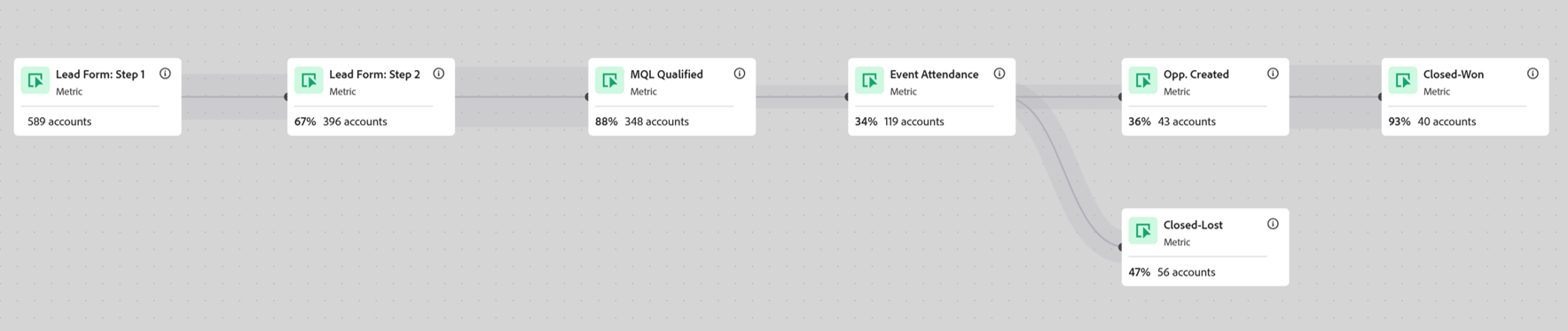
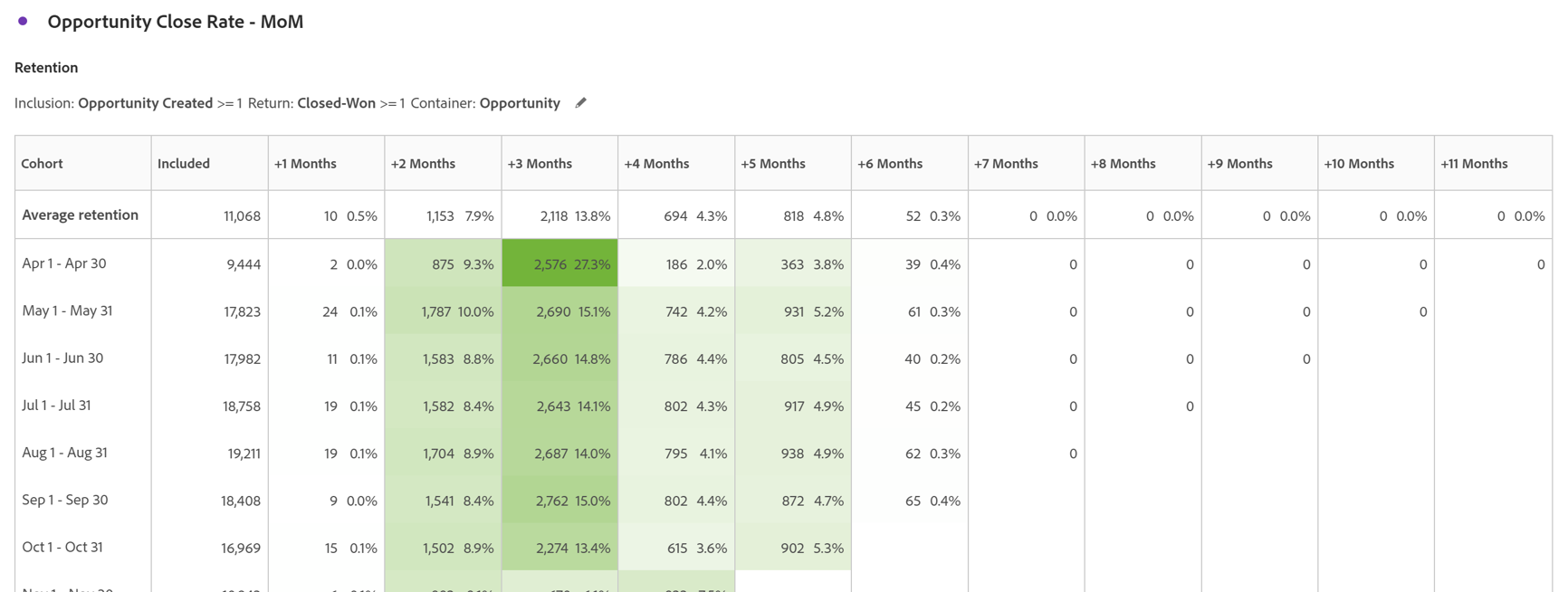
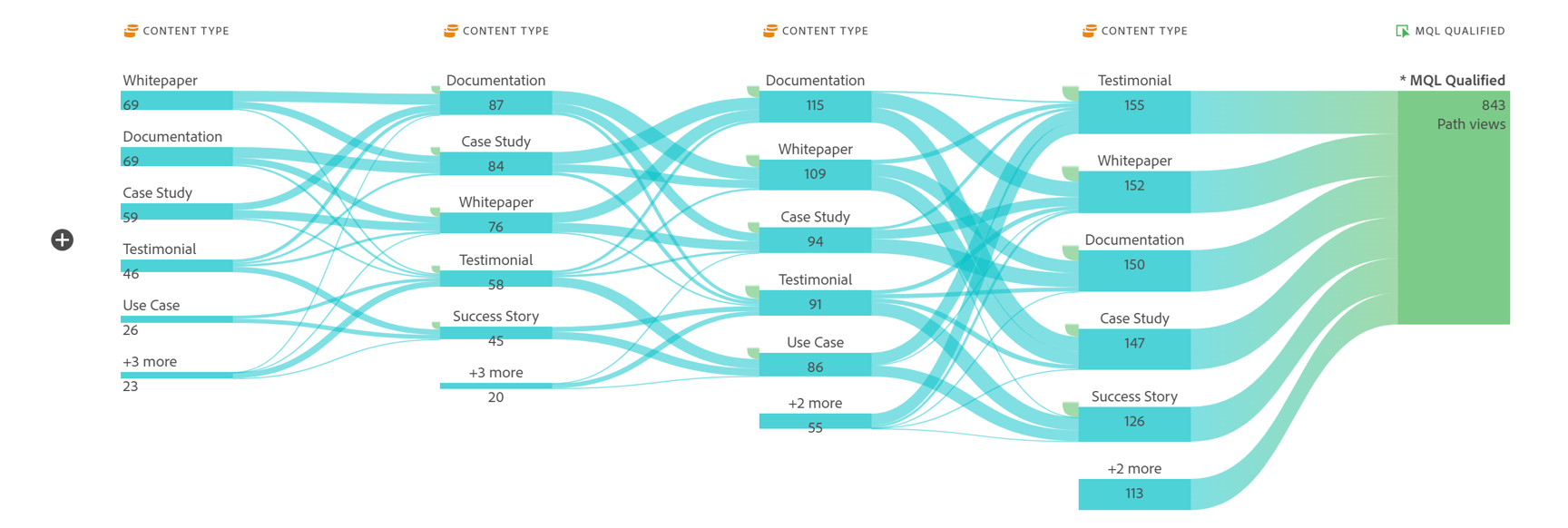
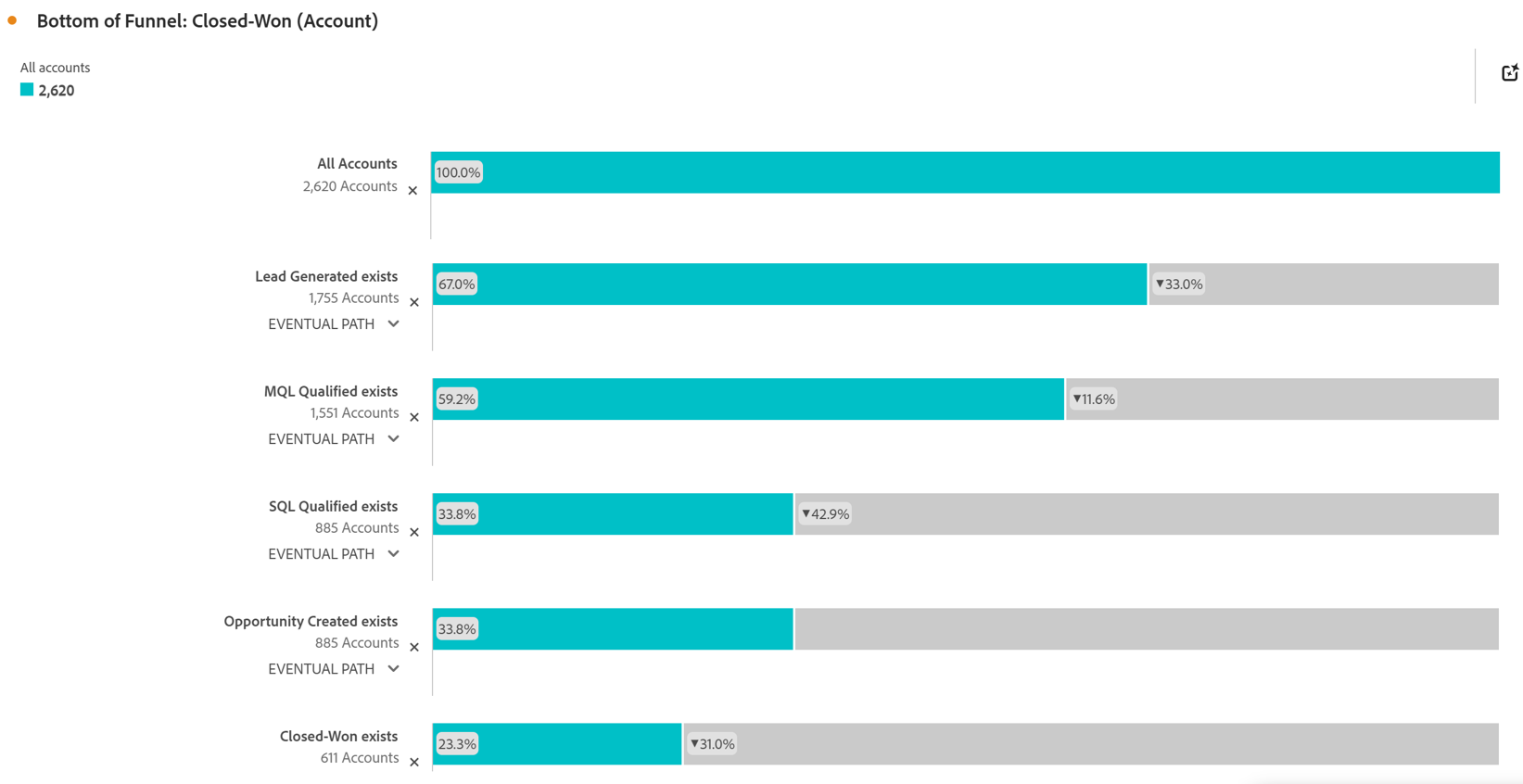
    Screenshot of Account Based Marketing Engagement using the Journey Canvas feature. Effective Account Based Marketing requires a deep understanding of the buying journey at the account level to determine the most impactful marketing activities to drive deal closer. Identify which experiences - both online and offline - are most impactful in driving closed opportunities. Journey canvas maps every interaction across accounts, buying groups, opportunities, campaigns and channels for clarity on what's working and what isn't. The Journey Canvas feature in CJA B2B Edition lets users see a detailed path for a specific high value account or buying group, including all known online and offline interactions. And users can contextualize key events, such as an MQL trigger and an Opportunity creation. Plus, Sales Development Reps can see the interaction history for specific accounts before outreach, allowing for highly relevant conversations.Screenshot of Cohort Segmentation. This identifies key groups of buyers to publish to CDP for activation in paid media, personalization or email orchestration. Cohort tables lets users group B2B entities - Accounts, Opportunities, Buying Groups - based on a shared starting point and track their progress across pipeline stages over time. By analyzing behavior patterns of buying groups, marketing and sales teams can understand the time to reach key milestones in the buying journey and determine which marketing efforts lead to faster pipeline progression.Screenshot of In-Person Events. The impact of in-person event attendance can be optimized by reporting on engaged accounts and viewing activity across multiple in-person events. Flow lets you visualize the paths accounts and buying groups take between key interactions or stages over time. Understanding what behaviors led to a key milestone, such as registering for an in-person event or flagging a lead as an MQL, helps both marketing and sales teams understand the most influential experiences that lead to conversion. For in-person events, the steps leading up to registration may include previous in-person event attendance, as well as digital experiences such as downloading white papers and case studies.Screenshot of Sales Stage Progression. The fallout report in CJA B2B Edition gives you sales funnel insights by letting you visualize conversion and drop off rates between predefined steps in a sequential journey. The fallout report can answer key questions around which steps in the sales stages caused the most drop off towards deal close.