Overview
ProductRatingMost Used ByProduct SummaryStarting Price
Adobe Learning Manager
Score 8.6 out of 10
Mid-Size Companies (51-1,000 employees)
Adobe Learning Manager is a Learning Management System developed by Adobe Inc. that offers personalized learning at scale to employees, partners and customers alike. Compliant with GDPR guidelines, SOC2 TYPE 2 and FedRAMP Certifications, Adobe Learning Manager integrates with Adobe Experience Manager Sites, Adobe Commerce, Marketo Engage with out-of-the-box components and any other application through Open APIs, offering hybrid learning programs and detailed analytics.…N/A
Schoolbox
Score 4.2 out of 10
Mid-Size Companies (51-1,000 employees)
Because learners thrive in a connected community. Schoolbox is an integrated, all-in-one learning management system (LMS), community portal, and engagement platform for K-12 schools. Schoolbox is designed to present a robust solution that connects the entire school community, and drives innovative teaching and learning. Schoolbox is self or cloud hosted, integrated, flexible, and secure to simplify communication and collaboration in schools, and improve teaching and learning.
$10
per student
Totara LMS
Score 8.2 out of 10
N/A
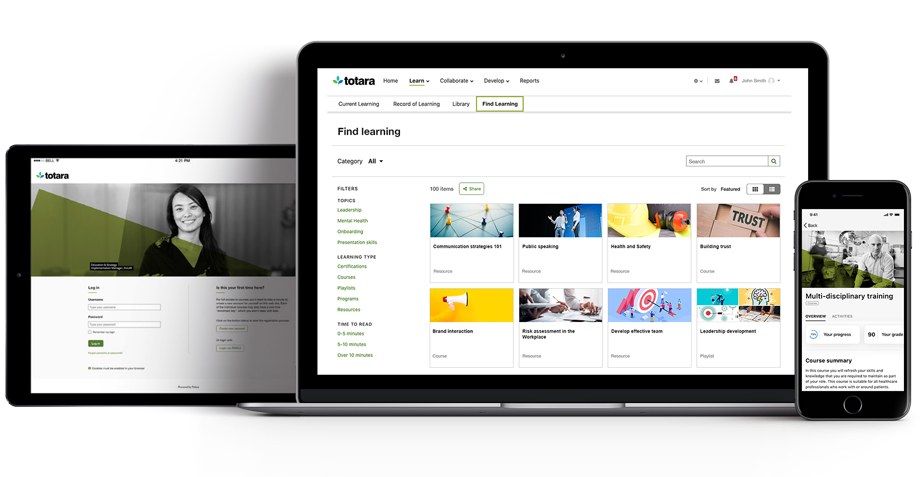
Totara Learning, headquartered in Wellington offers the Totara workforce learning management system with core LMS (Totara Learn) integratable social platform (Totara Social), support for instructor led learning, and cloud storage for learning materials, available on cloud.N/A
Pricing
Adobe Learning ManagerSchoolboxTotara LMS
Editions & Modules
No answers on this topic
Basic
$10.00
per student
Pro
$13.00
per student
Elite
$15.00
per student
No answers on this topic
Offerings
Pricing Offerings
Adobe Learning ManagerSchoolboxTotara LMS
Free Trial
YesYesNo
Free/Freemium Version
NoNoNo
Premium Consulting/Integration Services
YesYesNo
Entry-level Setup FeeNo setup fee$4,000 per installationNo setup fee
Additional Details
More Pricing Information
Community Pulse
Adobe Learning ManagerSchoolboxTotara LMS
Features
Adobe Learning ManagerSchoolboxTotara LMS
Learning Management
Comparison of Learning Management features of Product A and Product B
Adobe Learning Manager
7.6
144 Ratings
7% below category average
Schoolbox
8.0
1 Ratings
3% below category average
Totara LMS
7.7
3 Ratings
6% below category average
Course authoring8.1126 Ratings8.01 Ratings8.13 Ratings
Course catalog or library8.0139 Ratings8.01 Ratings8.03 Ratings
Player/Portal7.8134 Ratings8.01 Ratings7.53 Ratings
Learning content7.0127 Ratings00 Ratings8.03 Ratings
Mobile friendly6.8117 Ratings9.01 Ratings7.13 Ratings
Progress tracking & certifications6.0135 Ratings8.01 Ratings8.03 Ratings
Assignments7.8125 Ratings9.01 Ratings7.53 Ratings
Compliance management8.0107 Ratings00 Ratings8.03 Ratings
Learning administration7.0132 Ratings9.01 Ratings8.03 Ratings
Learning reporting & analytics7.0133 Ratings7.01 Ratings7.93 Ratings
Social learning8.0114 Ratings6.01 Ratings7.02 Ratings
Gamification8.025 Ratings00 Ratings00 Ratings
Single Sign On (SSO) Enabled Learning9.029 Ratings00 Ratings00 Ratings
Best Alternatives
Adobe Learning ManagerSchoolboxTotara LMS
Small Businesses
iSpring LMS
iSpring LMS
Score 9.5 out of 10
iSpring LMS
iSpring LMS
Score 9.5 out of 10
iSpring LMS
iSpring LMS
Score 9.5 out of 10
Medium-sized Companies
iSpring LMS
iSpring LMS
Score 9.5 out of 10
Schoology Learning
Schoology Learning
Score 8.0 out of 10
iSpring LMS
iSpring LMS
Score 9.5 out of 10
Enterprises
Axonify
Axonify
Score 10.0 out of 10
Schoology Learning
Schoology Learning
Score 8.0 out of 10
Axonify
Axonify
Score 10.0 out of 10
All AlternativesView all alternativesView all alternativesView all alternatives
User Ratings
Adobe Learning ManagerSchoolboxTotara LMS
Likelihood to Recommend
7.0
(149 ratings)
8.0
(1 ratings)
8.0
(3 ratings)
Likelihood to Renew
6.0
(12 ratings)
-
(0 ratings)
-
(0 ratings)
Usability
7.0
(45 ratings)
-
(0 ratings)
-
(0 ratings)
Availability
7.3
(3 ratings)
-
(0 ratings)
-
(0 ratings)
Performance
8.1
(3 ratings)
-
(0 ratings)
-
(0 ratings)
Support Rating
3.4
(9 ratings)
-
(0 ratings)
10.0
(1 ratings)
In-Person Training
6.4
(1 ratings)
-
(0 ratings)
-
(0 ratings)
Implementation Rating
1.0
(7 ratings)
-
(0 ratings)
-
(0 ratings)
Configurability
7.3
(3 ratings)
-
(0 ratings)
-
(0 ratings)
Ease of integration
8.5
(30 ratings)
-
(0 ratings)
-
(0 ratings)
Product Scalability
8.5
(3 ratings)
-
(0 ratings)
-
(0 ratings)
Vendor post-sale
8.7
(2 ratings)
-
(0 ratings)
-
(0 ratings)
Vendor pre-sale
5.2
(2 ratings)
-
(0 ratings)
-
(0 ratings)
User Testimonials
Adobe Learning ManagerSchoolboxTotara LMS
Likelihood to Recommend
Adobe
It's good if you have a good use case for that feed. I do know that you have to incorporate it in a process in isolation. It's not you don't realize the full value, so you have to incorporate it into an overall improvement process. I would say the pro cases are marketing optimization with respect to campaigns. And I would say that the areas it's not well suited is in distilling attribution. So if you were to take all of the improvements that it suggested, the numbers exceed revenue, which isn't real, but that's a hard problem to solve. Nobody's really solved that problem well. So distilling the attribution piece would be good. And it is well suited for marketing campaigns in the ideation phase of so
Read full review
Schoolbox
Schoolboxn is well suited to being a school portal. You can manage user accounts, access to information and communicate to users individually or as a group. The pages allow for a great range of media types, you can use blog, forum or chat and embed videos and images easily. As an LMS, this system is great. Student accounts link to class information easily by the back end sync tools. Giving students instant access to their information. Assessments are easily submitted and feedback given by teachers can be viewed by students and parents.
A situation where this system is less suitable is if you work in a school that already has a dedicated portal and/or LMS.
Read full review
Totara Learning
As a real estate services company with properties (& employees) in six states, Totara LMS is well suited for implementing and our employee learning platform to our many team members that work remotely and cannot benefit from regular in-person learning courses. Totara LMS's comprehensive and customizable reporting system also allows us to accurately review and tell the story of employee performance and talent development, while tailoring this reporting to the needs of different internal stakeholders.
Read full review
Pros
Adobe
  • Rich and engaging learning experiences that capture employees' attention.
  • Is multi-device capable so our teams can take classes where it's most convenient for them during the day, especially if they don't have an assigned static workstation?
  • Allows us to personalize compliance training based on where our employees are at in the organizational chart, competencies, and requirements.
Read full review
Schoolbox
  • Learning management
  • Feedback management
  • Communications - email/news posting
Read full review
Totara Learning
  • Distribute elearning
  • run exams
Read full review
Cons
Adobe
  • High initial set-up cost and licensing fees for all employees at one go
  • Once a courses been enrolled by employee, there's no function to remove those courses by themselves.
  • Mobile version not working very well and some contents not able to load, e.g. Leaderboard, Level.
Read full review
Schoolbox
  • User interface
  • System search
  • Quiz builder
Read full review
Totara Learning
  • Reporting can be a little inflexible - sometimes, the report cannot be customized to have all the columns you need as they are not available from that area of the LMS.
  • Graphic reporting needs some more work to be a bit more professional looking.
Read full review
Likelihood to Renew
Adobe
Currently, our company uses this program and another competitor for our learning management software. We like the adaptability of this program and appreciate the customer service that Adobe provides, however the other program is starting to turn out to be a better value for our company as they improve their compatibility.
Read full review
Schoolbox
No answers on this topic
Totara Learning
No answers on this topic
Usability
Adobe
In general, the user experience in Adobe Learning Manager is very satisfactory. The layout of the interface, the structure and the order of the available functionalities make it very intuitive and usable. The adaptation to mobile devices is very convenient since most of the participants connect through these electronic devices.
Read full review
Schoolbox
No answers on this topic
Totara Learning
No answers on this topic
Reliability and Availability
Adobe
On a few occasions, I've logged in to issue a test to a staff member and my course would just spin. I've had to reschedule several test attempts due to this. In my opinion, the issue was not resolved by Adobe
Read full review
Schoolbox
No answers on this topic
Totara Learning
No answers on this topic
Performance
Adobe
The performance of Adobe Captivate Prime is also extremely good. The user interface is fast and easy to load. The complexity is not nearly as bad as some of the other programs on the market. Speed was not impacted.
Read full review
Schoolbox
No answers on this topic
Totara Learning
No answers on this topic
Support Rating
Adobe
I think they have a competent, friendly and "resolving" team. I have only ever been met with a willingness to assist any and every query I have come across. Roy who is one of the technical people is amazing, and so is my Customer Success Manager, Hema! I do not know what I would do without them.
Read full review
Schoolbox
No answers on this topic
Totara Learning
Easy to access both local support and support/advice from other Totara LMS users as we keep in regular contact as a part of the totara government users group. Our vendor also keeps in touch with this group and a lot of knowledge is shared. It's easy to access the Totara LMS users academy, and one of my administrators has also set up a local forum where they ask each other questions and share knowledge as well. Our vendor is easy to access via our support plan and we have monthly catch-ups with our account manager where we hear about anything new coming up.
Read full review
In-Person Training
Adobe
Training by my staff was quick. Could have been a bit longer. Had to pick up on things myself
Read full review
Schoolbox
No answers on this topic
Totara Learning
No answers on this topic
Implementation Rating
Adobe
Trial period was great, and It let me plenty of time to try the different feature of the platform. However, when we decided to move forward, the ADOBE team was slow and not reactive at all. Actually after 2 years, I am still waiting for answers which is quite unacceptable.
Read full review
Schoolbox
No answers on this topic
Totara Learning
No answers on this topic
Alternatives Considered
Adobe
360 keeps up the Adobe learning manager. It even outclasses it in certain parts, but with a huge stalwart tech giant like Adobe, it is hard to keep up. Many of the features are present, but there's always that final touch missing. And it is always trying to play catchup.
Read full review
Schoolbox
Canvas is purely an LMS. Whilst it is a good system, it didn’t allow us to manage parent communication or use it as a portal. In the end we didn’t want to manage 2 separate systems. Schoolbox is the only all in one system we found that stacked up. Other systems did the portal well, or the LMS well, but not both together.
Read full review
Totara Learning
No answers on this topic
Scalability
Adobe
The product's overall scalability and flexibility is extremely good. I wish that the other products our company uses were this flexible! The product is easy to deploy across multiple departments and teams as needed.
Read full review
Schoolbox
No answers on this topic
Totara Learning
No answers on this topic
Return on Investment
Adobe
  • We are a small organization, so for now, we aren't quite sure if our ROI is working. But are confident in how this system will help us grow.
  • Our consumers have been truly delighted about the LMS and view us at a much more professional level now.
  • High level of security is very positive.
Read full review
Schoolbox
  • It’s a time saver for teachers as course information can be re-used
  • User administration rules allows for automation
  • Parent comms are centralised and easily managed
Read full review
Totara Learning
  • Totara LMS has helped increase our employee retention by 15%.
  • Totara LMS has drastically improved our employee learning and development processes that weren't in place prior to having this system.
  • Totara LMS has decreased the time the onboarding process takes by 1 day.
Read full review
ScreenShots

Adobe Learning Manager Screenshots

Screenshot of the platform for all learning needs.Screenshot of guided learning journeys.Screenshot of gamification.Screenshot of actionable insight from analytics.Screenshot of learning that’s engaging.Screenshot of measurable analytics.

Schoolbox Screenshots

Screenshot of DevicesScreenshot of School News FeedScreenshot of Calendar - eDiaryScreenshot of My ClassesScreenshot of Class MarkbookScreenshot of Inline Grader.

Totara LMS Screenshots

Screenshot of Ensure compliance with programs and pathways to improve safety and reduce business risks.Screenshot of Cater to multiple groups, partners and customers from a single instance of your LMS.Screenshot of The learning management system, trusted by thousands of customers, upskills your workforce the way you want, with the power and flexibility to deliver transformational learning.Screenshot of The Totara Mobile app is developed by Totara for Totara users. Our native app is available for both Android and iOS devices and offers a number of authentication options, including support for both single sign-on and manual login users. Your app login screen can be customized and branded to match your Totara Learn site so learners are offered a familiar and intuitive user experience.