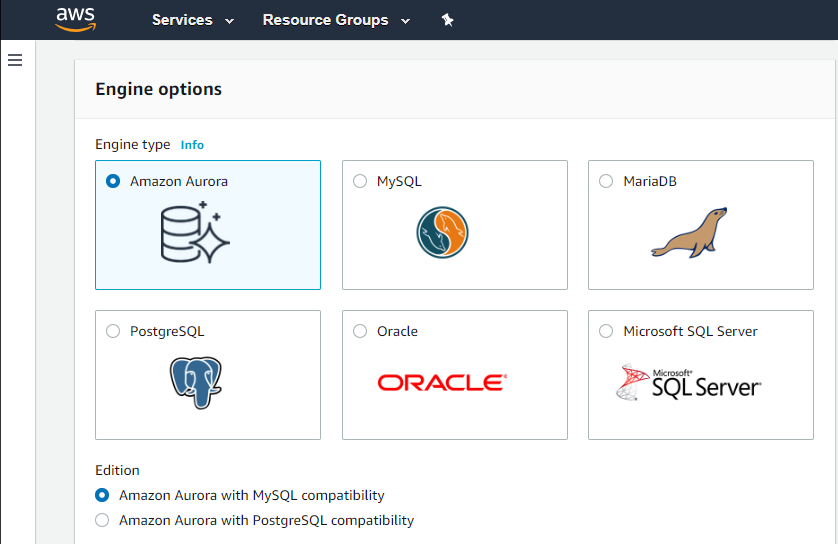
Amazon Relational Database Service (Amazon RDS) is a database-as-a-service (DBaaS) from Amazon Web Services.
N/A
SAP Datasphere
Score 8.5 out of 10
N/A
SAP Datasphere, the next generation of SAP Data Warehouse Cloud, is a comprehensive data service that enables data professionals to deliver seamless and scalable access to mission-critical business data. It provides a unified experience for data integration, data cataloging, semantic modeling, data warehousing, data federation, and data virtualization. SAP Datasphere enables users to distribute mission-critical business data — with business context and logic preserved — across the data…
N/A
Microsoft SQL Server
Score 8.6 out of 10
N/A
Microsoft SQL Server is a relational database.
$1,418
Per License
Pricing
Amazon Relational Database Service (RDS)
SAP Datasphere
Microsoft SQL Server
Editions & Modules
Amazon RDS for PostgreSQL
$0.24 ($0.48)
per hour, R5 Large (R5 Extra Large)
Amazon RDS for MariaDB
$0.25 ($0.50)
per hour, R5 Large (R5 Extra Large)
Amazon RDS for MySQL
$0.29 ($0.58)
per hour, R5 Large (R5 Extra Large)
Amazon RDS for Oracle
$0.482 ($0.964)
per hour, R5 Large (R5 Extra Large)
Amazon RDS for SQL Server
$1.02 ($1.52)
per hour, R5 Large (R5 Extra Large)
No answers on this topic
Subscription
$1,418.00
Per License
Enterprise
$13,748.00
Per License
Offerings
Pricing Offerings
Amazon RDS
SAP Datasphere
Microsoft SQL Server
Free Trial
No
Yes
No
Free/Freemium Version
No
No
No
Premium Consulting/Integration Services
No
No
No
Entry-level Setup Fee
Optional
No setup fee
No setup fee
Additional Details
—
SAP Datasphere is available as a subscription or consumption-based model. The SAP Datasphere capacity unit (CU) offers an adaptable approach to pricing that enables any workload on any hyperscaler. The number of CUs required is determined by the unique workload, with the ability to tailor the combination of required services within SAP Datasphere utilizing a flexible tenant configuration. The services that contribute to CU consumption are the core application (compute and storage), data lake, BW bridge, data integration, and data catalog (crawling and storage).
The only direct comparison that I have professionally would be from a past life where we ran Microsoft SQL Server on Microsoft Servers, and while I served as a technical liaison between a vendor and my customers, there were constant issues within my customers' technical teams …
We used to have On-Premises servers with Microsoft SQL Server and MySQL databases. We used that for years, and we had a hard time and a lot of work involved in securing and updating the server. And not no mention that growth involves a lot of calculations and extra costs. …
we could use Azure SQL for our project but as our other parts of the solutions existed on AWS, it was a better choice to have AWS RDS or else traffic exiting AWS would have taken a lot of cloud changes. Microsoft SQL Server requires license, either core-based or full license …
In a few words, we are just to confortable working with oracle and sql server. Using RDS add another layer of distributed database in order to backup everything we have in case of a disaster and also complies with authorities locally and internacionally. All database we use, …
We needed to use PostgreSQL due to it being the database engine that our application vendor uses. Once we were constrained on the database engine choice then Microsoft products (eg. SQL Server), whether on premise or in the cloud, were not appropriate. Therefore the only …
Even though Amazon Relational Database Service (RDS) is costlier than postgre SQL, We prefer Amazon Relational Database Service (RDS) just because of high performance and security features
We prefer RDS to spin up our own MySQL instances via traditional servers, EC2 instances, or containers, and RDS provides all of our DB needs compared to other database products AWS offers. As mentioned, the manageable, operational, security, and reliability features of RDS that …
Actually you can have most of these tools through AWS Relational Database Service as they are basically those technologies provided as a service. It is way better to have those products provided as a service through a huge and reliable infrastructure like AWS.
It's hard to identify how Amazon RDS stacks up against the databases they support, because to install and use a relational database in a production environment you need a Database Administrator to help install, configure and manage. Amazon RDS keeps the details simple enough …
Amazon Relational Database Service will probably give you everything you need from a traditional manual DB setup, except everything is managed for you. The only downside is having to pay the premium for the service; however, the trade-off of not having to deal with the …
RDS provides all the features of databases you could host yourself, without all of the maintenance and headaches required, while providing more flexibility and lower TCO.
Automated snap-shotting every 24 hours is, again something that I could just set up in minutes with a few clicks, though we also backup on cron jobs to elsewhere, and, because of our industry we have a HUGE "forensic logs" that initially live in the database but get archived …
Each of these listed software has its own unique strength and capacity that scales well. SAP Datasphere on its end up against them with more suitability for large establishments with complex data ecosystems with scalability support. Also, it avails a pay-as-you-go pricing for …
SQL Server is way ahead of the support available and documentation available. Oracle should invest heavily in bringing good technical books on MySQL rather than putting documentation online and expect users to go through it.
Easy to manage all tools without extra cost is a big …
If your application needs a relational data store and uses other AWS services, AWS RDS is a no-brainer. It offers all the traditional database features, makes it a snap to set up, creates cross-region replication, has advanced security, built-in monitoring, and much more at a very good price. You can also set up streaming to a data lake using various other AWS services on your RDS.
SAP Datasphere is well suited for scalable cloud based data integration scenarios which also opens up the doors for AI driven insights which are much harder to achieve with on-prem data warehouses. Considering the licensing model of SAP Datasphere being based on consumption driven capacity units cost can be a big consideration for organizations with large volumes of data that can be a pre-requisite for data mining and AI use cases. So this can be a bottleneck or not so well adopted scenario for SAP Datasphere.
Microsoft SQL is ubiquitous, while MySQL runs under the hood all over the place. Microsoft SQL is the platform taught in colleges and certification courses and is the one most likely to be used by businesses because it is backed by Microsoft. Its interface is friendly (well, as pleasant as SQL can be) and has been used by so many for so long that resources are freely available if you encounter any issues.
Automated Database Management: We use it for streamlining routine tasks like software patching and database backups.
Scalability on Demand: we use it to handle traffic spikes, scaling both vertically and horizontally.
Database Engine Compatibility: It works amazingly with multiple database engines used by different departments within our organization including MySQL, PostgreSQL, SQL Server, and Oracle.
Monitoring: It covers our extensive monitoring and logging, and also has great compatibility with Amazon CloudWatch
SAP Data Warehouse Cloud offers free trial for 90 days with free 128 GB of storage and 64 GB memory.
Availability of self-service data modeling and analytics on SAP Data Warehouse Cloud enables users to access and analyze data without getting support from the IT team.
Without zero coding while collecting, connecting, analyzing and modeling data, it saves us time and operational costs of partnering with external IT support experts.
It is a little difficult to configure and connect to an RDS instance. The integration with ECS can be made more seamless.
Exploring features within RDS is not very easy and intuitive. Either a human friendly documentation should be added or the User Interface be made intuitive so that people can explore and find features on their own.
There should be tools to analyze cost and minimize it according to the usage.
Microsoft SQL Server Enterprise edition has a high cost but is the only edition which supports SQL Always On Availability Groups. It would be nice to include this feature in the Standard version.
Licensing of Microsoft SQL Server is a quite complex matter, it would be good to simplify licensing in the future. For example, per core vs per user CAL licensing, as well as complex licensing scenarios in the Cloud and on Edge locations.
It would be good to include native tools for converting Oracle, DB2, Postgresql and MySQL/MariaDB databases (schema and data) for import into Microsoft SQL Server.
We do renew our use of Amazon Relational Database Service. We don't have any problems faced with RDS in place. RDS has taken away lot of overhead of hosting database, managing the database and keeping a team just to manage database. Even the backup, security and recovery another overhead that has been taken away by RDS. So, we will keep on using RDS.
We are moving into using SAP datasphere heavily and replacing all of the SAP HANA native calc view logic to the sap datasphere graphical view which will reduce the legacy SAP BW data warehouse. Also need some more features such as debugging, sql preview and prompts enhancements so that we can generate the reports.
We understand that the Microsoft SQL Server will continue to advance, offering the same robust and reliable platform while adding new features that enable us, as a software center, to create a superior product. That provides excellent performance while reducing the hardware requirements and the total cost of ownership of our solution.
I've been using AWS Relational Database Services in several projects in different environments and from the AWS products, maybe this one together to EC2 are my favourite. They deliver what they promise. Reliable, fast, easy and with a fair price (in comparison to commercial products which have obscure license agreements).
It is one of the best tools and a boon to Logistics teams across the globe. One tends to actually process warehousing data so smoothly and the way demonstration is made while in programs it makes it user friendly. The Inventory touch points that one identify is simply awesome and is best part.
SQL Server mostly 'just works' or generates error messages to help you sort out the trouble. You can usually count on the product to get the job done and keep an eye on your potential mistakes. Interaction with other Microsoft products makes operating as a Windows user pretty straight forward. Digging through the multitude of dialogs and wizards can be a pain, but the answer is usually there somewhere.
I have only had good experiences in working with AWS support. I will admit that my experience comes from the benefit of having a premium tier of support but even working with free-tier accounts I have not had problems getting help with AWS products when needed. And most often, the docs do a pretty good job of explaining how to operate a service so a quick spin through the docs has been useful in solving problems.
I would greatly acknowledge the services of Sap Data [warehouse Cloud] because we were struggling before its arrival where we used to get manual data connections and this used to consume a lot of time but after its use, we now are able to connect data easily saving a lot of time and finances.
We managed to handle most of our problems by looking into Microsoft's official documentation that has everything explained and almost every function has an example that illustrates in detail how a particular functionality works. Just like PowerShell has the ability to show you an example of how some cmdlet works, that is the case also here, and in my opinion, it is a very good practice and I like it.
Other than SQL taking quite a bit of time to actually install there are no problems with installation. Even on hardware that has good performance SQL can still take close to an hour to install a typical server with management and reporting services.
Amazon Relational Database Service (RDS) stands out among similar products due to its seamless integration with other AWS services, automated backups, and multi-AZ deployments for high availability. Its support for various database engines, such as MySQL, PostgreSQL, and Oracle, provides flexibility. Additionally, RDS offers managed security features, including encryption and IAM integration, enhancing data protection. The pay-as-you-go pricing model makes it cost-effective. Overall, Amazon RDS excels in ease of use, scalability, and a comprehensive feature set, making it a top choice for organizations seeking a reliable and scalable managed relational database service in the cloud.
Each of these listed software has its own unique strength and capacity that scales well. SAP Datasphere on its end up against them with more suitability for large establishments with complex data ecosystems with scalability support. Also, it avails a pay-as-you-go pricing for users, and it is widely up for data quality, data governance, and data discovery.
[Microsoft] SQL Server has a much better community and professional support and is overall just a more reliable system with Microsoft behind it. I've used MySQL in the past and SQL Server has just become more comfortable for me and is my go to RDBMS.
Despite the pricing model being expensive for small businesses, it provides decent features and capabilities for organizations of different sizes and it's an appropriate investment in today's business environment where there is constant pressure to build a scalable and flexible analytics service
Ever since we implemented SAP Data Warehouse Cloud, we have been able to reduce the additional costs of hiring third-party service providers by incorporating professional services offered by the vendor.
Preserving data quality has enhanced governance on data by having a single source that is accessible to every business user via self-service capabilities.
Operational cost is lowered by connecting data in one integrated solution hence making it easy to access information without having to keeping logging to other applications. Additionally, no external IT support is needed since SAP Data Warehouse Cloud has no-coding modeling tools.
SAP Data Warehouse Cloud has enabled every business user to understand different data by transforming data to real insights.
Increased accuracy - We went from multiple users having different versions of an Excel spreadsheet to a single source of truth for our reporting.
Increased Efficiency - We can now generate reports at any time from a single source rather than multiple users spending their time collating data and generating reports.
Improved Security - Enterprise level security on a dedicated server rather than financial files on multiple laptop hard drives.