Anaplan is a scenario planning and analysis platform designed to optimize decision-making in complex business environments so that enterprises can outpace their competition and the market. By building connections and collaboration across organizational silos, the Anaplan platform surfaces key insights.
N/A
Jedox
Score 9.0 out of 10
N/A
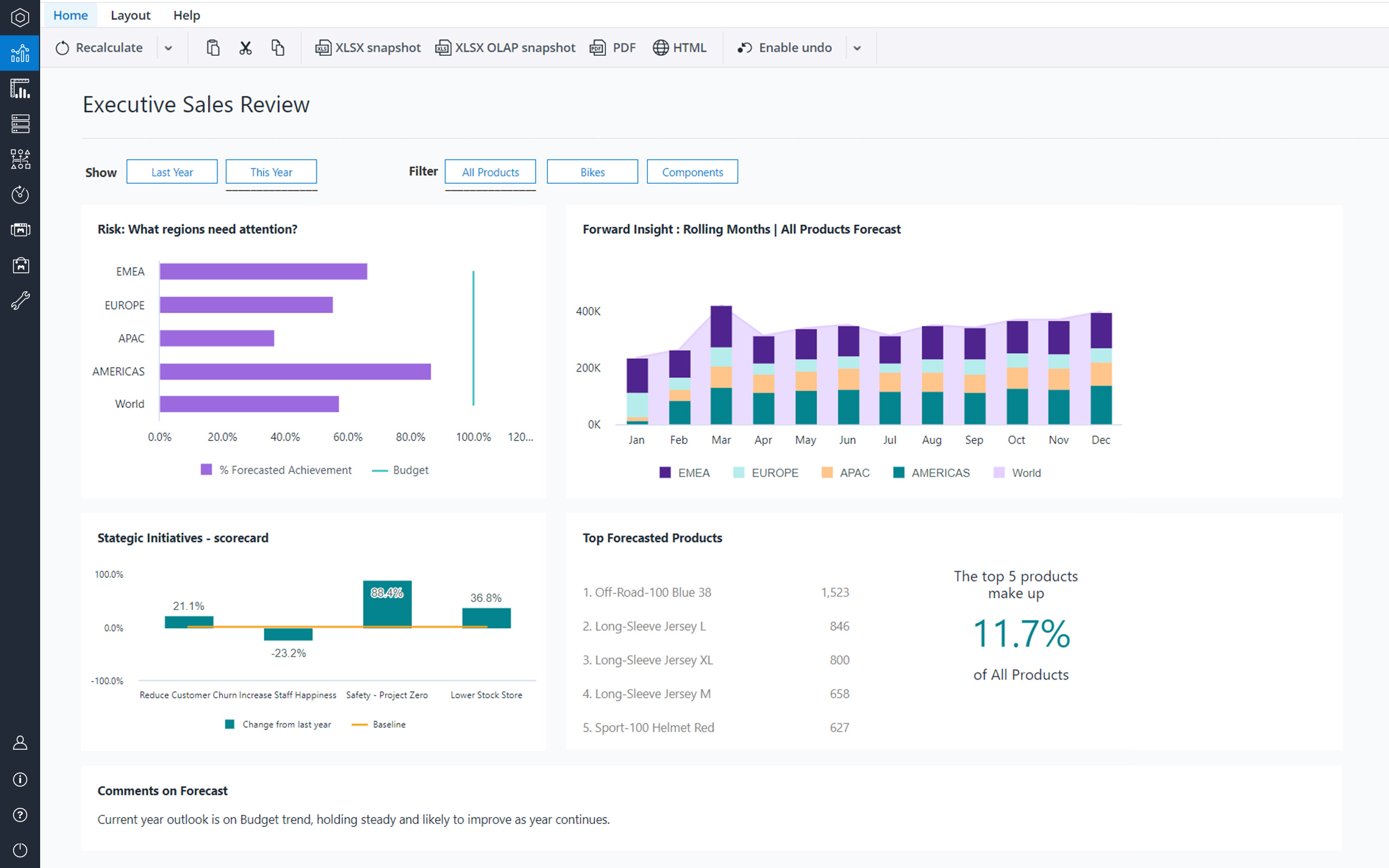
Jedox is a Business Intelligence and Corporate Performance Management solution. According to the vendor, their solution’s unified planning, analysis and reporting empowers decision makers from finance, sales, purchasing and marketing. Additionally, the vendor says this solution helps business users work smarter, streamline business collaboration, and make insight-based decisions with confidence. The vendor also says 1,900 organizations in 127 countries are using Jedox for real-time planning…
N/A
QlikView
Score 8.2 out of 10
N/A
QlikView® is Qlik®’s original BI offering designed primarily for shared business intelligence reports and data visualizations. It offers guided exploration and discovery, collaborative analytics for sharing insight, and agile development and deployment.
N/A
Pricing
Anaplan
Jedox
QlikView
Editions & Modules
No answers on this topic
No answers on this topic
QlikView
Custom
per user
Offerings
Pricing Offerings
Anaplan
Jedox
QlikView
Free Trial
No
Yes
Yes
Free/Freemium Version
No
Yes
No
Premium Consulting/Integration Services
Yes
Yes
Yes
Entry-level Setup Fee
Optional
No setup fee
Optional
Additional Details
—
—
On an perpetual license basis, based on server plus number of users.
Contact vendor for pricing.
QlikView, I do admit, put complete power into the builder's hands. However it was really complex and script heavy. We just didn't have the expertise to deploy properly and it didn't seem as Finance friendly as it still relied heavily on servers sitting behind IT barriers. Qli…
Jedox has limited the standard dimensions to 6 only in the financial workspace. If you need any other custom dimension, it has to be defined in analytical workspace. However, data interchange between Financial Workspace and Analytical workspaces are not real-time and rely on …
Anaplan and Pigment are both modern Connected Planning platforms, but they differ in maturity and depth. Pigment offers a very intuitive user experience with fast model setup, strong visual dashboards, and a modern interface that appeals to new planning teams or organizations …
Verified User
Director
Chose Anaplan
Easy of use is Anaplan's main advantage. As Anaplan is code-less configuration, and the logic for model building is by far the simplest, it would make the learning curve less steep. This is very important when we are showing our clients that, their complicated planning scenario …
Verified User
Employee
Chose Anaplan
Anaplan is an emerging software and it has more feature that is suitable for our client compared to the other softwares
Implementation time is very less. The end users can learn Anaplan faster and take control of the system without IT support pretty quickly. The logic/formula are straight forward and easy to implement.
We selected Anaplan for its intuitive design and our desire to get away from excel. It also enabled us a sandbox of usability to tailor the experience directly to our needs. Other systems compartmentalized areas into one format and did not allow us as much customization.
Pros:
- Rapid Time-To-Market
- Maximum flexibility due to cell-based approach inherited from Excel (vs. WYSIWYG and drag & drop UI (like BOARD) which is not as flexible)
Jedox has the edge over these products on total cost of ownership, borne through its quick deployment roll out, ease of use for end users and ease of maintenance.
QlikView
No answer on this topic
Features
Anaplan
Jedox
QlikView
BI Standard Reporting
Comparison of BI Standard Reporting features of Product A and Product B
Anaplan
7.3
235 Ratings
3% below category average
Jedox
9.1
4 Ratings
19% above category average
QlikView
8.5
68 Ratings
4% above category average
Pixel Perfect reports
6.47 Ratings
9.14 Ratings
8.050 Ratings
Customizable dashboards
7.7235 Ratings
9.14 Ratings
9.466 Ratings
Report Formatting Templates
7.96 Ratings
9.14 Ratings
8.060 Ratings
Ad-hoc Reporting
Comparison of Ad-hoc Reporting features of Product A and Product B
Anaplan
9.1
8 Ratings
15% above category average
Jedox
8.3
3 Ratings
6% above category average
QlikView
8.1
67 Ratings
1% above category average
Drill-down analysis
9.18 Ratings
8.23 Ratings
8.366 Ratings
Formatting capabilities
9.18 Ratings
8.23 Ratings
7.767 Ratings
Report sharing and collaboration
9.18 Ratings
8.53 Ratings
8.262 Ratings
Integration with R or other statistical packages
00 Ratings
8.53 Ratings
8.336 Ratings
Report Output and Scheduling
Comparison of Report Output and Scheduling features of Product A and Product B
Anaplan
8.3
240 Ratings
3% above category average
Jedox
7.9
3 Ratings
2% below category average
QlikView
8.6
62 Ratings
5% above category average
Publish to Web
8.67 Ratings
8.53 Ratings
8.049 Ratings
Publish to PDF
8.0238 Ratings
7.93 Ratings
9.056 Ratings
Report Versioning
8.6209 Ratings
7.03 Ratings
7.542 Ratings
Report Delivery Scheduling
7.98 Ratings
8.23 Ratings
10.048 Ratings
Data Discovery and Visualization
Comparison of Data Discovery and Visualization features of Product A and Product B
I've implemented a number of projects for Anaplan for Sales Performance Management use cases. It is obviously built for financial planning, but it allows for a lot of flexibility for territory and quota, ICM, sales forecasting, and other important use cases. Territory and Quota is very powerful in the tool as it organize complex assignment structures into hierarchies for easier analysis and reporting.
Best suited for financial consolidation and / or as a highly customized and compact EPM / BI solution (up to 100 CCU) with individual workflows, planning and reporting functionalities, with moderate number of users (no restrictions for any industry, all industries are covered well). It also has advanced reporting & data analysis requirements and provides an integration and reporting layer of imported data from different external systems (via ETL). It can help with migrating your legacy Excel-based business models to the Web. It is not well suited for Enterprise BI applications with expecting >500 CCU (users at the same time working with the system) - this may cause serious performance issues, as all data is kept in RAM. Jedox is also less suited for applications with heavy document management requirements (document management is not an out of the box functionality in Jedox and rather requires custom development through custom widgets etc.).
Sales data validations have helped manage our justifications in the past, especially with regard to new product development and new business introduction. It has also been helpful in identifying trends with business impact and direction specific to quarter and monthly sales from ERP data as well as decisions to purchase equipment of staffing based on run rates and product demand.
One thing that can get out of hand is data output - if you aren't careful in your query, you may be overloaded with data dumps and drown in the amount of info you have to filter through. This is a user caution, not a comment on the software itself.
Anaplan removes the time consuming process of integrating the results of individual spreadsheets.
Anaplan facilitates the standardization of assumptions across all sub-processes
Anaplan provides full transparency of the calculations and source inputs
Anaplan allows us to automate certain planning processes that would have been impossible when relying on the computational capabilities of an individual computer.
Diversity. Jedox can be applied to many different use cases from small to large deployments and from budgeting to enterprise class BI solutions. But rarely is one tool able to fulfill all of these requirements in one organisation. This value proposition can be complicated for prospective users.
Awareness. Jedox punches above its weight in capability and scalability, but not enough people have heard about it and therefore procurement processes can be drawn out as a result.
We found that QlikView can be a bit slow in supporting some forms of encryption. It is web-based and we needed to upgrade all of our server to not support the older SSL and TLS 1 protocols, only support TLS 1.2 and TLS 1.3. However, QlikView could not run with TLS 1.2 and TLS 1.3. We had to wait over six months to get a version that would handle the newer TLS versions.
There are so many options with QlikView that you can get lost when developing a visualization. There are still items I have not yet figured out, such as labeling a graph with the name of a selected detail item.
QlikView works by pulling the data it is going to use for visualization into its database. I am a security reviewer and I need to make certain that PII and PHI is not pulled by QlikView for a visualization, otherwise this could become a reportable indecent.
Anaplan is a very strong multi-dimensional modeling tool that provides a calculation engine to empower a complex planning process. It is fairly easy to learn for those with experience in similar tools, or excel. It forces structure and auditability that spread sheets do not have, along with extensive security capabilities
Ease of use, ability to load from pretty much any data source. today I created an application that loaded time sheets from excel that are not in a table format. With Qlik's "enable transformation steps" I was able to automate loads of multiple spreadsheets and multiple tabs easily. Could not do that with any other tool.
As a user it is a very simple tool, but at the same time with a very mature and powerful calculation engine. It is very easy to switch from excel or traditional tools with added capabilities of multi dimensionality and real time calculation engine to see quick insights needed to create plans and scenarios
To me Jedox deserves 10/10 because it is a consistent one-in-all platform with a modern look and feel. It is intuitive to use and allows you to make intuitive applications integrating traditional business intelligence with performance management functionality. It certainly has a short learning curve, especially for those that are familiar with MS Excel. An example: I've lost count but Jedox it is available in more than 25 languages. Another: Jedox does not require programming skills... it is developed to be used by the business.
QlikView is very easy to implement. The installation is very straight forward. QlikView has several different data connectors that can connect to different data sources very smoothly. The user interface to build the reports is very easy to understand. This helps to have a smaller learning curve. Something very helpful is that QlikView is a browser application for the end users. So, you don't need to install any applications on the user's computer.
There are very few outages. Maintenance is scheduled on two or three Saturdays per month, so as not to affect businesses. When there is an outage, users are kept informed of progress to restore the platform and typically this takes no more than an hour. Anaplan customer support is very responsive if we ever have questions about platform issues
Jedox has very few bugs. Reports are available through an Excel add-in, the web and/or mobile device (IOS/Android). In my opinion, availability also means high performance, not having to wait for the system to give you the required reports, analysis, dashboards instantly.
Everything is calculated in memory in the cloud. It's nearly instantaneous updates when you make changes. The only time things get a little slow is when you have a massive model with very intricate calculations...but "slow" for Anaplan is not what I would call "slow" for something like Hyperion. We used to have Hyperion calcs that ran for 60 mins before you could use data. The equivalent would be 60 seconds in Anaplan.
Support quality has dropped since Thoma Bravo has taken over. I think some serious re-focus needs to happen here -- part of the beauty of being in the Anaplan community was how involved you felt in it before. Before I didn't dread sending a support ticket, now I am starting to.
Jedox support in general is a professional and fast responding team. An easy-to-use ticketing system is in place. Bug-related questions are solved fast (responses come usually in a few hours after the question), but some questions / tickets, that are not Jedox-related bugs (for example some advanced questions about Jedox functionality), may be forwarded to Application Management team for further processing and then it may take several days or even weeks to get a response here -> there is room for improvement here.
My experience with the Qlik support team has been somewhat limited, but every interaction I have had with them has been very professional and I received a response quickly. Typically if there is a technical issue, our IT team will follow up. My inquiries are specific to product functionality, and Qlik has been very helpful in clarifying any questions I might have.
In my opinion, in-person training is always the best if you have the option to do so. This allows real-time interactions with the instructions, whereas the online training I took required me to write-down questions, email them, and wait for responses. This slows down the process, as you can imagine. That said, in-person training is an extra cost and it likely isn't needed for everyone. I would suggest selecting a small number of people to take in-person training and then having them act as mentors to the rest of your team. That way, as the rest of the team takes the online training, they have a resource to help them in real time.
My team attended, but I cannot myself rate, but I think it was good as they've successfully launched a training program at our company themselves for users. It was 3-4 day training.
Anaplan training materials are clear, simple, easy to understand and to follow. Visuals are excellent. The vendor is good at updating training materials in a timely manner and encouraging users and administrators to keep coming back to Academy site for refresher courses or new feature courses. I really like their interactive diagrams
Training was as expected. The demo environments tend to be more fully featured that our own environment, but the training was clear and well delivered.
One key insight from implementing Anaplan is that success comes from focusing on designing the process, not just building the model. Anaplan is extremely flexible—there are very few planning scenarios it cannot support—but that flexibility means the project needs strong governance, clear ownership of requirements, and a well-defined data model. When those foundations are in place, implementations are fast, iterations are easy, and users can quickly see value. In our projects, both Financial Planning and Integrated Business Planning models were adopted smoothly because we involved business users early, kept the model design intuitive, and leveraged Anaplan’s Excel-like syntax and user-friendly dashboards. The result was more efficient day-to-day work, reduced manual tasks, and increased collaboration across teams. In short: when you combine Anaplan’s flexibility with a structured implementation approach, adoption and value realization happen quickly.
The implementation of SSO, SAML Authentication, HTTPS, Server splitting (Frontend / Backend servers) could be more standardized and made more user friendly to set up (e.g. via setup guide). Otherwise the implementation of Jedox is quick and simple when compared to other similar technologies.
"Implementation" can mean a few things... so I'm not sure that this is the answer you want.... but here it goes: To me, implementation means: "Is the user interface intuitive and can I produce meaningful reports with ease?" On that score, I'd say YES. The amount of training required was minimal and the results were powerful. The desktop implementation is a simple, "blank" interface just waiting for your creativity. The pre-populated templates give you a reasonable start to any project -- and a good set of objects to "play around with" if you're just getting started. Finally, note that the "implementation" I used was baked into QuickBooks 2016 Enterprise -- called "Advanced Reporting"..... That integration makes it ultra useful and simple.
Anaplan is more powerful than Pigment considering that it is an Enterprise class system and is able to manage bigger data sets. Anaplan allows for advanced scenario modeling and formula capabilities along with custom reporting functionalities. Anaplan has proven its capabilities and stability across various use cases and across bigger enterprises when compared to Pigment which is still in earlier phases of its development
Calumo is similar product to Jedox. I have used it extensively in my previous role. It was a major contender when we evaluated a BI platform for NIDA. Calumo is a great product as well and it was a very close call. Where we found Jedox to be a better fit for NIDA was the ability to prepare dynamic reports with ease without the need to learn MDX which was used extensively by Calumo to make dynamic reports which expand or shrink based on the underlying data. Another major benefit we saw in Jedox was the whole ETL process could be managed within Jedox instead of doing it in SQL server which negates having a dedicated SQL specialist role when the scale expands.
The only other vendor product that I have worked with that provides a similar experience to Qlikview is Tableau. I would recommend Tableau if your use case is to build a fixed dashboard. You can share reports for free without needing to buy additional licenses. I would recommend Qlikview if your users are looking for a more interactive experience. They can create new objects to represent the data which can't be accomplished as easily in Tableau
We have managed to leverage Anaplan for financial planning and forecasting across the business. It is now used by almost every department, with more than 50 users (but I know of companies that have hundreds of users) and still the platform is quick and reliable. It is easy to make changes to divisions and departments or add users and apply different user settings - the core part of the model is not affected and end users can continue their work without any disruption
Scalability is often another word for speed. Given enough data, enough users or enough calculations, the tool becomes slower and slower. You will find that Jedox has a very high performance that can even be increased by the use of grafical cards. Other thaen that it does not only offer BI (looking back based on historical ERP data) but also allows you to look forward through integrated budgetting, planning, forecasting, workflow and collaboration. Not easy to find a tool that can support so much business functionality. So, also pretty scalable in that respect.
Anaplan's implementation led to a significant reduction in planning cycle errors and bugs, streamlining processes and improving overall accuracy in data inputs
Standardizing the planning process and enabling cross-functional collaboration through Anaplan enhanced our ability to adapt swiftly to changing business needs, resulting in improved agility in decision-making
The platform's capabilities, especially in Demand Planning and Supply Chain, positively impacted our ROI by optimizing resource allocation and solving complex business problems efficiently across multiple functions
Financial budgeting and Forecasting are done in a centralized fashion in Jedox now instead of a decentralized excel based approach. A lot of cost savings and improved reliability
Easy to use self-help Dashboards and detailed reports
You can use the free desktop version to do a lot of reporting and analysis work more quickly so the ROI is huge
QlikView is great at finding outliers such as data entry errors
QlikView is great at helping you quickly discover new insights about your business that can prompt you to take action that can immediately affect your cash flow.