Asana is a web and mobile project management app. With tasks, projects, conversations, and dashboards, Asana lets an entire team know who's doing what by when, enabling workload balancing. Users can also add integrations for GANTT charts, time tracking and more.
$13.49
per month per user
ClickMeeting
Score 9.4 out of 10
N/A
ClickMeeting is a webinar solution formerly owned by GetResponse, an email marketing software company. ClickMeeting's online meeting and collaboration tools are designed to support the sales, marketing, e-learning, and training needs of business of all sizes.
$25
per month
Quire
Score 8.2 out of 10
N/A
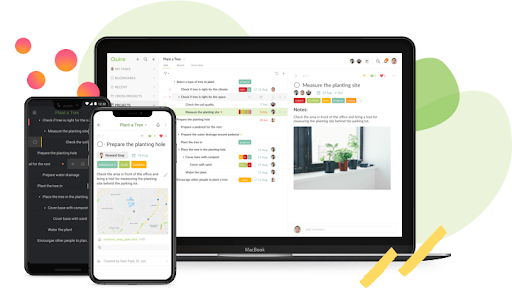
Quire is a visual collaboration platform that enables task and project management. It allows users to visualize their workflows and improves real-time collaboration.
$10.95
per month per user
Pricing
Asana
ClickMeeting
Quire
Editions & Modules
Starter
$13.49
per month per user
Advanced
$30.49
per month per user
Enterprise
Contact Sales
Personal
Free
Live 25
$25
up to 25 attendees
Live 50
$35
up to 50 attendees
Automated 25
$40
up to 25 attendees
Automated 50
$45
up to 50 attendees
Live 100
$60
up to 100 attendees
Automated 100
$75
up to 100 attendees
Live 200
$119
up to 200 attendees
Live 500
$139
up to 500 attendees
Automated 200
$145
up to 200 attendees
Enterprise
$165
500 - 5000
Automated 500
$179
up to 500 attendees
Live 1000
$239
up to 1000 attendees
Automated 1000
$279
up to 1000 attendees
Professional
$10.95
per month per user
Premium
$18.95
per month per user
Enterprise
$24.95
per month per user
Offerings
Pricing Offerings
Asana
ClickMeeting
Quire
Free Trial
Yes
Yes
Yes
Free/Freemium Version
Yes
No
Yes
Premium Consulting/Integration Services
Yes
Yes
Yes
Entry-level Setup Fee
Optional
No setup fee
No setup fee
Additional Details
A discount is offered for annual billing.
Detailed enterprise pricing on demand.
—
More Pricing Information
Community Pulse
Asana
ClickMeeting
Quire
Features
Asana
ClickMeeting
Quire
Project Management
Comparison of Project Management features of Product A and Product B
Asana
8.3
179 Ratings
7% above category average
ClickMeeting
-
Ratings
Quire
8.4
2 Ratings
8% above category average
Task Management
9.2179 Ratings
00 Ratings
6.02 Ratings
Resource Management
8.0152 Ratings
00 Ratings
00 Ratings
Gantt Charts
9.061 Ratings
00 Ratings
10.01 Ratings
Scheduling
8.4162 Ratings
00 Ratings
10.01 Ratings
Workflow Automation
8.9132 Ratings
00 Ratings
00 Ratings
Team Collaboration
9.3178 Ratings
00 Ratings
10.01 Ratings
Support for Agile Methodology
8.57 Ratings
00 Ratings
00 Ratings
Support for Waterfall Methodology
8.57 Ratings
00 Ratings
00 Ratings
Document Management
8.2150 Ratings
00 Ratings
00 Ratings
Email integration
8.2142 Ratings
00 Ratings
00 Ratings
Mobile Access
8.7149 Ratings
00 Ratings
6.01 Ratings
Timesheet Tracking
6.16 Ratings
00 Ratings
00 Ratings
Change request and Case Management
8.44 Ratings
00 Ratings
00 Ratings
Budget and Expense Management
7.077 Ratings
00 Ratings
00 Ratings
Professional Services Automation
Comparison of Professional Services Automation features of Product A and Product B
Asana
6.5
48 Ratings
17% below category average
ClickMeeting
-
Ratings
Quire
-
Ratings
Project & financial reporting
5.51 Ratings
00 Ratings
00 Ratings
Integration with accounting software
7.547 Ratings
00 Ratings
00 Ratings
Performance & Compatibility of Online Events Software
Comparison of Performance & Compatibility of Online Events Software features of Product A and Product B
Asana
-
Ratings
ClickMeeting
9.0
65 Ratings
13% above category average
Quire
-
Ratings
High quality audio
00 Ratings
9.765 Ratings
00 Ratings
High quality video
00 Ratings
9.465 Ratings
00 Ratings
Low bandwidth requirements
00 Ratings
8.559 Ratings
00 Ratings
Mobile support
00 Ratings
8.355 Ratings
00 Ratings
Screen Sharing
Comparison of Screen Sharing features of Product A and Product B
Asana
-
Ratings
ClickMeeting
9.4
64 Ratings
17% above category average
Quire
-
Ratings
Desktop sharing
00 Ratings
9.664 Ratings
00 Ratings
Whiteboards
00 Ratings
9.256 Ratings
00 Ratings
Online Meetings / Events
Comparison of Online Meetings / Events features of Product A and Product B
Asana
-
Ratings
ClickMeeting
9.7
66 Ratings
17% above category average
Quire
-
Ratings
Calendar integration
00 Ratings
9.753 Ratings
00 Ratings
Meeting initiation
00 Ratings
9.663 Ratings
00 Ratings
Integrates with social media
00 Ratings
9.647 Ratings
00 Ratings
Record meetings / events
00 Ratings
9.964 Ratings
00 Ratings
Slideshows
00 Ratings
9.760 Ratings
00 Ratings
Online Events Collaboration
Comparison of Online Events Collaboration features of Product A and Product B
Asana
-
Ratings
ClickMeeting
9.7
64 Ratings
18% above category average
Quire
-
Ratings
Live chat
00 Ratings
9.663 Ratings
00 Ratings
Audience polling
00 Ratings
9.759 Ratings
00 Ratings
Q&A
00 Ratings
9.859 Ratings
00 Ratings
Online Events Security
Comparison of Online Events Security features of Product A and Product B
The usability of Asana is broad since it's available in a variety of platforms that are widely used nowadays. I think that it would be great for people who are constantly on the move and switching devices, since it has allowed me to work from my phone, too. I also think that Asana has proven itself to handle a large quantity of work
ClickMeeting serves a dual purpose within our organization. Firstly, it acts as a reliable platform for hosting staff meetings, enabling effective communication and collaboration among team members. Whether it's for updates, discussions, or brainstorming sessions, ClickMeeting provides the necessary tools for seamless engagement.Secondly, ClickMeeting is instrumental in delivering online courses to our students. It empowers us to create interactive learning experiences regardless of geographical constraints. We can easily share course materials, conduct live or pre-recorded lectures, and facilitate interactive discussions and Q&A sessions. ClickMeeting ensures our students have access to high-quality education and a supportive learning environment.In summary, ClickMeeting is an invaluable tool for both internal staff communications and student-centered online courses. It fosters collaboration, engagement, and knowledge sharing in a flexible and accessible manner, enhancing our overall productivity and educational offerings.
Quire is useful for tracking daily to-do's or keeping track of a project. It's not as clean as some other software (such as Nuclino, for example) and can get a little messy when creating a Workspace. It was difficult for me to know what was private and what was visible to my collaborators
Through it, we were able to communicate and cooperate with the rest of the team to complete the work in the required manner and at the appropriate time.
ClickMeeting is user-friendly, the admin and user panel is simple, intuitive!
When conducting training, you can use default settings such as edu mode and it saves time, I don't have to worry if I'm sure I've muted everyone and if I'm the only one visible.
ClickMeeting is also integrated with the Moodle e-learning platform, so it's a great support in organizing blended-learning processes.
Individual Audio Controls. I'd love to be able to adjust the audio for each of the presenters within the platform, as the host. Not all presenters are tech savvy and sometimes don't know how to adjust this themselves.
Additional Saved Color Schemes. I'd love to be able to create/save multiple custom color schemes that I can use for various events instead of a single one.
It is very user-friendly. Takes a new employee an hour to start figuring out how the system works. That's an important factor. You don't want to encounter the issue where employees need a week to understand how the system works. For example, JIRA, I tried using it for a week and I still don't understand the complicated layout. Asana has a simple interface. Once you see it, you get it type of program.
ClickMeeting's overall usability is commendably excellent. Its intuitive, user-friendly interface makes it remarkably easy for users of all skill levels to navigate. The platform delivers a seamless, streamlined experience from setting up meetings to engaging with participants. Despite some advanced features having a slight learning curve, the platform remains user-friendly, efficient, and reliable.
I haven't had to use their support so I can't rate it. The fact that I haven't needed them reflects the ease of use of the product. I would recommend that any new users schedule a complete demo of the product to ensure that they are using it to it's fullest (there's a lot of useful features).
It takes a bit of time to get to grips with the platform at first, but it's short and there is an online help chat available. People on the chat are very helpful and available for a long time - also on weekends, which greatly improves work. Really very good support.
Asana is a top-tier project management software that helps us organize and track projects from start to finish. It allows us to apply tasks/to-dos to multiple projects without duplication, divide complex projects into smaller tasks, and track project progress. It also helps us organize work on Kanban boards or linear lists. It stands out from the crowd in a big way compared to the competition.
- does not require installation - clear interface - fast chat technical support - available in Polish language - provides a stable connection - it allows us to share presentations - we can also record the meeting - the process of creating the meeting is quick and easy also for beginners
ClickMeeting has had a very positive impact on our organization’s objectives. It allows us to run open training sessions and webinars for participants from multiple organizations, reaching more people without the need for travel or large venues. The platform’s reliability and ease of use help us deliver high-quality training efficiently.