
Rusty Angell
eGroups Director
Chose Flow (discontinued)

| Product | Rating | Most Used By | Product Summary | Starting Price |
|---|---|---|---|---|
 Asana | N/A | Asana is a web and mobile project management app. With tasks, projects, conversations, and dashboards, Asana lets an entire team know who's doing what by when, enabling workload balancing. Users can also add integrations for GANTT charts, time tracking and more. | $13.49 per month per user | |
 Flow (discontinued) | N/A | The Flow task management app featured a range of tools like kanban board, checklist, timeline, and other features for tracking projects from start to finish. The product is discontinued, and the company Flow Technologies is no longer operating. | N/A | |
 ProProfs Project | Mid-Size Companies (51-1,000 employees) | ProProfs Project is an online project management software for managing both teams and multiple projects on one dashboard. From creating project goals and objectives to tracking work progress, this PM tool aims to allow users to meet project deadlines efficiently. The PM tool allows users to communicate with in-house or remote teams - anytime, anywhere. Moreover, the vendor says users can generate insightful reports and accurate invoices in just a few clicks. Along with these features,… | $0 3 Projects |
| Asana | Flow (discontinued) | ProProfs Project | ||||||||||||||||||||||
|---|---|---|---|---|---|---|---|---|---|---|---|---|---|---|---|---|---|---|---|---|---|---|---|---|
| Editions & Modules |
| No answers on this topic |
| |||||||||||||||||||||
| Offerings |
| |||||||||||||||||||||||
| Entry-level Setup Fee | Optional | No setup fee | No setup fee | |||||||||||||||||||||
| Additional Details | A discount is offered for annual billing. | — | — | |||||||||||||||||||||
| More Pricing Information | ||||||||||||||||||||||||
| Asana | Flow (discontinued) | ProProfs Project | |
|---|---|---|---|
| Considered Multiple Products |  Asana No answer on this topic | Flow (discontinued) Rusty Angell eGroups Director Chose Flow (discontinued) | ProProfs Project |
| Asana | Flow (discontinued) | ProProfs Project | |||||||||||||||||||||||||||||||||||||||||||||||||||||||||||
|---|---|---|---|---|---|---|---|---|---|---|---|---|---|---|---|---|---|---|---|---|---|---|---|---|---|---|---|---|---|---|---|---|---|---|---|---|---|---|---|---|---|---|---|---|---|---|---|---|---|---|---|---|---|---|---|---|---|---|---|---|---|
| Project Management |
| ||||||||||||||||||||||||||||||||||||||||||||||||||||||||||||
| Professional Services Automation |
|
| Asana | Flow (discontinued) | ProProfs Project | |
|---|---|---|---|
| Small Businesses |  Stackby Score 8.9 out of 10 | Stackby Score 8.9 out of 10 | Stackby Score 8.9 out of 10 |
| Medium-sized Companies |  InEight Score 8.4 out of 10 | InEight Score 8.4 out of 10 | InEight Score 8.4 out of 10 |
| Enterprises | InEight Score 8.4 out of 10 | InEight Score 8.4 out of 10 | InEight Score 8.4 out of 10 |
| All Alternatives | View all alternatives | View all alternatives | View all alternatives |
| Asana | Flow (discontinued) | ProProfs Project | |
|---|---|---|---|
| Likelihood to Recommend | 9.0 (208 ratings) | 9.7 (7 ratings) | 8.2 (6 ratings) |
| Likelihood to Renew | 9.6 (34 ratings) | - (0 ratings) | - (0 ratings) |
| Usability | 8.3 (36 ratings) | - (0 ratings) | - (0 ratings) |
| Availability | 8.4 (2 ratings) | - (0 ratings) | - (0 ratings) |
| Support Rating | 5.0 (42 ratings) | - (0 ratings) | 10.0 (1 ratings) |
| Product Scalability | 8.2 (1 ratings) | - (0 ratings) | - (0 ratings) |
| Asana | Flow (discontinued) | ProProfs Project | |
|---|---|---|---|
| Likelihood to Recommend | Asana
 Marina Torttoli Marketing Director | Discontinued Products
| ProProfs
 Arindam Saha Senior UX Designer |
| Pros | Asana
 Ammar Aboalrub Freelancer | Discontinued Products
| ProProfs
|
| Cons | Asana
| Discontinued Products
 Chloe Sayers Billing Specialist | ProProfs
|
| Likelihood to Renew | Asana
 page V CEO (Chief Executive Officer) | Discontinued Products No answers on this topic | ProProfs No answers on this topic |
| Usability | Asana
| Discontinued Products No answers on this topic | ProProfs No answers on this topic |
| Reliability and Availability | Asana
 Ronen Soreq Project Manager | Discontinued Products No answers on this topic | ProProfs No answers on this topic |
| Support Rating | Asana
 Adam Lumley Director of Marketing & Communications | Discontinued Products No answers on this topic | ProProfs
|
| Alternatives Considered | Asana
 Rafiqul Islam Full-stack Software Engineer | Discontinued Products
 Hanna Bedoya Software Developer | ProProfs
 Carlton Smith Owner |
| Scalability | Asana
Ronen Soreq Project Manager | Discontinued Products No answers on this topic | ProProfs No answers on this topic |
| Return on Investment | Asana
 Kristi Porter Chief Do-Gooder | Discontinued Products
Rusty Angell eGroups Director | ProProfs
|
| ScreenShots | Asana Screenshots      | ProProfs Project Screenshots  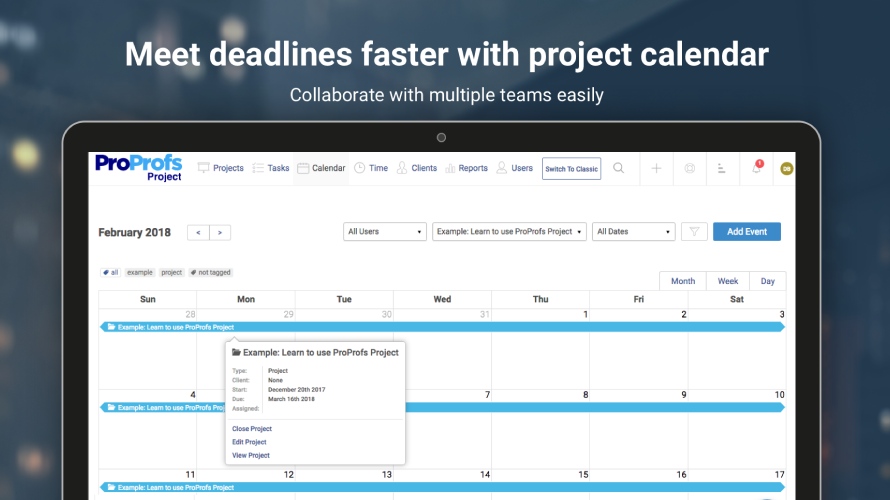   |