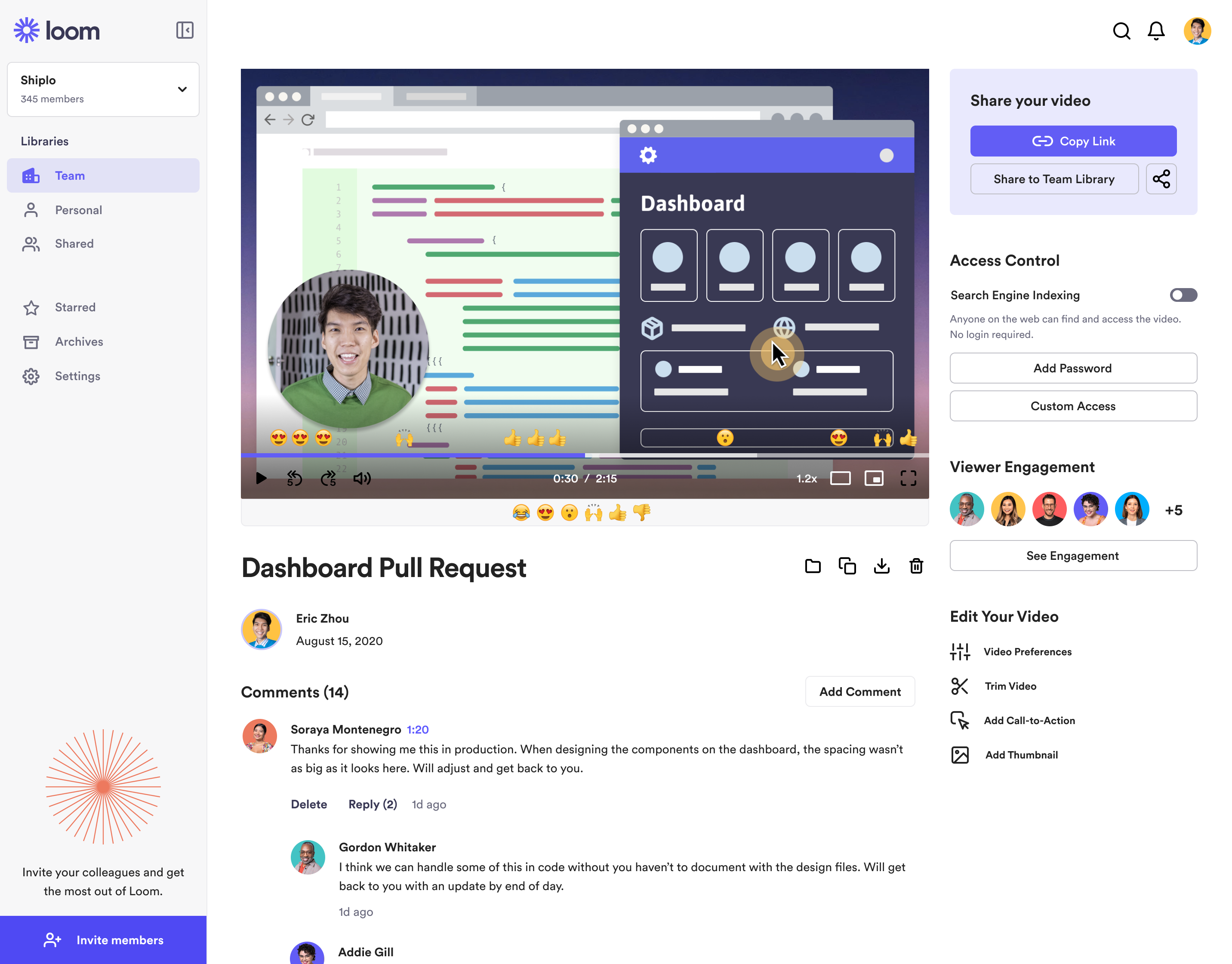
Loom is a screen recorder for Chrome, Mac, Windows, and iOS from Atlassian, presented as quick to install, easy to use, and boasting a functional free edition.
$8
per month
Camtasia
Score8.6 out of 10
N/A
Camtasia is a video editor and screen recorder. Camtasia offers a range of plans designed to meet varying video creation needs, and enables users to produce professional-looking videos. Its features include Camtasia Rev, script generation, text-to-speech, translations, and avatar videos, to streamline the video creation process. The editions available are Free, Essentials, Create, or the Pro plan.
$179.88
per year per user
Pricing
Atlassian Loom
Camtasia
Editions & Modules
Business
$10
per creator/per month
Starter
Free
Enterprise
Custom Pricing
Camtasia Business
$198
per year per seat
Offerings
Pricing Offerings
Atlassian Loom
Camtasia
Free Trial
No
Yes
Free/Freemium Version
Yes
Yes
Premium Consulting/Integration Services
No
No
Entry-level Setup Fee
Optional
No setup fee
Additional Details
—
*Discounts available for purchases supporting a large volume of users.
Creative Entrepreneur Coach at F the Lines (Professional Training & Coaching, 1-10 employees)
Chose Atlassian Loom
I tried lots of different screen recording software but ultimately chose Loom because it had the simplest and most user-friendly UI. There are certainly more advanced apps, like screenflow, but my use case is fairly simple—I just want to be able to record video/screen-shares as …
A de minimis incentive was given to thank the reviewer for their time. The incentive was not used to bias or drive a particular response, nor was the incentive contingent on a positive endorsement. More Info
Director Of Business Development in Sales at TruSTAR Technology (Computer Software, 51-200 employees)
Chose Atlassian Loom
There are plenty of screengrab / screen recording tools out there. I like loom based on it's simplicity for acheiving regularly occuring challenges. I don't typically need anything heavier, so having this as a quick tool is great!
A de minimis incentive was given to thank the reviewer for their time. The incentive was not used to bias or drive a particular response, nor was the incentive contingent on a positive endorsement. More Info
Launch Engineer in Marketing at Let's Launch (Marketing and Advertising, 1-10 employees)
Chose Camtasia
Camtasia lets you purchase the software and download it to your computer. You don't need to have an internet connection to work on your projects with Camtasia. You don't have to pay a monthly subscription for Camtasia like you do the others. Camtasia is the software to use if …
A de minimis incentive was given to thank the reviewer for their time. The incentive was not used to bias or drive a particular response, nor was the incentive contingent on a positive endorsement. More Info
Loom is a must, I am not sure how many other tools like this one there are but Loom really becomes a key player in a team collaboration, specially if that team collaborates remotely or internationally. You can use the video links to embedded these in other places or downloadthem for editing
Camtasia is so easy to use that I recommend it over Adobe Premiere, Captivate, Storyline, and other tools. The only problem is the price. Due to the fact that I purchased this for education purposes, and educational prices have gone up exponentially, it has been difficult even at $179 to upgrade, as an educator and the organization is not always willing to reimburse the purchase, it would have been more economical. It was less than $100 (Black Friday) when I bought our updated version in 2019. Camtasia profile accounts aren't the best setup, however. My profile account does not reflect when I was a user or show past invoices, and I wanted to see how long ago I was a user.
A de minimis incentive was given to thank the reviewer for their time. The incentive was not used to bias or drive a particular response, nor was the incentive contingent on a positive endorsement. More Info
Loom is valuable for creating video tutorials and onboarding materials.
It allows trainers to record step-by-step instructions, share best practices, and provide visual demonstrations, facilitating the learning process for new employees or team members.
Sales teams can create personalized video pitches or product demonstrations to engage prospects effectively.
Collaborating between timezones and replacing meetings/ emails with quick videos.
A de minimis incentive was given to thank the reviewer for their time. The incentive was not used to bias or drive a particular response, nor was the incentive contingent on a positive endorsement. More Info
A de minimis incentive was given to thank the reviewer for their time. The incentive was not used to bias or drive a particular response, nor was the incentive contingent on a positive endorsement. More Info
The still screenshot feature should let us edit/mark up the images.
I work on 3 X monitors and the desktop version of Loom still can't seem to know that I always want to record on the screen from which I open the app. Short of that, it should ask us what screen we want to record on instead of making us catch the fact that it's set to record on some other screen. This causes me to have to stop the recording and restart because it was recording the wrong screen.
You can't yet transfer a video seamlessly between workspaces. This causes you to have to download and then re-upload to the other workspace if you happen to work for numerous companies using Loom.
A de minimis incentive was given to thank the reviewer for their time. The incentive was not used to bias or drive a particular response, nor was the incentive contingent on a positive endorsement. More Info
USB Microphones can sometimes cause a problem if they become accidentally unplugged during a recording session. This can corrupt some of the files that the Camtasia Recorder application uses to capture directly to .avi mode.
You'll sometimes get a message when you next try to record that .avi mode isn't available and the only way to fix this is by completely uninstalling and reinstalling Camtasia (with a reboot in the middle of these two actions).
This bug only manifested after Camtasia 8 was released, but still seems to cause an issue right up to and including Camtasia 2021.
I'd like to see more standard Annotation options. The existing ones are pretty good, but variety is a little lacking.
More 'Behaviours' would also be really welcome as these are a great feature and make Callouts a bit more interesting and lively. I've not seen any new Behaviours over the past few versions (since Camtasia 2018).
A de minimis incentive was given to thank the reviewer for their time. The incentive was not used to bias or drive a particular response, nor was the incentive contingent on a positive endorsement. TR verified that a representative sample of customers was invited. More Info
Each release of Camtasia has added just enough functionality to justify the upgrade to the new version. I like that Camtasia is not a subscription-based product as we have more flexibility and control over our spend on the product. We can also purchase support packages that include the next version when released.
A de minimis incentive was given to thank the reviewer for their time. The incentive was not used to bias or drive a particular response, nor was the incentive contingent on a positive endorsement. More Info
It's dirt easy for the one thing it does exceptionally well. If you think, "hmmm, I should make a quick screen capture of this thing on screen, you can start recording in seconds with almost no additional effort." Once you're done, the recording is automatically uploaded to your account site, and automatically creates a URL you can copy and share with your target audience. From IDEA to EXECUTION to DISTRIBUTION is literally seconds.
A de minimis incentive was given to thank the reviewer for their time. The incentive was not used to bias or drive a particular response, nor was the incentive contingent on a positive endorsement. More Info
I haven't used another video recording and editing tools that is as comprehensive and straight-forward as Camtasia. Typically, if you want a user-friendly video editing tools for novice users, you have to compromise on features. Camtasia solves this problem by offering extensive editing features in a simplistic, user-friendly environment. Highly recommend
A de minimis incentive was given to thank the reviewer for their time. The incentive was not used to bias or drive a particular response, nor was the incentive contingent on a positive endorsement. More Info
Loom is one of my favorite solutions and I've been a raving fan since they first launched. The value of quickly sharing videos in seconds is amazing. Our customers love it so much that they have even downloaded the Loom Chrome extension for their own use with their clients! It's so simple, and nothing else compares or competes.
A de minimis incentive was given to thank the reviewer for their time. The incentive was not used to bias or drive a particular response, nor was the incentive contingent on a positive endorsement. More Info
I use Loom for simple tasks. Never used customer support really. It's so simple to use. I haven't had any real issue with Loom which would require customer support to help me out. So I just put 5 because I don't know if the customer support is good or bad since I never used, so I'm kind of neutral.
A de minimis incentive was given to thank the reviewer for their time. The incentive was not used to bias or drive a particular response, nor was the incentive contingent on a positive endorsement. More Info
With the latest version (Camtasia 2020), I actually had problems with an Imac with HighSierra, but from the first moment they answered and guided me to solve the problem, even before making the purchase (with some doubts I had). And they have support in English and Spanish, I really liked that.
When we evaluated the alternatives, Loom was by far the most advanced tool, with multiple types of integrations. Additionally, Loom also provided a Free plan, which made it easy to consider as an alternative. Vidyard and similar tools integrated better with certain other tools (Vidyard + HubSpot), but Loom had better overall integrations with most tools we use.
A de minimis incentive was given to thank the reviewer for their time. The incentive was not used to bias or drive a particular response, nor was the incentive contingent on a positive endorsement. More Info
I've tried several freeware recorders, too. If all you want to do is literally record your screen, and nothing else, you don't need Camtasia. There are literally dozens of apps that will do that. If you want an app that will record your screen while capturing mouse clicks, follow you, record your voice while you capture, and annotate when you're done, Camtasia has no equal. Plus, it doesn't stop there. You can add professional intros and outros (many already created to choose from), lower thirds, etc., leading to videos with very high production value. This is THE program to buy if you want to produce training videos of very high quality.
A de minimis incentive was given to thank the reviewer for their time. The incentive was not used to bias or drive a particular response, nor was the incentive contingent on a positive endorsement. More Info
Loom has increased my efficiency and value to clients so much. I save a ton of time by being able to send them video recordings walking through their website rough drafts and final tutorials.
Loom is incredibly affordable. I am satisfied with their subscription cost.
Loom has helped me communicate clearly to clients, so there's less room for error/misunderstanding (especially when talking about design decisions).
A de minimis incentive was given to thank the reviewer for their time. The incentive was not used to bias or drive a particular response, nor was the incentive contingent on a positive endorsement. More Info
A de minimis incentive was given to thank the reviewer for their time. The incentive was not used to bias or drive a particular response, nor was the incentive contingent on a positive endorsement. More Info