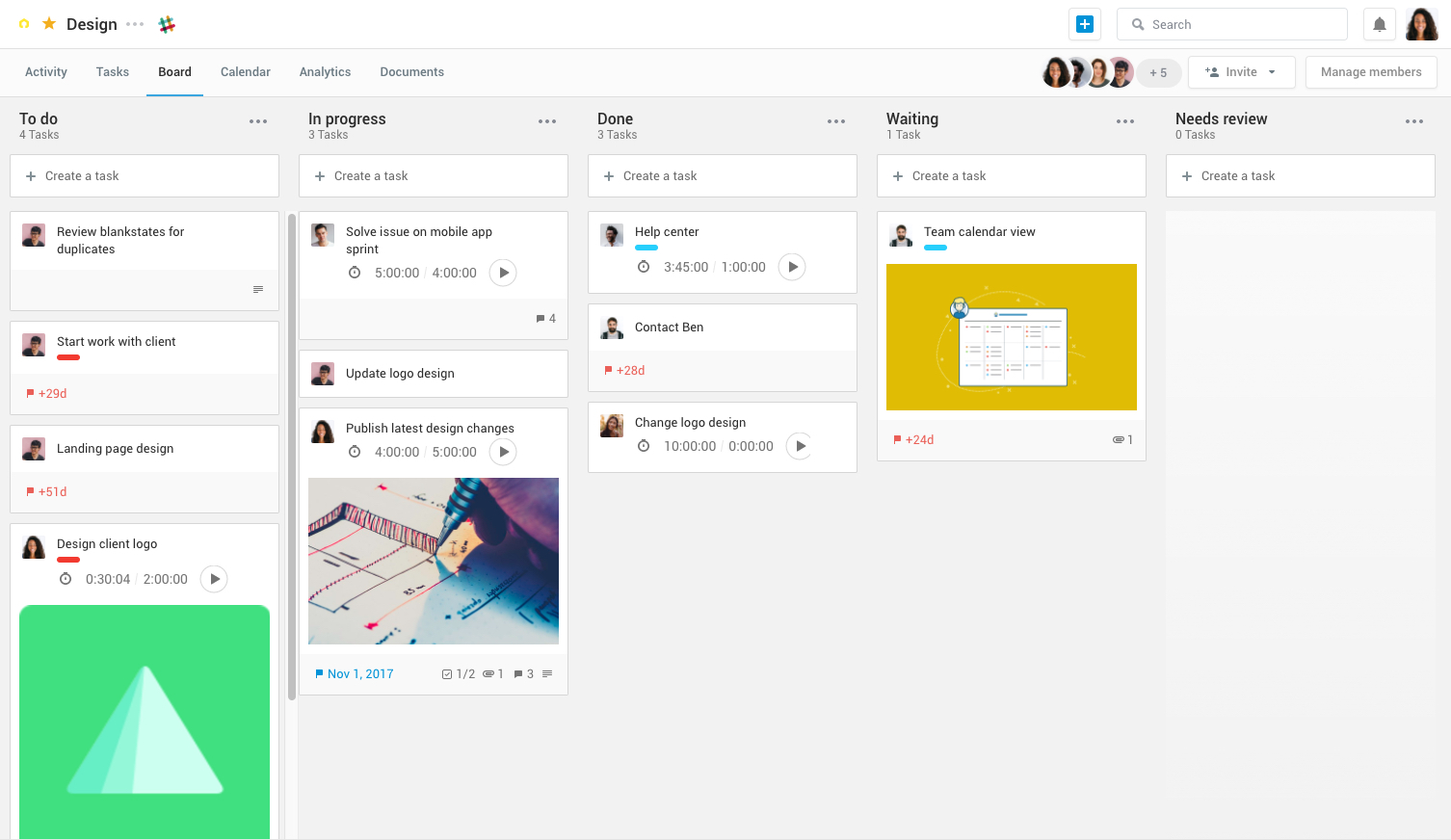
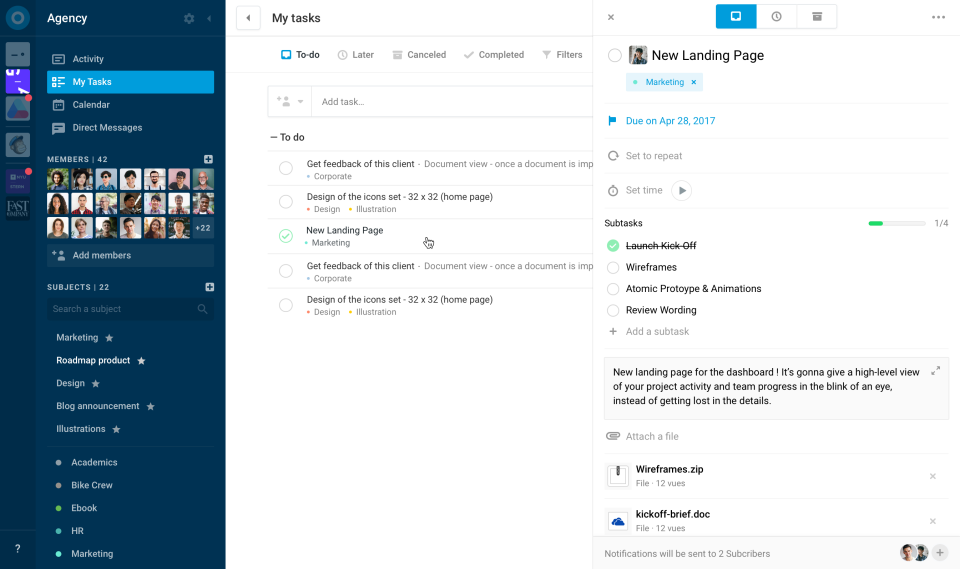
Azendoo is a work management application to help teams work more effectively by giving them the tools to communicate, plan and execute together. Azendoo is designed to make teams collaborate in a more transparent and positive way while making work more enjoyable. Conversations are held in threads shared on projects to see through every piece of information and eventually take action by creating a task based on a conversation. Tasks allow team members to see all of their work in one…
$7.50
per user
Contractor Foreman
Score 8.4 out of 10
N/A
Contractor Foreman is an online construction management software for contractors and boasts users among contractors in more than 75 countries.
$588
per year
Pricing
azendoo
Contractor Foreman
Editions & Modules
Team plan
$7.50
per user
Business plan
$14.00
per user
Enterprise plan
custom pricing
per user
Basic
$588
per year
Standard
$948
per year
Plus
$1,497
per year
Pro
$1,990
per year
Unlimited
$2,988
per year
Offerings
Pricing Offerings
azendoo
Contractor Foreman
Free Trial
Yes
Yes
Free/Freemium Version
No
No
Premium Consulting/Integration Services
No
No
Entry-level Setup Fee
$7.50 per user
No setup fee
Additional Details
Add some time tracking: +$5.00 user/month
Scheduled and accumulated time per task
Plans are based on features and licenses needed. Plus, Pro, and Unlimited plans include a 100-day money back guarantee.
Azendoo, unlike Trello, is a tool that provides a much more organized interface and features that provide more effective project management and direct communication. Trello is based on a slightly older interface and still requires different tools to be ideal for carrying out …
azendoo has a very easy-to-understand interface, allows for scaling in a way that Basecamp doesn't, and is constantly reinventing the platform (and appears to take customer feedback very seriously). Overall, while many project management platforms seem very similar, and I've …
azendoo is a different tool, meant for a different project type. While it's a good program on its own, Evernote ultimately had all I needed as a single employee/student is the only person within my workspaces. I did not need to network and as such, I did not find it applicable. …
A few of them were too specialized, and we're trying to limit the amount of software we have data entry into. BuilderTrend was probably the biggest competitor we reviewed, but the cost and migration effort didn't seem enticing to us as a business. I think Contractor Foreman has …
Everything in Houzz Pro is designed to look beautiful for the client. It’s "high-end" and "boutique." If your business is 80% aesthetic consultation, it’s a winner. If your business is 80% hammers and nails, it feels a bit "fragile." The interface isn't as "slick" as Houzz, …
We switched from Houzz Pro which was a decent program, alot more user friendly but it always felt like there was a glitch or that nothing worked right. As if nothing was ever finished being put together. We have kept them for their 3d renderings and mood boards but don't use …
They are very similar except CoConstruct allows for more selections of a customer. This is more for a company who doesn’t deal with interior designers as often who control the specs of the job. Most everything else was able to be done. I like the estimates sections and …
The communication within CF is not as reliable as I would like it to be. We communicate on teams internally to make sure all of the information is translated properly. Within CF, we rely on multiple positions to add details to a project. Attempting to compile everything within …
We considered Houzz Pro but when we looked at all the features that Contractor Foreman offered along with its pricing we decided that Contractor Foreman was better value for money and a better fit for the business.
We evaluated Procore before choosing Contractor Foreman. Procore is a strong platform but was too expensive for our type of projects and company size. Contractor Foreman offers most of the same essential features — such as project management, daily reports, and cost tracking — …
Contractor Foreman has better integration for commercial projects - Buildertrend focuses on residential construction. Contractor Foreman is relatively cost comparable with Buildertrend, but is better suited for the work we do.
We started with ServiceTitan since it was our industry's standard. But it was far too complicated, and the implementation was not efficient. We gave it a solid try, but after many attempts to try and understand the system, we decided to find something different.
Contractor Foreman is by far less of a major corporation selling a software and more of a personalized experience with people who truly care. Houzz Pro does have some great features, but the lack of the same service definitely hinders it in my option.
Combines everything into one software. CRM, Estimating, Project Management, Job Costing all in one. We prefer to train people on one software rather than several. When everyone is using the same program it's easier for team collaboration. It also eliminates the excuse the I …
Monday.com was limited and I noticed myself integrating other programs rather than just using Monday.com I used Zoho at a sales company and it was fine for that. One of my friends uses Zoho for HVAC and I liked the Contractor Foreman interface better.
Large organizations can really benefit from azendoo due to its ability to segment into teams. The various levels of organization are helpful for organizations with many coexisting initiatives, and I find that it has been instrumental in our success building out large campaigns or product launches. In general, azendoo is just an excellent project management tool, with little-to-no learning curve.
As the name suggests, Contractor Foreman is GREAT for general contractors. However, being a consultant, I feel as though if upper management within the company I serve were more tech-savvy, they could accomplish much of the same tasks on other platforms that could give more advanced metrics. I also feel that the platform may feel outdated on purpose to ensure that those general contractors who aren't as tech savvy can understand the platform more.
Search Function - I consistently find it difficult to find old tasks where I don't immediately know the subject to which it belongs. I would appreciate more advanced search capabilities and a stronger search function in general.
Message Feature - We just don't use this feature at our organization, because it's not very robust. We'd prefer more of a "chat" like function, with a pop-up window (something similar to Slack).
In the CDB, I'd like to be able to create a line item with a specified percentage, and when I pull that line item into an estimate or proposal, I'd like the system to automatically calculate it based on that contract value. (Example, Contingency line is always going to be 15% of the contract value).
I'd like to be able to rearrange "blocks" on a page when I'm getting ready to send or print it. Lots of dead space on pages. Estimates 4 pages in total when it could be 2.
I'd like to be able to create budget summaries. Where the line items are grouped into their respective master format categories, and the category has the sum of all the line items in that category.
We have compiled so much information on CF it would be counterproductive to move to another software. We have also sold a lot of clients on the client portal feature. It is crucial for our communication between customers. The only reason we wouldn't renew the service is if somewhere offered the exact same service but at a lower cost
Overall, Contractor Foreman is a great product, and I’m sure we’ve only scratched the surface of everything it has to offer. It can be a little quirky at times, occasionally displaying a 'Bad Gateway' message, but we haven’t experienced any timeout issues in the past few months. As we continue to use it, I’m confident we’ll uncover even more ways to streamline our workflow
Many times we had issues that turned out to be errors and bugs. At first, we would be told forcefully that there were no bugs, then we would document them, and we would get an acknowledgement but no apology for essentially either gaslighting us or being ignorant of their system
We have only had one issue the entire time we have had Contractor Foreman and that was that we had the hardest time getting the platform to allow us to log in, but we called our support and within 5 mins we able to log back in
azendoo is a different tool, meant for a different project type. While it's a good program on its own, Evernote ultimately had all I needed as a single employee/student is the only person within my workspaces. I did not need to network and as such, I did not find it applicable. Later down the road in a shared office, I might feel differently.
A few of them were too specialized, and we're trying to limit the amount of software we have data entry into. Buildertrend was probably the biggest competitor we reviewed, but the cost and migration effort didn't seem enticing to us as a business. I think Contractor Foreman has its own quirks, but once you understand the methodology behind the software, it works very well, and at the price, it's hard to imagine migrating away to something that does the exact same thing for 2-3x the cost (plus all the data migration).
Azendoo has really been an advantage to our company because, thanks to its features that make communication much more feasible and direct, business productivity has increased.
The support team is really very attentive so we have not had any problems left unsolved. That has prevented us from delays in project deliveries.